
Saved
Choose the name that will be shown in your Saved menu.
Done!
| Developer: | 沦 彭 (13) | ||
| Price: | * Free | ||
| Score: | 1,240 Gold | ||
| Rankings: | 0 | ||
| Comments: | 0 Add a comment | ||
| Lists: | 1 + 0 | ||
| Points: | 0 + 0 ¡ | ||
| +1 Points | |||
Description

Languages: Latin, Arabic, Cyrillic, Greek, Turkish, Hebrew, Baltic, Vietnamese, Thai, Japanese, simplified Chinese, traditional Chinese, Korean.
Main features:
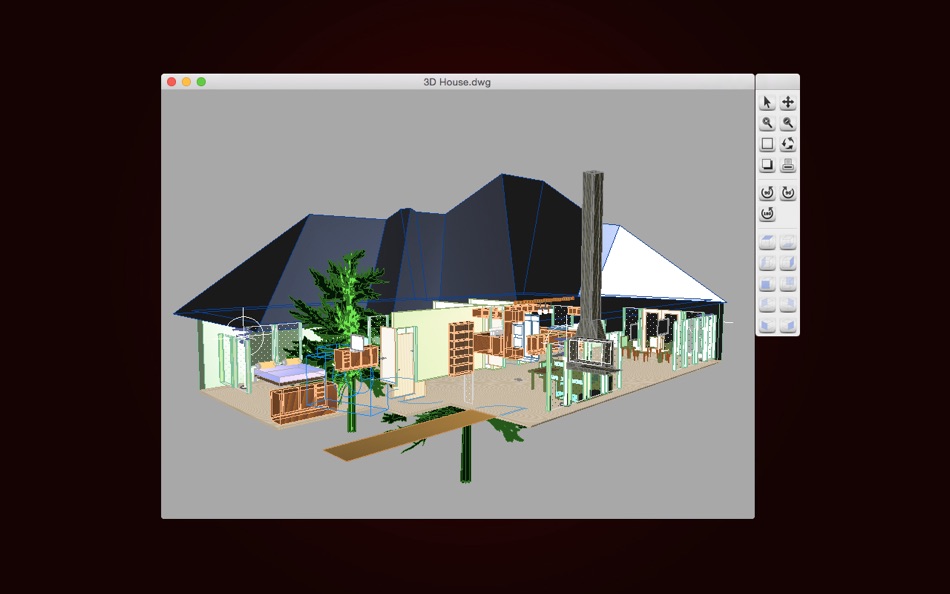
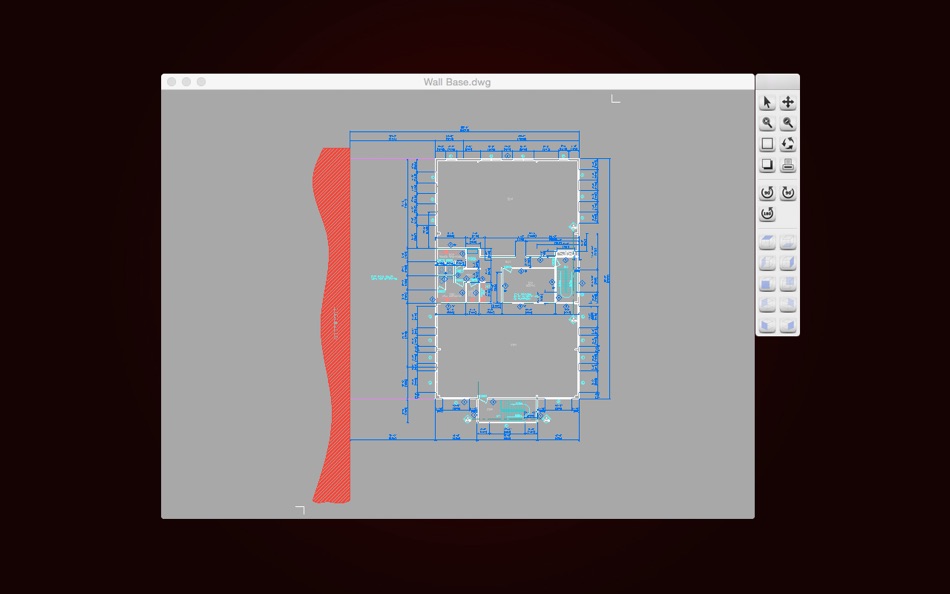
◆View and Print
1. Double-click to open the local CAD file.
2. Drag to change the position of the view.
3. Zoom the view:
Zoom in and out by clicking on the zoom button.
Roll the mouse to zoom in and out of the view.
Zoom Extents: zoom the view to the maximum extent.
Zoom Window: zoom the selected view to the window.
4. Rotate the view:
Rotate the view 90 degrees counterclockwise,
Rotate the view 180 degrees counterclockwise,
Rotate the view 90 degrees clockwise.
5. Free dynamic observation: look at objects from different perspectives.
6. Switch the background color of the view.
7. 3D View:
Face Top, Face Bottom, Face Left, Face Right, Face Front, Face Back.
Face SW, Face SE, Face NW, Face NE.
8. Import graphics files in other formats, such as .dwf, .dgn, .dae, .pdf, .svg, .wmf, .emf, etc.
9. Select print mode and parameters for different user needs.
Print the current view.
Print the selected view through Zoom Window.
Print the entire view through Zoom Extents.
Change the paper type and size, similar to AutoCAD printing.
◆Tools
Export:
1. Export CAD to PDF.
Convert CAD(including.dwg and.dxf, the following is the same as here.) to PDF, and the user can adjust the effect of the conversion as needed.
For example, transform the specified layout, set the page size, transform the specified area, and adjust the line weight.
2. Export CAD o Image.
Convert CAD to Image, and the user can set commonly used picture parameters.
For example, select the format of the image, such as jpeg, png and bmp, Set the background color of the image, and set the size of the image.
3. Export CAD o DWF.
Convert CAD to a specified version of the DWF.
For example, XPS, B6, A6, C5.5, B5.5, A5.5, C4, B4, A4.
4. Export CAD o SVG.
Import:
5. Import DWF to CAD.
6. Import DGN to CAD.
7. Import DAE to CAD.
Convert other format files to a specific version of CAD.
8. Version Converter.
Convert the version of the CAD file(including.dwg and.dxf).
Font instructions: By Default, DWG Tools selects a specific alternative font for different languages. Users can customize the alternative font in "Fonts Settings", or turn off the "Use Default Font" function, and manually select the alternative font for the missing font.
Note: If the text is scrambled, you can set the default alternative font in "Fonts Settings", and you must choose the language corresponding to CAD files. DWG Tools select the font of the language specified in "Fonts Settings" according to the CodePage of the CAD file. If you don't know which language to choose, you can try to set all the languages to the specified font, and "Reset" will help you restore the default font. If you need to reset the alternative font of the opened file, you need to restart DWG Tools.
We regularly update the product, if you have any questions or suggestions, please send a message to the mailbox(moonlight_beauty@yeah.net), or leave a message on our website.
If you are enjoying the app, please consider leaving a review or rating.
Screenshots


Ad
Price History
-
* In-App Purchases - Current price: Free
- Minimum: Free
- Maximum: Free
Track prices
AppAgg Score
1,240
Estimated AppAgg Score for
DWG Tools - View & Convert DWG
1,240 Gold
Higher scores usually mean stronger signals on AppAgg.
Based on: popularity · ratings · freshness · deals · store data · community signals
Recalculated daily using fresh AppAgg data.
Short URL: Copied!
What's new
- Version: 6.1
- Last Updated:
- Version 6.1
● Resolve compatibility issues between different versions of macOS.
● Bug fixes and improving drawing conversion.
Additional Information
- Release Date:
- Category:
macOS Apps›Graphics & Design - OS:
macOS,macOS 10.13 and up - Size:
73 Mb - Supported Languages:
Chinese,English - Content Rating:
4+ - Mac App Store Rating:
0 - Website:
 http://moobe.mystrikingly.com
Developer
Lists (1)
- DWG Tools - View & Convert DWG

Points (0)
0
Rankings (0)
0
Comments (0)
Be the first to comment
Summary
DWG Tools - View & Convert DWG Short URL: Copied!- Share
- Mac App Store
«DWG Tools - View & Convert DWG» is a Graphics & Design app for macOS, developed by «沦 彭». It was first released on and last updated on . This app is currently free. This app has not yet received any ratings on AppAgg. It has been added to 1 public lists and 0 private lists created by users. Available languages: Chinese, English. AppAgg continuously tracks the price history, ratings, and user feedback for «DWG Tools - View & Convert DWG». AppAgg does not host applications or distribute software. All trademarks, logos and screenshots belong to their respective owners. Subscribe to this app or follow its RSS feed to get notified about future deals or updates.
Similar
-
- DWG Tools Professional
- macOS Apps: Graphics & Design By: 沦 彭
- * Free
- Lists: 0 0 0
- Points: 0 + 0 600 Version: 7.1 DWG Tools Professional integrates powerful CAD intelligent assistance functions, which can help you be more productive and creative when processing CAD drawings on Mac. Integrating ... ⥯
-
- DWG Lab - View & Convert DWG and DXF Files (3D)
- macOS Apps: Graphics & Design By: 晖 向
- $15.99
- Lists: 0 0 0
- Points: 0 + 0 740 Version: 3.3 A multifunctional tool for viewing and coverting DWG and DXF files in Mac. DWG Lab provides you with a powerful file list, because of it, you can easily manage your DWG and DXF files, ... ⥯
-
- DWG Viewer 3
- macOS Apps: Graphics & Design By: Microspot Ltd.
- $29.99
- Lists: 0 0 0
- Points: 0 + 0 850 Version: 3.0.1 DWG Viewer is an easy to use app for viewing your AutoCAD DWG files and Microspot MacDraft documents on the Mac. Perfect for teams collaborating on projects. View files stored locally ... ⥯
-
- Convert All Images
- macOS Apps: Graphics & Design By: Clovis Michel Pedroso Picanco
- $6.99
- Lists: 0 0 0
- Points: 0 + 0 580 Version: 3.0.0 Convert any image to the format you need fast, easy, and in bulk. SUPPORTED FORMATS Export to PNG, JPEG, TIFF, BMP, WebP, HEIC, or GIF. Convert from virtually any image format your ... ⥯
-
- Pixel Tools
- macOS Apps: Graphics & Design By: Save The Machine
- $4.99
- Lists: 0 0 0
- Points: 1 + 0 680 Version: 1.4.6 The ideal companion for designers and anyone that needs to make pixel precise measurements, get the numeric value of a color, or magnify a portion of any screen. Pixel Tools does the ... ⥯
-
- Creative Convert
- macOS Apps: Graphics & Design By: Splash Colors
- Free
- Lists: 1 + 1 0 0
- Points: 35 + 0 8K Version: 1.4.3 Creative Convert is a simple, beautiful app for converting JPG, JPEG, BMP, TIFF, PNG, PDF, Ai, SVG, PSD and/or EPS, PS (PostScript) files into separate Graphic file formats. Creative ... ⥯
-
- Photo Info Viewer · View Exif
- macOS Apps: Graphics & Design By: Xi'an 7kit Technology Co., Ltd.
- $0.99
- Lists: 0 + 1 0 0
- Points: 12 + 0 6K Version: 26 Photo Info Viewer supports viewing the Exif (Exchangeable image file format) information of images. I. Exif Information Photo Info Viewer supports viewing the following Exif ... ⥯
-
- Image Tools Pro
- macOS Apps: Graphics & Design By: Abdul Rahim Khurram
- Free
- Lists: 0 0 0
- Points: 0 + 0 630 Version: 2.0 Get Image Tools Pro with 75% discount! It's a time limited offer, so hurry up and get it now A Simple and Easy application to perform multiple function very easily and quickly. Simple ... ⥯
-
- Lazy's Image Tools
- macOS Apps: Graphics & Design By: Lazydev Games
- $9.99
- Lists: 0 0 0
- Points: 1 + 0 1K Version: 1.5 Transform Your Images with Professional-Grade Tools Lazy's Image Tools is the ultimate image processing suite for developers, designers, and creative professionals. Built natively for ... ⥯
-
- Simple Image Tools
- macOS Apps: Graphics & Design By: Khalid Akanbi
- $3.99
- Lists: 0 0 0
- Points: 0 + 0 690 Version: 1.1 Edit and convert your images completely offline. Simple Image Tools is a fast, offline suite for all your everyday image tasks. Convert, compress, resize, crop, rotate, combine images ... ⥯
-
- Hexee Pro-Color Editor & Tools
- macOS Apps: Graphics & Design By: Alberto Malagoli
- $7.99
- Lists: 0 + 1 0 0
- Points: 1 + 0 1K Version: 3.1.2 Hexee Pro is a set of advanced color tools for designers and artists. With it, you can create, edit, and organize your color palettes, fine-tune colors, generate tints and shades, and ... ⥯
-
- Images 2 JPEG - Batch convert
- macOS Apps: Graphics & Design By: BraveCloud
- $5.99
- Lists: 0 0 0
- Points: 0 + 0 570 Version: 4.0 Turn whole sets of images into clean, ready to share JPEGs in seconds. Images 2 JPEG Batch convert is a focused, Mac native tool that does one thing exceptionally well: batch convert ... ⥯
-
- Brushes for Procreate | Tools
- macOS Apps: Graphics & Design By: Syed Waqas Arshad
- * Free
- Lists: 0 0 0
- Points: 0 + 0 670 Version: 1.2 Level up your creative workflow with Brushes & Tools for Procreate, a powerful and easy-to-use Mac app offering a curated collection of premium Procreate brushes, fonts, monograms, and ⥯
-
- iBrush : Tools For Procreate
- macOS Apps: Graphics & Design By: Zain Umer
- * Free
- Lists: 0 0 0
- Points: 0 + 0 1K Version: 1.3.1 Unlock Your Creative Power Take your digital art projects to the next level with our Premium Brushes & Creative Tools for Procreate App for Procreate is the ultimate digital resource ... ⥯