
| Sviluppatore: | ADOBE INC. (47) | ||
| Prezzo: | * Gratis | ||
| Classificazioni: | 4 (1) | ||
| Recensioni: | 0 Scrivi una recensione | ||
| Commenti: | 0 Pubblica commento | ||
| Listes: | 5 + 2 | ||
| Punti: | 18 + 45,439 (4.5) ¡ | ||
| Windows Store | |||
Descrizione

Conveniently capture, view, and edit screenshots and images in one place with files that are easy to find and simple to navigate. Edit PNGs, JPEGs, and 20+ other image file types - even without an internet connection.
Easily find more of the tools you need to make high-quality image edits and screenshot markups lightning fast - with suggestions and inspiration to make your content look polished.
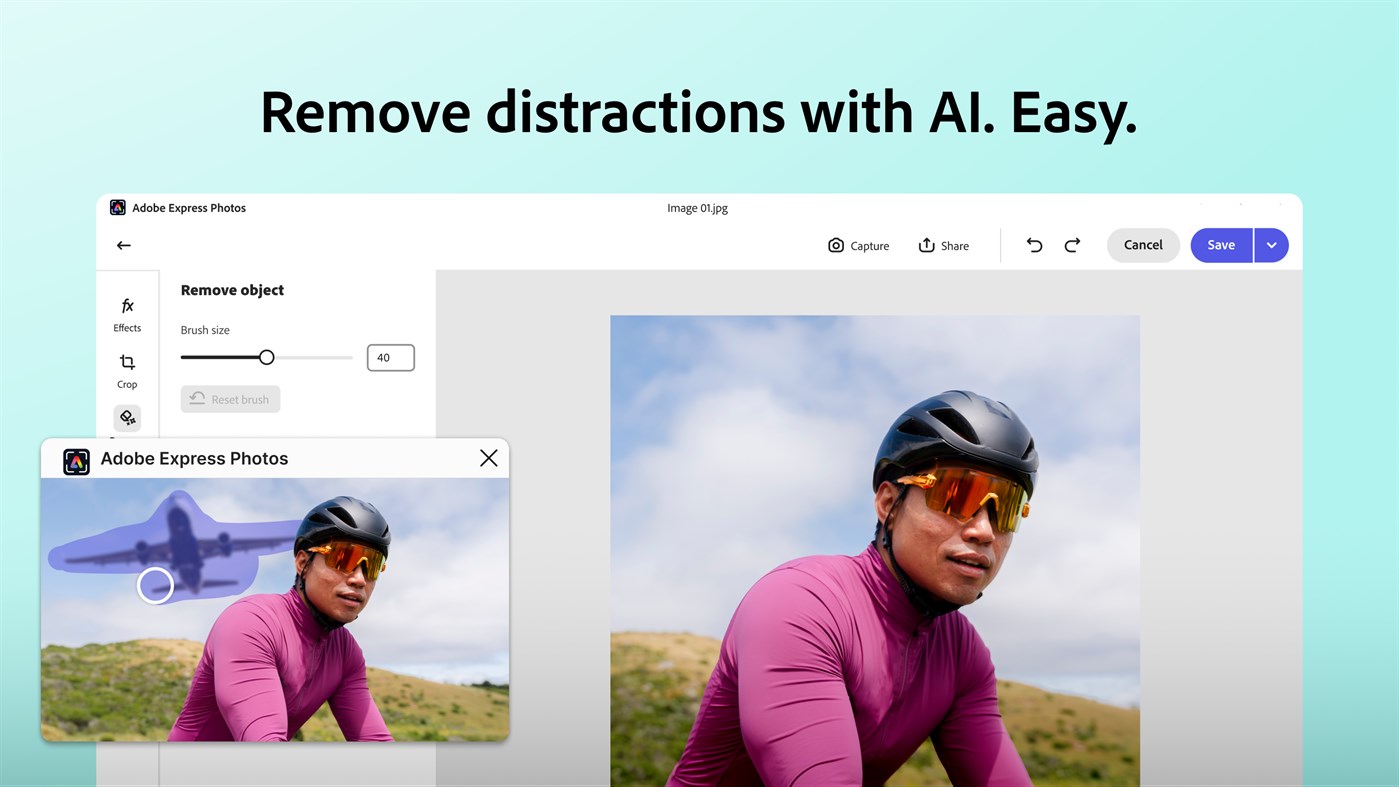
Stunning images are just a click away with time-saving AI features that make impossible edits a reality in seconds. Remove image backgrounds and get rid of unwanted distractions and photo bombers in one click for professional-looking results.
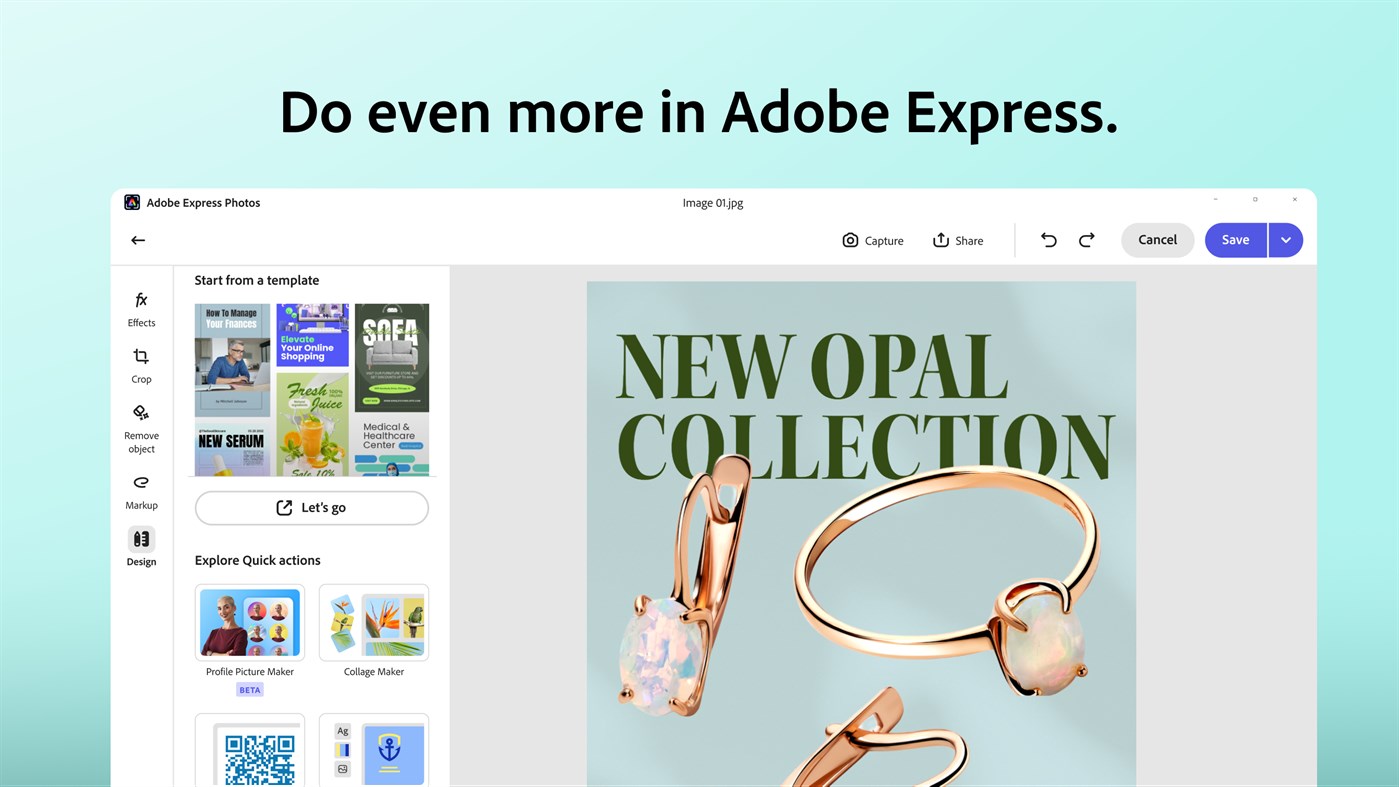
Get even more for free by easily bringing your image or screenshot into Adobe Express. Instantly use thousands of free design elements and professionally designed templates to easily make and share polished, on-brand social posts, presentations, flyers, and more.
*Adobe Photoshop Express is free to download and use. Optional in-app purchases are available for additional capabilities, including generative AI photo editing credits.
If you’re new to the app, here are few features to get you started:
NEW and IMPROVED LOOK and FEEL:
Easily find more of the tools you need to make image edits and screenshot markups lightning fast - with clearly labeled icons and tools to help you work faster.
CAPTURE and MARKUP SCREENSHOTS
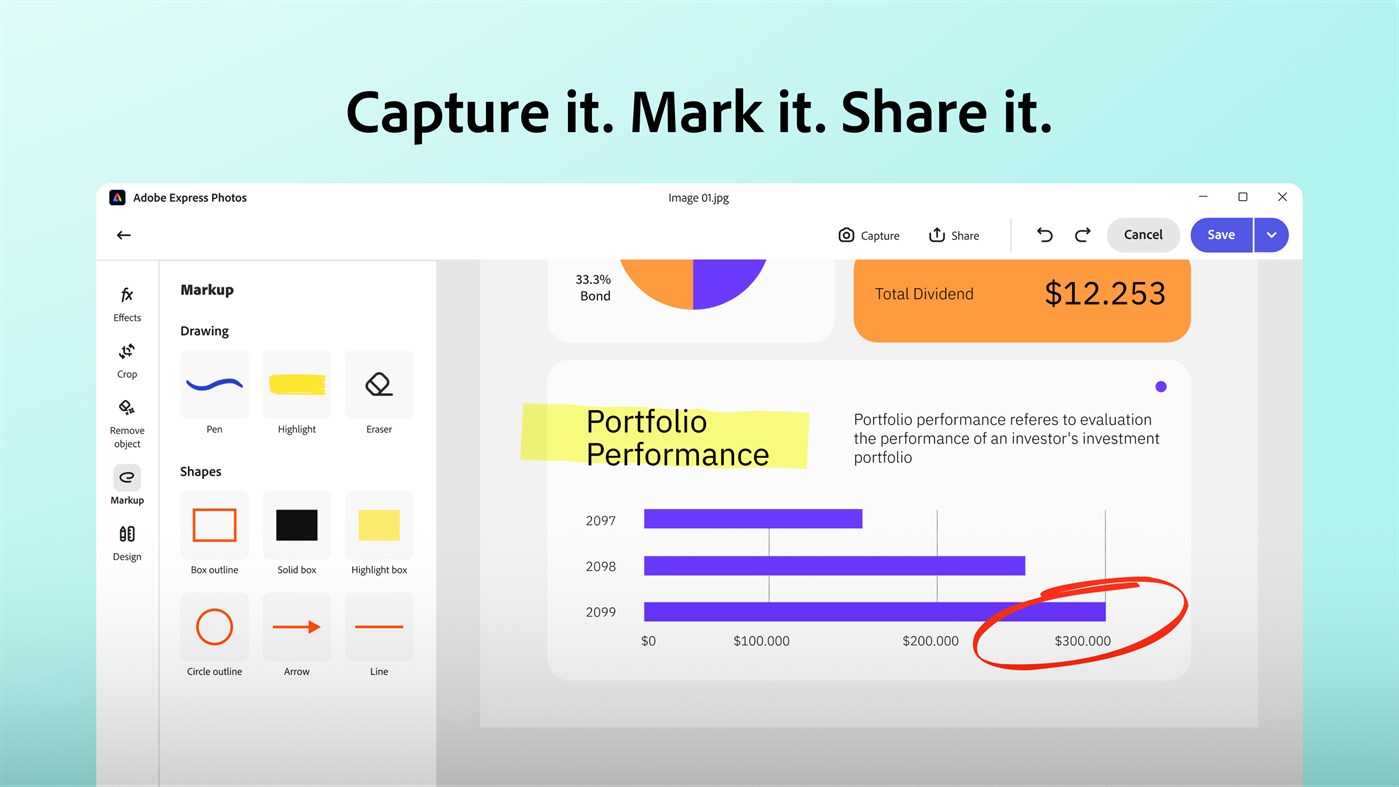
Capture screenshots fast with the “print screen” (PrtSc) keyboard shortcut and mark them up with text, shapes, pens, and highlighter brushes that draw attention to the most important areas. Save them for later or copy and share directly with coworkers, friends, and more!
VIEW and NAVIGATE YOUR IMAGES
Seamlessly view over 20+ image formats in one user-friendly interface, including common image formats like PNGs, JPEGs, and even less common ones like cr2 and nef.
REMOVE BACKGROUNDS AND DISTRACTIONS WITH AI
Remove image backgrounds and get rid of unwanted distractions and photo bombers in one click for professional-looking results.
1-CLICK INSPIRATION TO DO MORE WITH YOUR IMAGE:
Get inspired to take your image and screenshot to the next level with suggestions and inspiration to make your content look polished, including adding it into free, professionally designed templates.
ADDITIONAL FEATURES INCLUDE:
EDIT PHOTOS:
Quickly open photos from your desktop.
Edit photos to look their best with an easy-to-use interface that provides seamless switching between various edits.
The comprehensive photo editor allows you to polish your photos so that you can turn your imagination to reality.
AUTO ENHANCE:
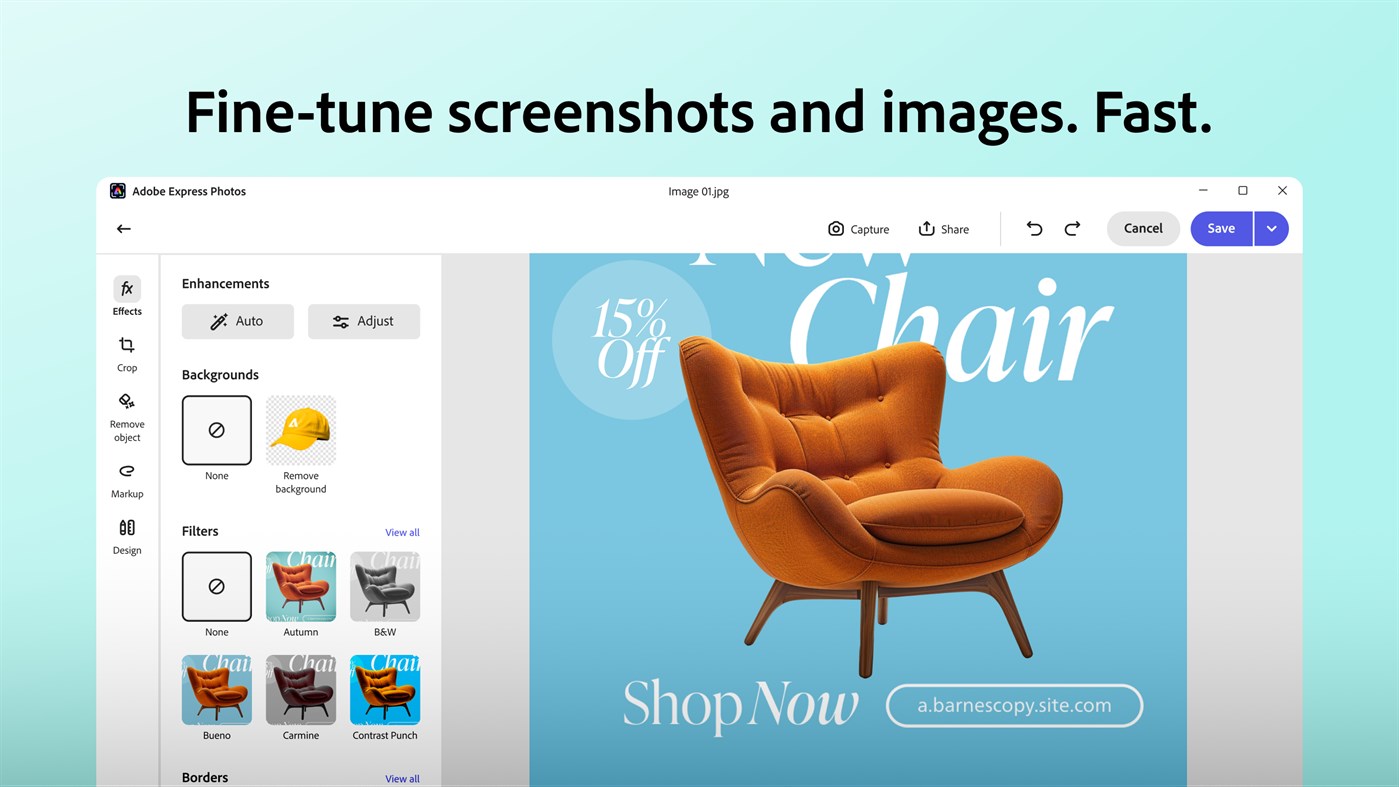
Edit and fix up your photos with a one-touch auto adjustment to correct brightness, contrast, and more.
CROP:
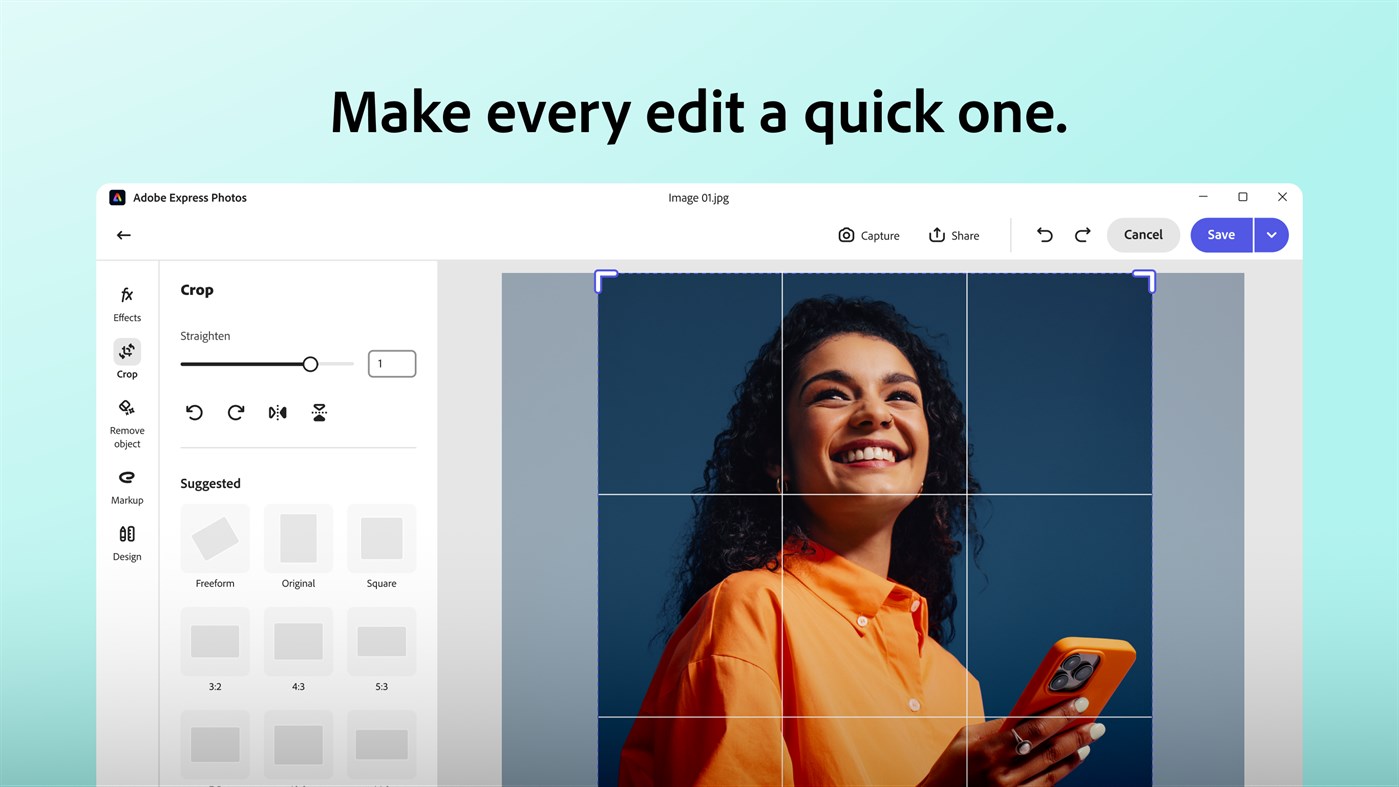
Fix photos fast — crop, straighten, rotate clockwise and anticlockwise, flip horizontal and vertical.
Crop also provides easy one-touch default aspect ratios – perfect for social media posts!
CREATIVE EFFECTS:
Choose from more than 90 filters and 30 borders in the Effects panel! Control the intensity of Filters with a simple slider. Different categories of Looks like Black and White, Portrait, Nature, Pop Color, and Duo Tones help to get you the right effect to apply.
FRAMES:
Use 30+ Frames to add a distinctive personal touch to the border of your photos.
ADJUSTMENTS:
Make your photos pop with simple sliders:
Control and set contrast, clarity, saturation, vibrance, dehaze
Use these controls in your photos to produce stunning results.
Contrast is an attention-grabbing control that can turn your ordinary photo into a dazzling masterpiece.
Adjust the color saturation using the Vibrance and Saturation controls.
Adjust the clarity slider to reveal more texture and detail in your photos.
Use the Dehaze slider to add or remove haze from your photos.
Exposure, highlights, shadows, blacks and whites
You can fine-tune the photo’s exposure setting using the Exposure adjustment controls. Highlights and Shadows are the best way to optimize your photos exposure in highlights, midtones, and shadows, without compromising on other areas of tonality. Use Blacks and Whites toggles to adjust tone intensity.
Temperature and Tint
Use Temperature and Tint controls to introduce warmth or coldness to your photos. You can also control the amount of green and red tones in your photos.
Use the Temperature slider controls to increase or decrease the amount of orange or blue tone. Increasing the amount of orange introduces warmth to your photos. Increasing the amount of blue introduces coldness to your photos.
Use the Tint slider control to add more red or green tone to your photos. Auto White-Balance does this automatically for you.
Details
Use Sharpen, Reduce Luminance Noise, and Reduce Color Noise to make photos look more beautiful and minimize unwanted grain and speckling in your photos.
Split Tone
Stylize your photos through color tints in the highlights and shadows.
Blur
Use the Blur effect to give your images an enhanced, surreal effect.
Fade
Blend images with the background using the new “Fade” effect and give a matte feel to your photos.
Vignette Effect
Add a sentimental feeling or evoke nostalgia to your images using the Vignette effect.
RAW PHOTO SUPPORT:
Adobe Photoshop Express supports the following file formats:
Photo: JPG, PNG
Raw files: arw (SONY), cr2 (CANON), crw (CANON), dng, erf (EPSON), raf (FUJI), 3fr and fff (HASSELBLAD), dcr (KODAK), mrw (KONICA), mos (LEAF), rwl (LEICA), nef and nrw (NIKON), orf (OLYMPUS), rw2 (PANASONIC), pef (PENTAX), srw (SAMSUNG).
PRINT FEATURE:
Print edited photos or screenshots directly using your Windows device.
STORE AND SHARE:
Your original photo is not lost during editing. Undo and redo the changes until you get the desired look.
Easy sharing, your way: Share your screenshots and photos directly to email using the Windows sharesheet, no copy and paste needed.
AVAILABLE LANGUAGES:
English, Chinese Simplified, Chinese Traditional, Czech, Danish, Dutch, French, German, Italian, Finnish, Japanese, Korean, Polish, Portuguese (Brazilian), Russian, Spanish, Swedish, Norwegian, and Turkish.
Terms and conditions:
Your use of this Adobe application is governed by the Adobe General Terms of Use http://www.adobe.com/go/terms_en, and Adobe Privacy Policy http://www.adobe.com/go/privacy_policy_en and any successor versions thereto.
By installing this app, you agree to the Adobe Terms of Use and Adobe Privacy Policy.
Do not sell or share my personal information: https://www.adobe.com
Ad
Screenshot
Cronologia dei prezzi
-
* Acquisti in-app - Oggi: Gratis
- Minimo: Gratis
- Massimo: Gratis
Monitora prezzi
Novità
- Versione: PC
- Aggiornata:
Sviluppatore
- Adobe, Inc.
- Piattaforme: Android App (2) iOS App (31) macOS App (2) Windows App (11) Meta Giochi (1)
- Listes: 30 + 15
- Punti: 124 + 4,143,212 ¡
- Classificazioni: 4 (2)
- Recensioni: 0
- Commenti: 0
- Sconti: 0
- Video: 1
- RSS: Sottoscrivi
Punti (18)
-

- 214 VagGon
- +1
-
- 1 Mat Bortolus
- +1
-
- 1 HEZRON WAITHAKA
- +1
-
- 1 Micheal Olanlokun
- +1
-
- 3 alu star
- +1
-
- 1 mohamed GLIX
- +1





Classificazioni (1)
-
- 214 VagGon
- 4
Listes (5)
- Adobe Express Photos (formerly Photoshop Express)


Recensioni (0)
Scrivi tu la prima recensione 🌟
Informazioni aggiuntive
- Versione: PC
- Categoria:
Windows App›Foto e video - Sistemi operativi:
Mobile,PC - Dimensioni:
217 Mb - Lingue supportate:
Bangla,Chinese,Danish,Dutch,English,Filipino,Finnish,French,German,Greek,Hindi,Indonesian,Italian,Japanese,Korean,Malay,Norwegian,Polish,Portuguese,Romanian,Spanish,Swedish,Tamil,Thai,Turkish - Classificazione contenuti:
EVERYONE - Windows Store Voto:
4.5(45,439) - Aggiornata:
- Data di uscita:
Contatti
- Sito web:
 https://www.adobe.com/express/photos
«Adobe Express Photos (formerly Photoshop Express)». Piattaforma: Windows. Categoria: Foto e video. Sviluppatore: «ADOBE INC.». Prima uscita: . Ultimo aggiornamento: . Prezzo attuale: gratuito. Valutazione AppAgg: 4 / 5. Voti: 1. Elenchi: pubblici 5, privati 2. Punti tracciati: confermati 18, indiretti 45,439. Negozio: Windows Store. Valutazione del negozio: 4.5. Voti: 45,439. Lingue disponibili: Bangla, Chinese, Danish, Dutch, English, Filipino, Finnish, French, German, Greek, Hindi, Indonesian, Italian, Japanese, Korean, Malay, Norwegian, Polish, Portuguese, Romanian, Spanish, Swedish, Tamil, Thai, Turkish. AppAgg tiene traccia della cronologia dei prezzi, delle valutazioni e del feedback degli utenti per «Adobe Express Photos (formerly Photoshop Express)». Segui futuri sconti e aggiornamenti tramite RSS. AppAgg non ospita applicazioni né distribuisce software. Tutti i marchi, loghi e screenshot appartengono ai rispettivi proprietari.
Commenti (0)
Sii il primo a commentare 🌟
Adobe Express Photos (formerly Photoshop Express) URL breve: Copiato!- 🌟 Condividi
- Windows Store
Ad
Simili
-
- Adobe Lightroom - 2023
- Windows App: Foto e video di: ADOBE INC.
- * Gratis
- Listes: 1 + 0 Classificazioni: 0 Recensioni: 0
- Punti: 2 + 2,223 (4.0) 0 Versione: PC A qualifying Adobe Photoshop Lightroom subscription is required. Non-subscribers may try the product free for 7 days before incurring the monthly Lightroom subscription fee. Join ... ⥯
-
- Video Editor & Slideshow Maker Express
- Windows App: Foto e video di: Express Apps
- * Gratis
- Listes: 0 + 0 Classificazioni: 0 Recensioni: 0
- Punti: 2 + 749 (3.4) 0 Versione: PC Video Editor & Slideshow Maker Express is a versatile toolkit for editing videos and building creative slideshows. Whether you re trimming clips, merging footage, adding music, or ... ⥯
-
- Photos Plus - HEIC Over 170 Formats
- Windows App: Foto e video di: MediaHub
- Gratis
- Listes: 0 + 1 Classificazioni: 0 Recensioni: 0
- Punti: 1 + 73 (4.0) 0 Versione: PC Photos Plus is an alternative to the system's default image viewer, it supports many formats, and can batch convert to regular formats, add text, shapes, crop, etc. Support formats as ... ⥯
-
- Photos 4W
- Windows App: Foto e video di: Yves Pflieger
- $14.99
- Listes: 0 + 0 Classificazioni: 0 Recensioni: 0
- Punti: 0 + 0 0 Versione: PC Who was photographed? What does this picture represent? Where was the photo taken? When was it taken? These are the four questions that everyone asks about their photo album: who, ... ⥯
-
- Photos In Flowers
- Windows App: Foto e video di: Emobi Technologies Pvt. Ltd
- Gratis
- Listes: 0 + 0 Classificazioni: 0 Recensioni: 0
- Punti: 0 + 0 0 Versione: PC Make your photos unforgettable! Flowers, plants, roses, daisies, sunflowers, tulips and more! Create best looking pictures with Flowers around your photos and bring cuteness to any ... ⥯
-
- Photos Compressor
- Windows App: Foto e video di: APPSKOUSIKA SOTWARE DEVELOPERS (OPC) PVT. LTD.
- $1.99
- Listes: 0 + 0 Classificazioni: 0 Recensioni: 0
- Punti: 0 + 1 (5.0) 0 Versione: PC Compress photos to minimum file size(Disk space). There will not be any major visible changes in the photos/images. Photo/image frame size or aspect ratio are not altered. You can ... ⥯
-
- Microsoft Photos
- Windows App: Foto e video di: Microsoft Corporation
- * Gratis
- Listes: 16 + 2 Classificazioni: 0 Recensioni: 0
- Punti: 25 + 288,779 (3.2) 0 Versione: PC Microsoft Photos is a rich media experience that empowers you to do more with your photos and videos. The newly redesigned and reengineered Photos app is intuitive, elegant, and ... ⥯
-
- Text On Photos
- Windows App: Foto e video di: Queenloft
- * Gratis
- Listes: 0 + 0 Classificazioni: 0 Recensioni: 0
- Punti: 0 + 449 (4.4) 0 Versione: PC Express yourself better than before in your photo frames by adding refreshing emotions and text to your images with the help of captions and quotes. Text over photos is the coolest app ⥯
-
- FLV Converter Express
- Windows App: Foto e video di: 姚知福
- $4.99
- Listes: 0 + 0 Classificazioni: 0 Recensioni: 0
- Punti: 0 + 0 0 Versione: PC FLV Converter Express enables you convert WMV, MP4, VOB, AVI, MP4, MKV, RMVB, MOV, and 3GP to FLV video. Support most popular video formats FLV (Flash Video is a container file format ... ⥯
-
- PhotoPad Photo Editor Express Edition
- Windows App: Foto e video di: NCH Software
- * Gratis
- Listes: 1 + 0 Classificazioni: 0 Recensioni: 0
- Punti: 2 + 79 (4.1) 0 Versione: PC Editing your photos has never been faster or easier than with PhotoPad photo editor. Simply drag and drop your photos, choose specific pictures from a folder, or add a whole folder and ⥯
-
- Editing Photos & Pictures - Lite Version of Graphics Converter Pro
- Windows App: Foto e video di: Newera Software Technology Inc.
- $29.99
- Listes: 1 + 1 Classificazioni: 0 Recensioni: 0
- Punti: 2 + 3 (4.0) 0 Versione: PC This is a lite version of Graphics Converter Pro. It's a powerful batch image processing tool, such as filtering, converting, cropping, splitting, combining, resizing, renaming photos, ⥯
-
- Business Card Create - Templates for Photoshop
- Windows App: Foto e video di: BraveCloud
- $8.99
- Listes: 0 + 0 Classificazioni: 0 Recensioni: 0
- Punti: 0 + 2 (1.0) 0 Versione: PC Nowadays Business Cards are a social need, so it's important to find the right design suitable for your business. Business Card Create - Templates for Photoshop delivers 50 exclusive ... ⥯
-
- Video Maker of Photos with Music
- Windows App: Foto e video di: Good Job Apps
- * Gratis
- Listes: 0 + 1 Classificazioni: 0 Recensioni: 0
- Punti: 2 + 365 (3.9) 0 Versione: PC Video Maker of Photos with Music : Video Editor,SlideShow Maker is the easiest video editing tool and slideshow maker to make stylish videos/photos. This app offers the best tools for ... ⥯
-
- Photo Transfer App - Photos & Videos
- Windows App: Foto e video di: Mobileware Studio
- Gratis
- Listes: 0 + 1 Classificazioni: 0 Recensioni: 0
- Punti: 1 + 62 (3.0) 0 Versione: PC Photo Transfer App allows you to quickly download and upload photos between your Android or iOS device to your Windows over WiFi. This application requires "Photo Transfer App" ... ⥯