
Saved
Choose the name that will be shown in your Saved menu.
Done!
| Developer: | Beijing Yunsi Software Technology Co., Ltd (3) | ||
| Price: | * Free | ||
| Rankings: | 0 | ||
| Comments: | 0 Add a comment | ||
| Lists: | 2 + 1 | ||
| Points: | 4 + 0 ¡ | ||
| Mac App Store | |||
Description

Integrating powerful tools for book annotation, mindmapping, flashcards and more, to build up your reading notes as never before.
============================================
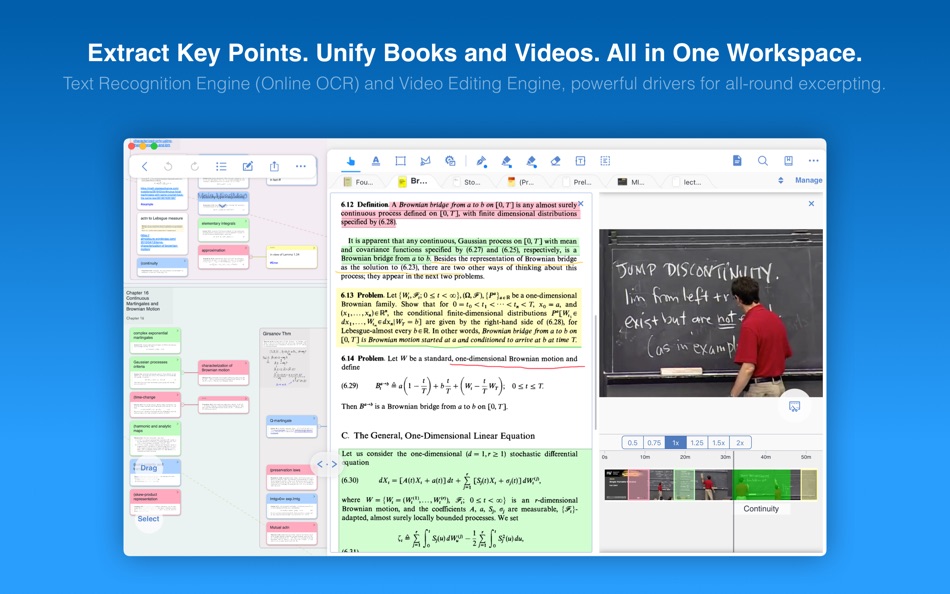
Welcome to MarginNote. This is a highly powerful reading and study software and is applicable to Mac, iPad, and iPhone. By integrating the PDF/EPUB reader and multiple powerful study tools, MarginNote will enable learners to reorganize and connect knowledge from different aspects, then memorize and grasp it accordingly.
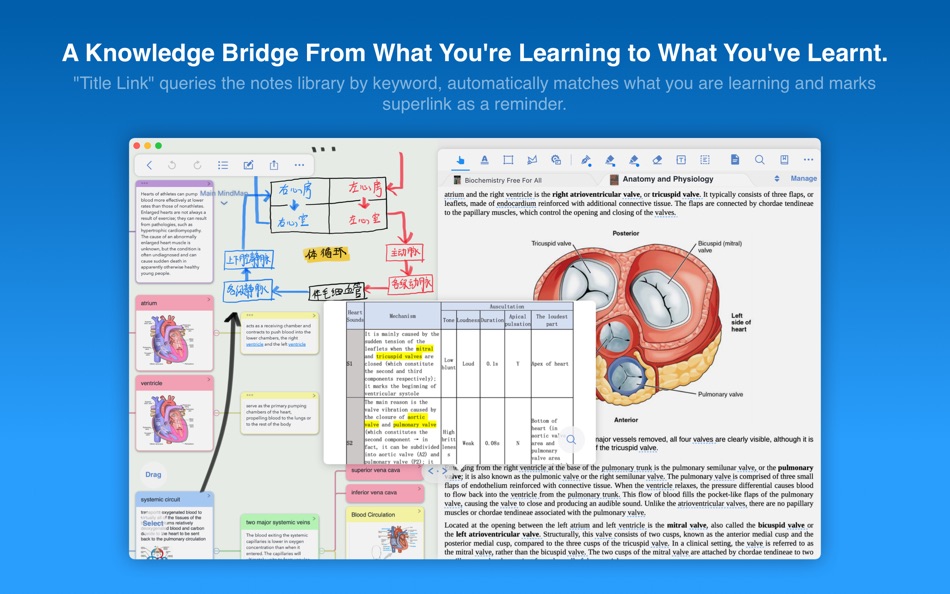
Whatever your profession, such as student, educator, researcher, lawyer, or life-long learner, you may annotate and take notes through MarginNote, organize notes via Mindmap and Outline, connect knowledge horizontally via Hashtag and raise memory effect via the Flashcards.
You will discover what MarginNote does is not to simply integrate these tools. Instead, it combines them deeply and skillfully, which makes it easier for users to toggle between different tools.
What’s New in MarginNote 3
* New and Clean UI Completely redesigned.
* Improved performance and Running more smoothly
* Support both Document Reading mode & Study Reading mode.
* Excerpts & Note-taking
* Enhanced Handwriting support.
* Support TextBox on PDF.
* Support direct text-typing & sketching when editing note cards.
* Support Auto OCR when excerpting on scanned PDFs.
* Emphasis & Cloze
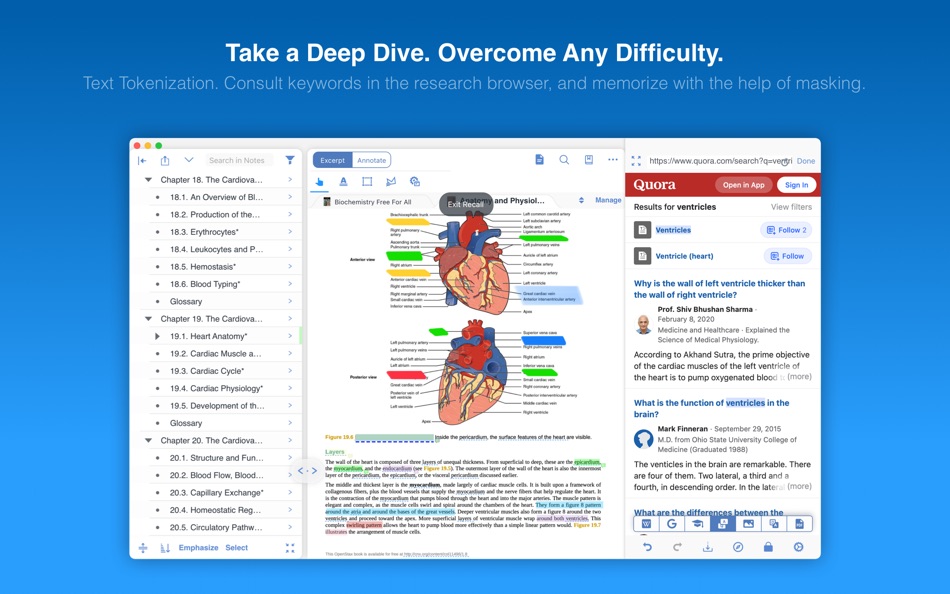
* Support direct emphasis in powerful Emphasis mode both on PDF or Outline.
* Support auto convert emphasis to Cloze in CardDeck.
* Support creating Image-Occlusion flashcards.
* Multi-Documents
* Support both document tabs & split views to switch between documents.
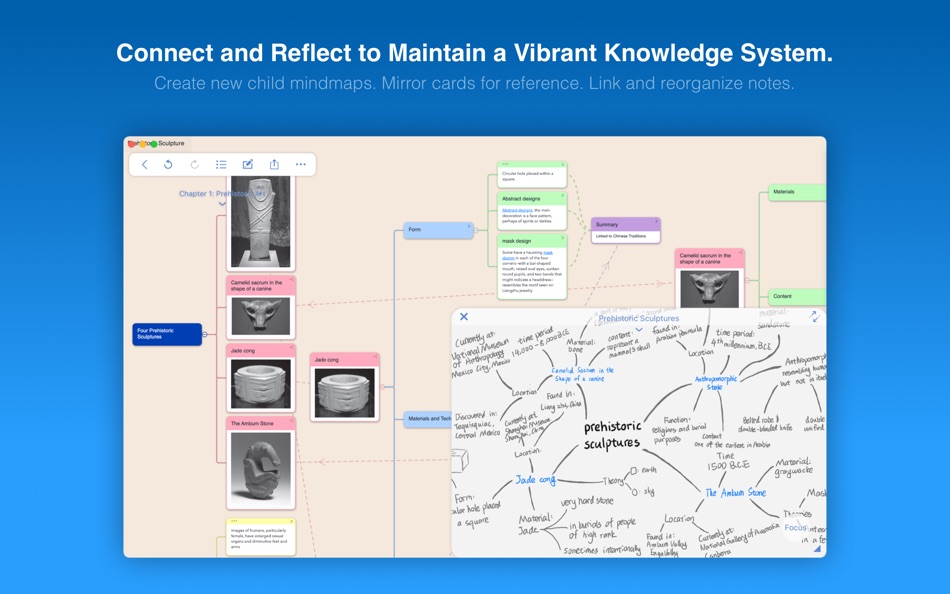
* MindMap
* Auto grouping new excerpts by Document Table of Contents.
* Support new brach display mode: Framework.
* Swipe/Drag gestures to slide in/out Outline & Documents in Study mode.
* Enhanced grouped cut/paste, drag to merge,.. etc.
* Outline
* Improved search and displaying keywords in results.
* Improved styles.
* CardDeck:
* View Flashcards in MindMap mode and Document mode.
* Enhanced Anki Export: Card styles, Image occlusions, Cloze
* Enhanced Research web browser.
* iCloud Sync
* Fixed several design issue in previous versions.
* More stable & improved performance.
* Categories
* Separate categories for Document, Study and Review.
* Trash
* Recover data from Trash and make data more safe.
* Trial
* 14-days free trial.
===========================================
MarginNote 2.X features:
Reading:
- Support PDF and EPUB format;
Annotating and NoteTaking:
- Support text highlight and rectangular highlight;
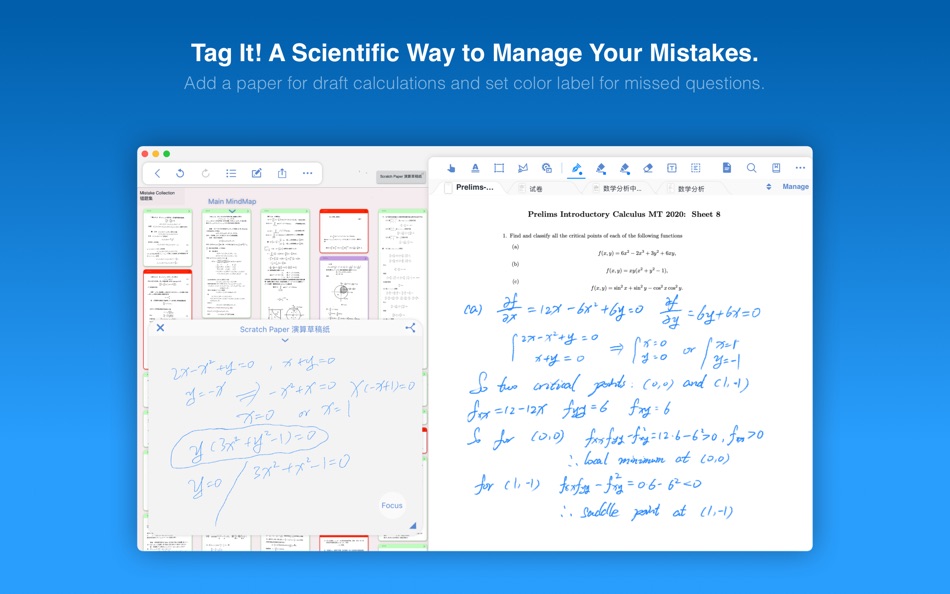
- Add notes directly at the page margin; the note editing area will not overlap with the book content at all;
- Text, voice, picture, sketching and many other forms of comments in note;
- Add hashtags to notes to facilitate the connection of notes;
Outline and Mindmap:
- Outline and Mindmap in one view;
- Create Outline tree by swipe gestures;
- Multi-selection editing such as group, merge, clone, etc;
- Quick searching and filtering according to colors, hashtags, books.
Flashcard:
- Highlights and notes can be automatically turned into flashcards for review;
- Spaced repetition adopting the Anki-based algorithm;
- Switch to the linking book page at any time;
Import, Export and Sync:
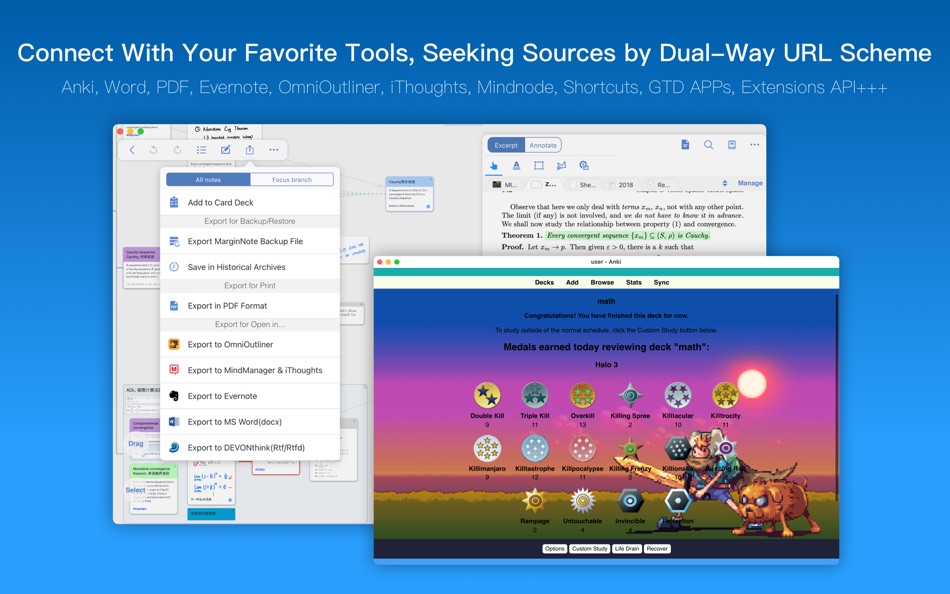
- Import webpages and notes from Evernote;
- Export flashcards to Anki;
- Export Outline to OmniOutliner;
- Export Mindmap to iThoughts or MindManager;
- Export to Evernote;
- Export all the margin notes, MindManager, Outline and related PDF/EPUB to a printable PDF;
- Sync books & notes with iCloud;
Feel free to drop us a line!
www.marginnote.com
Ad
Screenshots

Price History
-
* In-App Purchases - Current price: Free
- Minimum: Free
- Maximum: Free
Track prices
Additional Information
- Release Date:
- Category:
macOS Apps›Productivity - OS:
macOS,macOS 11.5 and up - Size:
238 Mb - Supported Languages:
Chinese,English,Japanese - Content Rating:
17+ - Mac App Store Rating:
0 - Website:
 http://marginnote.com
What's new
- Version: 3.7.31
- Updated:
- Fixed a bug in the research function related to Baidu Translate.
Developer
- Beijing Yunsi Software Technology Co., Ltd
- Platforms: iOS Apps (2) macOS Apps (1)
- Lists: 11 + 4
- Points: 12 + 5,712 ¡
- Rankings: 0
- Comments: 0
- Deals: 0
- Videos: 0
- RSS: Subscribe
Lists (2)
- MarginNote 3





Rankings (0)
0 ☹️
Comments (0)
Be the first to comment 🌟
«MarginNote 3» is a Productivity app for macOS, developed by «Beijing Yunsi Software Technology Co., Ltd». It was first released on and last updated on . This app is currently free. This app has not yet received any ratings on AppAgg. It has been added to 2 public lists and 1 private lists created by users. AppAgg has tracked 4 confirmed points plus 0 indirect points for this app. Available languages: Chinese, English, Japanese. AppAgg continuously tracks the price history, ratings, and user feedback for «MarginNote 3». Subscribe to this app or follow its RSS feed to get notified about future deals or updates. AppAgg does not host applications or distribute software. All trademarks, logos and screenshots belong to their respective owners.
MarginNote 3 Short URL: Copied!- 🌟 Share
- Mac App Store
Similar
-
- Note'n'do Web Clipper
- macOS Apps: Productivity By: Alex Stotz
- Free
- Lists: 0 0 0
- Points: 0 Version: 2.22.42 Please note that this web clipper is specifically designed for use with the NND application. Note'n'do Web Clipper allows you to create snippets from web pages. All snippets are ... ⥯
-
- Note-C
- macOS Apps: Productivity By: Xelaton Software
- $5.99
- Lists: 0 0 0
- Points: 1 Version: 2.6.3 Note-C is an easy-to-use program for writing, collecting and processing notes and texts. Note-C offers a rich set of features for working with text, support for popular markup ... ⥯
- New
- Margin.alia
- macOS Apps: Productivity By: SCOTT SMITH CUNNINGHAM
- $4.99
- Lists: 0 0 0
- Points: 0 Version: 1.1 Margin.alia is a native macOS writing app for people who think in Markdown. It pairs a clean, distraction-free editor with a smart file organizer powerful enough for serious writing, ... ⥯
-
- Note App For Google Keep
- macOS Apps: Productivity By: Farhana Farooq
- * Free
- Lists: 0 0 0
- Points: 1 Version: 1.0.4 Introducing the ultimate Notes app designed to make note-taking, organizing, and creativity easier than ever! With our powerful and intuitive features, you can capture your ideas, ... ⥯
-
- Note & Writing - ConniePad
- macOS Apps: Productivity By: Huy Le
- $59.99
- Lists: 0 0 0
- Points: 0 Version: 7.0.38 ConniePad is built for those who need speed, flexibility, and total control over their notes without relying on the internet. Why ConniePad? - Works Anywhere No login, no cloud ... ⥯
-
- Noteworthy PDF: Margin Notes
- macOS Apps: Productivity By: Tailored Swift LLC
- * Free
- Lists: 0 0 0
- Points: 0 Version: 1.0.2 Convert PDF Annotations into Margin Notes Noteworthy PDF is a lightweight Mac utility that converts popup PDF annotations and comments into clean, readable margin notes inside your ... ⥯
-
- Capture Note - Note On Screen
- macOS Apps: Productivity By: Jaeil Roh
- Free
- Lists: 0 0 0
- Points: 2 Version: 0.1.15 "Capture Note" provides fastest and easiest way to make notes over the screenshot. You can easily take screenshots and writes notes on them. You can easily save it image file or copy ... ⥯
-
- base note
- macOS Apps: Productivity By: Alistair Dark
- $2.99
- Lists: 0 0 0
- Points: 0 Version: 1.61 Drowning in complex features and information overload? Base Note is the radically simple writing app designed as a sanctuary for your thoughts. Cut through the noise, regain focus, and ⥯
-
- App Note Maker
- macOS Apps: Productivity By: Ebey Tech LLC
- * $1.99
- Lists: 0 + 1 0 0
- Points: 1 Version: 1.0 Innovative concept for creating and managing notes for individual apps. Add apps into a main list and create notes for the apps. When a chosen app's UI is focused the built-in menubar ... ⥯
- New
- Ai Note Taker : Voice Recorder
- macOS Apps: Productivity By: Fahid Zahoor
- * Free
- Lists: 0 0 0
- Points: 0 Version: 1.1 AI Note Taker is a powerful ai note taker designed for Mac users who want to quickly capture ideas, conversations, lectures, and meetings using advanced speech to text technology. ... ⥯
-
- Smart Noter AI Note Taker
- macOS Apps: Productivity By: ZEN TECH
- * Free
- Lists: 0 0 0
- Points: 0 Version: 1.0.3 Turn your content into insights with Notebook - AI Note Taker, your ultimate AI-powered learning and productivity companion. Millions of students, professionals, creators, researchers, ⥯
-
- Lightning Note
- macOS Apps: Productivity By: 庆 田
- * Free
- Lists: 0 0 0
- Points: 0 Version: 2.1.4 Lightning Note offers a fast, easy-to-use note-taking experience on macOS. Key features: 1> One-click access (or shortcut key) Open a new note instantly from the menu bar. 2> Auto-save ⥯
-
- Flash Note - No Dock
- macOS Apps: Productivity By: Paulo Martins
- $4.99
- Lists: 0 0 0
- Points: 0 Version: 1.0.3 Take notes instantly, distraction-free. Flash Note is a minimalist app that lets you capture notes instantly from your Mac s menu bar. Never lose an idea or an important note again ... ⥯
-
- Handy Note - Sticky Notes
- macOS Apps: Productivity By: FIPLAB Ltd
- Free
- Lists: 0 + 1 0 0
- Points: 6 Version: 1.0.5 Handy Note is a beautifully crafted sticky note app for your Mac. Quickly jot down ideas, tasks and important information - and keep it all visible right on your desktop. Search with ... ⥯