
| Entwickler: | Maxim Ananov (3) | ||
| Preis: | * Kostenlos | ||
| Klassifizierungen: | 0 | ||
| Rezensionen: | 0 Rezension schreiben | ||
| Kommentare: | 0 Kommentar posten | ||
| Listen: | 2 + 0 | ||
| Punkte: | 7 + 0 ¡ | ||
| Mac App Store | |||
Beschreibung

How It Works:
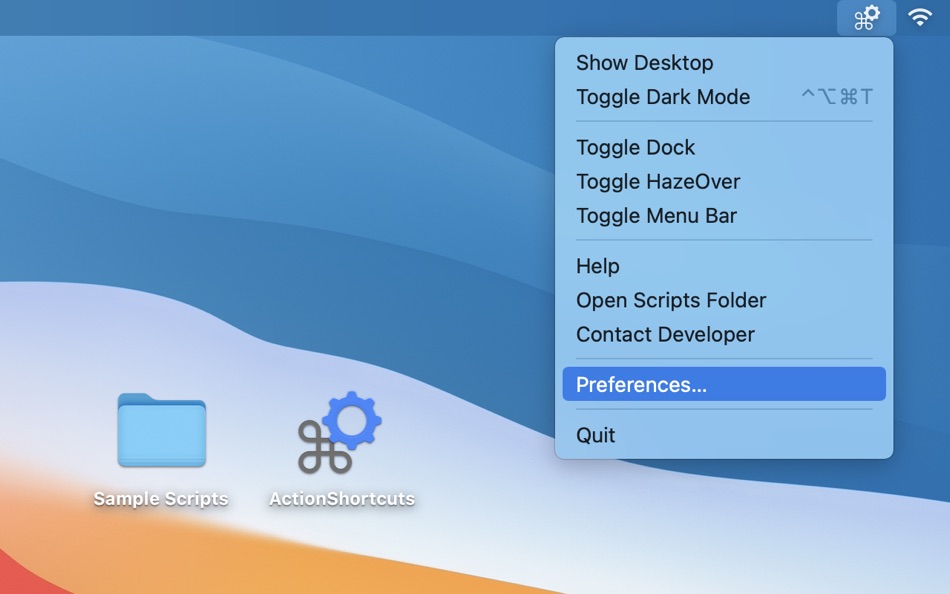
• Open the ActionShortcuts app, click its status icon in the menu bar and select ”Open Scripts Folder”.
• Copy your script files to that folder, or create symbolic links (see down below). You can create new script files using Script Editor or Automator apps built into macOS.
Supported file types are AppleScript, Automator workflows, applications, command and shell scripts (with proper shebangs).
• To set up keyboard shortcuts, click the app icon in the menu bar and select ”Settings”.
• To execute a command, select it in the menu or use a keyboard shortcut you’ve set.
• Hold “Option” key and select a menu item to edit the script. Or hold the “Shift” key to reveal it in Finder. These actions are also available in the context menu in ”Settings” window > “Actions” tab.
Keyboard shortcuts will only work while the app is running, but you can have the app start automatically at login using “Settings” menu > “About” tab.
You can hide the menu bar icon or hide individual actions in the menu.
To add separators to the script list menu: use -- (double dash) anywhere in the script file name.
• Use symbolic links to launch scripts from other locations. Symlinks should have proper file extensions and be created using Terminal (aliases created using Finder won’t work).
For example: ln -s SourceScript.sh ~/Library/Application\ Scripts/com.pointum.actions/TargetSymLink.sh
Not sure where to start?
Contact me for help, or download the Sample Scripts pack from the app website. It includes scripts that toggle Dark Mode, hide Dock, auto hide menu bar, show Desktop and control HazeOver app.
Ad
Screenshots


Preisentwicklung
-
* In-App Käufe - Heute: Kostenlos
- Mindestens: Kostenlos
- Maximale: $1.99
Preise beobachten
Entwickler
- Maxim Ananov
- Plattformen: macOS Apps (3)
- Listen: 8 + 2
- Punkte: 19 + 0 ¡
- Klassifizierungen: 0
- Rezensionen: 0
- Kommentare: 0
- Rabatte: 0
- Videos: 0
- RSS: Abonnieren
Punkte (7)





Klassifizierungen (0)
0 ☹️
Listen (2)
- Action Shortcuts: Automation

Rezensionen (0)
Schreiben Sie die erste Bewertung 🌟
Weitere informationen
- Version: 1.0.10
- Kategorie:
macOS Apps›Dienstprogramme - Betriebssysteme:
macOS,macOS 13 oder höher - Größe:
750 Kb - Unterstützte Sprachen:
English - Altersfreigabe:
4+ - Mac App Store Bewertung:
0 - Aktualisiert:
- Veröffentlichungsdatum:
Kontakte
 https://hazeover.com/actionshortcuts.html
 «Action Shortcuts: Automation». Plattform: macOS. Kategorie: Dienstprogramme. Entwickler: «Maxim Ananov». Erste Veröffentlichung: . Letzte Aktualisierung: . Aktueller Preis: kostenlos. Dieser Titel hat noch keine Bewertungen oder Rezensionen auf AppAgg erhalten. Listen: öffentliche 2, private 0. Verfolgte Punkte: bestätigte 7, indirekte 0. Verfügbare Sprachen: English. AppAgg verfolgt den Preisverlauf, Bewertungen und Benutzerfeedback für «Action Shortcuts: Automation». Verfolgen Sie zukünftige Rabatte und Updates über RSS. AppAgg hostet keine Anwendungen und vertreibt keine Software. Alle Marken, Logos und Screenshots gehören ihren jeweiligen Eigentümern.
Kommentare (0)
Seien Sie der Erste, der einen Kommentar abgibt 🌟
Action Shortcuts: Automation Kurz-URL: Kopiert!- 🌟 Teilen
- Mac App Store
Ad
Ähnliches
-
- Shortcuts in Menu Bar
- macOS Apps: Dienstprogramme Von: Binh Nguyen
- $2.99
- Listen: 1 + 0 Klassifizierungen: 0 Rezensionen: 0
- Punkte: 0 + 0 0 Version: 1.2.5 A small utility that provides links to your frequently used files, folders, websites, applications. Help you to keep your Desktop and Dock bar clean. Help you easier to organize your ... ⥯
-
- Unlock Shortcuts
- macOS Apps: Dienstprogramme Von: Boris Vanin
- Kostenlos
- Listen: 0 + 0 Klassifizierungen: 0 Rezensionen: 0
- Punkte: 0 + 0 0 Version: 1.3 It is simple: You unlock the Mac - it runs your selected Shortcuts You lock your Mac - it runs another Shortcuts Add anything you want to a Shortcuts automation and select it from the ... ⥯
-
- Easy Shortcuts
- macOS Apps: Dienstprogramme Von: reinert.dev
- * Kostenlos
- Listen: 0 + 0 Klassifizierungen: 0 Rezensionen: 0
- Punkte: 4 + 0 0 Version: 1.1.1 Easy Shortcuts allows you to access a list of configurable shortcut items with the press of a button. Activating a shortcut is then as simple as clicking it or by using its keyboard ... ⥯
-
- Menu Bar Shortcuts
- macOS Apps: Dienstprogramme Von: Present Day Media LLC
- $3.99
- Listen: 0 + 0 Klassifizierungen: 0 Rezensionen: 0
- Punkte: 0 + 0 0 Version: 1.14 Menu Bar Shortcuts brings four everyday productivity tools to the one place you check all day long the macOS menu bar. Instant Calculator A full-featured calculator that supports ... ⥯
-
- ShareBot for Shortcuts
- macOS Apps: Dienstprogramme Von: Pedro Jose Pereira Vieito
- $5.99
- Listen: 0 + 2 Klassifizierungen: 0 Rezensionen: 0
- Punkte: 1 + 0 0 Version: 1.2 ShareBot is the missing Share Extension for Shortcuts on macOS. It allows you to run any of your shortcuts on items like files, URLs or text shared from any app with share menu support ⥯
-
- ASAP Shortcuts
- macOS Apps: Dienstprogramme Von: SAWAKO YAMADA
- $2.99
- Listen: 0 + 0 Klassifizierungen: 0 Rezensionen: 0
- Punkte: 2 + 0 0 Version: 1.0.6 ASAP Shortcuts puts your most-used apps one keypress away. Assign a global keyboard shortcut to any app on your Mac, then trigger it from anywhere no matter what you're doing. ASAP ... ⥯
-
- CyberScore
- macOS Apps: Dienstprogramme Von: Cyber Automation PTY LTD
- Kostenlos
- Listen: 0 + 0 Klassifizierungen: 0 Rezensionen: 0
- Punkte: 0 + 0 0 Version: 4.9.11 CyberScore is a security assessment tool for Windows and macOS, designed to evaluate key security measures on your computer. In minutes, CyberScore performs dynamic security checks and ⥯
-
- DAutomator
- macOS Apps: Dienstprogramme Von: 刚刚 孔
- $4.99
- Listen: 0 + 0 Klassifizierungen: 0 Rezensionen: 0
- Punkte: 2 + 0 0 Version: 1.8 An powerful automator for Mac, support simulate mouse click, keyboard input, scroll wheel, mouse drag and etc, it can execute complex action script. [Key Features] 1. Support simulate ... ⥯
-
- AI Shortcut Actions
- macOS Apps: Dienstprogramme Von: Alexander Moritz Weichart
- Kostenlos
- Listen: 0 + 0 Klassifizierungen: 0 Rezensionen: 0
- Punkte: 0 + 0 0 Version: 1.0 AI Shortcuts adds powerful AI actions to Apple s Shortcuts app, so you can use Siri, automations, and workflows to write, summarize, generate images, transcribe audio, and create ... ⥯
-
- Yoink - Better Drag and Drop
- macOS Apps: Dienstprogramme Von: Matthias Gansrigler-Hrad
- * $8.99
- Listen: 6 + 12 Klassifizierungen: 0 Rezensionen: 0
- Punkte: 10 + 0 0 Version: 3.7 Yoink simplifies and improves drag and drop between windows, apps, spaces and fullscreen apps, by providing a temporary "shelf" for your files and app-content. It frees up your mouse, ... ⥯
-
- Shortery
- macOS Apps: Dienstprogramme Von: Unit Numberfive oHG
- * Kostenlos
- Listen: 3 + 4 Klassifizierungen: 1 (1) Rezensionen: 0
- Punkte: 19 + 0 0 Version: 8.6 Run your Shortcuts automatically with Shortery. Automate your workflows without lifting a finger. Shortery allows you to run shortcuts automatically in response to system events, ... ⥯
-
- SwiftyMenu
- macOS Apps: Dienstprogramme Von: 圣罡 汤
- * Kostenlos
- Listen: 0 + 2 Klassifizierungen: 0 Rezensionen: 0
- Punkte: 23 + 0 0 Version: 26.5.6 SwiftyMenu is a powerful macOS Finder extension that enhances your workflow with customizable context menus for quick file and folder operations. Key Features: Custom Context Menus: ... ⥯
-
- Barbee - Hide Menu Bar Items
- macOS Apps: Dienstprogramme Von: 翔 何
- * Kostenlos
- Listen: 3 + 3 Klassifizierungen: 0 Rezensionen: 0
- Punkte: 14 + 0 0 Version: 4.1.3 Barbee The Ultimate Menu Bar Manager Need a Bartender alternative? Barbee gives you full control over your menu bar! Why Choose Barbee? It s lightweight, powerful, and designed to make ⥯
-
- Trypa
- macOS Apps: Dienstprogramme Von: Tom Woodhams
- $12.99
- Listen: 1 + 3 Klassifizierungen: 5 (2) Rezensionen: 5 (2)
- Punkte: 5 + 0 0 Version: 1.8.6 Automate your Automations In a few seconds, automate your automations and set up triggers using different environmental, hardware and network scenarios. Trigger any Mac shortcut ... ⥯