
Saved
Choose the name that will be shown in your Saved menu.
Done!
| Developer: | Maxim Ananov (3) | ||
| Price: | * Free | ||
| Score: | 6,540 Platinum | ||
| Rankings: | 0 | ||
| Comments: | 0 Add a comment | ||
| Lists: | 2 + 0 | ||
| Points: | 7 + 0 ¡ | ||
| +1 Points | |||
Description

How It Works:
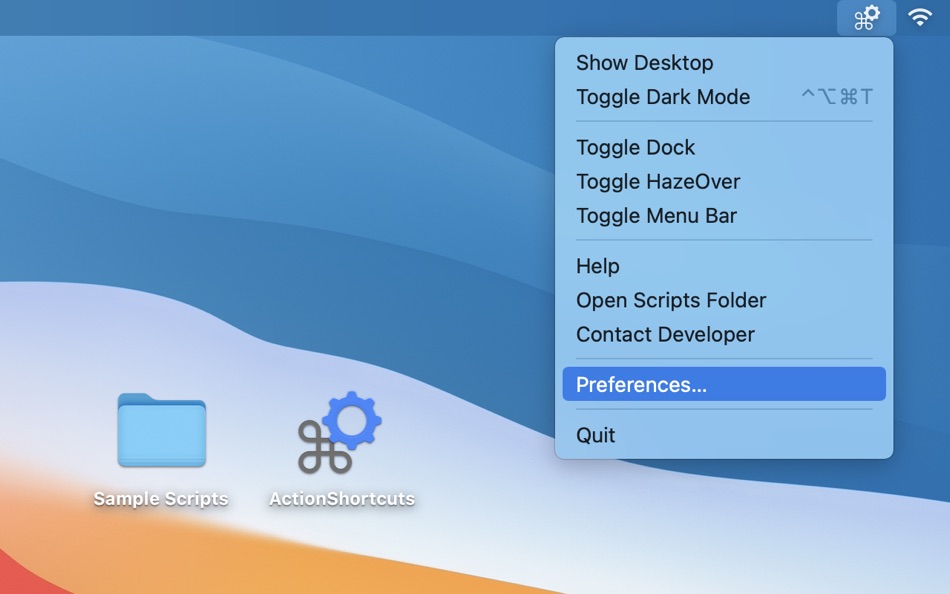
• Open the ActionShortcuts app, click its status icon in the menu bar and select ”Open Scripts Folder”.
• Copy your script files to that folder, or create symbolic links (see down below). You can create new script files using Script Editor or Automator apps built into macOS.
Supported file types are AppleScript, Automator workflows, applications, command and shell scripts (with proper shebangs).
• To set up keyboard shortcuts, click the app icon in the menu bar and select ”Settings”.
• To execute a command, select it in the menu or use a keyboard shortcut you’ve set.
• Hold “Option” key and select a menu item to edit the script. Or hold the “Shift” key to reveal it in Finder. These actions are also available in the context menu in ”Settings” window > “Actions” tab.
Keyboard shortcuts will only work while the app is running, but you can have the app start automatically at login using “Settings” menu > “About” tab.
You can hide the menu bar icon or hide individual actions in the menu.
To add separators to the script list menu: use -- (double dash) anywhere in the script file name.
• Use symbolic links to launch scripts from other locations. Symlinks should have proper file extensions and be created using Terminal (aliases created using Finder won’t work).
For example: ln -s SourceScript.sh ~/Library/Application\ Scripts/com.pointum.actions/TargetSymLink.sh
Not sure where to start?
Contact me for help, or download the Sample Scripts pack from the app website. It includes scripts that toggle Dark Mode, hide Dock, auto hide menu bar, show Desktop and control HazeOver app.
Screenshots


Ad
Price History
-
* In-App Purchases - Current price: Free
- Minimum: Free
- Maximum: $1.99
Track prices
AppAgg Score
6,540
Estimated AppAgg Score for
Action Shortcuts: Automation
6,540 Platinum
Higher scores usually mean stronger signals on AppAgg.
Based on: popularity · ratings · freshness · deals · store data · community signals
Recalculated daily using fresh AppAgg data.
Short URL: Copied!
Additional Information
- Release Date:
- Category:
macOS Apps›Utilities - OS:
macOS,macOS 13 and up - Size:
750 Kb - Supported Languages:
English - Content Rating:
4+ - Mac App Store Rating:
0
 https://hazeover.com/actionshortcuts.html
Developer
- Maxim Ananov
- Platforms: macOS Apps (3)
- Lists: 8 + 2
- Points: 19 + 0 ¡
- Rankings: 0
- Comments: 0
- Deals: 0
- Videos: 0
- RSS: Subscribe
Lists (2)
- Action Shortcuts: Automation


Points (7)




Rankings (0)
0
Comments (0)
Be the first to comment
Summary
Action Shortcuts: Automation Short URL: Copied!- Share
- Mac App Store
«Action Shortcuts: Automation» is a Utilities app for macOS, developed by «Maxim Ananov». It was first released on and last updated on . This app is currently free. This app has not yet received any ratings on AppAgg. It has been added to 2 public lists and 0 private lists created by users. AppAgg has tracked 7 confirmed points plus 0 indirect points for this app. Available languages: English. AppAgg continuously tracks the price history, ratings, and user feedback for «Action Shortcuts: Automation». AppAgg does not host applications or distribute software. All trademarks, logos and screenshots belong to their respective owners. Subscribe to this app or follow its RSS feed to get notified about future deals or updates.
Similar
-
- Shortcuts in Menu Bar Lite
- macOS Apps: Utilities By: Binh Nguyen
- Free
- Lists: 0 0 0
- Points: 2 + 0 1K · Gold Version: 2.2 This is the Lite version of Shortcuts in Menu Bar. Get Full version at: https://apps.apple.com/us/app/shortcuts-in-menu-bar/id1471125513 Transform the way you work with Shortcuts in ...
-
- Unlock Shortcuts
- macOS Apps: Utilities By: Boris Vanin
- Free
- Lists: 0 0 0
- Points: 0 + 0 500 · Bronze Version: 1.3 It is simple: You unlock the Mac - it runs your selected Shortcuts You lock your Mac - it runs another Shortcuts Add anything you want to a Shortcuts automation and select it from the ...
-
- Easy Shortcuts
- macOS Apps: Utilities By: reinert.dev
- * Free
- Lists: 0 0 0
- Points: 4 + 0 1K · Silver Version: 1.2.0 Easy Shortcuts allows you to access a list of configurable shortcut items with the press of a button. Activating a shortcut is then as simple as clicking it or by using its keyboard ...
-
- Menu Bar Shortcuts
- macOS Apps: Utilities By: Present Day Media LLC
- $3.99
- Lists: 0 0 0
- Points: 0 + 0 590 · Bronze Version: 1.14 Menu Bar Shortcuts brings four everyday productivity tools to the one place you check all day long the macOS menu bar. Instant Calculator A full-featured calculator that supports ...
-
- ShareBot for Shortcuts
- macOS Apps: Utilities By: Pedro Jose Pereira Vieito
- $5.99
- Lists: 0 + 2 0 0
- Points: 1 + 0 1K · Gold Version: 1.2 ShareBot is the missing Share Extension for Shortcuts on macOS. It allows you to run any of your shortcuts on items like files, URLs or text shared from any app with share menu support
-
- Rulebook: File Automation
- macOS Apps: Utilities By: Lucas Raggers
- $7.99
- Lists: 0 0 0
- Points: 0 + 0 590 · Bronze Version: 1.1 Rulebook keeps your files organized. Automatically. Set up rules for any folder on your Mac and Rulebook takes care of the rest. When new files arrive, Rulebook checks your conditions ...
-
- Pulse Home - WiFi Automation
- macOS Apps: Utilities By: Bugra Gunay
- * Free
- Lists: 0 0 0
- Points: 0 + 0 1K · Silver Version: 1.0 Pulse Home brings WiFi-based home automation to your menu bar. Create automation rules that trigger when you enter or leave a room all detected through WiFi signal analysis. Control ...
-
- ASAP Shortcuts
- macOS Apps: Utilities By: SAWAKO YAMADA
- $2.99
- Lists: 0 0 0
- Points: 2 + 0 800 · Silver Version: 1.0.6 ASAP Shortcuts puts your most-used apps one keypress away. Assign a global keyboard shortcut to any app on your Mac, then trigger it from anywhere no matter what you're doing. ASAP ...
-
- Kommand: Keyboard Shortcuts
- macOS Apps: Utilities By: Uemit Guel
- * Free
- Lists: 0 0 0
- Points: 0 + 0 710 · Silver Version: 1.3 Press ⌥⌘K. See every shortcut for the app you're using. Kommand gives you an instant overlay, menu bar access, and practice mode so you actually remember shortcuts instead of googling ...
-
- CyberScore
- macOS Apps: Utilities By: Cyber Automation PTY LTD
- Free
- Lists: 0 0 0
- Points: 0 + 0 580 · Bronze Version: 5.3.13 CyberScore is a security assessment tool for Windows and macOS, designed to evaluate key security measures on your computer. In minutes, CyberScore performs dynamic security checks and
-
- Batchio
- macOS Apps: Utilities By: Marcel Iseli
- * Free
- Lists: 0 0 0
- Points: 1 + 0 860 · Silver Version: 1.0 Batchio is the fastest way to batch rename files on your Mac. Drag in files or entire folders, set your rename rules, and see every change in real time before anything touches your ...
-
- Mila's Tools: Unit Converter
- macOS Apps: Utilities By: Scott DeSapio
- $19.99
- Lists: 0 + 1 0 0
- Points: 5 + 0 7K · Platinum Version: 2.7.10 Convert anything 29 categories, one beautifully simple app. Mila's Unit Converter PRO is the only unit converter you'll ever need. Whether you're a student, engineer, nurse, home cook,
-
- SnapPro - Screenshot & Record
- macOS Apps: Utilities By: 永 张
- Free
- Lists: 0 0 0
- Points: 1 + 0 600 · Silver Version: 1.0 SnapPro is the professional screenshot and screen recording tool macOS deserves. Pixel-perfect capture, unlimited recording, OCR text recognition all completely free. ## Free No Limits
-
- DAutomator
- macOS Apps: Utilities By: 刚刚 孔
- $4.99
- Lists: 0 0 0
- Points: 2 + 0 590 · Bronze Version: 1.8 An powerful automator for Mac, support simulate mouse click, keyboard input, scroll wheel, mouse drag and etc, it can execute complex action script. [Key Features] 1. Support simulate ...