
保存済み
保存済みメニューに表示する名前を選択してください。
完了
| デベロッパー: | Cultured Code GmbH & Co. KG (4) | ||
| 価格: | $49.99 | ||
| ランキング: | 0 | ||
| コメント: | 0 コメントを投稿する | ||
| リスト: | 20 + 13 | ||
| ポイント: | 12 + 0 ¡ | ||
| Mac App Store | |||
説明

Best of all, it’s easy to use. Within the hour, you’ll have everything off your mind and neatly organized—from routine tasks to your biggest life goals—and you can start focusing on what matters today.
“Things offers the best combination of design and functionality of any app we tested, with nearly all the features of other power user applications and a delightful interface that never gets in the way of your work.”
—Wirecutter, The New York Times
KEY FEATURES
• Your To-Dos
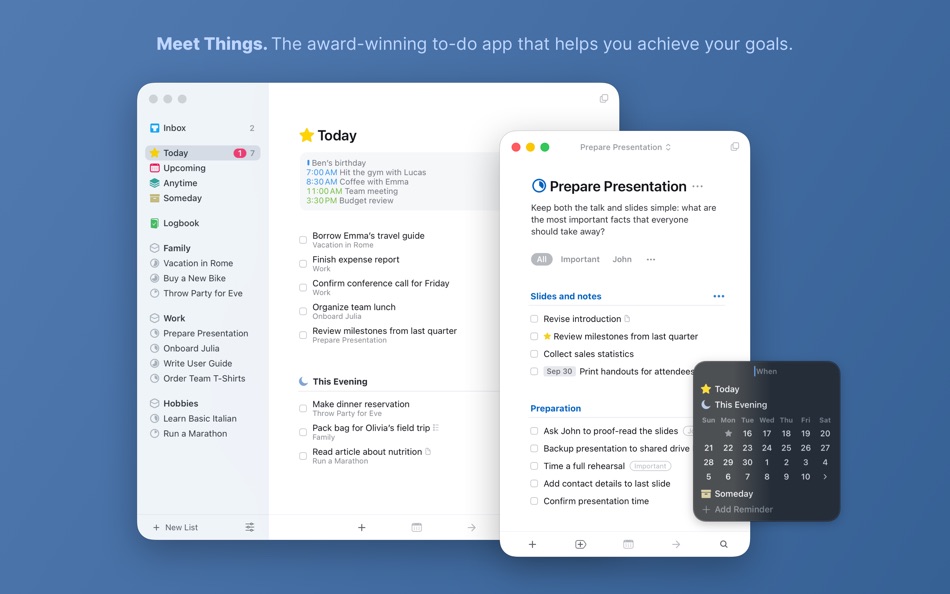
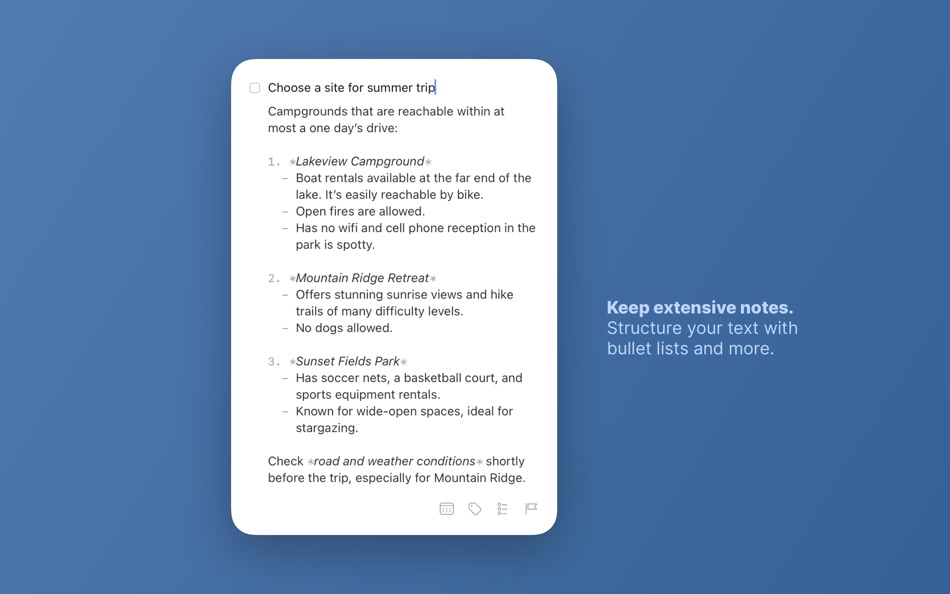
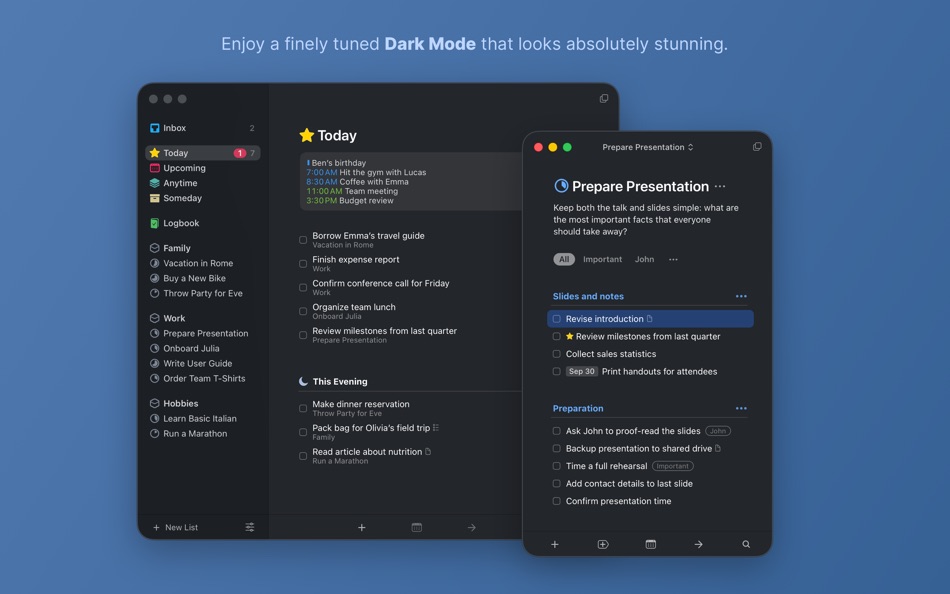
Your basic building block is the almighty To-Do—each a small step toward a great accomplishment. You can add notes, tag it, schedule it, and break it down into smaller steps.
• Your Projects
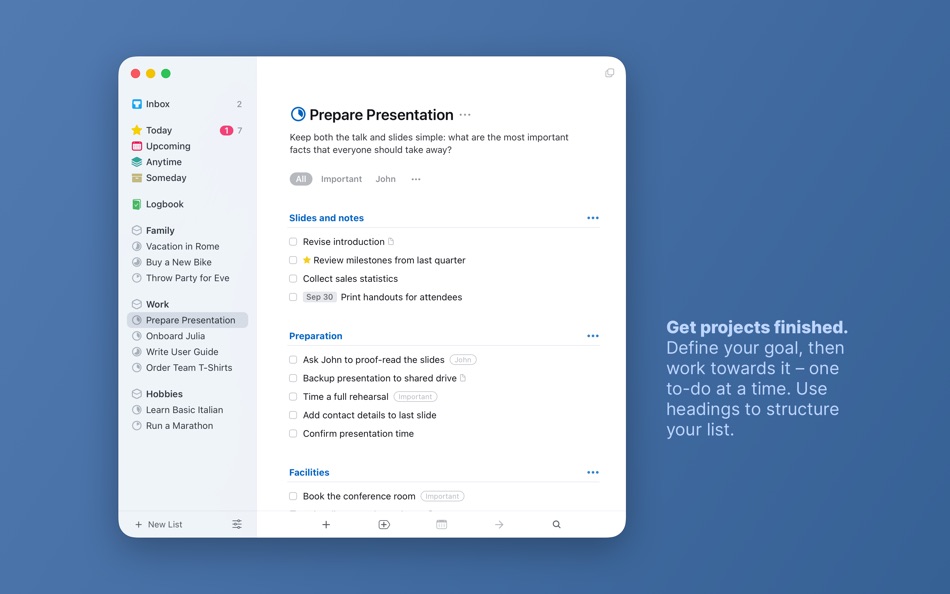
Create a Project for any big goal, then add the to-dos to reach it. Use headings to structure your list as you outline your plan. There’s also a place to jot down your notes, and a deadline to keep you on schedule.
• Your Areas
Create an Area for each sphere of your life, such as Work, Family, Finance, and so on. This keeps everything neatly organized, and helps you see the big picture as you set your plans in motion.
• Your Plan
Everything on your schedule is neatly laid out in the Today and Upcoming lists, which show your to-dos and calendar events. Each morning, see what you planned for Today and decide what you want to do. The rest is down to you :)
MORE THINGS TO LOVE
As you dive deeper, you’ll find Things packed with helpful features. Here are just a few:
• Reminders — set a time and Things will remind you.
• Repeaters — automatically repeat to-dos on a schedule you set.
• This Evening — a special place for your evening plans.
• Calendar integration — see your events and to-dos together.
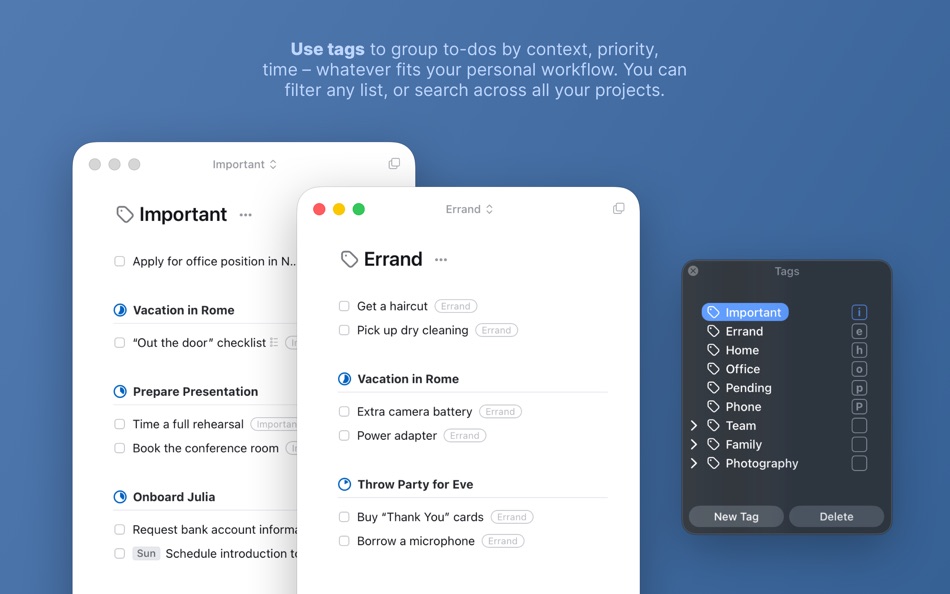
• Tags — categorize your to-dos and quickly filter lists.
• Quick Entry — create to-dos from anywhere, as soon as the thought hits you.
• Quick Find — instantly locate to-dos, headings, or tags.
• Type Travel — jump from list to list with your keyboard; just start typing!
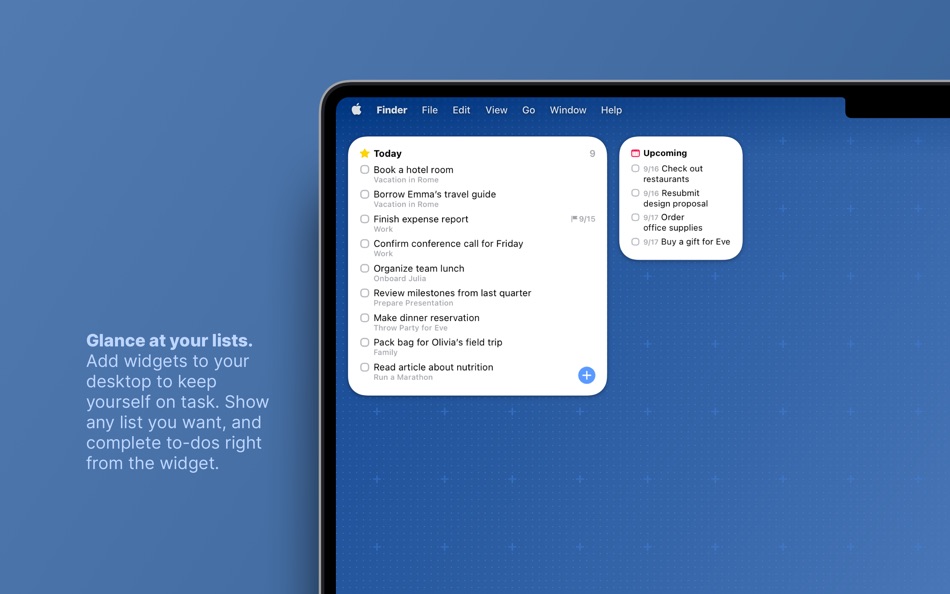
• Widgets — see your lists on the desktop or in Notification Center.
• Mail to Things — forward an email to Things; now it’s a to-do.
• Markdown — structure & style your notes.
• And much more!
MADE FOR MAC
Things is tailored to the Mac with deep system integrations as well. A great example is Quick Entry with Autofill: a shortcut that grabs content from other apps and adds it to Things for you, such as a link to a website or an email you want to get back to.
You can also enjoy a beautiful dark mode at sunset, connect your calendars, open multiple windows, add a variety of widgets, import from Reminders—Things can do it all! There’s even Shortcuts integration if you want to automate your workflows.
STAY PRODUCTIVE ON THE GO
Things also has full-featured apps for iPhone, iPad, Apple Watch, and Apple Vision Pro (sold separately). All your devices sync seamlessly via our free Things Cloud service. It’s great to have everything at your fingertips when you need it!
AWARD-WINNING DESIGN
Made in Stuttgart, with two Apple Design Awards to its name, Things is a fine example of German engineering: designed not only to look fantastic, but to be perfectly functional as well. Every detail is thoughtfully considered, then polished to perfection.
“It’s like the unicorn of productivity tools: deep enough for serious work, surprisingly easy to use, and gorgeous enough to enjoy staring at.”
—Apple
GET THINGS TODAY
Whatever it is you want to accomplish in life, Things can help you get there. Install the app today and see what you can do!
Visit our website now and get a free 15-day trial for your Mac: www.things.app
If you have any questions, please get in touch. We provide professional support and will be glad to help you!
Ad
スクリーンショット


価格履歴
- 現在の価格: $49.99
- 最小値: $34.99
- 最大: $49.99
料金のチェック
情報
 https://culturedcode.com/things/
新機能
- バージョン: 3.22.11
- アップデート:
- • Fixed a layout glitch for link buttons in Settings.
• Fixed a bug where generated URL scheme tokens had insufficient entropy.
• Fixed a rare crash.
THINGS 3.22
Things is ready for macOS 26 Tahoe, with a new app icon, an entirely refreshed interface, control buttons, support for new widget styles, and more.
FRESH LOOK & FEEL
• Things’ interface has been completely refreshed in every corner. You’ll notice a touch of glass in the sidebar that lets a hint of color shine through; increased rounding of corners for windows, dialogs, and to-dos.
• Things’ icon has been refined and realigned to sit beautifully within macOS 26. It’s familiar at a glance – and unmistakably Things.
• Icon & widget styles: Things’ app icon and widgets now support styles on Mac. To change your style, go to System Settings > Appearance and choose from Dark, Tinted, or Clear.
QUICK CONTROLS
Things’ handy control buttons are now available on Mac. Open Control Center from the menu bar and click Edit Controls. Things offers controls for New To-Do and List (you choose a list). You can place them in Control Center, or directly in your menu bar for one-click access.
AND MORE
• Spotlight can now create to-dos. After you’ve invoked Spotlight (⌘ Space), type “Create To-Do”, press Return, then enter your title. Your new to-do is created in the Inbox – even if Things isn’t running.
• Things’ Quick Entry feature now supports adding links from the new Comet browser.
We hope you enjoy using Things on macOS 26 Tahoe!
デベロッパー
リスト (20)
- Things 3





ポイント (12)
-

- 106 Arman S
- +1
-
- 10 Michal Kolář
- +1
-
- 240 Attila Szucs
- +1
-
- 5 eshill
- +1
-
- 534 MichaelTheGeek
- +1
-
- 59 조계준
- +1


ランキング (0)
0 ☹️
コメント (0)
最初にコメントしてください 🌟
«Things 3». プラットフォーム: macOS. カテゴリ: 仕事効率化. 開発者: «Cultured Code GmbH & Co. KG». 最初のリリース: . 最終更新日: . 現在の価格: $49.99. 記録された最低価格: $34.99 (). 記録された最高価格: $49.99 (). このタイトルはまだ AppAgg で評価やレビューを受けていません。 リスト: 公開: 20, 非公開: 13. 追跡ポイント: 確認済み: 12, 間接: 0. 利用可能な言語: Chinese, English, French, German, Italian, Japanese, Russian, Spanish. AppAgg は «Things 3»の価格履歴、評価、ユーザーフィードバックを追跡します。 今後の値下げと更新をフォロー: RSS で確認できます. AppAgg はアプリケーションをホストしたり、ソフトウェアを配布したりしません。 すべての商標、ロゴ、スクリーンショットはそれぞれの所有者に帰属します。
Things 3 短縮 URL: コピーしました!- 🌟 シェア
- Mac App Store
類似
-
- Things To Get Me Extension
- macOS アプリ: 仕事効率化 作者: Things To Get Me
- フリー
- リスト: 0 0 0
- ポイント: 0 バージョン: 4.5 The Things To Get Me Safar extension allows you to add any products and links from anywhere to your wish-list on Things To Get Me. ⥯
-
- Doo 3: Get Things Done
- macOS アプリ: 仕事効率化 作者: Ciarlo Software, LLC
- $9.99
- リスト: 0 0 0
- ポイント: 0 バージョン: 3.5.0 Become a more productive you, one card at a time. WHY DOO? It s easy to procrastinate your to-do list without a clear first step. Tasks with large goals can feel impossible to finish. ... ⥯
-
- Website & App Blocker - Filter
- macOS アプリ: 仕事効率化 作者: Meaningful Things GmbH & Co. KG
- * フリー
- リスト: 0 0 0
- ポイント: 2 バージョン: 2026.0 FILTER - the easy and elegant way to block apps and websites in Safari, Chrome, Opera, Microsoft Edge and Brave. An essential tool for all knowledge workers like freelancers, ... ⥯
-
- HazeOver • Distraction Dimmer™
- macOS アプリ: 仕事効率化 作者: Maxim Ananov
- $4.99
- リスト: 6 + 2 0 0
- ポイント: 12 バージョン: 1.9.7 Too many windows to manage? Large display? Or getting lost in multiple monitors? HazeOver is for you! TRIAL version: HazeOver.com Turn distractions down and focus on your current task. ⥯
-
- Be Focused Pro - Focus Timer
- macOS アプリ: 仕事効率化 作者: Denys Ievenko
- $12.99
- リスト: 5 + 4 0 0
- ポイント: 9 バージョン: 2.5.2 Staying on task seems is a real challenge for our screen-bound generation. The Be Focused lets you get things done by breaking up individual tasks among discrete intervals, separated ... ⥯
-
- Due — Reminders & Timers
- macOS アプリ: 仕事効率化 作者: Due Apps LLP
- * $14.99
- リスト: 5 + 2 0 0
- ポイント: 4 バージョン: 26.2 Due just doesn t let you forget. It is the reminders app that actually helps you get stuff done. It captures your reminders quickly, reminds you persistently, and allows you to ... ⥯
-
- Airmail - Lightning Fast Email
- macOS アプリ: 仕事効率化 作者: Bloop S.R.L.
- * フリー
- リスト: 4 + 5 0 0
- ポイント: 5 バージョン: 26.0.3 Apple Design Award 2017 Winner Airmail is a mail client designed with performance and intuitive interaction in mind optimized for macOS and iOS! Support for iCloud™, MS Exchange, ... ⥯
-
- Wise Menu
- macOS アプリ: 仕事効率化 作者: Wise Tech Labs Private Limited
- $4.99
- リスト: 2 + 2 0 0
- ポイント: 14 バージョン: 2.2 Wise Menu is an ultra light Finder extension that adds useful actions to the context menu that appears on right clicking any item in Finder. The additional menu items that are added on ⥯
-
- GoodTask
- macOS アプリ: 仕事効率化 作者: haha Interactive
- $39.99
- リスト: 2 + 3 0 0
- ポイント: 7 バージョン: 8.2.1 GoodTask is a Powerful Task/Project Manager based on Apple's Reminders & Calendars. You can use it as simple checklist to focus or as complex project management tool to get big things ... ⥯
-
- Keep It
- macOS アプリ: 仕事効率化 作者: Steve Harris
- * フリー
- リスト: 1 0 0
- ポイント: 8 バージョン: 2.8.4 Keep It is a powerful notebook and document organizer for Mac, and is also available as a separate app for iPhone and iPad. Keep It can create and edit notes, rich text, plain text and ⥯
-
- Task Office: to-do, calendar
- macOS アプリ: 仕事効率化 作者: DK CONSULTING, TOV
- * フリー
- リスト: 0 0 0
- ポイント: 10 バージョン: 9.0 Task Office is the best of ever existing GTD, to do lists, projects and contacts management apps. Designed to make business planning, scheduling and getting things done more efficient. ⥯
-
- MindNode - Classic
- macOS アプリ: 仕事効率化 作者: IdeasOnCanvas GmbH
- * フリー
- リスト: 3 0 0
- ポイント: 6 バージョン: 2026.0.1 Every great idea starts with a single thought. And another. And then a million more. MindNode is the most delightful brainstorming app for Mac and iOS. It helps you capture your ... ⥯
-
- TickTick:To-Do List, Calendar
- macOS アプリ: 仕事効率化 作者: Appest Limited
- * フリー
- リスト: 1 + 1 0 0
- ポイント: 6 バージョン: 8.0.40 Design exclusively for macOS, TickTick is your daily must-have to-do & task list to get all things done. TickTick can be accessed on more than 10 different platforms including Mac, ... ⥯
-
- Notebook - Notes, To do
- macOS アプリ: 仕事効率化 作者: Zoho Corporation
- * フリー
- リスト: 0 + 2 0 0
- ポイント: 5 バージョン: 5.9.11 Bring ideas to life with Notebook. Write notes, add files, create to-dos, sketch ideas, record audio, capture moments and more using Notebook. Notebook instantly syncs across your ... ⥯