
Saved
Choose the name that will be shown in your Saved menu.
Done!
| Developer: | 文达 田 (5) | ||
| Price: | * $12.99 | ||
| Score: | 10,640 Legend | ||
| Rankings: | 0 | ||
| Comments: | 0 Add a comment | ||
| Lists: | 3 + 1 | ||
| Points: | 3 + 0 ¡ | ||
| +1 Points | |||
Description

QSpace has powerful Multi-Pane state Auto-save and Restore capabilities, which makes it not only a file manager, but also a secretary for your work status management. Make your work easier and more efficient.
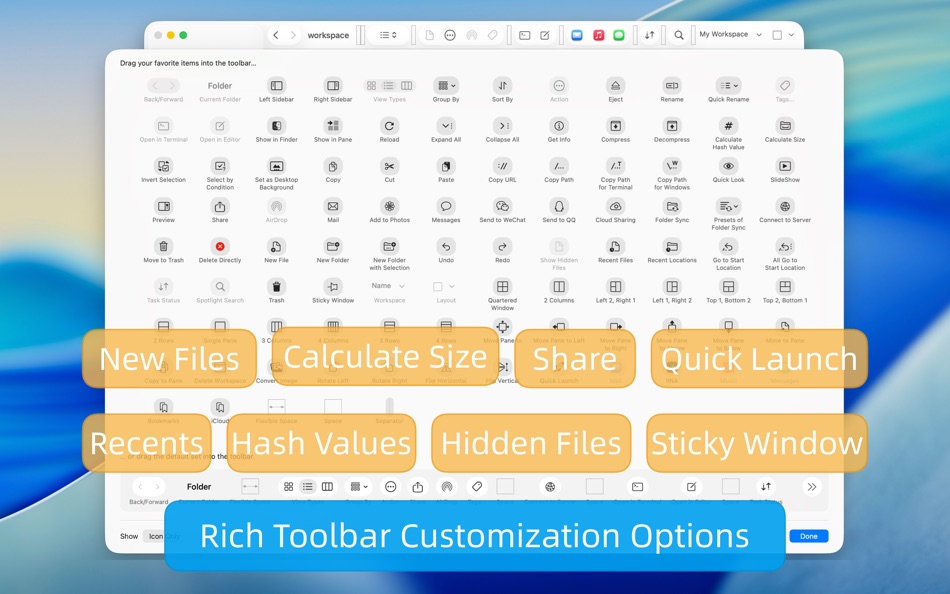
In addition, QSpace also supports a wealth of personalized settings: customize Context Menu, customize Toolbar, custom Touch Bar, customize Hotkeys, customize Quick Launcher. Here, you can follow your own way~ The interface is more concise and the operation is more efficient!
-------- Multi-Pane Workspace --------
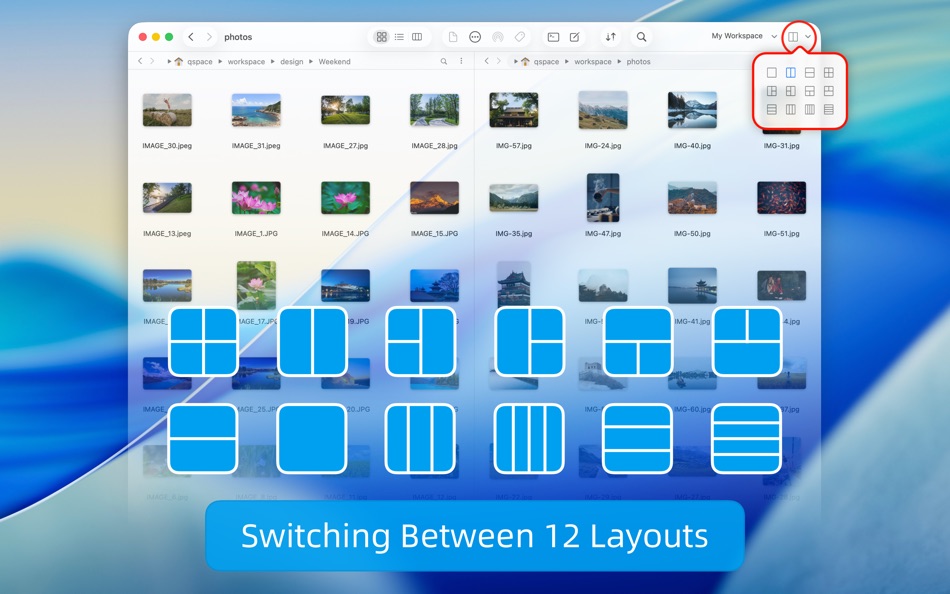
* Support 12 window layouts with one-click flexible switching.
* Support to create multiple workspaces, and you can set independent hotkey for each workspace.
* The status of the workspace supports automatic saving and can be restored by opening it again!
* Support window tabs, you can put multiple workspaces into one window.
-------- File Management Enhancement --------
* Segmented Interactive Address Bar: Quick access to every level of directories, support forward and backward operations.
* Editable Address Bar: Supports copying, editing, or directly entering the path.
* Quick Access: One-click access to the system's common directories and support for directory bookmarking.
* Customized Sidebar: Create custom bookmark group, support drag and drop sorting items, set different accent colors.
* Customized Context Menu: You can set any menu item display switch and its position.
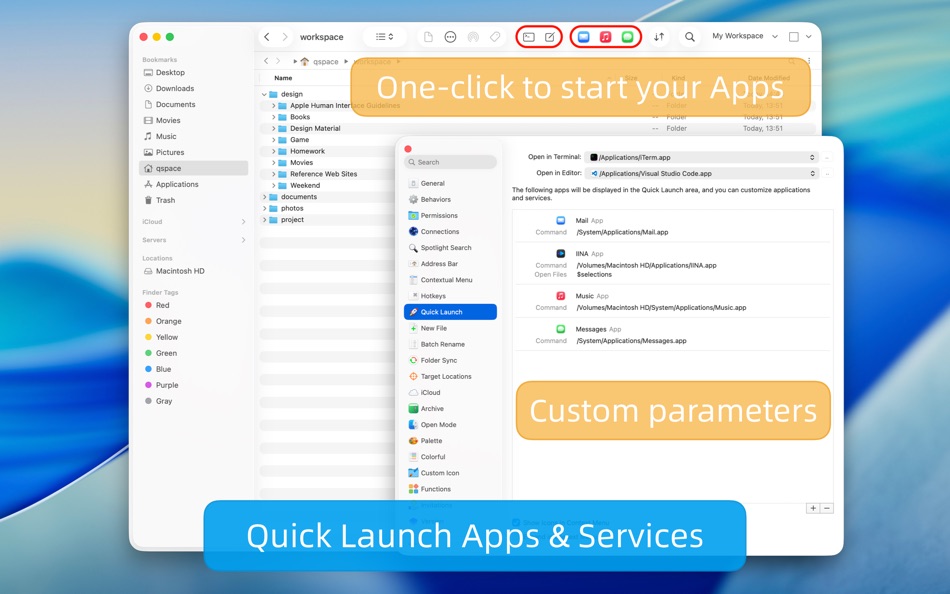
* Customized Quick Launcher: You can place commonly used applications or services in the Toolbar with one click to open.
* Quick Search: Supports global search or specified workspace search, and context menu actions on results.
* Terminal shortcut: Open selected directories in the specified terminal with one click (support Terminal, iTerm)
* Editor shortcut: Open selected files or directories in the specified editor with one click (supports VSCode, Atom, Sublime)
* File hash value calculation supports MD5/SHA256/SHA128/SHA224/SHA384/SHA512/CRC32.
* Support for creating new files and folders anywhere.
* Support for customize new file templates, customizable file names and its contents, and file name support date variables.
* Support cutting, copying, pasting, dragging, etc. between panes.
-------- Extensions --------
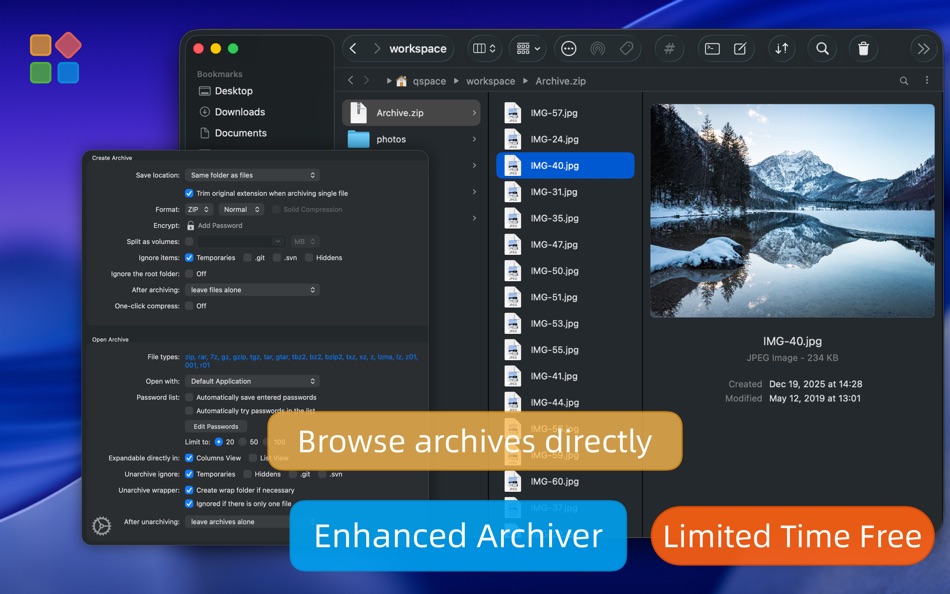
【Enhanced Archiver】
Browse the contents of an archive, just like browsing a folder! You can compress files into zip or 7z. Supports encryption and multiple volumes. Supports unarchiving more than 20 popular archive formats such as rar, zip, 7z, tar, gz, bz2, xz, lzma, lz4 etc.
【Stash Shelf】
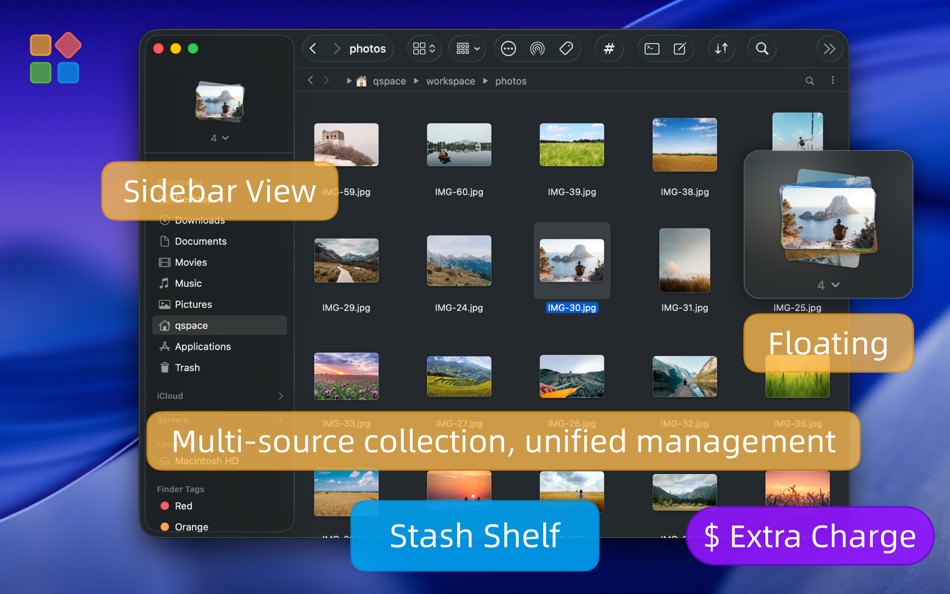
You can drag local items and web images to the “Stash Shelf”, and then perform unified processing: copy or move to somewhere, share via AirDrop, batch rename, calculate hash values, run services etc. Support Quick Launch variable “$stash_items”.
【Advanced Batch Rename】
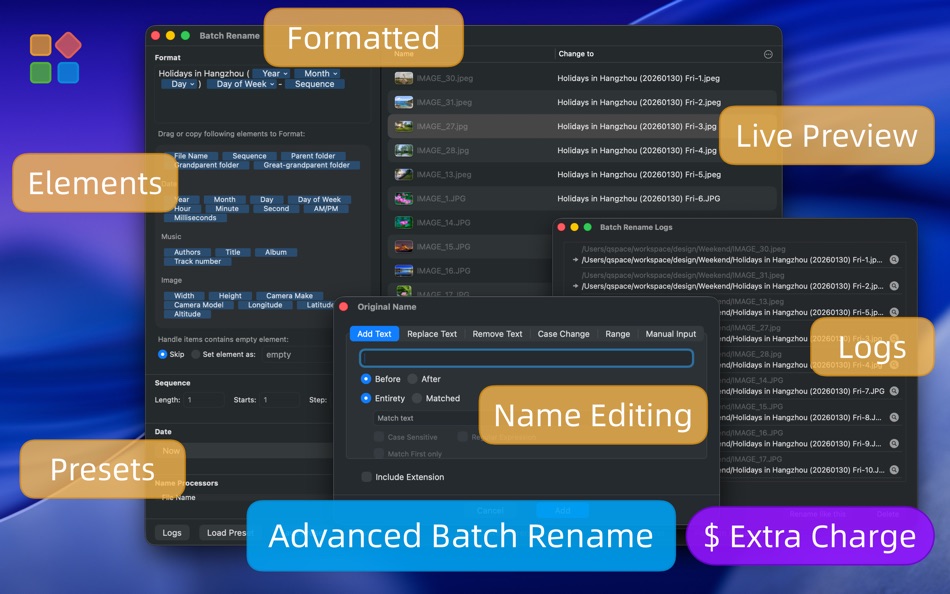
Supports real-time preview of modified results. Supports multiple text additions, replacements, and removals, and regular expression options. Supports saving and loading preset rules. Each batch operation will automatically record logs for reviewing previous names.
【Server Connections】
Connect to servers and currently support FTP, SFTP, WebDAV, Dropbox, OneDrive, Google Drive, Aliyun Drive, SMB, NFS, AFP, Amazon S3(and S3 compatible), Aliyun OSS. Similar to the operation experience of local files.
-------- Feedback --------
In case of problems, you can get help in the following ways:
Tutorials: https://qspace.awehunt.com/en-us/tutorial.html
Email: qspace@awehunt.com
Screenshots




Ad
Price History
-
* In-App Purchases - Current price: $12.99
- Minimum: $0.99
- Maximum: $12.99
Track prices
AppAgg Score
10,640
Estimated AppAgg Score for
QSpace
10,640 Legend
Higher scores usually mean stronger signals on AppAgg.
Based on: popularity · ratings · freshness · deals · store data · community signals
Recalculated daily using fresh AppAgg data.
Short URL: Copied!
What's new
- Version: 6.2.1
- Last Updated:
- [New] Flatten Folder, supports custom contextual menu item and hotkey.
[New] Export Directory Tree, supports custom contextual menu item and hotkey.
[New] Select Same Type, supports custom contextual menu item and hotkey.
[New] Sidebar: Tabs group.
[New] Sidebar: Show remove button when hovering over items in Recent Locations and Recent Files groups.
[New] Sidebar > Bookmarks > Context menu > Edit Location.
[New] Menu bar > Workspace > Reopen Last Closed Workspace.
[New] Menu bar > Edit > Select Same Type.
[New] Settings > Quick Locations.
[New] Settings > Quick Launch > Expand in Customize Toolbar, enabled by default.
[New] Settings > Behaviors > New Folder with Selection: Applies to single selection, off by default.
[New] Settings > Hotkeys > Workspace > Reopen Last Closed Workspace.
[New] Settings > Hotkeys > Pane > Increase/Decrease Pane Width.
[New] Settings > Hotkeys > Pane > Increase/Decrease Pane Height.
[New] Settings > Contextual Menu > Google Drive extension functions: Copy Shared Link, View Online.
[New] Settings > Version > Crash reports.
[New] Settings > ... > Backup Configuration / Restore Configuration, supports toolbar options.
[New] [Server Connections] Thumbnail option.
[Improved] When searching within a pane, pressing the search hotkey now toggles the "Search in subfolders" option.
[Improved] Get Info: Display application‑related information.
[Improved] Get Info: Remember expanded/collapsed state of information sections.
[Improved] Sidebar > Locations: Recognizes Nextcloud entry.
[Improved] [Server Connections] Improved FTP server connection compatibility.
[Improved] Compatibility with macOS 26.4 Finder tag list.
[Improved] Copy path is terminal-friendly.
[Improved] Some UI details.
[Fixed] Columns view: Expanding a Tag does not refresh the contents of its subfolders.
[Fixed] [Server Connections] After connecting to Baidu Netdisk and Aliyun Drive, changing the name may cause the connection to fail.
[Fixed] [Server Connections] Issues with usernames containing special characters.
[Fixed] [Server Connections] Some folders inaccessible on FTP servers.
[Fixed] [Server Connections] Custom icon may not appear in the address bar.
[Fixed] [Enhanced Archiver] Name conflict not prompted when dragging to extract files.
[Fixed] [Enhanced Archiver] Extraction failure for some 7z archives.
[Fixed] iCloud files not displayed on systems before macOS 14.
[Fixed] When setting the active pane, the quick launch parameters are incorrect.
[Fixed] File color status not automatically refreshing.
[Fixed] Corner radius anomaly in panes under certain conditions.
[Fixed] Incorrect Kind attribute display for executable files.
[Fixed] Dragging and dropping hyperlinks from browser to create link files may fail.
[Fixed] Proportional scaling may not work when converting images.
[Fixed] Some potential crashes.
[Adjusted] Settings > Target Locations, now integrated into "Quick Locations".
[Adjusted] Settings > Contextual Menu > Open in New Tab, only available for folders, enabled by default.
[Adjusted] Settings > Version > Notification of New Versions, no longer queries the server when unchecked.
Additional Information
- Release Date:
- Category:
macOS Apps›Productivity - OS:
macOS,macOS 10.15 and up - Size:
35 Mb - Supported Languages:
Chinese,Dutch,English,French,German,Hungarian,Italian,Japanese,Korean,Polish,Russian,Spanish,Turkish - Content Rating:
4+ - Mac App Store Rating:
0 - Website:
 https://qspace.awehunt.com
Developer
Lists (3)
- QSpace




Rankings (0)
0
Comments (0)
Be the first to comment
Summary
QSpace Short URL: Copied!- Share
- Mac App Store
«QSpace» is a Productivity app for macOS, developed by «文达 田». It was first released on and last updated on . The lowest historical price was $0.99 on , and the highest was $12.99 on . This app has not yet received any ratings on AppAgg. It has been added to 3 public lists and 1 private lists created by users. AppAgg has tracked 3 confirmed points plus 0 indirect points for this app. Available languages: Chinese, Dutch, English, French, German, Hungarian, Italian, Japanese, Korean, Polish, Russian, Spanish, Turkish. AppAgg continuously tracks the price history, ratings, and user feedback for «QSpace». AppAgg does not host applications or distribute software. All trademarks, logos and screenshots belong to their respective owners. Subscribe to this app or follow its RSS feed to get notified about future deals or updates.
Similar
-
- VMTek
- macOS Apps: Productivity By: Cyaneous, Inc.
- * Free
- Lists: 1 + 2 0 0
- Points: 23 + 0 12K Version: 3.1.0 VMTek is the Mac virtualization platform you've been waiting for. Run multiple instances and versions of macOS*, Linux and other operating systems side-by-side on your Mac with ease. ... ⥯
-
- NotchBox - Easier Drag & Drop
- macOS Apps: Productivity By: 裕涛 兰
- * Free
- Lists: 2 + 1 0 0
- Points: 21 + 0 13K Version: 1.1.69 NotchBox Turn Your Mac s Notch into a Dynamic Hub NotchBox transforms your Mac s notch into a lively, interactive space just like the iPhone s Dynamic Island. From music playback to ... ⥯
-
- Mountain Duck
- macOS Apps: Productivity By: David Kocher
- * Free
- Lists: 2 + 6 0 0
- Points: 19 + 0 10K Version: 5.2.1 Mountain Duck lets you mount server and cloud storage as a disk on your desktop. With Smart Synchronization, files are synchronized to the local disk when opened to allow offline usage ⥯
-
- Soonie - Meeting Reminder
- macOS Apps: Productivity By: Unit Numberfive oHG
- Free
- Lists: 2 + 2 0 0
- Points: 17 + 0 8K Version: 3.1 You know how it goes: suddenly your meeting is here, and you were deep into something else. Soonie quietly lives in your Mac s menu bar and gently pops up to show you how much time you ⥯
-
- Bridges Link Formatting
- macOS Apps: Productivity By: Jonathan Ruiz
- Free
- Lists: 1 + 1 0 0
- Points: 14 + 0 8K Version: 2.1 Bridges is the best way to collect custom formatted links. Saving a link for your podcast, newsletter, or blog post has never been easier. If you ve ever had the task to collect links ... ⥯
-
- SoundPaste
- macOS Apps: Productivity By: Maxim Kuzmenko
- * Free
- Lists: 0 + 3 0 0
- Points: 14 + 0 7K Version: 1.6.0 Introducing SoundPaste the simple, revolutionary app that lets you copy and paste sound. Tired of saving and dragging sound files around? With SoundPaste, just record and paste. It s ... ⥯
-
- LaunchPalette – App Switcher
- macOS Apps: Productivity By: Seungwoo Choe
- * Free
- Lists: 0 + 3 0 0
- Points: 13 + 0 9K Version: 1.14.6 Switch between apps and projects in milliseconds, without breaking your flow. LaunchPalette brings keyboard-first navigation to macOS, letting you instantly jump to any app, project, ... ⥯
-
- Clipboard Manager - CopyQ
- macOS Apps: Productivity By: Umut Acerbatimur
- * Free
- Lists: 0 + 1 0 0
- Points: 13 + 0 6K Version: 1.5.2 Seeing your clipboard has never been easier. Press Option Command V and boom! your entire history appears. CopyQ stores everything you copy or cut, text, images, links, files and ... ⥯
-
- Unified Calendar Sync
- macOS Apps: Productivity By: Paulo Soares
- * Free
- Lists: 0 + 1 0 0
- Points: 13 + 0 6K Version: 1.3.1 Unified Calendar Sync is a lightweight macOS menu bar app that creates and maintains a dedicated unified calendar acting as your single source of truth. The app syncs events from ... ⥯
-
- Grila • calendar for typers
- macOS Apps: Productivity By: THE LOW-TECH GUYS SRL
- Free
- Lists: 0 + 1 0 0
- Points: 13 + 0 7K Version: 2.0.4 Grila is a keyboard-driven instantly available calendar. The calendar can be shown instantly using ⌥ Right Option + \ (backslash), which is configurable to any other hotkey. Navigating ⥯
-
- Canary Mail App
- macOS Apps: Productivity By: Cartasec Pte. Ltd.
- * Free
- Lists: 3 + 3 0 0
- Points: 13 + 0 12K Version: 5.19.4 The Best Email Client for Mac. Your AI Email Assistant. Canary can be as simple or as powerful as you want it to be: FOREVER FREE: Best for students & personal use Includes: **Unified ... ⥯
-
- PerfectViewer
- macOS Apps: Productivity By: Abdusodik Saidov
- * Free
- Lists: 0 + 1 0 0
- Points: 13 + 0 5K Version: 1.0.1 Tool to Open and Convert WordPerfect Documents and Graphics. Simple, beautiful app for viewing WordPerfect .wpd, wpg files and .txt, rtf, rtfd documents. PerfectViewer features: . ... ⥯