
保存済み
保存済みメニューに表示する名前を選択してください。
完了
説明

Tab Space includes the following features:
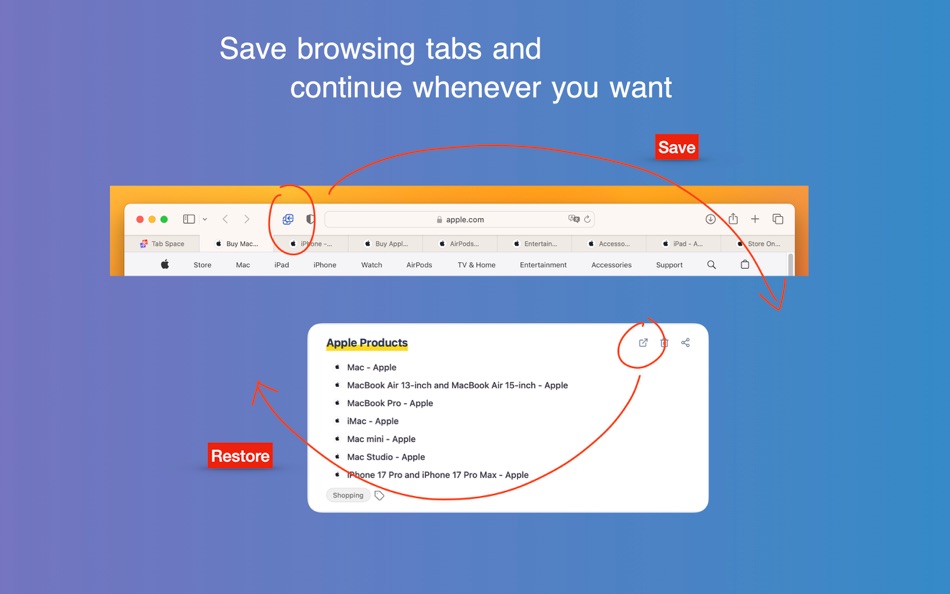
1. Save & Restore Tabs — Save your browsing tabs with just one click. Restore them whenever you need, individually or all at once.
2. iCloud Sync — Your saved sessions sync automatically across all your Mac devices via iCloud.
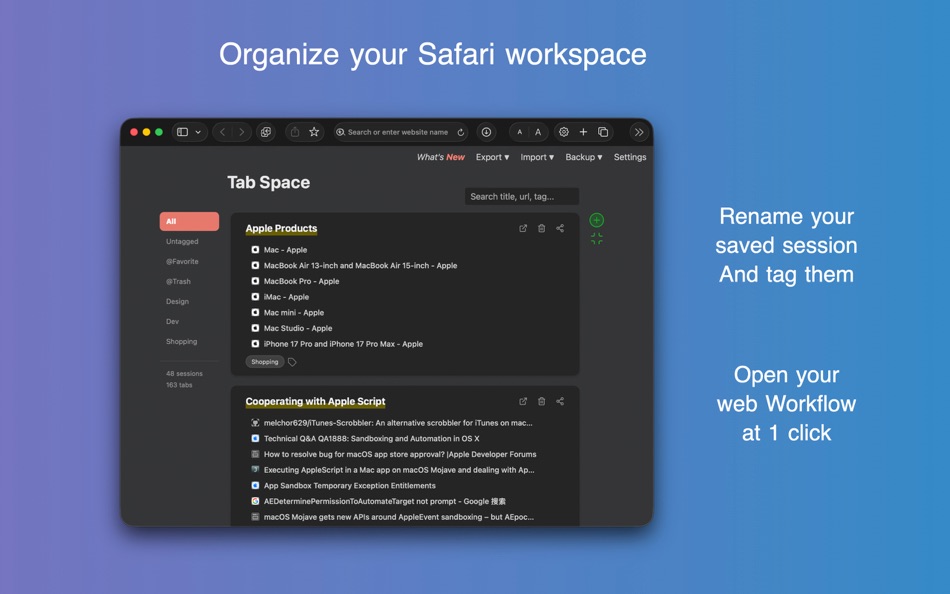
3. Tag System — Add custom tags to organize your saved sessions. Use Tab Space as a workflow launcher—create a "News" workflow to open all your favorite news websites with a single click. Star your favorite sessions for quick access.
4. Search — Quickly find any saved session by searching titles, URLs, or tags.
5. Drag & Drop — Reorganize your sessions and individual tabs by dragging them. Move tabs between sessions or reorder your session list.
6. Merge Sessions — Combine multiple sessions into one for better organization.
7. Export & Import:
- Export sessions as Text, Markdown, HTML, or JSON backup files
- Import from Tab Space backup files (.tabspace)
- Import from OneTab
8. Automatic Backups — Tab Space automatically creates backups when you save sessions. Smart retention keeps 7 hourly, 7 daily, 4 weekly, and 12 monthly backups. Easily restore from any backup.
9. Keyboard Shortcuts — Powerful shortcuts for Safari that offer commonly used functions:
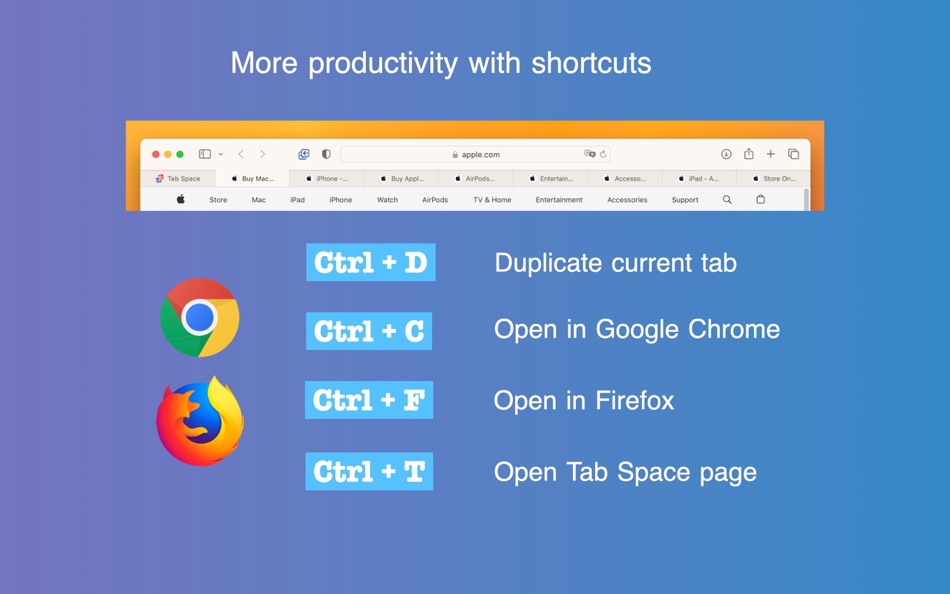
- Ctrl + D — Duplicate current tab
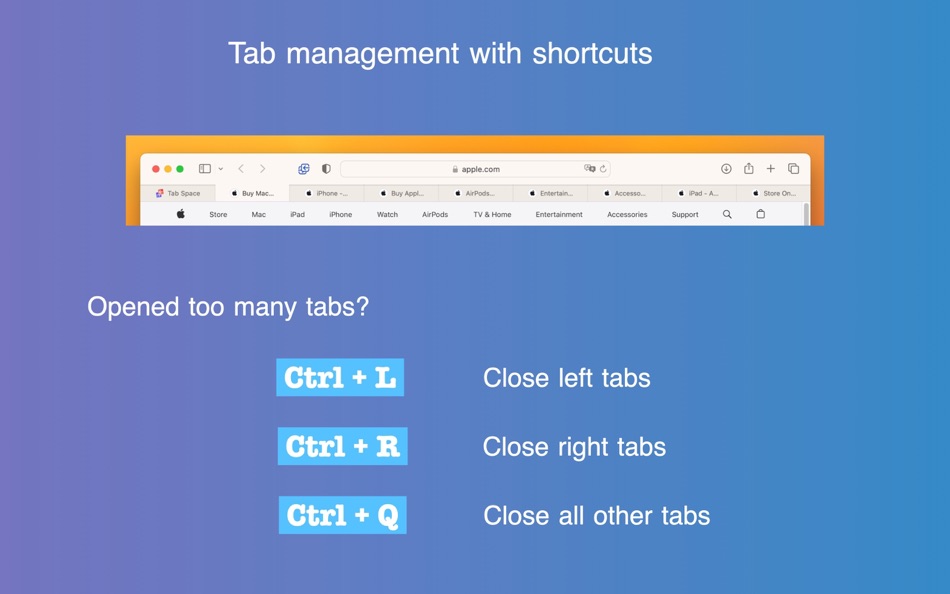
- Ctrl + L — Close left tabs
- Ctrl + R — Close right tabs
- Ctrl + K — Close same domain tabs
- Ctrl + Q — Close all other tabs
- Ctrl + ; — Save all tabs and close them
- Ctrl + S — Save current tab to Tab Space
- Ctrl + T — Open Tab Space
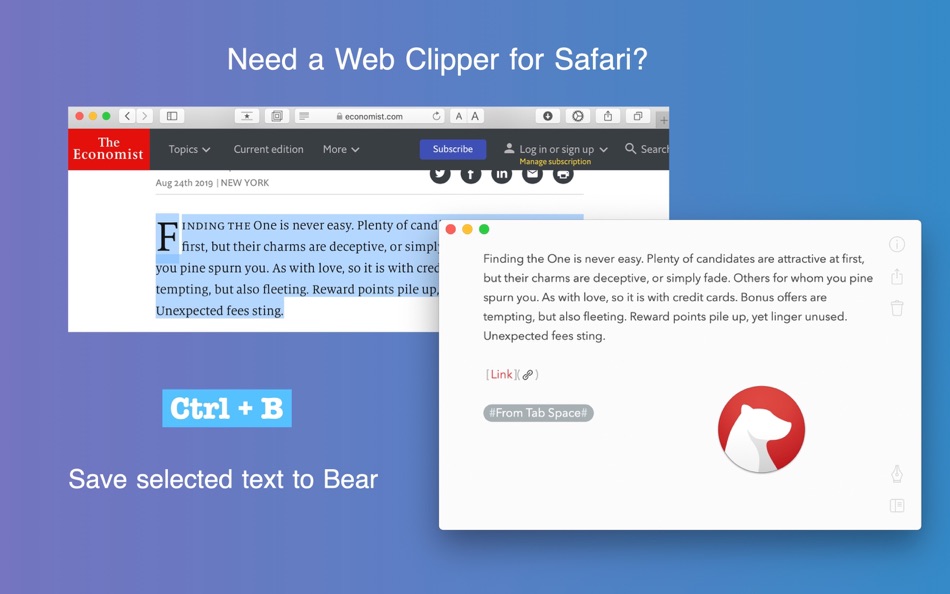
- Ctrl + B — Save selected text to Bear
- Ctrl + M — Copy URL as Markdown link
- Ctrl + C / Ctrl + F — Open in external browsers (configurable: Chrome, Edge, Firefox, Arc, Brave)
10. Customizable Settings:
- Ignore pinned tabs when saving
- Ignore duplicate tabs
- Save tabs from all windows
- Remove site from session after clicking
- Trigger shortcuts with Ctrl + Shift instead of Ctrl
- Disable shortcuts or context menus if needed
11. Dark Mode — Beautiful interface with full dark mode support.
12. Multi-language — Available in 16 languages including English, Chinese, Spanish, German, French, Japanese, Korean, and more.
If you encounter any problems after upgrading Tab Space, please try restarting Safari or macOS.
スクリーンショット

価格履歴
- 現在の価格: $2.99
- 最小値: $0.99
- 最大: $2.99
料金のチェック
Ad
情報
 https://mytab.space
新機能
- バージョン: 3.14
- アップデート:
- What's New in This Version:
- Save to a specific session: Save open tabs directly into an existing session from the toolbar menu.
- Delete sessions from the menu: Remove sessions directly from the extension's session menu.
- Fixed a loading issue where the admin page could get stuck on "Connecting to Tab Space App…".
- Rebuilt the main menu for better stability on recent macOS versions.
- Refreshed app icon for a crisper look on recent macOS versions.
- More reliable bookmark fetching with improved retry behavior.
デベロッパー

ポイント (1)
-

- 767 Erin
- +1

ランキング (0)
0 ☹️
コメント (0)
最初にコメントしてください 🌟
«Tab Space». プラットフォーム: macOS. カテゴリ: 仕事効率化. 開発者: «渊 周». 最初のリリース: . 最終更新日: . 現在の価格: $2.99. 記録された最低価格: $0.99 (). 記録された最高価格: $2.99 (). このタイトルはまだ AppAgg で評価やレビューを受けていません。 リスト: 公開: 1, 非公開: 1. 追跡ポイント: 確認済み: 1, 間接: 0. 利用可能な言語: Chinese, Danish, Dutch, English, French, German, Italian, Japanese, Korean, Polish, Russian, Spanish, Swedish, Turkish, Ukrainian. AppAgg は «Tab Space»の価格履歴、評価、ユーザーフィードバックを追跡します。 今後の値下げと更新をフォロー: RSS で確認できます. AppAgg はアプリケーションをホストしたり、ソフトウェアを配布したりしません。 すべての商標、ロゴ、スクリーンショットはそれぞれの所有者に帰属します。
Tab Space 短縮 URL: コピーしました!- 🌟 シェア
- Mac App Store
類似
-
- Tab Browser - MenuTab for Web Browsing for Mac OS X
- macOS アプリ: 仕事効率化 作者: Bastian Roessler
- $1.99
- リスト: 1 0 0
- ポイント: 0 バージョン: 2.0.0 Tab Browser is the quick and easy way to always have an eye on the website that matters to you the most! Sitting in your Mac's menu bar, your favorite website is never more than one ... ⥯
-
- Tab Notes
- macOS アプリ: 仕事効率化 作者: Catalystwo Limited
- $24.99
- リスト: 0 0 0
- ポイント: 1 バージョン: 2.4.1 Tab Notes is a Menu Bar application which keeps your notes tidy and easy to access and your screen uncluttered. Click on your screen edge, then a note pops up! Watch the demonstration ... ⥯
-
- Tab Search
- macOS アプリ: 仕事効率化 作者: Tuan Nguyen
- $1.99
- リスト: 0 0 0
- ポイント: 0 バージョン: 1.0 Tab Search is a practical web extension designed to simplify tab management in your browser. This Safari extension introduces a fuzzy search function that helps you find tabs quickly, ... ⥯
-
- Tab Finder Lite for Safari
- macOS アプリ: 仕事効率化 作者: Oleh Kopyl
- フリー
- リスト: 1 0 0
- ポイント: 0 バージョン: 1.4.4 Search, navigate, and organize your browsing history faster than ever. This lightweight Safari extension enhances productivity with quick tab switching and search. Navigate in the ... ⥯
-
- Tab Notes Theme Editor
- macOS アプリ: 仕事効率化 作者: Catalystwo
- フリー
- リスト: 0 0 0
- ポイント: 2 バージョン: 1.0.4 You can create your own themes for Tab Notes. * Please note: The header sizing bar in the preview popover is for preview purpose only. If you need to adjust size, please use Tab Notes ... ⥯
-
- Tab Application Switcher
- macOS アプリ: 仕事効率化 作者: BRONSON EDWARD MCKINLEY
- フリー
- リスト: 0 0 0
- ポイント: 1 バージョン: 1.2.3 Switch between browser tabs using Alt+Tab, just like switching between apps on your computer. Features: Most Recently Used (MRU) tab ordering - your last tab is always one keystroke ... ⥯
-
- Tab for Trello
- macOS アプリ: 仕事効率化 作者: Joacim Ståhl
- * $0.99
- リスト: 0 0 0
- ポイント: 0 バージョン: 1.1 Tab for Trello that gives you fast and instant access to Trello directly from your toolbar. Manage your work via boards and tasks faster than ever. Just click the Tab for Trello icon ... ⥯
-
- Tab Control Center
- macOS アプリ: 仕事効率化 作者: Robin Lieb
- フリー
- リスト: 0 0 0
- ポイント: 2 バージョン: 1.0.0 Tab Control Center is a browser extension that adds the functionality to Safari to set a limit of allowed open tabs. When the limit is reached the extension closes automatically the ... ⥯
-
- Tab Snooze
- macOS アプリ: 仕事効率化 作者: Pawan Dixit
- $0.99
- リスト: 0 0 0
- ポイント: 1 バージョン: 1.0.1 Tab Snooze lets your schedule your browser tabs to come back at a later point in time. It works just like the snooze function in your email. When you snooze an email for tomorrow your ... ⥯
-
- Tab Control
- macOS アプリ: 仕事効率化 作者: Clever Armadillo LLC
- $1.99
- リスト: 0 0 0
- ポイント: 0 バージョン: 2024.1.0 Tab Control allows you to switch between the two most recently used tabs in Safari. The default keyboard shortcut for switching between tabs is CMD+SHIFT+H. You can also copy the ... ⥯
-
- Tab for a Cause
- macOS アプリ: 仕事効率化 作者: Gladly
- フリー
- リスト: 0 0 0
- ポイント: 0 バージョン: 1.0 Raise money for charity with every tab you open in Safari! Just by surfing the web, you can build libraries, plant trees, help shelter cats, send emergency aid, give clean water, and ... ⥯
-
- Tab Launcher
- macOS アプリ: 仕事効率化 作者: Oktoid
- $3.99
- リスト: 2 0 0
- ポイント: 1 バージョン: 2.9.6 TabLauncher will help you find and launch your favorite programs, web pages, folders, or any type of files in a fast and easy way. Taking up fewer resources as possible, and allowing ... ⥯
-
- Space Drop - Drag, Store, Drop
- macOS アプリ: 仕事効率化 作者: FIPLAB Ltd
- $7.99
- リスト: 1 + 1 0 0
- ポイント: 0 バージョン: 2.8 Park files mid-drag. Space Drop adds a frosted glass shelf to the side of your screen that appears the moment you start dragging. Drop files onto it, switch apps, browse folders, then ... ⥯
-
- Tab Limit for Safari – TabCap
- macOS アプリ: 仕事効率化 作者: Thales Brederodes
- $3.99
- リスト: 0 0 0
- ポイント: 0 バージョン: 1.2 Limit Safari Tabs. Regain Focus. TabCap lets you set a maximum number of tabs in Safari on macOS. Once the limit is reached, Safari won t open new tabs helping you stay focused, ... ⥯