
저장됨
저장됨 메뉴에 표시할 이름을 선택하세요.
완료!
| 개발자: | PDF Technologies, Inc. (23) | ||
| 가격: | * $79.99 | ||
| 순위: | 0 | ||
| 댓글: | 0 댓글 게시 | ||
| 목록: | 1 + 1 | ||
| 포인트: | 1 + 0 ¡ | ||
| Mac App Store | |||
기술

AI-powered PDF
・Summarize, translate, proofread, rewrite, and extract insights from PDFs.
ANNOTATE PDF
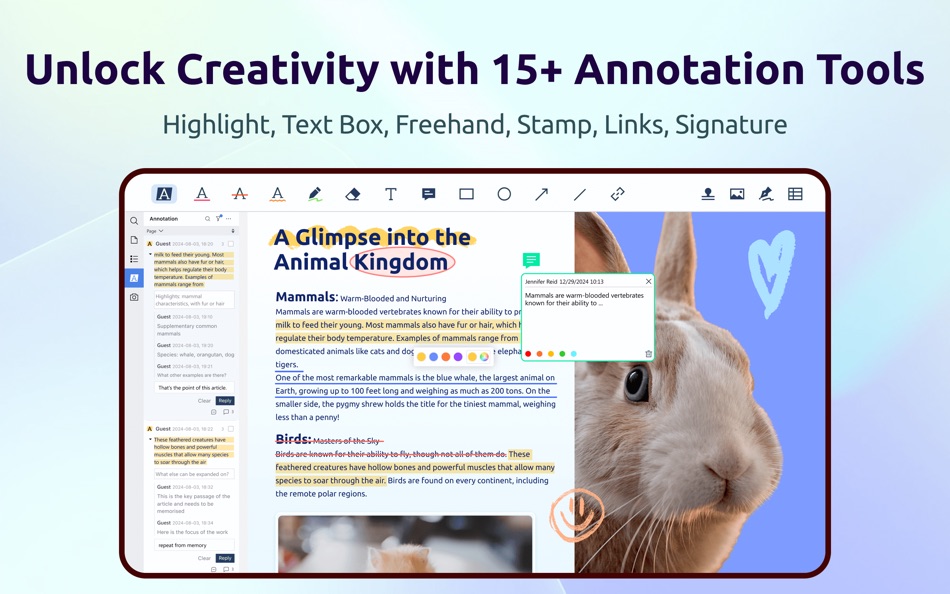
・Classic tools - Highlight, underline, strikethrough, freehand, text box, anchored note, shape, etc.
・Sign - Create multiple signatures with trackpad, keyboard, or images.
・Stamps - Customize PDFs with custom, image, and dynamic stamps.
・Link - Add and edit hyperlinks to websites, other pages, or email.
・Measure - Annotate dimensions within a PDF like distance, perimeters, and areas.
EDIT PDF
・Edit text and change font size, style, color. Align multiple text boxes with one click.
・Edit images: Crop, rotate, flip, and replace images.
・Watermark - Add, edit, or remove watermarks. Support text and image watermarks.
・Header & Footer - Add, edit, or remove headers & footers.
・Bates number - Identify and retrieve information from legal documents.
・Background - Change the background (color or image) of PDFs.
・Compare PDFs - Compare two versions of a PDF and highlight changes.
SIGN PDF
・eSign: Create, distribute, and track signing status in real time.
・Quick Signatures: Add typed, handwritten, or image-based signatures in seconds—perfect for approvals.
・Secure Digital Signatures: Protect integrity and verify signer identity with trusted digital signatures.
OCR & Scanner
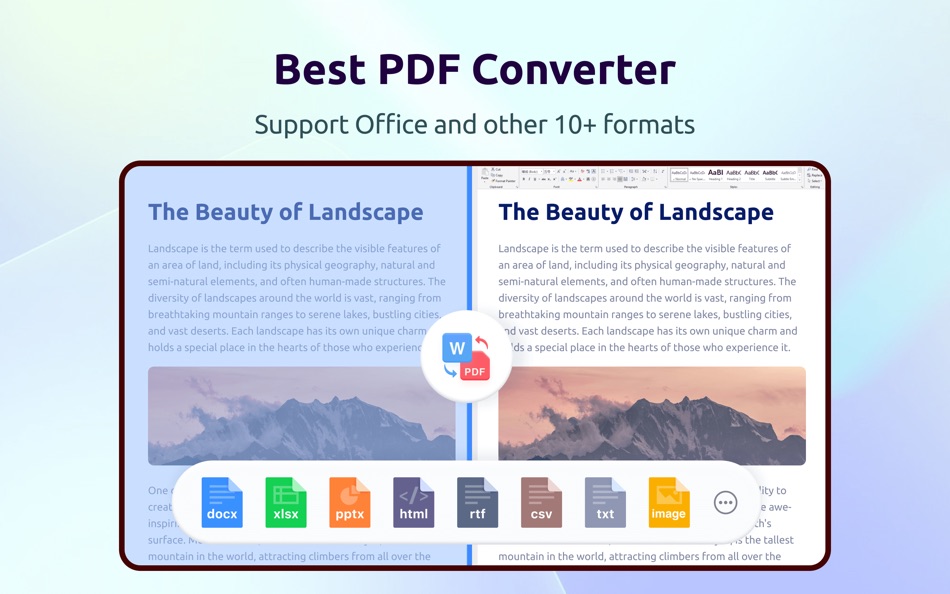
・Convert scanned documents to an editable PDF for fast editing.
・Image enhancement and image correction.
・Use area OCR to extract specific content from any page.
・Scan documents, receipts, forms, and notes into PDFs.
ORGANIZE PAGE
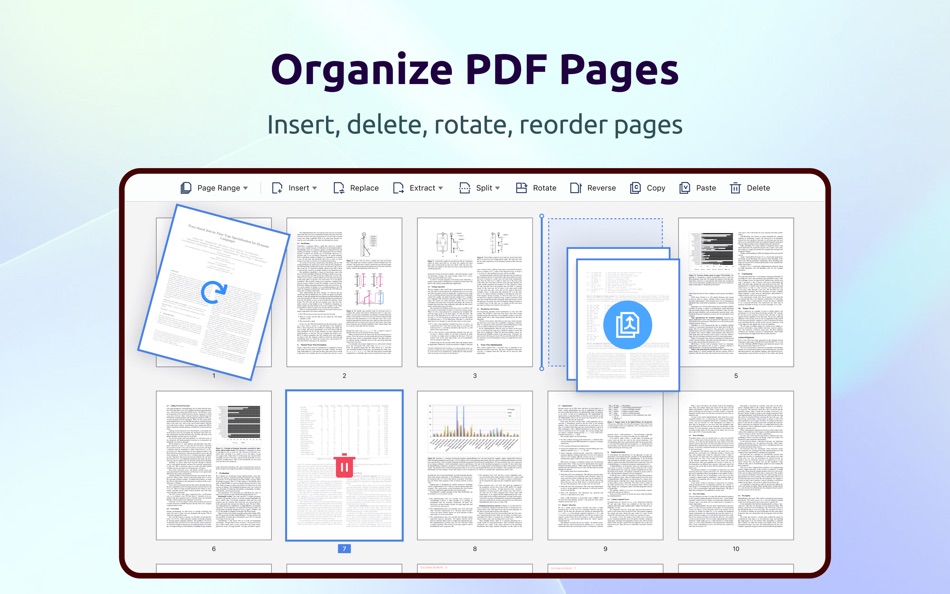
・Split & Combine - Split files or combine multiple pages into a new PDF.
・Insert - Insert pages from other PDFs, images, blank pages, or scanners.
・Extract - Extract desired pages to create a new PDF.
・Combine PDFs - Merge multiple PDFs into one.
・Rotate, copy, delete, replace, and crop pages.
CREATE & FILL FORMS
・Create fillable forms with interactive fields like buttons, checkboxes, and list boxes. Easily align objects.
・Fill out any PDF forms. Work with static and interactive forms created in Adobe Acrobat.
VIEW PDF
・View PDF in single page, two page, full screen, horizontal or vertical orientation, auto scroll mode.
・Support switching to dark mode.
・Split view mode to read and compare two different PDFs simultaneously.
・Slideshow Mode to present your PDF as PPT.
・Create, Edit, and Search outlines to navigate through the file.
・Bookmark specific pages of PDFs.
PRINT & SHARE PDF
・Booklet printing - Put pages side by side re-sorted for booklet printing.
・Poster printing - Divide large PDF pages into multiple smaller pages.
・Multiple printing - Print more than one page on a single sheet.
・Share a flattened PDF to make contents static.
・Support uploading files to Dropbox, iCloud Drive, etc.
COMPRESS PDF
・Reduce PDF size for a lighter document.
・Customize compression parameters by setting image resolution or discarding redundant items.
SECURE FILES
・Password protect sensitive documents and authorization to edit, copy, modify, or print.
・Redact PDF - Black out sensitive information permanently.
LISTEN (Text-to-Speech)
・Tired of reading large files? Try Text-to-Speech (TTS). 50+ languages supported!
Terms of Service
https://www.pdfreaderpro.com/terms_of_service
Privacy Policy
https://www.pdfreaderpro.com/privacy-policy
Powered by ComPDF:
https://www.compdf.com/
Contact ComPDF:
support@compdf.com
Have feedback? Please contact us directly at support@pdfreaderpro.com
Ad
스크린샷







가격 내역
-
* 인앱 구매 - 오늘: $79.99
- 최소: $59.99
- 최대: $89.99
가격 추적
새로운 기능
- 버전: 5.3.0
- 업데이트:
- Welcome you to the all-in-one PDF Reader Pro, fully compatible with macOS Tahoe 26 to fulfill all your document needs! It's just like a great Mac app.
- eSign: Create, assign, and sign — all in one go. Streamline your team’s document signing workflow.
- Edit Scanned Documents: The all-new OCR engine allows you to convert a scanned document to an editable PDF, so that you can fast modify text and images.
- Image Enhancement: Enhances the clarity of scanned images, making text easier to recognize and extract.
- Image Correction: Fixes skewed, distorted, or warped scanned documents and images to ensure precise OCR results.
PDF Reader Pro powered by ComPDF. Have any feedback, comments or issues? Please drop a line at support@pdfreaderpro.com
추가 정보
- 출시일:
- 카테고리:
macOS 앱›생산성 - 운영체제:
macOS,macOS 11.0 이상 - 크기:
488 Mb - 지원되는 언어:
Arabic,Catalan,Chinese,Croatian,Czech,Danish,Dutch,English,Finnish,French,German,Greek,Hebrew,Hindi,Hungarian,Indonesian,Italian,Japanese,Korean,Malay,Norwegian,Polish,Portuguese,Romanian,Russian,Slovak,Spanish,Swedish,Thai,Turkish,Ukrainian,Vietnamese - 콘텐츠 등급:
9+ - Mac App Store 개의 평가:
0
 https://www.pdfreaderpro.com
개발자
목록 (1)
- PDF Reader Pro - Edit&Convert

포인트 (1)
-

- 103 Chris
- +1

순위 (0)
0 ☹️
댓글 (0)
가장 먼저 댓글을 남겨주세요 🌟
«PDF Reader Pro - Edit&Convert». 플랫폼: macOS. 카테고리: 생산성. 개발자: «PDF Technologies, Inc.». 첫 번째 릴리스: . 마지막 업데이트: . 현재 가격: $79.99. 최저 기록 가격: $59.99 (). 최고 기록 가격: $89.99 (). 이 타이틀은 아직 AppAgg에서 평가나 리뷰를 받지 못했습니다. 목록: 공개: 1, 비공개: 1. 추적된 포인트: 확인됨: 1, 간접: 0. 사용 가능한 언어: Arabic, Catalan, Chinese, Croatian, Czech, Danish, Dutch, English, Finnish, French, German, Greek, Hebrew, Hindi, Hungarian, Indonesian, Italian, Japanese, Korean, Malay, Norwegian, Polish, Portuguese, Romanian, Russian, Slovak, Spanish, Swedish, Thai, Turkish, Ukrainian, Vietnamese. AppAgg는 «PDF Reader Pro - Edit&Convert»의 가격 기록, 평점 및 사용자 피드백을 추적합니다. 향후 할인 및 업데이트 받기: RSS에서 확인할 수 있습니다. AppAgg는 애플리케이션을 호스팅하거나 소프트웨어를 배포하지 않습니다. 모든 상표, 로고 및 스크린샷은 해당 소유자의 자산입니다.
PDF Reader Pro - Edit&Convert 단축 URL: 복사됨!- 🌟 공유하기
- Mac App Store
유사 항목
-
- PDF Reader Pro: Convert & Edit
- macOS 앱: 생산성 게시자: PDF Technologies, Inc.
- * 무료
- 목록: 0 + 0 0 0
- 포인트: 3 + 0 버전: 5.3.0 PDF Reader Pro, available on Mac, iPad, and iPhone, fulfills all your document needs across platforms. Building on features like AI tools, comment, text and image edit, merge, ... ⥯
-
- PDF Reader Converter PRO
- macOS 앱: 생산성 게시자: Grzegorz Rakoca
- $1.99
- 목록: 0 + 1 0 0
- 포인트: 2 + 0 버전: 1.0.2 Key Features: PDF Viewer - View PDF documents with smooth zooming and navigation Multi-language Support - Work in Polish, English, German, or Spanish Document Management - Easily ... ⥯
-
- PDF Reader: PDF Editor,Convert
- macOS 앱: 생산성 게시자: CYNOBLE TECHNOLOGY LIMITED
- * 무료
- 목록: 0 + 0 0 0
- 포인트: 2 + 0 버전: 2.5 PDF Reader is a PDF software with all the tools and functions users need. In addition to viewing and printing PDFs with Cos PDF, users also have access to a variety of commonly used ... ⥯
-
- PDF Reader + Converter
- macOS 앱: 생산성 게시자: 惠源 赵
- * 무료
- 목록: 0 + 0 0 0
- 포인트: 2 + 0 버전: 3.0.2 A simple and easy to use PDF Reader. It can not only read, but also help you manage your PDF files. # Functional Features - Bookshelves to record the books you have read. - ... ⥯
-
- PDF Reader X
- macOS 앱: 생산성 게시자: 方成 印
- $4.99
- 목록: 0 + 0 0 0
- 포인트: 0 + 0 버전: 1.2 LIMITED-TIME SALE: 40% OFF PDF Reader X is a fast and lightweight PDF viewer designed to help you browse PDF documents quickly and efficiently. It combines speed, simplicity, and ... ⥯
-
- PDF Expert – Edit, Sign PDFs
- macOS 앱: 생산성 게시자: Readdle Technologies Limited
- * $139.99
- 목록: 10 + 13 0 0
- 포인트: 6 + 0 버전: 3.11.2 It s fast and intuitive while effortlessly letting you complete any PDF task. Over 30 million people globally use PDF Expert apps. All the tools you need, done right. PDF Expert is the ⥯
- 새로운
- PDF Merge Files - PDF Tools
- macOS 앱: 생산성 게시자: PDF Merge Files
- 무료
- 목록: 0 + 0 0 0
- 포인트: 0 + 0 버전: 1.0 PDF Merge Files - PDF Tools is a powerful Safari extension that puts 20 essential PDF tools at your fingertips - all working directly in your browser with no uploads required. CORE ... ⥯
-
- EasyPDF - PDF Editor & Convert
- macOS 앱: 생산성 게시자: Tuba Shoaib
- * 무료
- 목록: 0 + 0 0 0
- 포인트: 0 + 0 버전: 1.2 EasyPDF Toolkit is a modern and reliable PDF solution designed exclusively for macOS. It helps you edit, convert, organize, and secure PDF files effortlessly from your MacBook or iMac, ⥯
-
- PDF Editor: Scan & Reader
- macOS 앱: 생산성 게시자: Free PDF Inc
- * 무료
- 목록: 0 + 0 0 0
- 포인트: 0 + 0 버전: 1.4.2 PDF Editor is a professional, efficient, and user-friendly PDF editing and management tool designed specifically for Mac users. Whether you are handling study materials, work reports, ... ⥯
-
- BookMapper PDF Reader
- macOS 앱: 생산성 게시자: Chern Hway Seet
- * 무료
- 목록: 0 + 0 0 0
- 포인트: 0 + 0 버전: 2.10.6 BookMapper is a one-of-a-kind app, as there is no other tool that does what it does. If you frequently work with PDF ebooks in your study or job, BookMapper can help you become more ... ⥯
-
- Nitro PDF Pro: Edit & Sign
- macOS 앱: 생산성 게시자: Nitro Software, Inc.
- * 무료
- 목록: 0 + 0 0 0
- 포인트: 4 + 0 버전: 26.0 Experience the power of a full suite of PDF tools, tailored for individuals and small teams. Streamline your workflows with automation, batch processing, password protection, and ... ⥯
-
- Arc PDF - PDF Reader
- macOS 앱: 생산성 게시자: 红星 胡
- 무료
- 목록: 1 + 0 0 0
- 포인트: 3 + 0 버전: 1.3.1 A professional PDF tool designed for deep reading and long-term reference. Convert RSS articles and web content into editable PDFs, then highlight, annotate, extract text, and reuse ... ⥯
- 새로운
- Folio PDF Reader & Editor
- macOS 앱: 생산성 게시자: Adel Hashemi
- 무료
- 목록: 0 + 0 0 0
- 포인트: 1 + 0 버전: 1.2.4 Folio is the modern, all-in-one PDF workspace designed to completely transform how you interact with documents on your Mac. Whether you are analyzing complex research, managing massive ⥯
-
- PDF Editor ゜
- macOS 앱: 생산성 게시자: Netron
- * 무료
- 목록: 0 + 0 0 0
- 포인트: 0 + 0 버전: 1.0.3 PDF Convertor is a modern and efficient PDF workspace built for macOS. With fast conversions, essential PDF tools, secure signing, OCR, and AI-powered PDF chat, it helps you manage ... ⥯