
已保存
为“已保存”菜单中的项目设置名称。
完成!
说明
[ How to use it: ]
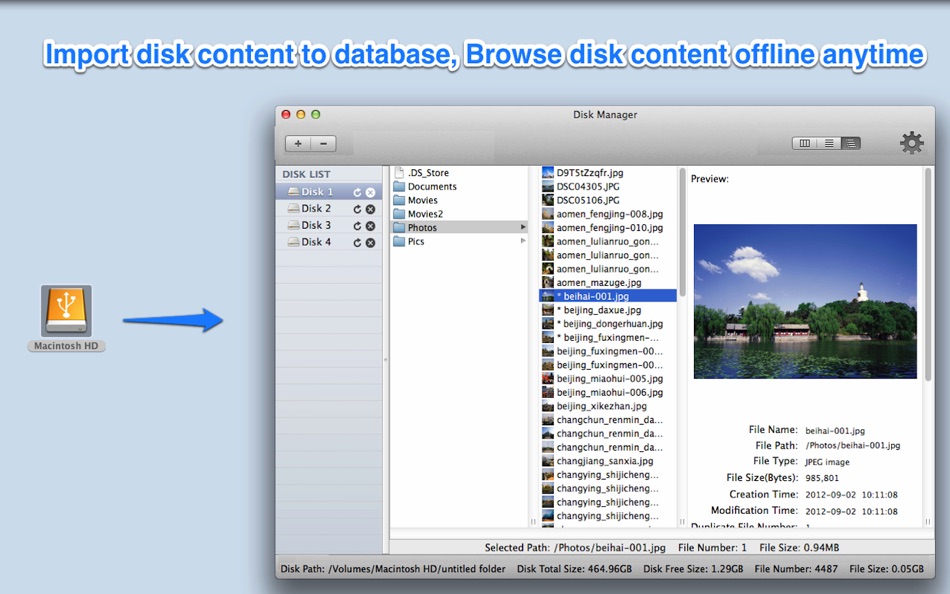
1. Add or drag disks/folders to the left disk list pane of App
2. After import the disk content, you can then browse&find disk content offline.
[ Key features: ]
1. Backup disk file information to database precisely. Easily browse disk content offline anytime anywhere. Support to customise database store path and switch database.
2. Provides rich query condition to easily search disk content offline.
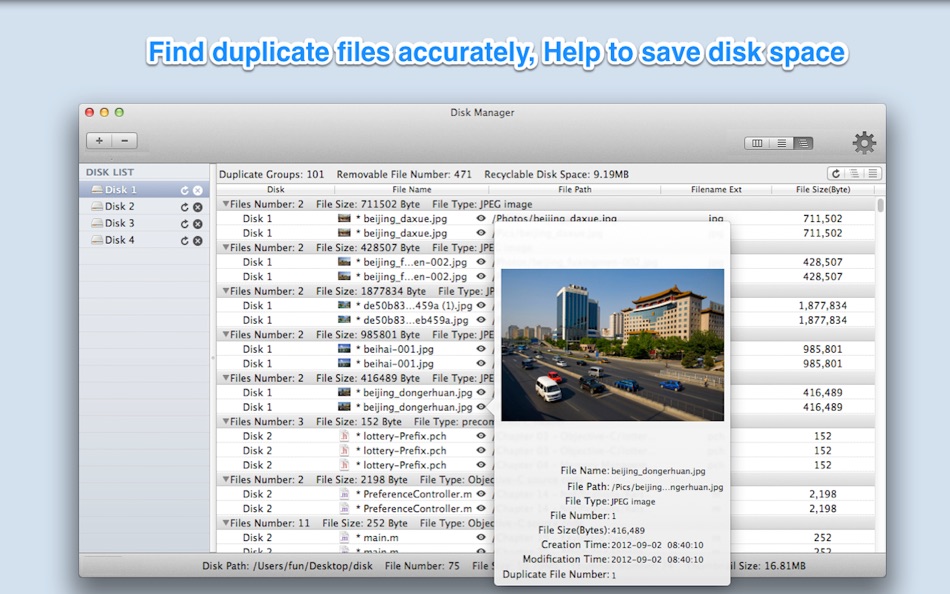
3. Find out all duplicate files on disks accurately, help to save disk space.
4. Create thumbnail for images, videos, PDF files and all other Preview supported files, more convenient to browse.
5. Support protect login by password.
[ Contact: ]
Email: dummyapps@163.com
******Users FAQ******
Q0: How to import disks and how to view duplicate files?
A:Please follow the steps below:
1. From the preferences panel of "Disk Manager" , please turn on "Duplicate file detection" option.
2. Drag or click "+" button to import disks to "Disk Manager", and wait the import finished, then you can browse the content of the disks now.
3. For duplicate files, there is a segment button on the top right of toolbar,please click the third one, then click the "refresh" button, if there are duplicate files, they will show in the table.
Q1: Why import disk is slow sometimes?
A: There are two reasons:
1) The detection of duplicate files will slow down the disk import speed, you can disable it from preference.
2) Take thumbnail of some file types is slow, you can disable it from preference.
3) Because some package file and bundle file contain many sub-files, the calculation of these package files will take a lot of time.
Q2. Why it takes a lot of disk space after import huge number of files?
A: Because large number of high quality of thumbnail take a lot of disk space, you can choose to disable it or take low quality thumbnail instead from preference.
Q3: How do I know the disk import progress?
A: If you click other disk , then back to click the importing disk, do it for several times, you will find that the status information of the importing disk at the bottom bar changes continuously, then you will know that how many files have imported so far.
Q4: How do I delete imported disk?
A: Click the disk you want to remove in the left disk list, then click "-" button.
Q5: How to detect duplicate files?
A:
1. Check the option "Duplicate Detection" in preference panel.
2. Import disks
3. Click "Refresh" button in duplicate file list view.
Q6:How to search files in disks?
A:
1. If you want to search files in all imported disks, please click "all disk" from the left pane.
2. if you want to search files in the certain disk, please click the disk you want to search in the left pane.
3. Change to the search view by clicking the middle button of the segment button in the toolbar , and you can choose the search condition and click "search" button
Q7. How to backup&restore disk database?
A:
1. Click the "Open disk store folder" menu
2. Backup the "FileRecorder" folder
3. To restore disk database, close the app first, and then replace the "FileRecorder" folder with your backup, then re-launch the app
Q8: How to rename imported disk?
A: Click the disk name, when it editable, rename it.
Q9: Why import some of disks need so much time?
A: 1. Disable duplicate files detection from preferences.
2. Disable create file thumbnail from preferences.
3. Only import your interesting folder in your disks.
Q10: how to only search file or folder?
A: please add a "child file number" query condition in search query, when child file number is 0, only search file, otherwise search folder
********
please note: when switch database or delete database, App will save database and quit automatically to make the change take effect.
广告
屏幕截图


价格历史
- 目前价格: $0.99
$4.99-80% - 最小值: ▼ $0.99
- 最大值: $4.99
AppAgg 评分
1,780
AppAgg 预估评分:
Disk Manager-manage all disks
开发者: 刚刚 孔
1,780 黄金
评分越高,通常表示其在 AppAgg 上的各项指标表现越好。
基于: 热度 · 用户评分 · 新鲜度 · 优惠 · 商店数据 · 社区活跃度
根据最新 AppAgg 数据每日重新计算。
网站徽章:  已复制!
已复制!
新版变化
- 版本: 5.8
- 最后更新:
- * Fix minor bugs to improve user experience
其他信息
 https://www.jianshu.com/p/697693efb7c9
开发者
列表 (1)
- Disk Manager-manage all disks

积分 (1)
-

- 2,821 바람처어럼
- +1

排名 (0)
0
评论 (0)
来发第一条评论吧
摘要
Disk Manager-manage all disks 短网址: 已复制!- Mac App Store
在 AppAgg 上,您可以关注由 刚刚 孔 开发的“Disk Manager-manage all disks”应用。适用平台:macOS;分类:工具。 AppAgg 评分:1,780(黄金)。 AppAgg 为该应用记录的积分:已确认 1,间接 0。 收录此应用的公开列表:1 个。将其保存到私密列表的用户:1 人。 AppAgg 用户尚未对该应用评分。 已确认积分记录已登录 AppAgg 用户前往商店的操作,间接积分则基于商店数据。 两个计数分别表示公开列表数量,以及将应用或游戏保存到私密列表的用户人数。 该应用首次发布于。 该应用最近更新于。 该应用此前售价$4.99,现价为$0.99(降价80%)。 价格记录中,该应用的最低价格为$0.99 (),最高价格为$4.99 ()。 该应用支持以下语言:Chinese, English。 查看价格历史、将应用加入列表,或关注开发者。 通过RSS 订阅源关注该应用今后的优惠和更新。 AppAgg 不托管或分发该应用。 与该应用相关的所有商标、徽标和屏幕截图均归其各自所有者所有。

