
已保存
选择将在你的已保存菜单中显示的名称。
完成!
| 开发人员: | Pranoy Chowdhury (17) | ||
| 价格: | * 免费 | ||
| 排名: | 0 | ||
| 评论: | 0 发表评论 | ||
| 列表: | 3 + 2 | ||
| 积分: | 3 + 0 ¡ | ||
| Mac App Store | |||
说明

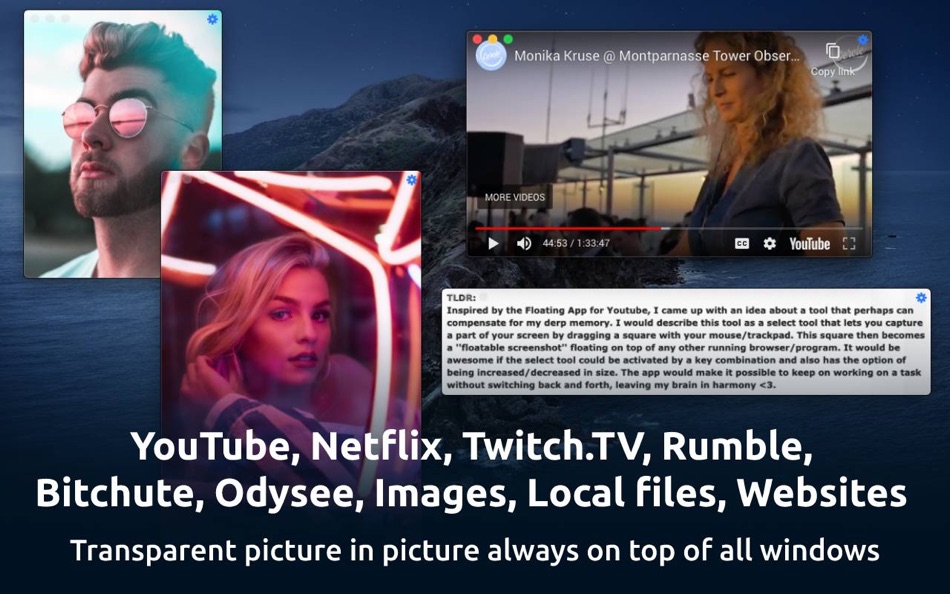
Websites, YouTube, YouTube playlists, Netflix, Vimeo, Dailymotion, Twitch.TV, Bitchute, Rumble, Odysee, local photos, videos, PDF are supported.
Note that Floating is a menubar only app and runs only in the menubar (top right of screen).
How to use:
Simply right click the menu bar icon to float from front browser
Control, Shift, Command, 9 to float from front browser tab
Control, Shift, Command, 8 to close & float from front browser
Control, Shift, Command, 7 to float from clipboard
You can also drag website/video links or images into menu bar icon
Scroll up or down on top edge of window to change transparency
Control, Shift, Command, m to hide/minimize/maximize
Control, Shift, Command, Left Arrow for previous image
Control, Shift, Command, Right Arrow for next image
Control, Shift, Command, + to zoom in
Control, Shift, Command, - to zoom out
Control, Shift, Command, 0 to reset zoom
Pinch gesture on floating window to resize window
You can also execute custom javascript on a floating website. Please click the menubar button for the app, then read the tutorial in "How to execute javascript on floating sites".
Note that browser method relies on AppleScript to work and only supports Safari, Chrome, Brave and Opera. Firefox doesn't have proper AppleScript support. First time using this shortcut, MacOS will ask for permission to read browser's URL for privacy and security reasons. All this happens locally and is not logged anywhere from the app.
------
I offer an ad and analytics free and simple app for the absolute best experience for my users. If you are finding my app useful, please leave me a positive rating on the app store as that helps get the word out to others!
If you have any feedback or feature requests or any other video platform which you would like to be added, please email Pran at:
pran@pranapps.com
The idea for this app was inspired by this Reddit post:
https://www.reddit.com/r/AppIdeas/comments/g1usmh/screen_select_tool_floating_and_adjustable_in_size/
Ad
屏幕截图
价格历史
-
* 提供应用内购商品 - 目前价格: 免费
- 最小值: 免费
- 最大值: 免费
可选
其他信息
 https://docs.google.com/document/d/1VW8-AhhEHI9i8K8u1sMWuBRlv_P5ezkAR-iAet8xuq8/edit?usp=sharing
新版变化
- 版本: 69
- 已更新:
- - Added a new setting "Disable window shadow" as requested by users.
Small indie developers like me benefit from your support. I offer an ad and analytics free and simple app for the absolute best experience for my users. If you are finding my app useful, please support me by purchasing the one time only in app purchase. You can also leave me a positive rating on the app store as that helps get the word out to others!
I improve my apps based on user feedback. If you have any feedback or feature requests or any other video platform which you would like to be added, please email Pran at:
pran@pranapps.com
开发人员
列表 (3)
- Floating: Picture in Picture


积分 (3)
-

- 512 expat4i
- +1
-
- 1,121 m374
- +1
-
- 11,339 Simon Chan
- +1


排名 (0)
0 ☹️
评论 (0)
成为第一个发表评论的人 🌟
«Floating: Picture in Picture». 平台: macOS. 类别: 效率. 开发商: «Pranoy Chowdhury». 首次发布: . 最后更新: . 目前价格: 免费. 该条目尚未在 AppAgg 上获得评分或评论。 列表: 公开: 3, 私密: 2. 追踪点: 已确认: 3, 间接: 0. 可用语言: English. AppAgg 会跟踪 «Floating: Picture in Picture»的价格历史、评分和用户反馈。 关注未来折扣和更新: RSS. AppAgg 不托管应用程序或分发软件。 所有商标、徽标和屏幕截图均属于其各自所有者。
Floating: Picture in Picture 短网址: 已复制!- 🌟 分享
- Mac App Store
类似
-
- Floating Clipboard
- macOS 应用: 效率 来自: Ebey Tech LLC
- $1.99
- 列表: 1 + 1 0 0
- 积分: 21 版本: 1.0 Features: -Clipboard history. -Auto fetching of clipboard contents (optional). -Float Window above other apps & windows (optional). -Fast & fluid type-based filtering. -Inserted ... ⥯
-
- Floating Notes for Obsidian
- macOS 应用: 效率 来自: Ilarion Ioannidis
- $4.99
- 列表: 0 0 0
- 积分: 0 版本: 1.2.2 Never lose a thought again with floating notes for Obsidian! Obsidian Floating Notes is a macOS menu bar app that puts your Obsidian vault just a keystroke away. Perfect for capturing ... ⥯
-
- Floating Timers: Sticky timers
- macOS 应用: 效率 来自: Phil Trevor
- $0.99
- 列表: 0 0 0
- 积分: 0 版本: 1.0 Floating Timers: Sticky Timers is a macOS app that lets you create unlimited timers that stay visible above all your windows - so you never miss a countdown again. Perfect for work, ... ⥯
-
- Picture-in-picture : OnScreen
- macOS 应用: 效率 来自: LEAP STUDIO
- * 免费
- 列表: 0 0 0
- 积分: 5 版本: 1.3 Say goodbye to the endless shuffling between tabs, windows, applications or spaces. With OnScreen, you can effortlessly capture any portion of your screen and transform it into a ... ⥯
- 新
- Floating Desktop Labels
- macOS 应用: 效率 来自: Atwell Guy
- $4.99
- 列表: 0 0 0
- 积分: 0 版本: 1.0 Create always-visible, draggable text labels to identify your macOS Spaces at a glance. Drop a label like "Research", "EMBA", or "Project Alpha" on any desktop it stays put, floats ... ⥯
-
- Floating AI assistant
- macOS 应用: 效率 来自: 斐 王
- * 免费
- 列表: 0 0 0
- 积分: 1 版本: 1.2 A lightweight desktop floating AI assistant that enhances your productivity with seamless accessibility. Supports multiple AI providers: - DeepSeek (DeepSeek-V3) *Embedded in App - ... ⥯
-
- Floating ToDo
- macOS 应用: 效率 来自: Takeyuki Imajo
- 免费
- 列表: 0 0 0
- 积分: 0 版本: 1.0 With Floating ToDo, the tasks you need to focus on now are always visible! This is recommended for those who have trouble concentrating on and completing their daily plans. Features - ... ⥯
-
- Floating Memo :QuickNote
- macOS 应用: 效率 来自: Masaharu Tsukamoto
- $0.99
- 列表: 0 + 1 0 0
- 积分: 4 版本: 1.0.3 QuickNote is an application that is fixed to the forefront of the screen and allows you to quickly take notes at any time. ⥯
-
- Lucid - Floating Timers
- macOS 应用: 效率 来自: imaginary institute
- 免费
- 列表: 0 0 0
- 积分: 0 版本: 1.1.0 Keep your workflow smooth with translucent timers that you can position anywhere on your screen. Simply type natural phrases like "30 minutes" or "2 hours," and watch as Lucid creates ... ⥯
-
- Fixture in Picture for Safari
- macOS 应用: 效率 来自: Hiroyasu Niitsuma
- 免费
- 列表: 2 0 0
- 积分: 0 版本: 1.0.0 Safariで開いているページをFixture in Pictureで開くことができるようになる拡張機能です。 右クリックのメニューから「Open Fixture in Picture」をクリックすることで、Fixture in Pictureを起動することが可能となっています。 「Fixture in Picture」のダウンロードはこちらから ... ⥯
-
- miniVideo - Picture in Picture
- macOS 应用: 效率 来自: Junhao Peng
- 免费
- 列表: 0 0 0
- 积分: 0 版本: 1.3.1 Enable Picture-in-Picture for your favourite website** with just one click. Simply click miniVideo icon in your safari toolbar to enable Picture-in-Picture! binge-watching while ... ⥯
-
- Always on Top Browser
- macOS 应用: 效率 来自: Ruchira Ramesh
- $4.99
- 列表: 1 0 0
- 积分: 0 版本: 4.3 A web browser that always stays on top of all other applications and can open Webpages or Local HTML webpages. Once you open the application, it will always remain on top of the screen ⥯
-
- Things 3
- macOS 应用: 效率 来自: Cultured Code GmbH & Co. KG
- $49.99
- 列表: 20 + 13 0 0
- 积分: 12 版本: 3.22.11 Get things done! The award-winning Things app helps you plan your day, manage your projects, and make real progress toward your goals. Best of all, it s easy to use. Within the hour, ... ⥯
-
- Dato
- macOS 应用: 效率 来自: Sindre Sorhus
- $18.00
- 列表: 3 + 3 0 0
- 积分: 10 版本: 5.7.2 Dato gives you a local clock, date, multiple world clocks, and upcoming events in the menu bar. When you click Dato in the menu bar, you get a menu with a calendar, calendar events, ... ⥯