
Gemte
Vælg det navn, der skal vises i menuen Gemte.
Færdig!
| Udvikler: | Pedro Jose Pereira Vieito (15) | ||
| Pris: | * Gratis | ||
| Rangeringer: | 5 (1) | ||
| Kommentarer: | 0 Skriv kommentar | ||
| Lister: | 2 + 3 | ||
| Point: | 15 + 0 ¡ | ||
| Mac App Store | |||
Beskrivelse

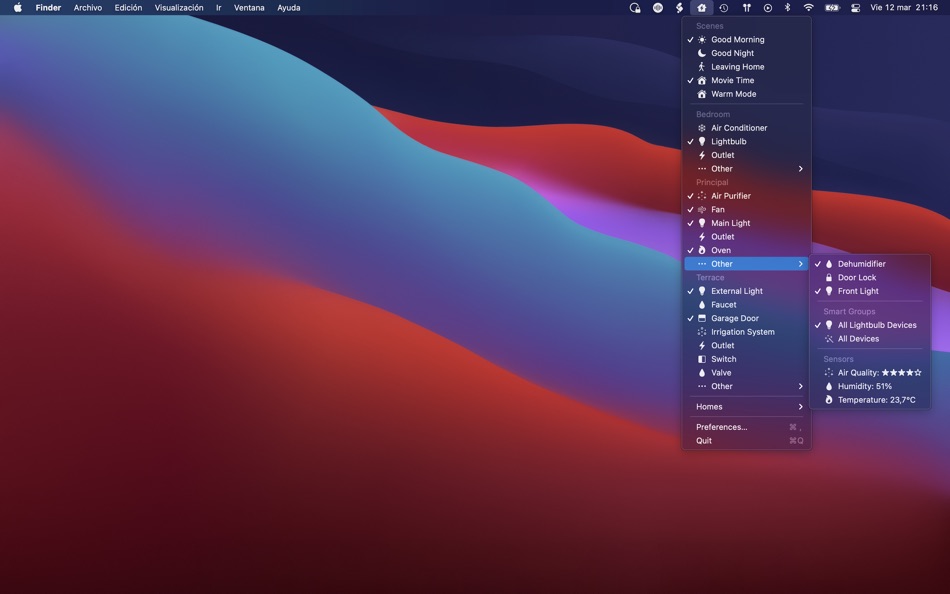
HomeControl supports controlling and automating the following HomeKit items:
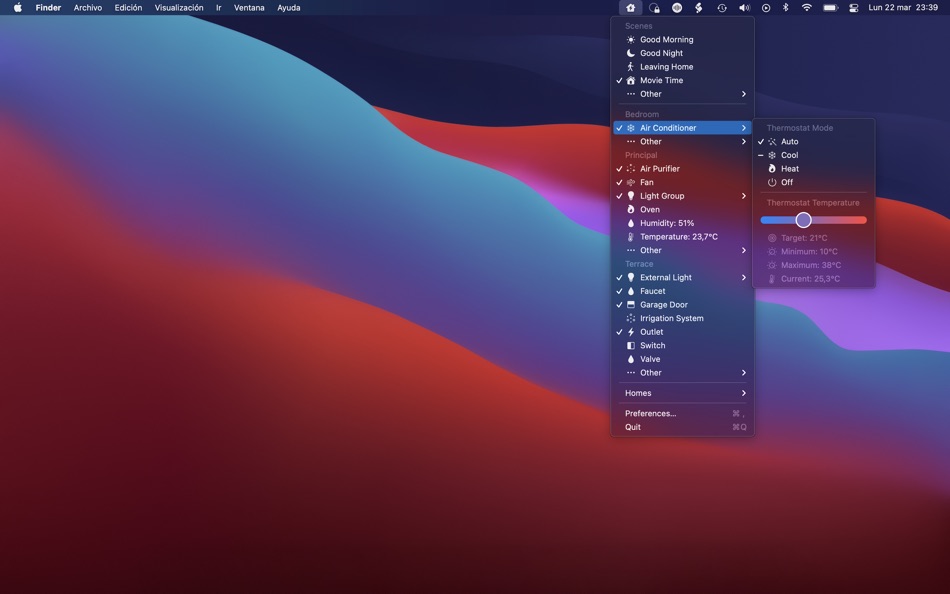
• Scenes: HomeControl supports triggering and showing the state of each scene and also auto-detects the scene type and choses an appropriate icon for it.
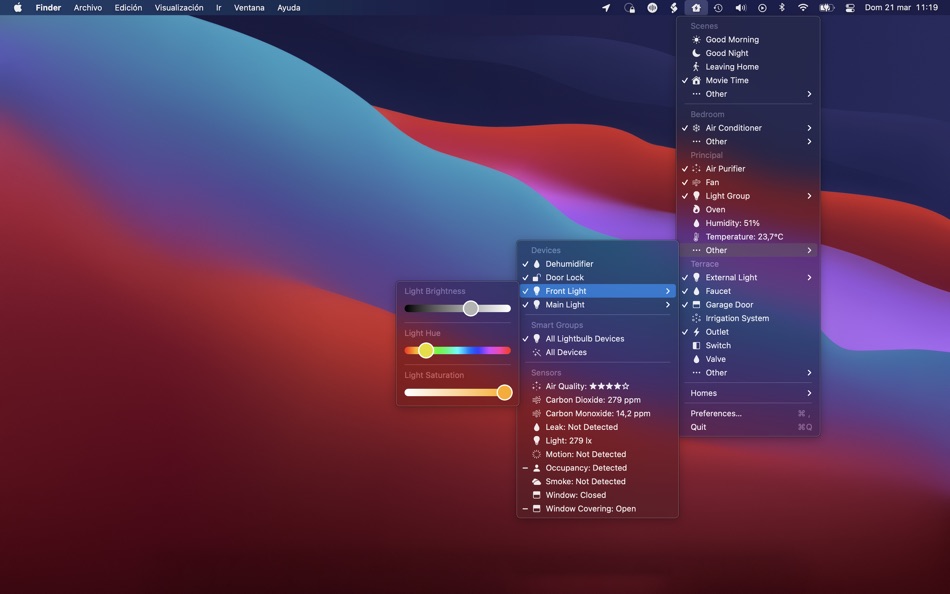
• Devices and Device Groups: HomeControl can control all devices that can be activated and deactivated (like outlets, lightbulbs, switches, thermostats…). You can quickly see their state from the HomeControl menu and change it. HomeControl also supports changing device properties like light brightness and color, thermostat mode and temperature or blinds position.
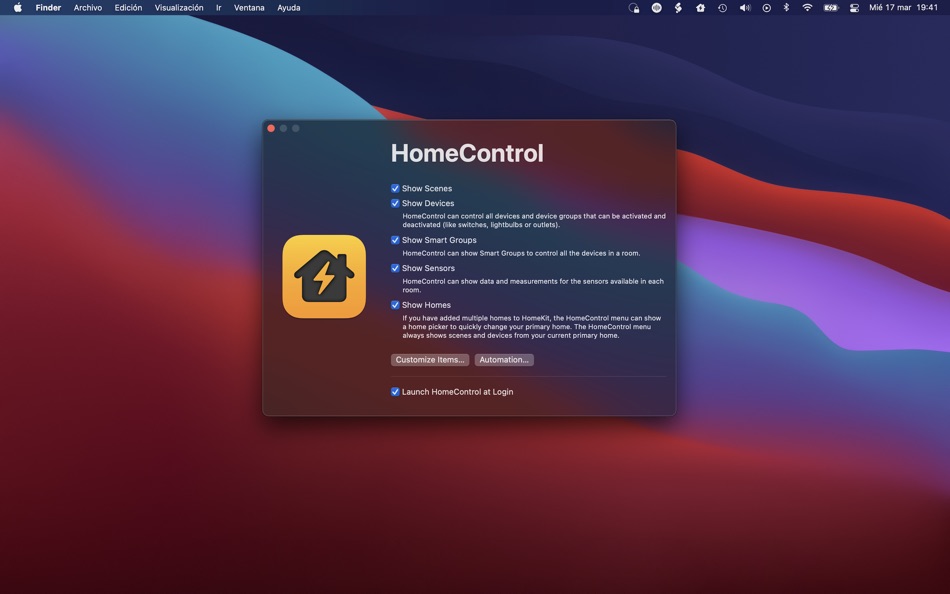
• Homes: If you have added multiple homes to HomeKit, HomeControl can show a home picker to quickly change your primary home. HomeControl always shows scenes and devices from your current primary home.
HomeControl also includes the concept of Smart Groups to quickly control all the devices of a room from the menu (for example, activate all lightbulbs of a room or deactivate all its devices) and supports showing measurements or detections from sensors available in your HomeKit setup.
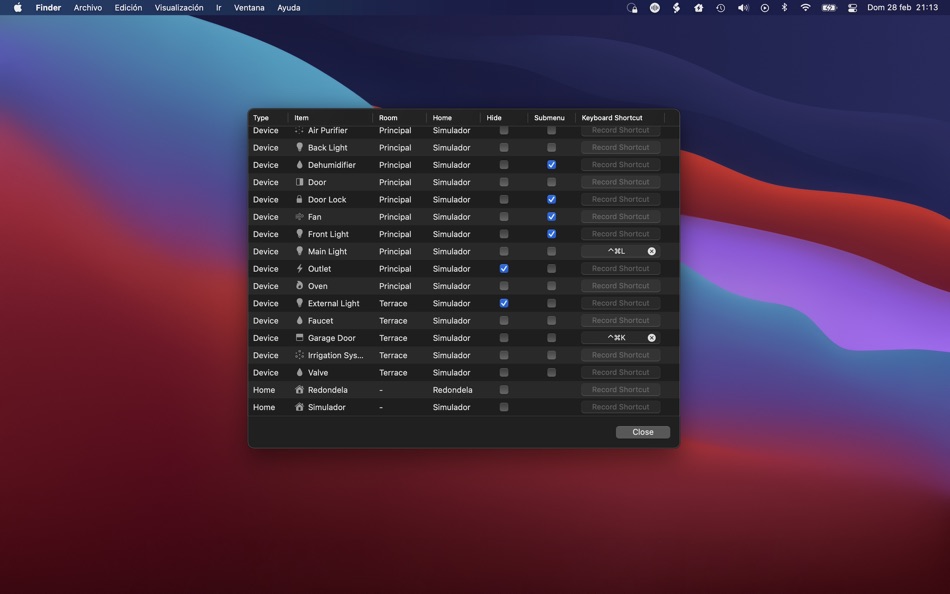
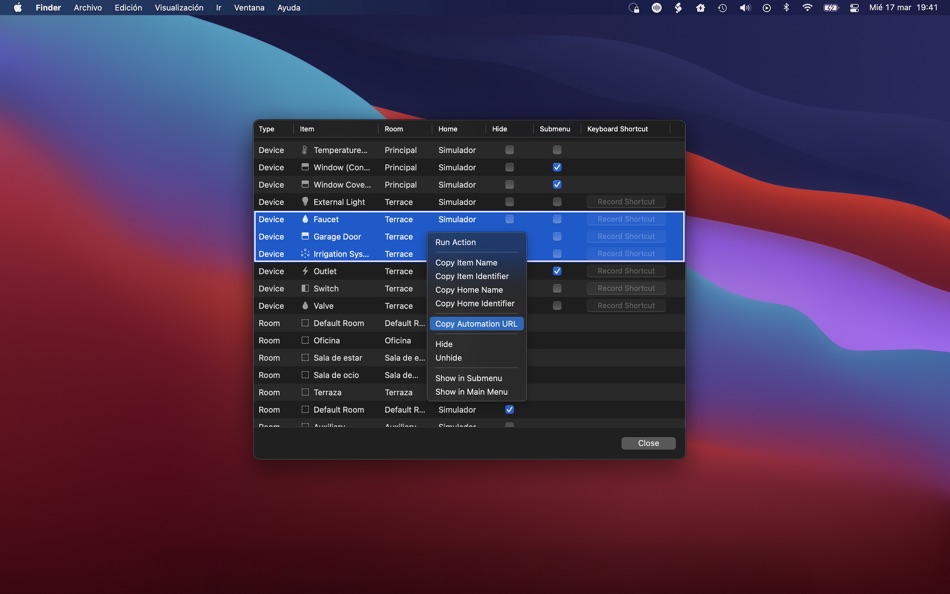
All the items can be configured to be hidden on the menu, shown in a submenu, invoked by a global keyboard shortcut, and sorted either automatically or manually.
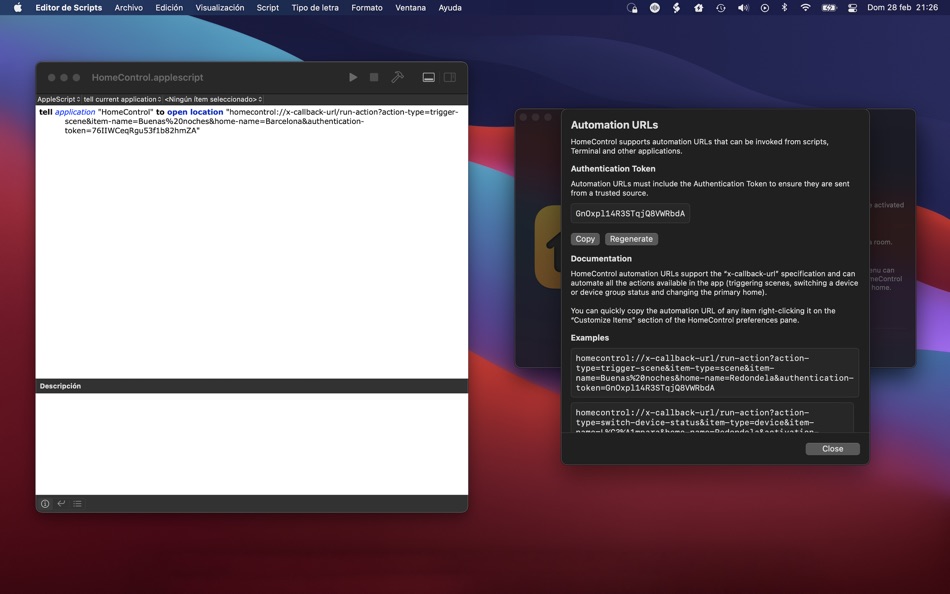
HomeControl also includes full automation support for all the actions available in the app (triggering scenes, switching a device or device group status, changing the primary home and also changing device properties!) with “x-callback-url”-compatible automation URLs which can be easily invoked from AppleScript, Terminal, custom scripts and other apps.
HomeControl requires an active paid plan to use the following features:
• HomeControl Pro: Run Home Actions and Customize Home Items (Sort, Hide & Move to Submenu).
• HomeControl Ultra: All Pro features + Keyboard Shortcuts, Automation URLs, and Family Sharing.
Notes:
• HomeControl can detect and control the status of all HomeKit devices that can be activated and deactivated: outlets, lightbulbs, switches, thermostats, fans, air purifiers, heaters, dehumidifiers, windows, window coverings, faucets, valves, irrigation systems, doors, garage door openers and locks!
• HomeControl supports reading and showing measurements or detections from the following types of sensors: temperature, humidity, air quality, carbon dioxide, carbon monoxide, contact, smoke, leak, motion, light and occupancy sensors.
• HomeControl supports changing and reading the following device properties: light brightness, light hue, light saturation, light color temperature, thermostat mode (auto, cool, heat or off), thermostat target temperature, heater-cooler mode, cooling threshold temperature, heating threshold temperature, fan rotation speed and door, window, blinds or shades position.
• You can quickly copy the automation URL of any item right-clicking it on the “Customize Items” section of the HomeControl preferences pane. There are also examples for using them from AppleScript and Terminal on the “Automation” section of the preferences pane.
• HomeControl cannot currently control AirPlay devices (like TVs, Apple TVs or HomePods) as they are not exposed through HomeKit to third party apps.
• HomeControl cannot detect the status of scenes that do not include HomeKit actions, like scenes that only control AirPlay devices (like Apple TV or HomePods) or devices that have already been removed.
Terms of Use: https://www.apple.com/legal/internet-services/itunes/dev/stdeula/
Ad
Skærmbilleder

Prishistorie
-
* Indkøb i appen - I dag: Gratis
- Minimum: Gratis
- Maksimalt: $24.99
Overvåg priser
Yderligere oplysninger
- Udgivelsesdato:
- Kategori:
macOS Apps›Hjælpeprogrammer - Operativsystem:
macOS,macOS 12.0 eller nyere - Størrelse:
8 Mb - Understøttet sprog:
English - Indholdsklassificering:
4+ - Mac App Store Bedømmelse:
0
Udvikler
- Pedro Jose Pereira Vieito
- Platforme: iOS Apps (7) macOS Apps (8)
- Lister: 8 + 11
- Point: 35 + 321 ¡
- Rangeringer: 5 (1)
- Kommentarer: 0
- Rabatter: 0
- Videoer: 0
- RSS: Abonner
Lister (2)
- HomeControl Menu for HomeKit

Point (15)


Rangeringer (1)
-

- 21 Anders Moldin
- 5

Kommentarer (0)
Vær den første til at kommentere 🌟
«HomeControl Menu for HomeKit». Platform: macOS. Kategori: Hjælpeprogrammer. Udvikler: «Pedro Jose Pereira Vieito». Første udgivelse: . Sidste opdatering: . Nuværende pris: gratis. AppAgg-bedømmelse: 5 / 5. Stemmer: 1. Lister: offentlige 2, private 3. Sporede punkter: bekræftede 15, indirekte 0. Tilgængelige sprog: English. AppAgg sporer prishistorik, vurderinger og brugerfeedback for «HomeControl Menu for HomeKit». Følg fremtidige rabatter og opdateringer via RSS. AppAgg hoster ikke applikationer eller distribuerer software. Alle varemærker, logoer og skærmbilleder tilhører deres respektive ejere.
HomeControl Menu for HomeKit Kort webadresse: Kopieret!- 🌟 Del
- Mac App Store
Lignende
- Ny
- Menu Stats
- macOS Apps: Hjælpeprogrammer Ved: 晨一 倪
- $0.99
- Lister: 0 + 0 0 0
- Point: 0 + 0 Version: 1.1 Menu Stats is a lightweight system monitor built for the macOS menu bar. Keep CPU, GPU, memory, swap, disk and network activity visible at a glance without opening a full app. Menu ... ⥯
-
- Menu Bar Shortcuts
- macOS Apps: Hjælpeprogrammer Ved: Present Day Media LLC
- $3.99
- Lister: 0 + 0 0 0
- Point: 0 + 0 Version: 1.14 Menu Bar Shortcuts brings four everyday productivity tools to the one place you check all day long the macOS menu bar. Instant Calculator A full-featured calculator that supports ... ⥯
-
- Menu Bar Manager
- macOS Apps: Hjælpeprogrammer Ved: 泳诗 陈
- $5.99
- Lister: 0 + 1 0 0
- Point: 15 + 0 Version: 1.7 With Menu Bar Manager, you can customize the display or hiding of your menu bar to help users solve the problem of cluttered menu bar icons. 1. Drag the Menu Bar Manager icon to the ... ⥯
-
- Menu Drop
- macOS Apps: Hjælpeprogrammer Ved: Sindre Sorhus
- Gratis
- Lister: 0 + 0 0 0
- Point: 2 + 0 Version: 1.0.2 AirDrop files simply by dragging them onto the app's menu bar icon. You can drop files, images, and links. Note: The app uses the system AirDrop dialog. It has no control over the ... ⥯
-
- Menu World Time
- macOS Apps: Hjælpeprogrammer Ved: Steve Foster
- Gratis
- Lister: 0 + 0 0 0
- Point: 1 + 0 Version: 1.12 Get times for cities around the world straight from the menu bar. - Show a clock for each city right in the menu bar - Click the icon in the menu bar to quickly see city times - ... ⥯
-
- Menu Wifi - Signal Monitor
- macOS Apps: Hjælpeprogrammer Ved: Z9Apps LLC
- Gratis
- Lister: 0 + 1 0 0
- Point: 3 + 0 Version: 1.1 Menu Wifi is a system menu bar app that provides real-time insights into your Wi-Fi connection, helping you monitor signal strength, troubleshoot issues, and optimize network ... ⥯
-
- Home Integrator Core : HA
- macOS Apps: Hjælpeprogrammer Ved: Tony Scott
- * Gratis
- Lister: 0 + 0 0 0
- Point: 0 + 0 Version: 1.01 Home Integrator Core is a native macOS companion for Home Assistant built for users who'd rather click once than open a browser tab. Why Home Integrator Core? This app lives in your ... ⥯
-
- Menu Bar Icon Manager
- macOS Apps: Hjælpeprogrammer Ved: 金玲 李
- $1.99
- Lister: 0 + 1 0 0
- Point: 2 + 0 Version: 6.7.3 Menu Bar Icon Manager is a macOS-based menu bar icon management tool that helps users hide, aggregate, and quickly access cluttered menu bar icons. - By simulating the interaction ... ⥯
-
- Menu Volume – System & Music
- macOS Apps: Hjælpeprogrammer Ved: Alexander Kohlhofer
- $1.99
- Lister: 0 + 0 0 0
- Point: 0 + 0 Version: 1.1 Menu Volume gives you two simple sliders in your menu bar: one for your Mac and one for Apple Music. Adjust each volume independently from a single, fast menu. Mac volume slider ... ⥯
-
- Menu Mirror
- macOS Apps: Hjælpeprogrammer Ved: Alexander Brunner
- Gratis
- Lister: 0 + 0 0 0
- Point: 1 + 0 Version: 1.0 Menu Mirror lets you quickly toggle the camera from your menu bar ⥯
-
- Menu Calendar
- macOS Apps: Hjælpeprogrammer Ved: Roberto Panetta
- $1.99
- Lister: 0 + 0 0 0
- Point: 0 + 0 Version: 1.5.5 Menu Calendar brings a convenient and easily accessible calendar to your menu bar, no matter which application you are using. With a simple click, you can bring up a small calendar ... ⥯
-
- @home
- macOS Apps: Hjælpeprogrammer Ved: Beat Rupp
- Gratis
- Lister: 0 + 0 0 0
- Point: 0 + 0 Version: 1.3.0 @home is a small status bar utility that keeps your portable Mac unlocked when you are at home, by disabling sleep mode and screensaver. It does this by checking your wireless ... ⥯
-
- Menu Bar Quick Links
- macOS Apps: Hjælpeprogrammer Ved: Florian Schweizer
- Gratis
- Lister: 2 + 1 0 0
- Point: 4 + 0 Version: 1.2 Easily access your most important links right in the menu bar. Add a link via the textfields. Copy links with a single button press or directly open it by right clicking the link's ... ⥯
-
- Menu Eclipse 2
- macOS Apps: Hjælpeprogrammer Ved: Mohsan Khan
- Gratis
- Lister: 0 + 1 0 0
- Point: 5 + 0 Version: 2.4.3 Dim, Colorize and Scrub the menu bar. Gain better focus on your work & play, and away from the menu bar. Runs in the background, and does not show up in the Dock. Please visit the ... ⥯