
Saved
Choose the name that will be shown in your Saved menu.
Done!
| Developer: | Gordon Pedersen (2) | ||
| Price: | $2.99 | ||
| Rankings: | 0 | ||
| Comments: | 0 Add a comment | ||
| Lists: | 1 + 1 | ||
| Points: | 3 + 0 ¡ | ||
| Mac App Store | |||
Description

To use this add-on, simply click the add-on icon while you are browsing the page you want to save offline. A popup will show the rendered markdown so you can make minor edits or copy the text, or you can click the download button to download an .md file.
Selecting text will allow you to download just the selected text
## Context Menus
You can also right-click on pages, images, links and selections to copy or download snippets of Markdown.
You can also download all tabs in a window as Markdown files
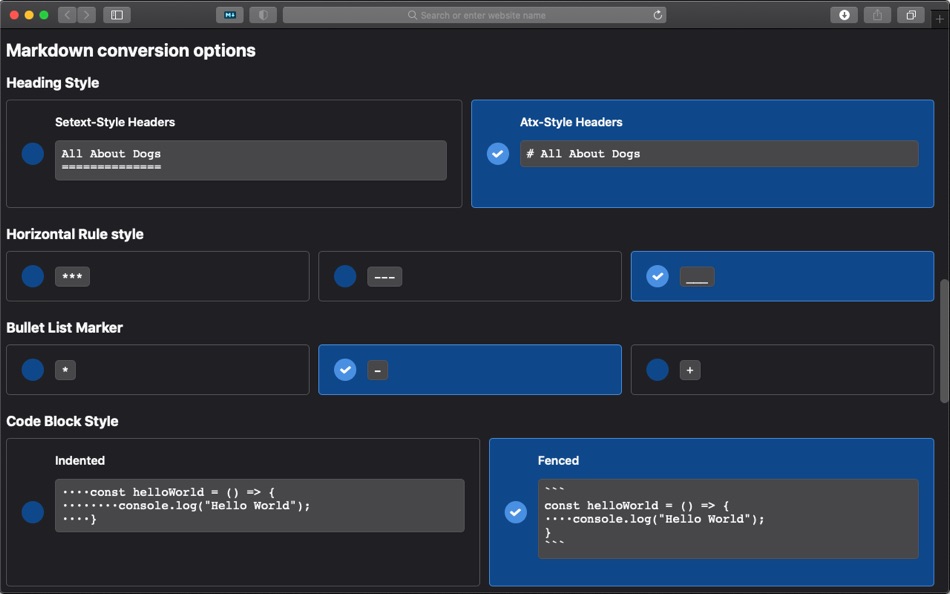
## More features
Did you know MarkDownload is highly customizable? There are too many options for this description, so check out the user guide: https://publish.obsidian.md/death-au/30-39+Personal+Dev/33+Browser+Extensions/33.01+MarkDownload/Markdownload+User+Guide
# Permissions
- Data on all sites: used to enable "Download All Tabs" functionality - no other data is captured or sent online
- Storage: used to save extension options
- Clipboard: used to copy Markdown to clipboard
Ad
Screenshots


Price History
- Current price: $2.99
- Minimum: $2.99
- Maximum: $2.99
Track prices
Additional Information
- Release Date:
- Category:
macOS Apps›Productivity - OS:
macOS,macOS 10.14 and up - Size:
4 Mb - Supported Languages:
English - Content Rating:
4+ - Mac App Store Rating:
0
 https://publish.obsidian.md/death-au/30-39+Personal+Dev/33+Browser+Extensions/33.01+MarkDownload/Markdownload+User+Guide
What's new
- Version: 3.4.0
- Updated:
- - Fixed extra spaces in titles which could cause issues (thanks @rickdoesdev !)
- Fixed an issue with image paths in some circumstances (thanks @rickdoesdev !)
- Added parametersizations for "mixed-kebab" and "mixed_snake" which retain original casing but replace spaces (thanks @NSHenry !)
- Also added a special "obsidian-cal" parameterization which is the same as "mixed-kebab" with duplicate `-` removed for additional compatibility with the Obsidian Consistent Attachment Location plugin (thanks @NSHenry !)
- Added lowecase and uppercase options to parameterizations (thanks @redxtech !)
- Updated Turndown to v7.1.3 (thanks @WeHat !)
- Updated Readability to v0.5.0 (thanks @WeHat !)
- Fixed some issues with code block parsing and formatting (thanks @WeHat !)
- Fixed an issue with some sites missing a proper title (thanks @WeHat !)
- Fixed an issue with bad base urls causing issues with links in certain circumstances (thanks @WeHat !)
- Fixed an issue with readability removing everything in certain circumstances (thanks @WeHat !)
- Send properly configured title to the Obsidian integration (thanks @nekton39 !)
- Updates to the README (thanks @2gn and @eugenesvk !)
Developer
- Gordon Pedersen
- Platforms: iOS Games (1) macOS Apps (1)
- Lists: 1 + 1
- Points: 3 + 0 ¡
- Rankings: 0
- Comments: 0
- Deals: 0
- Videos: 0
- RSS: Subscribe
Lists (1)
- MarkDownload




Rankings (0)
0 ☹️
Comments (0)
Be the first to comment 🌟
«MarkDownload» is a Productivity app for macOS, developed by «Gordon Pedersen». It was first released on and last updated on . The lowest historical price was $2.99, and the highest was $2.99. This app has not yet received any ratings on AppAgg. It has been added to 1 public lists and 1 private lists created by users. AppAgg has tracked 3 confirmed points plus 0 indirect points for this app. Available languages: English. AppAgg continuously tracks the price history, ratings, and user feedback for «MarkDownload». Subscribe to this app or follow its RSS feed to get notified about future deals or updates. AppAgg does not host applications or distribute software. All trademarks, logos and screenshots belong to their respective owners.
MarkDownload Short URL: Copied!- 🌟 Share
- Mac App Store
Similar
-
- Skitch - Snap. Mark up. Share.
- macOS Apps: Productivity By: Skitch
- * Free
- Lists: 0 0 0
- Points: 0 Version: 2.9 See something that sparks an idea? Use Skitch to snap it, mark it up, and send it on in an instant. Your bold ideas stand out even brighter with Skitch. People everywhere use Skitch to ⥯
-
- Rocket Calendar
- macOS Apps: Productivity By: Mark Vitale
- Free
- Lists: 0 0 0
- Points: 1 Version: 1.3 Rocket Calendar is a speedy, always-accessible calendar that lives in your menu bar. You can quickly check dates, navigate between months, and even copy the selected date to your ... ⥯
-
- This week
- macOS Apps: Productivity By: Mark Cornelisse
- $0.99
- Lists: 0 0 0
- Points: 0 Version: 1.2.0 What week number is it? Do you always have that question? Don't look any further. The current week number of this year now sits in your menubar. So there is no need to look it up in ... ⥯
-
- scanSort
- macOS Apps: Productivity By: Mark Butler
- $4.99
- Lists: 0 0 0
- Points: 0 Version: 1.0.10 scanSort makes scanning double sided documents with only a single sided scanner super easy. Scan the front sides of a documents pages into a PDF document file, turn the document over ... ⥯
-
- LifeTimes2
- macOS Apps: Productivity By: Mark S. Wall
- $4.99
- Lists: 0 0 0
- Points: 0 Version: 1.4 (21) The full LifeTimes2 User Manual is in the Help System under the Help Menu LifeTimes2 is a complete rewrite of the original LifeTimes app in Swift. Create Daily Notes Use LifeTimes2 to ... ⥯
-
- Menu Bar Quick Calc
- macOS Apps: Productivity By: Mark Huber
- $0.99
- Lists: 0 0 0
- Points: 0 Version: 1.0 Menu Bar Calculator is a lightweight, always-accessible calculator that lives in your Mac's menu bar. Perfect for quick calculations without interrupting your workflow. Features: ... ⥯
- New
- Heads up - Meeting
- macOS Apps: Productivity By: Mark King
- $3.99
- Lists: 0 0 0
- Points: 0 Version: 1.0 Never miss another meeting. Heads Up sits quietly in your menu bar, watching your calendar and counting down to your next event second by second. When you're just 90 seconds away, it ... ⥯
-
- TimeProof
- macOS Apps: Productivity By: Peter Franco
- $0.99
- Lists: 0 + 1 0 0
- Points: 6 Version: 1.2.20 Download TimeProof today! Take the guesswork out of Computer based work time tracking and show your work with confidence. TimeProof is the ultimate productivity tool for freelancers, ... ⥯
-
- DuLoad for OneDrive
- macOS Apps: Productivity By: 韩 明洁
- $1.99
- Lists: 0 0 0
- Points: 0 Version: 2.3 Download and upload OneDrive's files and folders to your MacBook efficiently. Easy to use. (Only for personal accounts now! It doesn t work with OneDrive for Business now ) * Download ... ⥯
-
- Tidi - Clean Up and Organize
- macOS Apps: Productivity By: Bradley Zellman
- Free
- Lists: 0 0 0
- Points: 0 Version: 1.1.3 Download folders can become dumping grounds for all the files you get from Slack, email, etc. That's where Tidi comes in. Tidi helps you organize and clean up your mac with reminders, ... ⥯
-
- User Sense
- macOS Apps: Productivity By: User Sense
- Free
- Lists: 0 0 0
- Points: 0 Version: 1.1.0 Download the User Sense app and get paid to test websites. Help User Sense to make websites more user-friendly by testing websites from your device. Get admitted to the pool and get ... ⥯
-
- Sqzsoft AI
- macOS Apps: Productivity By: 启铮 石
- Free
- Lists: 0 0 0
- Points: 0 Version: 1.0 Download AI model files and chat with AI directly on your device completely offline. No chat data is ever transmitted over the internet. Features: 1. Supports multiple AI models: Qwen3 ⥯
-
- Caseflow AI
- macOS Apps: Productivity By: Jean Degeorge
- Free
- Lists: 0 0 0
- Points: 0 Version: 1.0.1 Download latest version and leave feedback on caseflow-ai.netlify.app. Save hours by turning client intake forms into structured case summaries with fully private, offline AI. Caseflow ⥯
-
- PDF Expert – Edit, Sign PDFs
- macOS Apps: Productivity By: Readdle Technologies Limited
- * $139.99
- Lists: 11 + 13 0 0
- Points: 6 Version: 3.11.2 It s fast and intuitive while effortlessly letting you complete any PDF task. Over 30 million people globally use PDF Expert apps. All the tools you need, done right. PDF Expert is the ⥯