
Gemte
Vælg det navn, der skal vises i menuen Gemte.
Færdig!
| Udvikler: | Aliaksandr Melnikau (22) | ||
| Pris: | $3.99 | ||
| Rangeringer: | 0 | ||
| Kommentarer: | 0 Skriv kommentar | ||
| Lister: | 2 + 1 | ||
| Point: | 11 + 0 ¡ | ||
| +1 Point | |||
Beskrivelse

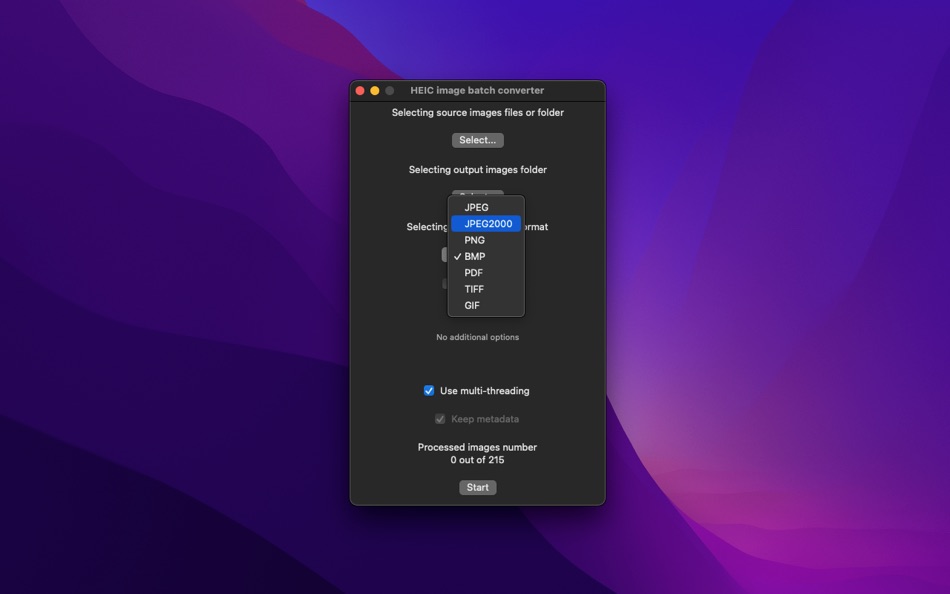
- allows export to JPEG and JPEG2000 (with compression ratio setting), PNG, BMP, TIFF, GIF and PDF files;
- can use multi-threading (multitasking), significantly increasing the processing speed;
- processes files locally on your computer, so it respects your privacy and security;
- advertising-free;
- without collecting personal data;
- lightweight, based on native technologies without third-party dependencies;
- has a simple, minimalist interface.
Skærmbilleder

Prishistorie
- Nuværende pris: $3.99
- Minimum: Gratis
- Maksimalt: $40.00
Overvåg priser
AppAgg-vurdering
Estimeret vurdering for denne app
$7,170
Højere vurderinger betyder som regel stærkere signaler på AppAgg.
Baseret på: 🔥 popularitet · ⭐ brugervurderinger · 🕒 aktualitet · 🏷️ tilbud · 🏬 butiksdata · 👥 fællesskabsaktivitet
Denne vurdering er kun til information. Den er ikke en reel pris, et salgstilbud eller en markedsvurdering.
Kort webadresse: Kopieret!
Ad
Yderligere oplysninger
Udvikler
- Aliaksandr Melnikau
- Platforme: iOS Apps (9) macOS Apps (13)
- Lister: 3 + 4
- Point: 136 + 9 ¡
- Rangeringer: 0
- Kommentarer: 0
- Rabatter: 0
- Videoer: 0
- RSS: Abonner
Lister (2)
- HEIC image batch converter

Point (11)


Rangeringer (0)
0 ☹️
Kommentarer (0)
Vær den første til at kommentere 🌟
«HEIC image batch converter». Platform: macOS. Kategori: Fotoapps. Udvikler: «Aliaksandr Melnikau». Første udgivelse: . Sidste opdatering: . Nuværende pris: $3.99. Laveste registrerede pris: $0.00 (). Højeste registrerede pris: $40.00 (). Denne titel har endnu ikke modtaget vurderinger eller anmeldelser på AppAgg. Lister: offentlige 2, private 1. Sporede punkter: bekræftede 11, indirekte 0. Tilgængelige sprog: Chinese, Dutch, English, Finnish, French, German, Japanese, Korean, Portuguese, Russian, Spanish, Turkish. AppAgg sporer prishistorik, vurderinger og brugerfeedback for «HEIC image batch converter». Følg fremtidige rabatter og opdateringer via RSS. AppAgg hoster ikke applikationer eller distribuerer software. Alle varemærker, logoer og skærmbilleder tilhører deres respektive ejere.
HEIC image batch converter Kort webadresse: Kopieret!- 🌟 Del
- Mac App Store
Lignende
-
- AVIF image batch converter
- macOS Apps: Fotoapps Ved: Aliaksandr Melnikau
- $5.99
- Lister: 0 + 1 0 0
- Point: 4 + 0 Version: 2.2 AVIF image batch converter - allows export to JPEG and JPEG2000 (with compression ratio setting), PNG, BMP, TIFF, GIF and PDF files; - can use multi-threading (multitasking), ... ⥯
-
- HEIC to JPG Converter
- macOS Apps: Fotoapps Ved: Kenneth Kao
- $2.99
- Lister: 0 0 0
- Point: 0 + 0 Version: 1.0 Easily convert HEIC / HEIF photos to JPEG. Features: - Original image quality preserved - Batch convert multiple images at once - Utilizes macOS native high-speed encoder - Preserves ... ⥯
-
- Image-Batch
- macOS Apps: Fotoapps Ved: Cody Ficht
- * Gratis
- Lister: 0 + 1 0 0
- Point: 6 + 0 Version: 4.1.6 Discover the ultimate all-in-one bulk photo editor for macOS fast, intuitive editing for hundreds of images at once. Perfect for photographers, graphic designers, content creators, ... ⥯
-
- HEIC Image Converter
- macOS Apps: Fotoapps Ved: Harald Meyer
- $2.99
- Lister: 0 0 0
- Point: 0 + 0 Version: 1.0.1 The HEIC Image Converter application converts images from and to the HEIC/HEIF format. ## Features - Convert images from *.heic to jpg, png, bmp, and tiff. - Convert images from jpg, ... ⥯
-
- Image Batch Crop
- macOS Apps: Fotoapps Ved: Morning Avocado LLC
- $2.99
- Lister: 0 0 0
- Point: 1 + 0 Version: 1.2 This app lets you quickly crop, resize, and convert a batch of images to the exact format you want. Features - Import multiple images at once, crop them with mouse cursor, - Resize ... ⥯
-
- ZiMu Subtitle Batch Converter
- macOS Apps: Fotoapps Ved: 鹏 边
- $6.99
- Lister: 0 0 0
- Point: 0 + 0 Version: 1.7.8 1. System requirements: -The minimum requirement for the system is macOS 10.11 2. Supported file types for file translation: -Fcpxml file for subtitles exported by Final Cut Pro (font, ⥯
-
- AnyMP4 HEIC to JPG Converter
- macOS Apps: Fotoapps Ved: AnyMP4 Studio
- $4.99
- Lister: 0 + 1 0 0
- Point: 6 + 0 Version: 1.0.13 Want to view all HEIC format photos on your Mac? Try this HEIC to JPG PNG Converter. It will allow you to open HEIC images on your computer or phone. Key Features: 1. Convert HEIC ... ⥯
-
- Image Size Compressor
- macOS Apps: Fotoapps Ved: Nikhil Anshuman
- $2.99
- Lister: 0 0 0
- Point: 1 + 0 Version: 1.2 Compress the JPEG, PNG and HEIC images easily using the application. The applications supports adding multiple files and folders at the same time. After adding the images, just specify ⥯
-
- HEIC Converter - Aiseesoft
- macOS Apps: Fotoapps Ved: Aiseesoft
- $9.99
- Lister: 0 + 1 0 0
- Point: 12 + 0 Version: 1.0.21 HEIC Converter is a professional picture converting tool which can help you convert iPhone iPad iPod photos from HEIC to JPG or PNG with ease. The output image quality will not be ... ⥯
-
- Image Convert Factory
- macOS Apps: Fotoapps Ved: 华芳 刘
- $0.99
- Lister: 0 0 0
- Point: 1 + 0 Version: 1.1 Image Convert Factory = Image Information Viewer + Image Browser + Image Converter + Watermark Generator + Animation Generator + Image Effects * Support Too Many Input Image Formats: ... ⥯
-
- Image Slide
- macOS Apps: Fotoapps Ved: Ebey Tech LLC
- $0.99
- Lister: 0 + 1 0 0
- Point: 7 + 0 Version: 1.3 Image Slide is a great way to skim through an array of images. Click the 'Choose Image Directory' button in toolbar to locate a directory containing image files. Images will be loaded ... ⥯
-
- Image Resizer Pro
- macOS Apps: Fotoapps Ved: Wicher B Donga
- $11.99
- Lister: 0 0 0
- Point: 0 + 0 Version: 1.1 Image Resizer Pro: Effortless Image Resizing Made Simple Tired of endlessly resizing images one by one? Meet Image Resizer Pro, the ultimate batch resizing tool that simplifies your ... ⥯
-
- HEIC Converter
- macOS Apps: Fotoapps Ved: Sindre Sorhus
- Gratis
- Lister: 0 + 1 0 0
- Point: 3 + 0 Version: 3.6.0 Convert HEIC images to JPEG or PNG. Features - Very fast conversion. - Convert to either JPEG or PNG. - Choose JPEG quality. - Preserves image metadata (Exif). - Set default output ... ⥯
-
- Batch Video Watermark
- macOS Apps: Fotoapps Ved: Ruchira Ramesh
- $4.99
- Lister: 0 0 0
- Point: 0 + 0 Version: 14.3 Protect Videos from unauthorised usage and copying by Watermarking them. Batch Video Watermark can add watermark to multiple videos at a time. Not only this, it comes with various ... ⥯
Du vil måske også kunne lide
Senest viste
Sidst opdateret:
Søgeoperatorer, du kan bruge med AppAgg