
Salvati
Scegli il nome che verrà mostrato nel tuo menu Salvati.
Completato!
| Sviluppatore: | Mahtca Global S.R.L. (10) | ||
| Prezzo: | * Gratis | ||
| Classificazioni: | 0 | ||
| Commenti: | 0 Pubblica commento | ||
| Listes: | 1 + 0 | ||
| Punti: | 4 + 0 ¡ | ||
| Mac App Store | |||
Descrizione

Snip My makes capturing, editing, and sharing your screen captures effortless. Every detail is designed to boost your productivity and protect your privacy.
_______________________
Capture your screen any way you want.
• Select exactly what you need - freehand, rectangle, circle, or even sharp edges.
• Capture a specific window
• Take your entire screen
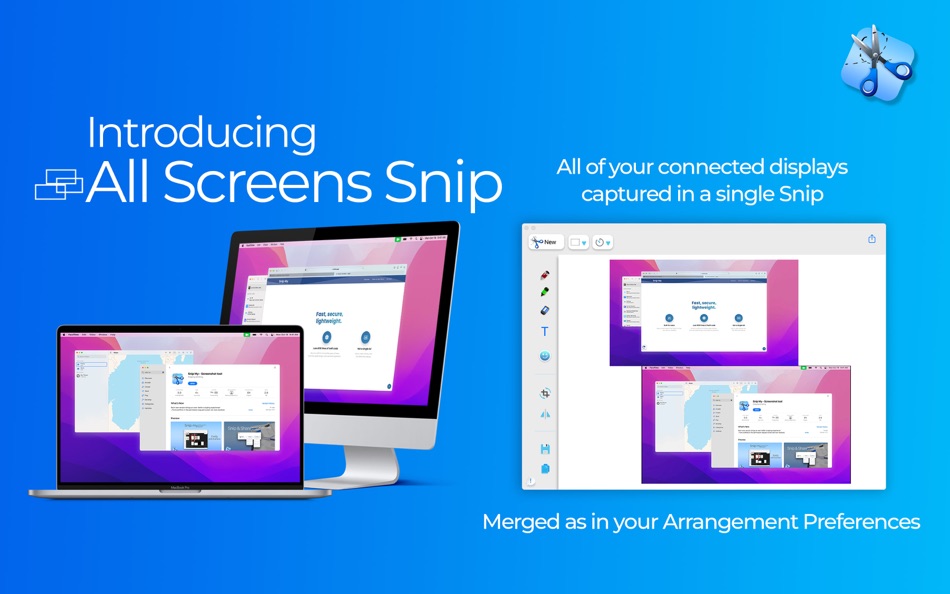
• Or snap all displays at once
• Set a delay, or trigger instantly with a single click
_______________________
Edit with precision.
Turn simple snips into clear, powerful visuals:
• Draw with Pen, Gel Pen or Highlighter
• Add text notes and stickers
• Flip, rotate, crop or resize
• Save in PNG, JPG, or PDF
• Share instantly
• Copy automatically to clipboard
• Print directly from Snip My
• Reload your last snips anytime (stored only on your Mac, never anywhere else)
_______________________
Customize your tools.
• Choose default colors for Pen and Highlighter
• Adjust the Highlighter’s opacity
• Add shadows for emphasis
• Redesigned tools for smoother, sharper results
• Unlimited colors to scribble freely on your snips
_______________________
Even more control in v7.0 and above
The most advanced version yet introduces powerful new ways to work:
• Burner Tool. Permanently erase sensitive data. Never recoverable.
• 5 Blurring Styles. Choose the blur that fits your privacy.
• Text Recognition. Extract text directly from snips - including handwriting. Copy instantly.
• Edge Form Snip. Capture shapes with precision.
• Ruler on screen. True-to-size, in inches or centimeters.
• 10+ Canvas Backgrounds. Graph, grid, dots, musical, dictando, math styles and more - frame your snips your way.
• Printing Dialogue. A cleaner, faster way to bring your snips to paper.
_______________________
Keyboard shortcuts built for speed.
• ⌘+C — Copy your edits to clipboard
• ⌘+1 or ⌥+R — Rectangular Snip
• ⌘+2 or ⌥+W — Window Snip
• ⌘+3 or ⌥+E — Entire Screen Snip
• ⌘+4 or ⌥+A — All Displays Snip
(Global shortcuts work everywhere — even when Snip My is hidden.)
_______________________
Privacy comes first.
Snip My does not collect any data.
We do not read, store, or access your screen, your files, or your snips.
Everything you capture stays private, visible only to you.
_______________________
Snip My is your screenshot tool, your canvas, your privacy shield, your productivity partner.
One-time purchase. Lifetime access. Always free basic features also included.
Don’t just capture your screen. Snip it. Own it.
Ad
Screenshot





Cronologia dei prezzi
-
* Acquisti in-app - Prezzo attuale: Gratis
- Minimo: Gratis
- Massimo: Gratis
Monitora prezzi
Informazioni aggiuntive
- Data di uscita:
- Categoria:
macOS App›Produttività - Sistemi operativi:
macOS,macOS 11.3 e versioni successive - Dimensioni:
19 Mb - Lingue supportate:
Arabic,English,German,Romanian,Spanish - Classificazione contenuti:
4+ - Mac App Store Voto:
0 - Sito web:
 https://www.snipmy.app
Novità
- Versione: 8.4.0
- Aggiornata:
- What's new in this version:
• More Accurate Capture: fixed an issue where the selected capture area didn’t always match the final result for some users.
• Ruler, Reimagined: now rotates freely 360°. Hold Shift to snap instantly to 90° angles for precise alignment.
• Full Display Rotation Support: use multiple monitors in any orientation - vertical, 180°, 270° - all working seamlessly together.
Snip My's most advanced, most intuitive way to capture and share what matters is now here.
Driven by your feedback, designed for what’s next. New awesome features are coming soon.
One-time purchase. Lifetime access.
Upgrade today and own the future of snipping.
Sviluppatore
- Mahtca Global S.R.L.
- Piattaforme: iOS App (3) macOS App (7)
- Listes: 3 + 1
- Punti: 12 + 36 ¡
- Classificazioni: 0
- Commenti: 0
- Sconti: 0
- Video: 0
- RSS: Sottoscrivi




Classificazioni (0)
0 ☹️
Commenti (0)
Sii il primo a commentare 🌟
«Snip My - Screenshot tool». Piattaforma: macOS. Categoria: Produttività. Sviluppatore: «Mahtca Global S.R.L.». Prima uscita: . Ultimo aggiornamento: . Prezzo attuale: gratuito. Questo titolo non ha ancora ricevuto valutazioni o recensioni su AppAgg. Elenchi: pubblici 1, privati 0. Punti tracciati: confermati 4, indiretti 0. Lingue disponibili: Arabic, English, German, Romanian, Spanish. AppAgg tiene traccia della cronologia dei prezzi, delle valutazioni e del feedback degli utenti per «Snip My - Screenshot tool». Segui futuri sconti e aggiornamenti tramite RSS. AppAgg non ospita applicazioni né distribuisce software. Tutti i marchi, loghi e screenshot appartengono ai rispettivi proprietari.
Snip My - Screenshot tool URL breve: Copiato!- 🌟 Condividi
- Mac App Store
Simili
-
- Snip
- macOS App: Produttività di: Tencent Technology (Shenzhen) Company Limited
- Gratis
- Listes: 0 + 1 0 0
- Punti: 1 Versione: 2.0 Snip is a screen-capture application that can capture the active window or custom areas. Drag to zoom in/out the screen shot; add labels, texts and handwriting contents of your choice ... ⥯
-
- Screenshot Text Extractor
- macOS App: Produttività di: thomas pentzek
- $9.99
- Listes: 0 0 0
- Punti: 0 Versione: 1.0 Screenshot Text Extractor Turn screenshots into editable text fast. Screenshots are great for saving information, but copying the text inside them is usually slow and frustrating. ... ⥯
-
- Screenshot One
- macOS App: Produttività di: Ruizheng Liu
- $4.99
- Listes: 0 0 0
- Punti: 1 Versione: 5.0 Screenshot One adds icon to Mac status bar, so you can take screenshot easily anytime! With Screenshot One, you can take screenshot for: - Selected window - Selected window without ... ⥯
- Nuova
- Screenshot Inventory
- macOS App: Produttività di: Marcelo Mafra
- * Gratis
- Listes: 0 0 0
- Punti: 0 Versione: 1.0 Screenshot Inventory is a macOS menu bar app that keeps your screenshots always within reach. Capture the full screen or select an area, then access everything from a fast, organized ... ⥯
-
- Screenshot for Street View
- macOS App: Produttività di: Bilaal Rashid
- $0.99
- Listes: 0 + 1 0 0
- Punti: 6 Versione: 1.1 Capture breathtaking views from Google Street View with ease. Frame your desired location in Street View, and with a click of a button, preserve stunning snapshots of real-world ... ⥯
-
- Screenshot App: Snipping Tool
- macOS App: Produttività di: Moon Technolabs Pvt Ltd
- Gratis
- Listes: 0 0 0
- Punti: 2 Versione: 1.7.0 The Ultimate Screenshot & Annotation Tool for Mac & Windows Say hello to your new favorite screen capture tool built for speed, flexibility, and total control. Whether you re snapping ... ⥯
-
- Screenshot Editor
- macOS App: Produttività di: 科 姚
- $4.99
- Listes: 0 0 0
- Punti: 0 Versione: 2.3 Screenshot Editor helps you to easily take screenshot and annotate the screenshot with a set of useful markup tools. Quickly take a screenshot with useful capturing modes: - Capture ... ⥯
-
- Screenshot Text Recognition
- macOS App: Produttività di: chan hong wing
- Gratis
- Listes: 0 0 0
- Punti: 2 Versione: 1.4 Text recognition by screenshot, no need Internet Support different languages Fast and accurate recognition using native engine Free, no restrictions and hidden charges ⥯
-
- McShot — Screenshot Mastery
- macOS App: Produttività di: ROMAN SIDOROFF
- Gratis
- Listes: 0 0 0
- Punti: 4 Versione: 1.1.1 McShot the ultimate screenshot tool carefully crafted by professionals. Capture your screen with unparalleled speed and ease, leaving annotations or marks effortlessly. Share your ... ⥯
-
- SnapNDrag Pro Screenshot
- macOS App: Produttività di: Yellow Mug Software
- $9.99
- Listes: 0 + 1 0 0
- Punti: 1 Versione: 4.5.3 SnapNDrag Pro is screen capture made ridiculously easy. Here is an app you didn't know you need until you try it. -- WHO IS IT FOR? As the old saying goes, "A screenshot is worth a ... ⥯
-
- Page Snip
- macOS App: Produttività di: Chris Yunker
- Gratis
- Listes: 0 0 0
- Punti: 1 Versione: 1.2 Page Snip includes a Safari Web Extension that lets you quickly save any webpage to your Notion workspace. When activated, the extension reads the current page's title, URL, and ... ⥯
-
- Video For Music Tool
- macOS App: Produttività di: Red Bennett
- * Gratis
- Listes: 0 0 0
- Punti: 0 Versione: 1.3.6 Video for Music Tool is an app to aid in the writing or performing of music synchronized to picture. It plays back video and audio synchronized with on-screen elements to visually aid ... ⥯
-
- Kano PDF Tool
- macOS App: Produttività di: Yu Feng Huang
- $2.99
- Listes: 0 0 0
- Punti: 0 Versione: 3.11.4 Kano PDF Tool is an efficiency-focused desktop tool for PDF and images. It offers clear viewing and practical editing: delete or add pages, export single pages, select and search text, ⥯
-
- Paraphraser tool
- macOS App: Produttività di: Amina Sehar
- * Gratis
- Listes: 0 0 0
- Punti: 0 Versione: 1.0 Easily humanize, detect AI, summarize, & paraphrase any type of text with the help of our AI app. What Is the Paraphrase Tool App? Paraphrase Tool can help you automatically paraphrase ⥯