
Preferiti
Scegli il nome che verrà mostrato nel tuo menu dei preferiti.
Completato!
| Sviluppatore: | DONGJIN HAN (2) | ||
| Prezzo: | $6.99 | ||
| Classificazioni: | 0 | ||
| Commenti: | 0 Pubblica commento | ||
| Listes: | 2 + 1 | ||
| Punti: | 1 + 0 ¡ | ||
| Mac App Store | |||
Descrizione

It can open various image files such as JPEG, PNG, TIFF, BMP, and RAW file of DSLR, EPS and PDF, AI(Adobe Illustrator). Can open image files in archive directly without extraction.
User can open files, rename files, delete files from EdgeView's file browser. Also can access to SMB/AFP/FTP network volume.
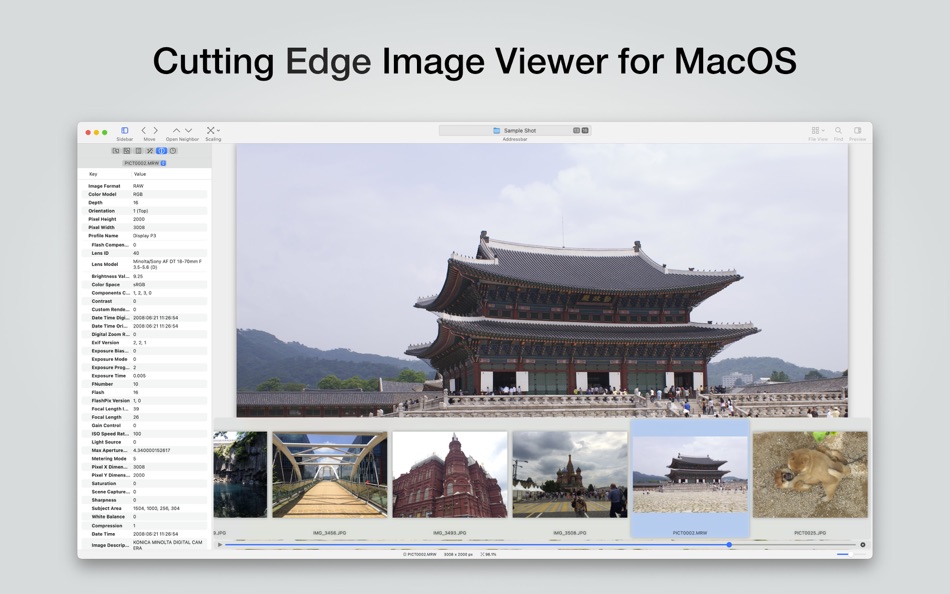
User can navigate images quickly by using keyboard shorcut, mouse wheel, trackpad gesture. EdgeVew show EXIF information, play animation GIF/PNG/WebP smoothly. Save last status to history, and restore when reopen file.
EdgeView 3 will be the best choice when viewing and managing image files.
- Features -
・ Rewrote full code as Swift for improve performance.
・ Support m1 CPU Mac.
・ Has easy UI, can control main function at Sidebar.
・ Support English/Korean/Japanese/Chinese(Simplified).
- Image Viewer -
・ Supporting image files such as JPG, GIF, BMP, PSD, TIFF, RAW, WEBP and PDF, AI(Adobe Illustrator), OpenEXR, HDR, TGA, JPEG-XL, AVIF.
(* Not support EPS in MacOS 14(Sonoma) or higher )
・ Can play animation GIF/PNG/WebP. User can control animation with floating animation controller.
・ Dispaly internal image(or frame) of animation GIF/PNG/WebP or HEIC that has multiple internal image.
・ Can read and show images of major archive formats (such as ZIP, RAR, CBZ, CBR, 7-zip) without extraction. Of course, can open ZIP file that 4GB over.
・ Can read encrypted archive file.
・ Can read archive file in archive file recursively
・ Improved draw speed by rebuilt image cache system and drawing engine.
・ Draw images as high quality.
・ Provide suitable functions for comic reading such as 'Two-Page Spread', 'Continuous Scroll mode', 'Right to Left', etc.
・ Provide multiple navigation functions like as 'Move', 'Skip', 'Shift', etc.
・ User can navigate images and check whole thumbnails at Thumbnailsbar.
・ User can navigate images by using keyboard shortcut, mouse wheel, trackpad gesture.
・ Can rotate and flip images. Orientation will be saved to history.
・ User can select part of images, and copy it or save as file.
・ Can zoom in/out image freely.
・ Built-in loupe function to make it easier to magnify part of image.
・ Show histogram.
・ Show neighbor files list. And can open neighbor file.
・ Support history feature for saving and restoring last status of file.
・ Can reopen file or remove history at history list.
・ Can rate image files.
- File Browser -
・ Built-in file browser can show and open files from local drive or AFP/SMB/FTP network drive.
・ Can display files as lists or icon.
・ Show images in folder/archive file at preview panel.
・ Generate thumbnails of archive files and folders.
・ Support powerful search feature.
・ Show category and writer information.
・ User can sort files by various options, and can delete or rename files.
・ Can rate files or folders.
- Others -
・ Support customizing feature. Also user can change shortcuts.
・ Built-in Quick Look Extension generate thumbnails and preview of archive files at Finder.
・ User can compress files to ZIP archive. Also extract various archives.
・ Comics on screenshot are public domain comic [War Birds 01], published by Fiction House at 1952, distributed in ComicBook+(https://comicbookplus.com).
Ad
Screenshot


Cronologia dei prezzi
- Oggi: $6.99
- Minimo: $2.99
- Massimo: $6.99
Monitora prezzi
Novità
- Versione: 5.7.9
- Aggiornata:
- - Image Viewer
・ Fix the bug that scroll to wrong position when select initial position as 'Always Top'.
Informazioni aggiuntive
- Data di uscita:
- Categoria:
macOS App›Grafica e design - Sistemi operativi:
macOS,macOS 11.5 e versioni successive - Dimensioni:
123 Mb - Lingue supportate:
Chinese,English,Japanese,Korean - Classificazione contenuti:
4+ - Mac App Store Voto:
0 - Sito web:
 https://www.edgeview.co.kr
Sviluppatore
- DONGJIN HAN
- Piattaforme: macOS App (2)
- Listes: 3 + 1
- Punti: 2 + 0 ¡
- Classificazioni: 0
- Commenti: 0
- Sconti: 0
- Video: 0
- RSS: Sottoscrivi


Punti (1)
-

- 661 IMO FUCASHI
- +1

Classificazioni (0)
0 ☹️
Commenti (0)
Sii il primo a commentare 🌟
«EdgeView 3». Piattaforma: macOS. Categoria: Grafica e design. Sviluppatore: «DONGJIN HAN». Prima uscita: . Ultimo aggiornamento: . Prezzo attuale: $6.99. Prezzo più basso registrato: $2.99 (). Prezzo più alto registrato: $6.99 (). Questo titolo non ha ancora ricevuto valutazioni o recensioni su AppAgg. Elenchi: pubblici 2, privati 1. Punti tracciati: confermati 1, indiretti 0. Lingue disponibili: Chinese, English, Japanese, Korean. AppAgg tiene traccia della cronologia dei prezzi, delle valutazioni e del feedback degli utenti per «EdgeView 3». Segui futuri sconti e aggiornamenti tramite RSS. AppAgg non ospita applicazioni né distribuisce software. Tutti i marchi, loghi e screenshot appartengono ai rispettivi proprietari.
EdgeView 3 URL breve: Copiato!- 🌟 Condividi
- Mac App Store
Simili
-
- Edge Cutter - Batch image crop
- macOS App: Grafica e design di: 永康 李
- * Gratis
- Listes: 0 + 0 0 0
- Punti: 0 + 0 Versione: 4.7.5 You can crop multiple images at once in just two steps: 1. Set the cropping margins, 2. Click the Save button. Batch Crop Images Easily. (Free) Convert Image Sequence to APNG. (Free) ... ⥯
-
- Photo Info Viewer · View Exif
- macOS App: Grafica e design di: Xi'an 7kit Technology Co., Ltd.
- $0.99
- Listes: 0 + 1 0 0
- Punti: 12 + 0 Versione: 26 Photo Info Viewer supports viewing the Exif (Exchangeable image file format) information of images. I. Exif Information Photo Info Viewer supports viewing the following Exif ... ⥯
-
- DWG Tools - View & Convert DWG
- macOS App: Grafica e design di: 沦 彭
- * Gratis
- Listes: 1 + 0 0 0
- Punti: 0 + 0 Versione: 6.1 DWG Tools is a tool kit which integrates the common functions of CAD. For example, view and print CAD files(free of .dxf and .dwg files within 300K), import other vector graphics, ... ⥯
-
- Photo View
- macOS App: Grafica e design di: 方成 印
- $1.99
- Listes: 0 + 0 0 0
- Punti: 0 + 0 Versione: 2.3 ON SALE FOR A LIMITED TIME: 50% OFF Photo View can easily browse and view photos. You can open a directory with photos and check them quickly. Shortcuts left arrow - previous image ... ⥯
-
- DWG Lab - View & Convert DWG and DXF Files (3D)
- macOS App: Grafica e design di: 晖 向
- $15.99
- Listes: 0 + 0 0 0
- Punti: 0 + 0 Versione: 3.3 A multifunctional tool for viewing and coverting DWG and DXF files in Mac. DWG Lab provides you with a powerful file list, because of it, you can easily manage your DWG and DXF files, ... ⥯
-
- SVG Merge
- macOS App: Grafica e design di: Craft Edge
- $4.99
- Listes: 0 + 0 0 0
- Punti: 0 + 0 Versione: 1.0 Quickly and easily combine multiple SVG files into a single SVG file. Useful for creating SVG files for use with Cricut Design Space and Brother ScanNCut Canvas software. Easily layout ⥯
-
- Pixelmator Pro
- macOS App: Grafica e design di: Apple
- $49.99
- Listes: 31 + 22 0 0
- Punti: 22 + 0 Versione: 3.7.1 Pixelmator Pro is an incredibly powerful, beautiful, and easy-to-use image editor designed exclusively for Mac. With over 50 image editing tools, Pixelmator Pro has everything you need ⥯
-
- Art Master
- macOS App: Grafica e design di: Splash Colors
- * Gratis
- Listes: 0 + 2 0 0
- Punti: 35 + 0 Versione: 3.1.1 Art Master Your All-in-One Image Viewer & Graphic Converter for Mac Fast Reliable Powerful Art Master is the easiest and fastest way to open, view, and convert images and graphics on ... ⥯
-
- Pixen
- macOS App: Grafica e design di: Furnace Creek Software LLC
- * Gratis
- Listes: 1 + 2 0 0
- Punti: 16 + 0 Versione: 6.1.1 Pixen is a native pixel art editor designed for working with low-resolution raster art, such as those 8-bit sprites found in old-school video games. Pixen packs all the tools pixel ... ⥯
-
- Art Text 4 - AI Graphic Design
- macOS App: Grafica e design di: Belight Software, ltd
- * Gratis
- Listes: 3 + 3 0 0
- Punti: 9 + 0 Versione: 4.5.8 Design eye-catching text based graphics, logos, postcards and greetings with Art Text - a graphic design app that powers up typography and lettering in your desktop publishing, social ... ⥯
-
- Alpha Blender: AI Cutout
- macOS App: Grafica e design di: Pavel Kosykh
- $5.99
- Listes: 0 + 1 0 0
- Punti: 11 + 0 Versione: 2.0 Remove backgrounds instantly. Keep your data private. Alpha Blender is the fastest way to create transparent images on your Mac. Whether you are designing a website, making a collage, ... ⥯
-
- Typeface 4
- macOS App: Grafica e design di: Floor Steeg
- * Gratis
- Listes: 1 + 2 0 0
- Punti: 8 + 0 Versione: 4.2.3 Typeface is a beautiful font manager that helps you pick the perfect font for your designs. Effortlessly organize your library with flexible tags and improve your design workflow by ... ⥯
-
- IconShop - Making Icons Easily
- macOS App: Grafica e design di: 文志 胡
- $9.99
- Listes: 1 + 1 0 0
- Punti: 10 + 0 Versione: 1.0.3 【 Making Icons Easily 】 Convert SF Symbols or custom string to icon, export Image Set or App Icon for Xcode. 【 Convert SF Symbols to Image 】 Do you want to use SF Symbols in iOS13 ... ⥯
-
- GraphicConverter 12
- macOS App: Grafica e design di: Lemke Software GmbH
- $34.99
- Listes: 2 + 0 0 0
- Punti: 0 + 0 Versione: 12.5.1 GraphicConverter 12 is the universal tool for browsing, enhancing, converting and renaming images. Simply drag a folder onto GraphicConverter 12 to view your pictures. The slide show ... ⥯