
저장됨
저장됨 메뉴에 표시할 이름을 선택하세요.
완료!
기술

Use GenAI tech to remove unwanted elements in your shots, expand the frame of your photos, and try out new ways to bring your vision to life. Plus, explore features such as the object remover and background eraser to declutter images. This image editor offers maximum performance.
Key Features:
GENERATIVE TOOLS:
• GenErase: Eliminate distractions and seamlessly fill gaps with AI-generated elements that match the surrounding area
• GenExpand: Extend the boundaries of your photos and fill the new space with realistic AI-generated visuals
• GenSwap: Replace specific elements in your photos with AI-generated visuals that seamlessly integrate with the rest of your image
LANDSCAPE TOOLS:
• Sky AI: Automatic sky replacement — make dull, cloudy days look brilliant
• Atmosphere AI: Realistically simulate weather effects like fog, mist, and haze using advanced 3D depth reconstruction
• Sunrays: Emulate the natural illumination and effects of sunlight
• Twilight Enhancer AI: Emulate the ambiance of the blue and golden hours around sunrise and sunset
• Water Enhancer AI: Adjust and refine the color, depth, and reflective quality of any body of water
PORTRAIT TOOLS:
• Skin AI: Automatically detect and remove skin imperfections while preserving texture and detail
• Face AI: Retouch facial features with precision
• Body AI: Adjust body proportions by removing or adding volume to a subject’s midsection to achieve the desired look
• Studio Light: Replicate studio lighting effects with a photo brightener, typically achieved with expensive studio equipment
• Portrait Bokeh AI: Create bokeh effects in portrait photos based on image depth reconstruction
OTHER TOOLS:
• Neon & Glow: Add captivating lighting effects and blend neon elements for added visual appeal
• Supercontrast: Precisely adjust tonal contrast in different ranges to enhance image depth and detail
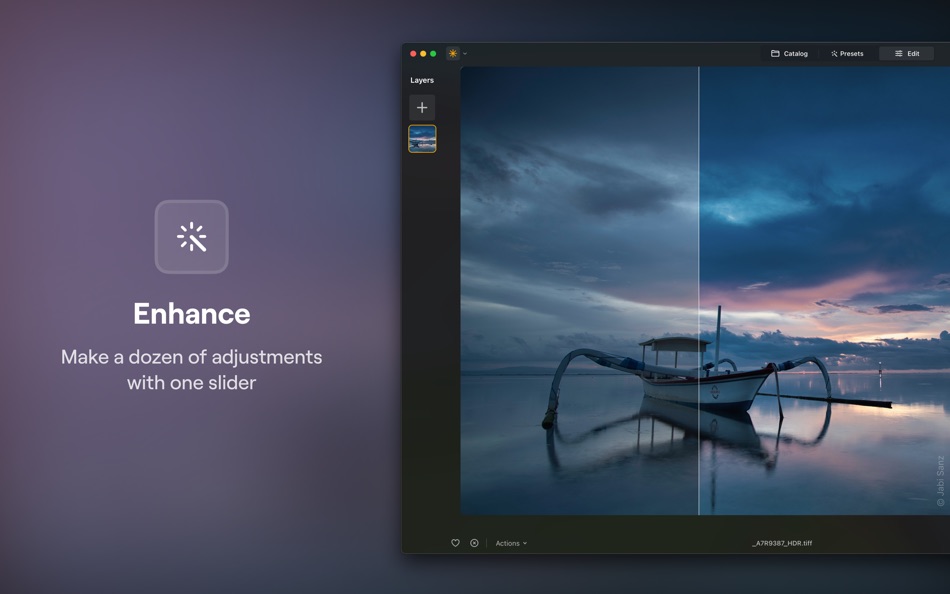
• Enhance AI: With one slider, automatically adjust up to a dozen elements, including shadows, highlights, contrast, tone, saturation, and exposure
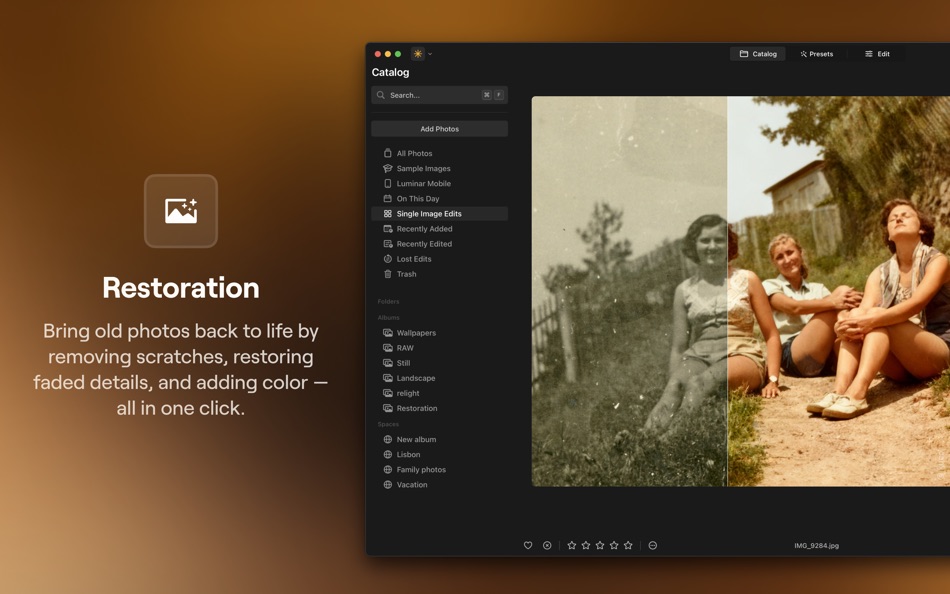
• Restoration: Bring old photos back to life by removing scratches, restoring faded details, and adding color — all in one click.
• Noiseless AI: Advanced noise reduction that keeps details intact
• Supersharp AI: Unblur photos and enhance details with this image sharpening tool
• Upscale: This photo resizer allows you to increase the resolution up to 6X
• Panorama Stitching: Create stunning panoramas from your photos and videos
• Focus Stacking: Achieve incredible detail with seamless blending of multiple depths of field
• Background Removal AI: Automatic background remover for any object
• Light depth: Add dimensional lighting and enhance depth with intelligent light and shadow adjustments powered by AI.
• HDR Merge: Batch HDR processing allows you to merge up to 1000 images using brackets
FLEXIBLE WORKFLOW:
• Apply multiple layers for unlimited creativity
• Apply any tool to any layer with photo Overlays
• Save all adjustments in Presets for quick reuse
• Effortlessly photo edit without losing original information
ADDITIONAL FUNCTIONALITY:
• Work with RAW images from over 1000 camera types, including CR2, CR3, NEF, ORF, and RAF formats
• Also works with JPEG, PNG, TIFF, and many more file formats
• Copy and paste adjustments across multiple images
To access all features, you need to purchase one of the plans below:
• Lifetime License
• Cross-device Lifetime License
+7 days trial. Once the trial is over, you will be charged for a selected plan.
Terms of use: https://skylum.com/terms-of-use
Privacy policy: https://skylum.com/legal
Ad
스크린샷






가격 내역
-
* 인앱 구매 - 현재 가격: 무료
- 최소: 무료
- 최대: 무료
가격 추적
추가 정보
 https://skylum.com/luminar
새로운 기능
- 버전: 1.26.1
- 업데이트:
- This update improves the quality of results from our generative tools while also making Luminar Neo more stable and reliable overall. We’ve enhanced performance, fixed crashes, and refined key interactions to make your editing smoother and more consistent
The AI Assistant panel is now fully draggable and resizable, so you can place it wherever it works best for you, and tools in Favorites can be reordered for greater control over your workspace. Export performance has also been enhanced for faster, smoother output.
Plus, Luminar Neo 1.26.1 adds support for Sony a7 V, Sony FX2, and Panasonic Lumix DC-S5IIX, ensuring seamless compatibility from import to final edit. Update and enjoy!
Bug fixes:
* Fixed an issue where the app window would suddenly shrink and could no longer be resized.
* Resolved a crash that occurred when dragging an image to the last group in HDR Merge or * * Panorama Stitching tools.
* Fixed catalog scrolling behavior on startup.
* Presets can now be saved to My Presets after switching between photos.
* AI Assistant no longer overlaps the list of Presets in the packs.
* Improved responsiveness of the Sky selection dropdown in the Apple Photos extension.
* Sped up chromatic aberration processing for .RAF files.
* Removed overcorrection artifacts after applying “Auto Fix Chromatic Aberrations” to ARW RAW files.

포인트 (3)
-

- 25 MaRy
- +1
-
- 1 Sensei Digby
- +1
-
- 2,979 바람처어럼
- +1



순위 (0)
0 ☹️
댓글 (0)
가장 먼저 댓글을 남겨주세요 🌟
«Luminar Neo - AI Photo Editor». 플랫폼: macOS. 카테고리: 사진 및 비디오. 개발자: «Skylum». 첫 번째 릴리스: . 마지막 업데이트: . 현재 가격: 무료. 이 타이틀은 아직 AppAgg에서 평가나 리뷰를 받지 못했습니다. 목록: 공개: 1, 비공개: 0. 추적된 포인트: 확인됨: 3, 간접: 0. 사용 가능한 언어: Chinese, Czech, Danish, Dutch, English, French, German, Italian, Japanese, Korean, Norwegian, Polish, Portuguese, Spanish, Swedish, Ukrainian. AppAgg는 «Luminar Neo - AI Photo Editor»의 가격 기록, 평점 및 사용자 피드백을 추적합니다. 향후 할인 및 업데이트 받기: RSS에서 확인할 수 있습니다. AppAgg는 애플리케이션을 호스팅하거나 소프트웨어를 배포하지 않습니다. 모든 상표, 로고 및 스크린샷은 해당 소유자의 자산입니다.
Luminar Neo - AI Photo Editor 단축 URL: 복사됨!- 🌟 공유하기
- Mac App Store
유사 항목
-
- Irix HDR: AI Photo Editor
- macOS 앱: 사진 및 비디오 게시자: Binaire
- * 무료
- 목록: 0 0 0
- 포인트: 0 버전: 2.3.58 Irix HDR Classic brings true to life HDR photo editing offering one click edits to full scale pro editing toolset. Sky Replacement (SkyXpress)- Replace skies and introduce weather. ... ⥯
-
- Fotor: AI Photo Editor, Design
- macOS 앱: 사진 및 비디오 게시자: Chengdu Everimaging Science and Technology Co., Ltd
- * 무료
- 목록: 1 + 1 0 5 (1)
- 포인트: 5 버전: 5.1.9 Join 800 million creators worldwide on Fotor! Designed for Mac, Fotor opens directly from your desktop and gives you powerful AI tools to create stunning photos and videos no editing ... ⥯
-
- Meitu-AI Photo Editor & Design
- macOS 앱: 사진 및 비디오 게시자: Xiamen Meitu Technology Co., Ltd.
- * 무료
- 목록: 0 0 0
- 포인트: 0 버전: 2.2.16 Meitu is the simplest image processing tool that can quickly achieve professional-level photo editing effects. AI tools are constantly updated, and everyone can make good pictures! AI ... ⥯
-
- Photo Editor
- macOS 앱: 사진 및 비디오 게시자: Codeway
- * 무료
- 목록: 0 0 0
- 포인트: 0 버전: 1.1 Fotoris AI Photo Editor is your ultimate creative powerhouse packed with advanced AI tools to transform any photo into something extraordinary. Create, design, edit, and imagine ... ⥯
-
- Photo Editor for Seedream
- macOS 앱: 사진 및 비디오 게시자: Yasir Islam
- * 무료
- 목록: 0 0 0
- 포인트: 0 버전: 1.3 Photo Editor for Seedream is an all-in-one AI photo editing app that turns your imagination into art. Create stunning visuals with Text to Image or transform existing photos using ... ⥯
-
- AI Photo Restore
- macOS 앱: 사진 및 비디오 게시자: HIG Studio
- $16.99
- 목록: 0 0 0
- 포인트: 0 버전: 1.1.7 AI Photo Restore is the best and most modern photo restoration software available as it uses the latest machine learning technology. The technology behind the app is a state-of-the-art ⥯
-
- Photo Editor: Presets, Filters
- macOS 앱: 사진 및 비디오 게시자: TS Technology
- * 무료
- 목록: 0 0 0
- 포인트: 0 버전: 1.2 Photo Editor - AI Background Eraser offers everything you want to edit pictures on this pics art tour. 100+ stylish effects, filters, photo collage, blur photo, grids, change ... ⥯
-
- AI Video & AI Photo Generator
- macOS 앱: 사진 및 비디오 게시자: Syeda Aneesha Tanseer
- * 무료
- 목록: 0 0 0
- 포인트: 0 버전: 2.0 AI Video & AI Photo Generator Create stunning AI generated videos and photos in seconds. Unleash your creativity with AI Video & Photo Generator, the fastest and most powerful tool for ⥯
-
- AI Face Editor: Perfect Selfie
- macOS 앱: 사진 및 비디오 게시자: AppCurrent, LLC
- * 무료
- 목록: 0 0 0
- 포인트: 0 버전: 1.3.2 Enhance your photos using AI and editing tools! Turn your photos into beautiful portraits and selfies in one touch with the help of AI Face Editor - Photo Enhancer. There is no need to ⥯
-
- Photo Editor: Filters & Frames
- macOS 앱: 사진 및 비디오 게시자: HESHAM ABDEL GAWAD
- $14.99
- 목록: 0 0 0
- 포인트: 0 버전: 1.0.3 Transform Your Photos with Our Powerful Photo Editor! Unlock your creativity with our all-in-one photo editor App,Choose from multiple one click Filters,Frames and Overlays and your ... ⥯
-
- AI Photo Enhancer : RAZE AI
- macOS 앱: 사진 및 비디오 게시자: Dzine Media
- * 무료
- 목록: 0 0 0
- 포인트: 1 버전: 1.0.5 Make your photos look better in a single click. Our RAZE - AI photo enhancer transforms your ordinary pictures into masterpieces. Perfect for personal or professional use. How to Use ... ⥯
-
- Photo 360 Pro - Amazing Photo Editor and Stylish Filters Effects
- macOS 앱: 사진 및 비디오 게시자: LI HUNG WANG
- $29.99
- 목록: 0 0 0
- 포인트: 0 버전: 1.0 Photo 360 brings your amazing collection of filters and photo effects on the Mac App Store, provides 260 filter effects beloved by professional photographers. Photo 360 themes vary ... ⥯
-
- Photo Editor: Cut Out Shapes
- macOS 앱: 사진 및 비디오 게시자: Any Case Solutions
- * 무료
- 목록: 0 0 0
- 포인트: 2 버전: 4.3.1 Enhance your favorite pictures and selfies with our fast & efficient photo eraser! Remove, change, blur background and unnecessary objects by using adjustable brushes. Use a wide range ⥯
-
- Photo AI - AI Photo Enhancer
- macOS 앱: 사진 및 비디오 게시자: 通 张
- * 무료
- 목록: 0 0 0
- 포인트: 2 버전: 2.0.0 PhotoAI is an all-in-one AI toolkit that enables you to enhance your photos with powerful AI tools. Here is the list of AI tools that you can use in our program. New features we have ... ⥯