
| Nhà phát triển: | Denk Alexandru (64) | ||
| Giá bán: | $1.99 | ||
| Xếp hạng: | 0 | ||
| Đánh giá: | 0 Viết đánh giá | ||
| Danh sách: | 1 + 1 | ||
| Điểm: | 2 + 4 (3.8) ¡ | ||
| Mac App Store | |||
Mô tả

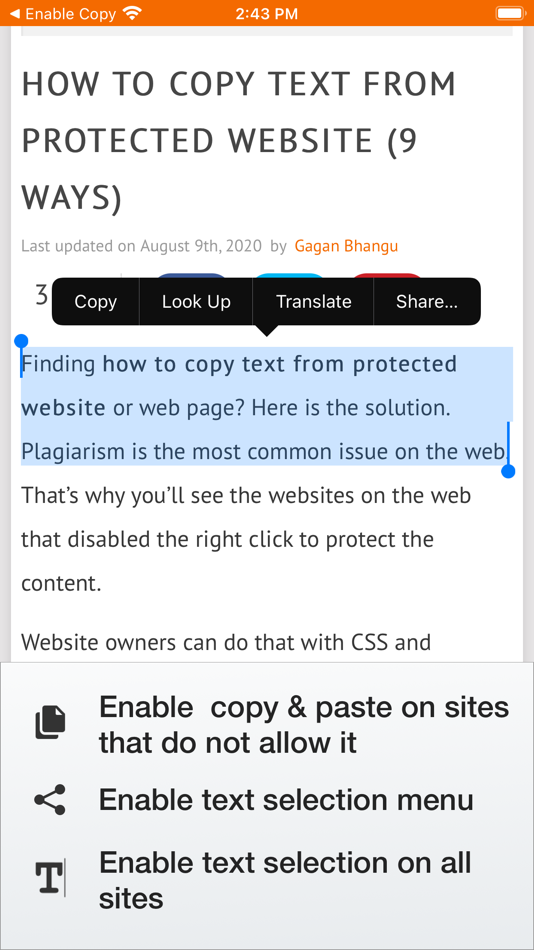
This Safari extension will re-enable copy, paste, text selection, and mouse menu on all websites, even if the sites disable these features.
Many websites intentionally block text selection, copying, pasting, and some standard user interface, like selection options - with this Safari extension, you can bypass these annoyances and restore your browsing experience.
Features
• Allow cut, copy, and paste on all websites
• Allow text selection (highlighting) and selection pop-up menu on all websites
• Per-site settings, easy to configure, no complicated options
Support
We read your support emails every day, day by day.
Write with confidence any question, feedback, or complaint, and you will receive an answer in a very short period of time.
Ảnh chụp màn hình
Giá bán
- Hôm nay: $1.99
- Tối thiểu: $1.99
- Tối đa: $2.99
Theo dõi giá
Nhà phát triển
- Denk Alexandru
- Nền tảng: iOS Ứng dụng (10) macOS Ứng dụng (54)
- Danh sách: 13 + 14
- Điểm: 206 + 1,005 ¡
- Xếp hạng: 5 (1)
- Đánh giá: 5 (1)
- Giảm giá: 1
- Video: 0
- RSS: Đăng ký


Xếp hạng
0 ☹️
Danh sách

Đánh giá
Hãy là người đầu tiên đánh giá 🌟
Thông tin bổ sung
- Phiên bản: 1.4.6
- Danh mục:
macOS Ứng dụng›Tiện ích - HĐH:
iPad,iPhone,macOS,macOS 15.0 trở lên - Kích thước:
12 Mb - Ngôn ngữ được hỗ trợ:
English - Xếp hạng nội dung:
4+ - Mac App Store Xêp hạng:
3.8(4) - Cập nhật:
- Ngày phát hành:
Danh bạ
- Trang web:
 https://alexdenk.eu/
Enable Copy for Safari URL ngắn: Đã sao chép!- 🌟 Chia sẻ
- Mac App Store
Bạn cũng có thể thích
-
- Enable Right Click
- macOS Ứng dụng: Tiện ích Bởi: Anjey Tsibylskij
- $0.99
- Danh sách: 0 + 0 Xếp hạng: 0 Đánh giá: 0
- Điểm: 0 + 0 Phiên bản: 1.0 Enable Right Click is a powerful yet simple Safari extension that removes website restrictions on right-clicking and text selection. Whether you need to copy content, paste text, or ... ⥯
-
- Copy On Select for Safari
- macOS Ứng dụng: Tiện ích Bởi: Pierre Stanislas
- $1.99
- Danh sách: 0 + 0 Xếp hạng: 0 Đánh giá: 0
- Điểm: 1 + 0 Phiên bản: 1.0 Copy On Select is a powerful and intuitive browser extension designed to streamline your text copying workflow. Say goodbye to tedious right-clicks and context menus. With Copy On ... ⥯
-
- Enable Right Click for Safari
- macOS Ứng dụng: Tiện ích Bởi: Alfredo Grassau
- $2.99
- Danh sách: 0 + 1 Xếp hạng: 0 Đánh giá: 0
- Điểm: 1 + 1 (5.0) Phiên bản: 1.0.33 Discover the ultimate freedom in web browsing with "Enable Right Click for Safari," the essential Safari extension that transforms your Safari experience. Tired of being restricted by ... ⥯
-
- Copy to Markdown
- macOS Ứng dụng: Tiện ích Bởi: 谦 陈
- $3.99
- Danh sách: 0 + 0 Xếp hạng: 0 Đánh giá: 0
- Điểm: 0 + 0 Phiên bản: 1.0 Instantly extract clean content from any webpage and copy it as Markdown with a single click. WHAT IT DOES Copy to Markdown extracts the main article content from web pages and ... ⥯
-
- Enable Context Menu for Safari
- macOS Ứng dụng: Tiện ích Bởi: Dongwook Cho
- $2.99
- Danh sách: 0 + 0 Xếp hạng: 0 Đánh giá: 0
- Điểm: 4 + 2 (3.0) Phiên bản: 1.0 [Enable Context Menu] is a Safari extension which enables disabled context menu, right mouse click(or long press), text selection and copy. It removes the unnecessary restriction on ... ⥯
-
- copy everything
- macOS Ứng dụng: Tiện ích Bởi: ALEVLA SOFTWARE SOLUTIONS S.R.L.
- Miễn phí
- Danh sách: 0 + 0 Xếp hạng: 0 Đánh giá: 0
- Điểm: 0 + 0 Phiên bản: 1.0 copy everything lets you do one simple thing: copy text that is not copiable. And it does this very well. With simple interface and simple control, you can get hold of any type of ... ⥯
-
- Copy Stacks
- macOS Ứng dụng: Tiện ích Bởi: Aysha Sehar
- Miễn phí
- Danh sách: 0 + 0 Xếp hạng: 0 Đánh giá: 0
- Điểm: 0 + 0 Phiên bản: 1.0 Copy Stacks is your ultimate clipboard manager, designed to supercharge your productivity. Whether you're a student, writer, coder, or multitasker, Copy Stacks helps you save, ... ⥯
- mới
- Copy 2 Clip
- macOS Ứng dụng: Tiện ích Bởi: Christian Ahrweiler
- $3.99
- Danh sách: 0 + 0 Xếp hạng: 0 Đánh giá: 0
- Điểm: 0 + 0 Phiên bản: 1.0.1 Copy 2 Clip is a lightweight clipboard manager that helps you stay focused by keeping everything you copy exactly where you need it. Instead of losing copied text when you overwrite ... ⥯
-
- Copy Random Files
- macOS Ứng dụng: Tiện ích Bởi: Chapman Shoop
- Miễn phí
- Danh sách: 0 + 0 Xếp hạng: 0 Đánh giá: 0
- Điểm: 0 + 0 Phiên bản: 1.0 Copy a random sample of files from a source folder to a destination folder. ⥯
-
- Copy History Mark Ⅱ
- macOS Ứng dụng: Tiện ích Bởi: kazutoshi miyasaka
- Miễn phí
- Danh sách: 0 + 1 Xếp hạng: 0 Đánh giá: 0
- Điểm: 2 + 0 Phiên bản: 2.0.6 Functions ・ Searching copy histories with texts at the Menu bar ・ Filtering copy histories with the star-mark ・ Adding a label to a copied item ・ Deleting Items ・ Shortcuts for ... ⥯
-
- Copy URLs and Titles
- macOS Ứng dụng: Tiện ích Bởi: Yoshiko Sato
- $1.99
- Danh sách: 2 + 1 Xếp hạng: 0 Đánh giá: 0
- Điểm: 1 + 1 (5.0) Phiên bản: 2.0.0 This extension copies the URL and title. URLs and titles of multiple tabs can also be retrieved at once. This extension works on Safari. How to use the template setup screen ・Set the ... ⥯
-
- Copy Link in Markdown
- macOS Ứng dụng: Tiện ích Bởi: Tongfan Dai
- Miễn phí
- Danh sách: 0 + 0 Xếp hạng: 0 Đánh giá: 0
- Điểm: 0 + 4 (5.0) Phiên bản: 1 The app provides a Safari Extension that lets you copy the link of the webpage you're on in Markdown format simply with a tap. ⥯
-
- Copy+-Manage clipboard history
- macOS Ứng dụng: Tiện ích Bởi: 万林 彭
- Miễn phí
- Danh sách: 0 + 1 Xếp hạng: 0 Đánh giá: 0
- Điểm: 3 + 0 Phiên bản: 1.2 Automatically save your clipboard history Quickly preview recorded content Double click to copy the history content you selected Quickly search for records with keywords Rename the ... ⥯
-
- Copy Paster
- macOS Ứng dụng: Tiện ích Bởi: BIG STORY FILMMAKING SERVICE
- * Miễn phí
- Danh sách: 0 + 0 Xếp hạng: 0 Đánh giá: 0
- Điểm: 0 + 0 Phiên bản: 43 Create customized text label for One-Tap-Paste. Works well with AI Prompt, Bot Command and client message reply. Free Feature: 1. Create cross timezone Unix timestamp. 2. JSON export & ⥯