
| Udvikler: | 缤 黄 (11) | ||
| Pris: | $1.99 | ||
| Rangeringer: | 0 | ||
| Anmeldelser: | 0 Skriv en anmeldelse | ||
| Lister: | 2 + 1 | ||
| Point: | 9 + 0 ¡ | ||
| Mac App Store | |||
Beskrivelse

Main Features
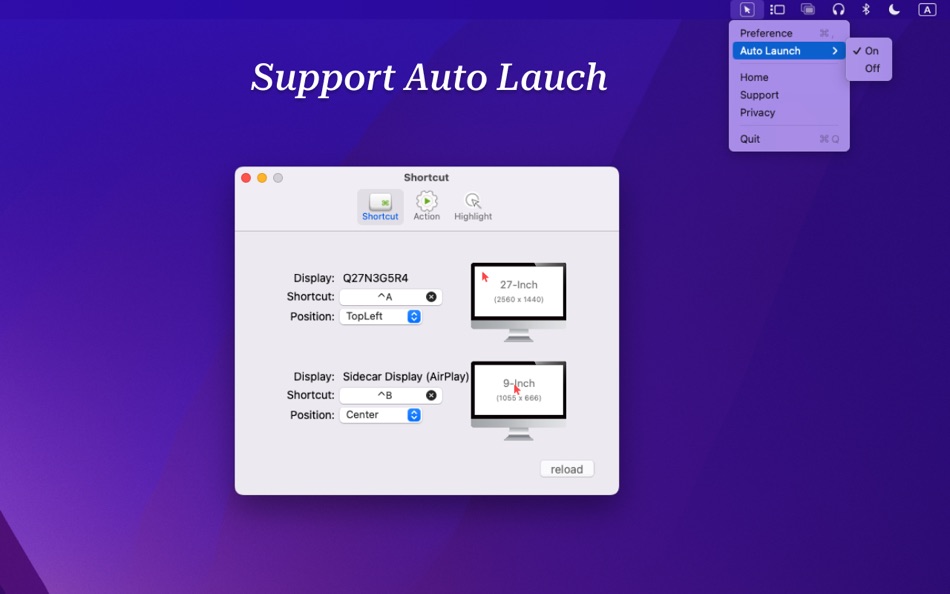
▪ Customizable Mouse Movement Shortcuts
Set up shortcuts to move your mouse to a specified position. Supports customizable hotkeys and allows you to freely choose the target position for the mouse movement (top left, top right, center, bottom left, bottom right), maximizing mouse movement efficiency.
Set up a shortcut to move your mouse to the previous position.
▪ Flexible Post-Movement Actions
After moving the mouse, you can set up click actions such as single-click or double-click to further enhance operational efficiency. The default is no action.
▪ Customizable Mouse Highlight
Enable a highlight around the mouse, with customizable highlight color and ring size, to assist with screen operation demonstrations efficiently and effectively.
Features
▪ Efficiency - No more manually moving your mouse across the screen. With intuitive shortcuts, switch to the target position in just 0.5 seconds, improving work efficiency by 50%.
▪ Ease of Use - MouseCatch is simple and intuitive to use. Set it up once, no need to repeatedly configure, making it convenient and easy to use.
▪ Privacy Protection - We value your privacy highly. CatchMouse does not save or upload any user data, ensuring absolute privacy and security.
▪ Action Triggers - After moving the mouse to the target position, you can set the mouse to automatically perform click actions, further streamlining workflows and reducing repetitive tasks.
▪Lightweight - MouseCatch is less than 1MB in size, with streamlined functions to achieve optimal size control, without taking up too much space.
▪ Customizable - You can customize the cursor and halo size and color, making your mouse more prominent on the screen, eliminating the need to search for the mouse.
▪Highlight Halo - Adds a highlight halo effect to the mouse cursor, allowing flexible customization of halo color and size to enhance visibility. Ideal for scenarios like screen content presentations.
Upgrade your mouse control experience and enjoy the efficiency and convenience brought by MouseCatch. Download MouseCatch now and experience the seamless power of shortcuts!
▪Note
MouseCatch is the standard version, supporting up to three monitors. For users with more monitors, please choose CatchMouse Pro.
▪User Reviews
"Switching with the mouse is too tiring, shortcut key switching is very convenient~~" -- Review from a user in China
"Efficient on a large screen" -- Review from a user in China
"Exactly what I needed. Simple to use and does just what I need it to do." -- User from Australia
Skærmbilleder


Pris
- I dag: $1.99
- Minimum: Gratis
- Maksimalt: $2.99
Overvåg priser
Udvikler
Point
-

- 636 Rocky4812
- +1
-
- 219 Carlos V
- +1
-
- 51 Geoff B
- +1
-
- 76 Alessandro
- +1
-
- 2,580 Alan
- +1
-
- 10,823 Simon Chan
- +1



Rangeringer
0 ☹️
Lister

Anmeldelser
Vær den første til at gennemgå 🌟
Yderligere oplysninger
- Version: 2.9.1
- Kategori:
macOS Apps›Hjælpeprogrammer - Operativsystem:
macOS,macOS 12.2 eller nyere - Størrelse:
353 Kb - Understøttet sprog:
Chinese,English,French,German,Japanese,Spanish - Indholdsklassificering:
4+ - Mac App Store Bedømmelse:
0 - Opdateret:
- Udgivelsesdato:
Kontaktpersoner
- Websted:
 https://app.bitszoo.com/catchmouse/
MouseCatch Kort webadresse: Kopieret!- 🌟 Del
- Mac App Store
Du vil måske også kunne lide
-
- Mouse Aura
- macOS Apps: Hjælpeprogrammer Ved: Samuel Barney
- $1.99
- Lister: 0 + 0 Rangeringer: 0 Anmeldelser: 0
- Point: 0 + 0 Version: 1.0 Mouse Aura brings the magic of the aurora borealis to your Mac desktop. Simply shake your mouse to activate a beautiful, flowing trail of colorful particles that follow your cursor ... ⥯
-
- Mouse Jiggler – Mouse Mover
- macOS Apps: Hjælpeprogrammer Ved: Bohdan Bilous
- * Gratis
- Lister: 0 + 2 Rangeringer: 0 Anmeldelser: 0
- Point: 8 + 0 Version: 2.7 Mouse Jiggler - Mouse Mover is a simple utility that generates subtle cursor movements to assist accessibility and interaction needs. It performs smoothly and efficiently without ... ⥯
-
- Mouse Insomnia
- macOS Apps: Hjælpeprogrammer Ved: Braden Aron Mc Corkle
- $0.99
- Lister: 0 + 0 Rangeringer: 0 Anmeldelser: 0
- Point: 0 + 0 Version: 1.1.0 Mouse Insomnia Keep your Mac awake with gentle, human-like mouse movements. Whether you re vibe-coding, running long simulations, or simply need your Mac to stay awake, Mouse Insomnia ... ⥯
-
- Mouse Smoothy
- macOS Apps: Hjælpeprogrammer Ved: Nha Ho
- * Gratis
- Lister: 0 + 0 Rangeringer: 0 Anmeldelser: 0
- Point: 0 + 0 Version: 3.0 Mouse Smoothy makes your mouse scroll like Apple s Magic Mouse smooth, natural, and fluid. Works across all apps, including creative and editor tools Support for multi-monitor setups ... ⥯
-
- Mouse Gestures
- macOS Apps: Hjælpeprogrammer Ved: George MacKerron
- $1.99
- Lister: 0 + 1 Rangeringer: 0 Anmeldelser: 0
- Point: 1 + 0 Version: 1.1.1 Mouse Gestures is a tiny macOS menu-bar app. It enables simple mouse gestures for navigation. Mouse Gestures recognises two gestures. Hold the right mouse button and drag leftwards to ... ⥯
-
- Mouse Maestro
- macOS Apps: Hjælpeprogrammer Ved: Essam Abdelhady
- $0.99
- Lister: 0 + 0 Rangeringer: 0 Anmeldelser: 0
- Point: 0 + 0 Version: 1.1 Mouse Maestro - Automate Your Mac with Ease Streamline your workflow and reclaim your time with Mouse Maestro, the elegant automation tool for macOS. Transform repetitive tasks into ... ⥯
-
- Mouse Clicker
- macOS Apps: Hjælpeprogrammer Ved: INGI Consulting ApS
- $4.99
- Lister: 0 + 0 Rangeringer: 0 Anmeldelser: 0
- Point: 0 + 0 Version: 1.1 Mouse Clicker can automatically click your mouse up to 1000 times per second or with regular intervals. There is no limit on the wait between intervals, meaning you can set the Mouse ... ⥯
-
- Mouse Click Sound
- macOS Apps: Hjælpeprogrammer Ved: 方成 印
- $2.99
- Lister: 0 + 0 Rangeringer: 0 Anmeldelser: 0
- Point: 0 + 0 Version: 1.5 Mouse Click Sound - Add Feedback to Your Silent Mouse and Trackpad Mouse Click Sound enhances your macOS experience by providing audio feedback for every click. Whether you're using a ... ⥯
-
- Mouse Clicker
- macOS Apps: Hjælpeprogrammer Ved: 波 冯
- Gratis
- Lister: 0 + 0 Rangeringer: 0 Anmeldelser: 0
- Point: 0 + 0 Version: 3.0.0 Mouse Clicker 是一个简单的自动点击器 支持多种单击 双击 次数 间隔等设置。它可以帮助您自动执行重复的鼠标点击操作 节省时间和精力。无论是游戏还是其他需要频繁点击的场景 Mouse Clicker 都能为您提供便利。 ⥯
-
- Mouse Snap Clicker
- macOS Apps: Hjælpeprogrammer Ved: 论 李
- $4.99
- Lister: 0 + 0 Rangeringer: 0 Anmeldelser: 0
- Point: 0 + 0 Version: 1.1.1 Mouse Snap Clicker Essential Mac auto clicker! Customize click intervals (hours/minutes/seconds/ms), select mouse button/type. Define precise positions via coordinates or screenshot. ... ⥯
-
- Mouse Clicker & Shaker
- macOS Apps: Hjælpeprogrammer Ved: Wise Tech Labs Private Limited
- $7.99
- Lister: 0 + 1 Rangeringer: 0 Anmeldelser: 0
- Point: 5 + 0 Version: 2.3 We've all faced this: You're playing a game and you need to click a lot for taking some coins or for another game play. Or you have an app that functions with clicks and you need to do ⥯
-
- Mouse Wheel Scroll Volume
- macOS Apps: Hjælpeprogrammer Ved: 莎 蒋
- $2.99
- Lister: 0 + 0 Rangeringer: 0 Anmeldelser: 0
- Point: 0 + 0 Version: 1.3.0 MouseWheelScrollVolume is a lightweight system utility that lets you adjust macOS system volume by simply holding a modifier key and scrolling your mouse wheel. No need to switch apps ... ⥯
-
- Mouse++ & New File Menu
- macOS Apps: Hjælpeprogrammer Ved: 威 蒋
- * Gratis
- Lister: 2 + 1 Rangeringer: 0 Anmeldelser: 0
- Point: 3 + 0 Version: 3.4 You can directly create new documents and other content on the desktop. It has rich functions to make your right-click menu even more powerful. The deeply rooted interactive design ... ⥯
-
- Mouse Hider
- macOS Apps: Hjælpeprogrammer Ved: SopoNext
- $0.99
- Lister: 0 + 0 Rangeringer: 0 Anmeldelser: 0
- Point: 1 + 0 Version: 3.5.1 The unique App for hide the cursor on the Mac App Store, and the best app in absolute! Mouse Hider makes the presence of the mouse cursor on the monitor less intrusive. Thanks to Mouse ⥯