
Uložené
Zvolte název, který se bude zobrazovat v nabídce Uložené.
Hotovo!
| Vývojář: | Pedro Jose Pereira Vieito (15) | ||
| Cena: | $3.99 | ||
| Hodnocení: | 0 | ||
| Komentáře: | 0 Přidat komentář | ||
| Seznamy: | 2 + 2 | ||
| Body: | 3 + 0 ¡ | ||
| Mac App Store | |||
Popis

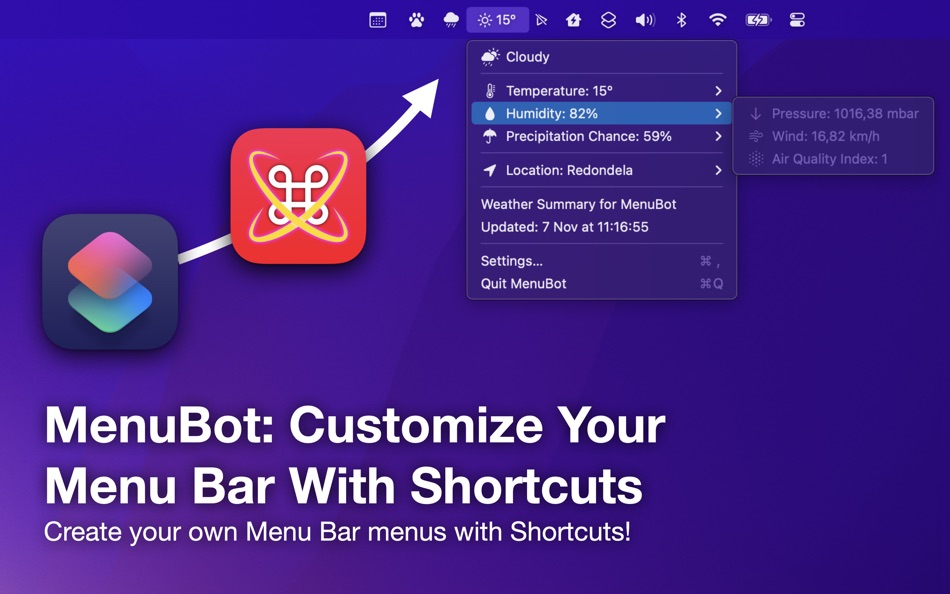
With different shortcuts you can create a myriad of useful Menu Bar menus. MenuBot includes some shortcut examples, like Weather Summary, Rain Probability, Today Events, Next Event, Web Links, Network Summary and Shortcut Launcher.
Of course, all of these shortcuts are fully customizable so you can use them as a base to create your desired Menu Bar menu!
Notes:
• MenuBot allows you to add Apple Symbols to the Mac Menu Bar and menus. Only one Apple Symbol can be added at the start of each line. To do it, simply search the Apple Symbol name and add it at the start of the line. MenuBot will detect it is an Apple Symbol and will convert it to an image. For example, if an output line of the shortcut is “umbrella.fill Rain Probability: 30%” MenuBot will add the umbrella Apple Symbol to the menu button or line. You have more info about Apple Symbols here: https://developer.apple.com/sf-symbols/.
• MenuBot also allows any custom character or emoji so you have endless possibilities to customize your menus.
• You can add an action to a menu item by appending a URL link at the end of the menu item text line. For example, a line in the shortcut output with the text “Open Google… https://google.com” will add a menu item to the menu with the text “Open Google…” and clicking it will launch “https://google.com”. You can also use app URI links like “shortcuts://run-shortcut?name=Shortcut%20Name” or “things:///show?id=today”.
• You can also insert native menu dividers with MenuBot, just add a line with a slash (“-”) to your shortcut menu text output and a menu divider will be added instead.
• To add a submenu you just need to prefix the submenu items with a “>” character. You can add up to 2 submenu levels using the “>>” prefix. Ensure the second level items are after a one level submenu. See the “Weather Summary” and “Web Links” example shortcuts to learn how to build submenus with MenuBot.
• Make sure to always end you shortcuts with the “Stop and Output” action with a text output so MenuBot can correctly display the results.
• Make sure you have enough space in the status bar so that the MenuBot menu bar item can be shown (it should appear as a “⌘” symbol). If the MenuBot menu does not appear, you can temporarily quit other menu bar apps to add space for it. You can move the position of menu bar items by holding the command key while dragging them.
• MenuBot includes multiple Shortcuts actions to manager your MenuBot menus. With them you can add, remove and list your configured menus as well as force them to be refreshed. You can also refresh MenuBot menus from Terminal and other apps using its Automation URL “menubot://refresh-menus”, for example from the Terminal you can use this command: “open -g menubot://refresh-menus”.
Privacy by Design: MenuBot works completely on-device and does not store or send any information outside of the protected app sandbox.
Ad
Snímky obrazovky


Historie cen
- Dnes: $3.99
- Minimální: $1.99
- Maximální: $5.99
Sledovat ceny
Novinky
- Verze: 1.6
- Aktualizováno:
- • New Glass-style icon with dark mode support.
• Compatibility update.
Další informace
- Datum vydání:
- Kategorie:
macOS Aplikace›Utility - OS:
macOS,macOS 14.6 a vyšší - Velikost:
6 Mb - Podporovaný jazyk:
English - Hodnocení obsahu:
4+ - Mac App Store Hodnocení:
0
Vývojář
- Pedro Jose Pereira Vieito
- Platformy: iOS Aplikace (7) macOS Aplikace (8)
- Seznamy: 8 + 11
- Body: 35 + 320 ¡
- Hodnocení: 5 (1)
- Komentáře: 0
- Slevy: 0
- Videa: 0
- RSS: Odebírat
Seznamy (2)
- MenuBot: Custom Menu Bar


Hodnocení (0)
0 ☹️
Komentáře (0)
Buďte první, kdo okomentuje 🌟
«MenuBot: Custom Menu Bar». Platforma: macOS. Kategorie: Utility. Vývojář: «Pedro Jose Pereira Vieito». První vydání: . Poslední aktualizace: . Aktuální cena: $3.99. Nejnižší zaznamenaná cena: $1.99 (). Nejvyšší zaznamenaná cena: $5.99 (). Tento titul zatím na AppAgg nezískal hodnocení ani recenze. Seznamy: veřejné 2, soukromé 2. Sledované body: potvrzené 3, nepřímé 0. Dostupné jazyky: English. AppAgg sleduje historii cen, hodnocení a zpětnou vazbu od uživatelů «MenuBot: Custom Menu Bar». Sledujte budoucí slevy a aktualizace prostřednictvím RSS. AppAgg nehostuje aplikace ani nedistribuuje software. Všechny ochranné známky, loga a snímky obrazovky patří jejich příslušným vlastníkům.
MenuBot: Custom Menu Bar Krátká adresa URL: Zkopírováno!- 🌟 Sdílet
- Mac App Store
Podobné
-
- Menu Bar Icon Manager
- macOS Aplikace: Utility Podle: 金玲 李
- $1.99
- Seznamy: 0 + 1 0 0
- Body: 2 + 0 Verze: 6.7.3 Menu Bar Icon Manager is a macOS-based menu bar icon management tool that helps users hide, aggregate, and quickly access cluttered menu bar icons. - By simulating the interaction ... ⥯
-
- Menu Bar Shortcuts
- macOS Aplikace: Utility Podle: Present Day Media LLC
- $3.99
- Seznamy: 0 + 0 0 0
- Body: 0 + 0 Verze: 1.14 Menu Bar Shortcuts brings four everyday productivity tools to the one place you check all day long the macOS menu bar. Instant Calculator A full-featured calculator that supports ... ⥯
- Novinka
- Menu Stats
- macOS Aplikace: Utility Podle: 晨一 倪
- $0.99
- Seznamy: 0 + 0 0 0
- Body: 0 + 0 Verze: 1.1 Menu Stats is a lightweight system monitor built for the macOS menu bar. Keep CPU, GPU, memory, swap, disk and network activity visible at a glance without opening a full app. Menu ... ⥯
-
- Menu Bar Manager
- macOS Aplikace: Utility Podle: 泳诗 陈
- $5.99
- Seznamy: 0 + 1 0 0
- Body: 15 + 0 Verze: 1.7 With Menu Bar Manager, you can customize the display or hiding of your menu bar to help users solve the problem of cluttered menu bar icons. 1. Drag the Menu Bar Manager icon to the ... ⥯
- Ad
-
- Menu Drop
- macOS Aplikace: Utility Podle: Sindre Sorhus
- Zdarma
- Seznamy: 0 + 0 0 0
- Body: 2 + 0 Verze: 1.0.2 AirDrop files simply by dragging them onto the app's menu bar icon. You can drop files, images, and links. Note: The app uses the system AirDrop dialog. It has no control over the ... ⥯
-
- Menu World Time
- macOS Aplikace: Utility Podle: Steve Foster
- Zdarma
- Seznamy: 0 + 0 0 0
- Body: 1 + 0 Verze: 1.12 Get times for cities around the world straight from the menu bar. - Show a clock for each city right in the menu bar - Click the icon in the menu bar to quickly see city times - ... ⥯
-
- Bar Pilot
- macOS Aplikace: Utility Podle: Austin Brown
- $0.99
- Seznamy: 0 + 0 0 0
- Body: 0 + 0 Verze: 1.1 Bar Pilot is a Mac OS menu bar application that puts your favorite folders at your fingertips. It uses security scoped bookmarks to maintain access across launches with no additional ... ⥯
-
- Menu Wifi - Signal Monitor
- macOS Aplikace: Utility Podle: Z9Apps LLC
- Zdarma
- Seznamy: 0 + 1 0 0
- Body: 3 + 0 Verze: 1.1 Menu Wifi is a system menu bar app that provides real-time insights into your Wi-Fi connection, helping you monitor signal strength, troubleshoot issues, and optimize network ... ⥯
-
- Menu Calendar
- macOS Aplikace: Utility Podle: Roberto Panetta
- $1.99
- Seznamy: 0 + 0 0 0
- Body: 0 + 0 Verze: 1.5.5 Menu Calendar brings a convenient and easily accessible calendar to your menu bar, no matter which application you are using. With a simple click, you can bring up a small calendar ... ⥯
-
- Menu Mirror
- macOS Aplikace: Utility Podle: Alexander Brunner
- Zdarma
- Seznamy: 0 + 0 0 0
- Body: 1 + 0 Verze: 1.0 Menu Mirror lets you quickly toggle the camera from your menu bar ⥯
-
- Menu Volume – System & Music
- macOS Aplikace: Utility Podle: Alexander Kohlhofer
- $1.99
- Seznamy: 0 + 0 0 0
- Body: 0 + 0 Verze: 1.1 Menu Volume gives you two simple sliders in your menu bar: one for your Mac and one for Apple Music. Adjust each volume independently from a single, fast menu. Mac volume slider ... ⥯
-
- Custom Font for Safari
- macOS Aplikace: Utility Podle: Dongwook Cho
- $4.99
- Seznamy: 0 + 0 0 0
- Body: 0 + 0 Verze: 1.0 [Custom Font for Safari] is a Safari extension which enables you to use any custom font you want for Safari web page. You can select any font from Google Font Service(which is all ... ⥯
-
- Menu Bar Quick Links
- macOS Aplikace: Utility Podle: Florian Schweizer
- Zdarma
- Seznamy: 2 + 1 0 0
- Body: 4 + 0 Verze: 1.2 Easily access your most important links right in the menu bar. Add a link via the textfields. Copy links with a single button press or directly open it by right clicking the link's ... ⥯
-
- Menu Bar Currency Converter
- macOS Aplikace: Utility Podle: Verbari LLC
- $2.99
- Seznamy: 0 + 1 0 0
- Body: 3 + 0 Verze: 2.1 The fastest way to check exchange rates right from your Mac's menu bar. Menu Bar Currency Converter gives you instant access to 130+ world currencies without switching apps or opening ... ⥯