
저장됨
저장됨 메뉴에 표시할 이름을 선택하세요.
완료!
| 개발자: | Lemke Software GmbH (5) | ||
| 가격: | $34.99 | ||
| 순위: | 0 | ||
| 댓글: | 0 댓글 게시 | ||
| 목록: | 2 + 0 | ||
| 포인트: | 0 + 0 ¡ | ||
| Mac App Store | |||
기술

pictures.
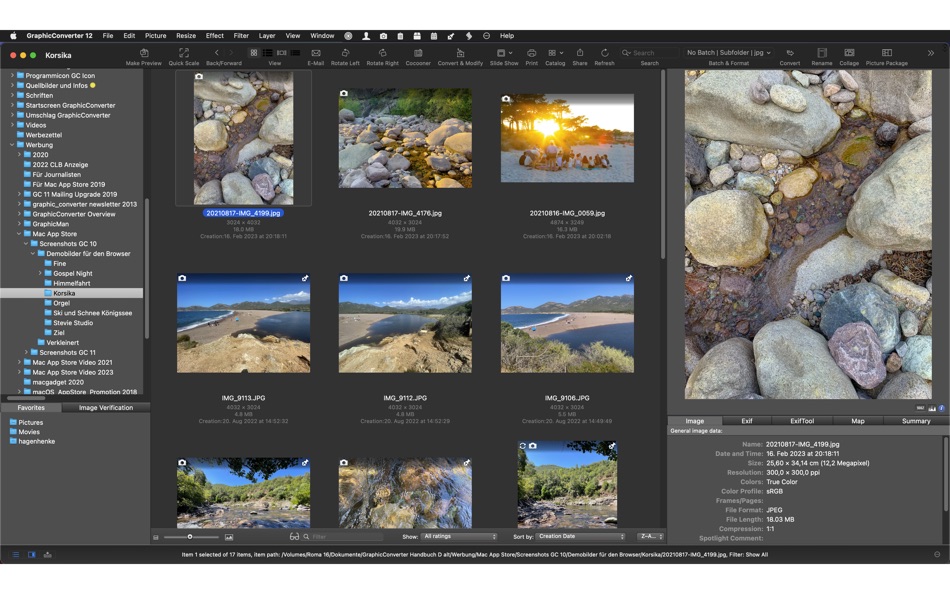
The slide show for viewing and sorting images is a big hit among users. Use standard tools to edit images or display the most important controls in the window.
Professional users love GraphicConverter 12 because of it’s wide range of functions for handling meta data like Exif, IPTC, XMP and GPS. Want to copy the filename into the IPTC description? GraphicConverter 12 will take care of this for you.
You can open over 200 graphic file types and save images in over 80 formats. A simple multiple conversion mode takes care of batch runs. Want to use a batch function to alter the image size or change the color mode to CMYK? Dozens of batch functions are available.
GraphicConverter 12 has everything you would expect from a versatile image processing application for your Mac. Simple usage and far-reaching options await you along with stability and reliability.
In the press, GraphicConverter has been described as a “Swiss Army knife” and as an “all-round wizard for image editing on Macs”. We could not describe it better.
New features of version 12:
Metadata Juggler
With GraphicConverter you have always been able to edit the metadata of your images and move them to other fields. Now it's even easier. With the new Metadata Juggler dialog you can effortlessly combine several editing steps, save them and open them again at any time, just as you already know from the actions. Your advantage: You can, for example, delete parts of the metadata such as exposure time and aperture in one editing step and copy the contents of an IPTC field into another field, etc. The images are not opened and resaved. This means that there is no loss of quality with compressed formats such as JPG and HEIC, and RAW images can also be edited.
Automatic cropping
Just like on iPhones and iPads, you can now automatically crop people and objects and insert them into another image, for example. You won't believe your eyes.
Vector objects
Many have been waiting for this: lines, circles and rectangles can now be created as vector objects, optionally with a shadow. Save your image in GraphicConverter format /gcimgd) to be able to change the vector objects later.
Torn edge improved
If you don't want to show an image in its entirety, for example, because of space limitations, you can make the edge look like it's been torn off. Simply draw a zigzag line with the mouse. GraphicConverter tears off the lower part and adds a shadow. A new feature is that the torn-off part is moved to the right so that you can position it freely.
Import and export all settings
If you move to a different or new Mac, you can now easily take all settings and saved actions, etc. with you.
Multiple conversion: Favorites
In Convert & Modify, you can now save your regularly used folders as favorites.
GainMap gain data
HEIC images can now be saved with GainMap gain data.
Crosshairs
In order to be able to read the mouse position at any time during editing, a crosshair can be switched on in the settings, whose lines always go to the edge of the image. This makes it easier for you to orientate yourself while working.
Convert via drag and drop
Our new dialog makes quick conversions even easier. Drag your images onto the dialog and sit back. GraphicConverter does the conversion and performs an action at the same time if you wish.
Update metadata only
If you have only changed the IPTC/XMP metadata, you can now save these changes without resaving the entire file. This way you avoid unnecessary quality losses with formats like the JPG or the HEIC format.
Optimized for M1, M2 and Intel Macs.
And much more…
Ad
스크린샷


가격 내역
- 현재 가격: $34.99
- 최소: $25.99
- 최대: $34.99
가격 추적
추가 정보
 https://www.lemkesoft.de/en/products/graphicconverter/
새로운 기능
- 버전: 12.5.1
- 업데이트:
- New features
menu Picture: Vector Objects: Select All
• menu View: Position: options for setting a custom base point (for display in the position palette); also possible from the position palette
• menu Effect: Unskew: with largest detected Rectangle
• menu Effect: Unskew: with smallest detected Rectangle
• menu Picture: Vector Objects: Create Objectes from detected Rectangles
• batch action: unskew (ai)
• menu General Metadata: MOVs: setting the frame rate playback flag
Updated features
• enhanced display of system requirements of not available menu items
• settings > browser > metadata 1: new option embed XMP into DNG, use sidecar file for all other RAWs
• settings > browser > display 2: option to disable scroll elasticity in the main area
• options icon in image window: save option with adding string to changed image
• printing: images are reduced to SDR space by default for print because many printer drivers can't handle HDR content correctly - option can be disabled in the printing dialog
• refactored progress bar
• refactored scrolling code
• improved PaperPort import
• libXL
• ExifTool
• set Exif date functions will now set in PDF files the PDF internal creation and modification date
• JPEG XR import: support for half float pixel data
• browser: Hasselblad HEIF file: support for display of metadata
• settings: save: general 1: options for default file format upon save as command for opened and new documents
• browser: send by email command can optional create a zip archive of the images
• Finder Service improved
• zoom during slideshow supports now HDR display
개발자
- Lemke Software GmbH
- 플랫폼: macOS 앱 (5)
- 목록: 2 + 0
- 포인트: 0 + 0 ¡
- 순위: 0
- 댓글: 0
- 할인: 0
- 동영상: 0
- RSS: 구독


포인트 (0)
0 ☹️
순위 (0)
0 ☹️
댓글 (0)
가장 먼저 댓글을 남겨주세요 🌟
«GraphicConverter 12». 플랫폼: macOS. 카테고리: 그래픽 및 디자인. 개발자: «Lemke Software GmbH». 첫 번째 릴리스: . 마지막 업데이트: . 현재 가격: $34.99. 최저 기록 가격: $25.99 (). 최고 기록 가격: $34.99 (). 이 타이틀은 아직 AppAgg에서 평가나 리뷰를 받지 못했습니다. 목록: 공개: 2, 비공개: 0. 사용 가능한 언어: Chinese, Czech, Danish, Dutch, English, French, German, Italian, Japanese, Portuguese, Russian, Spanish, Swedish. AppAgg는 «GraphicConverter 12»의 가격 기록, 평점 및 사용자 피드백을 추적합니다. 향후 할인 및 업데이트 받기: RSS에서 확인할 수 있습니다. AppAgg는 애플리케이션을 호스팅하거나 소프트웨어를 배포하지 않습니다. 모든 상표, 로고 및 스크린샷은 해당 소유자의 자산입니다.
GraphicConverter 12 단축 URL: 복사됨!- 🌟 공유하기
- Mac App Store
유사 항목
-
- Graphic
- macOS 앱: 그래픽 및 디자인 게시자: Picta, Inc
- $29.99
- 목록: 6 + 4 0 0
- 포인트: 0 버전: 3.1 Graphic is a powerful feature-packed vector drawing and illustration application for macOS. "Lightweight vector drawing; easy to use; 9/10" - Mac.AppStorm.net Featured in "Amazing Mac ... ⥯
-
- Graphic Design & Logo Creator
- macOS 앱: 그래픽 및 디자인 게시자: Muhammad Younas
- 무료
- 목록: 1 0 0
- 포인트: 0 버전: 1.4 Graphic Design & Logo Creator giving ready-made templates for Social Media Designs. Application allow you to create amazing multiple posts, instagram posts ,stories, poster templates ... ⥯
-
- Graphic Design Templates
- macOS 앱: 그래픽 및 디자인 게시자: Faisal Musthaq
- * 무료
- 목록: 0 0 0
- 포인트: 0 버전: 1.0 Discover a vast collection of editable templates for all your design needs. From posters and social media posts to business cards, resumes, logos, and YouTube thumbnails, this app ... ⥯
-
- AI SVG Converter - SVG Maker!
- macOS 앱: 그래픽 및 디자인 게시자: ZipoApps
- * 무료
- 목록: 0 0 0
- 포인트: 0 버전: 1.4 AI SVG Converter - Transform Your Images into SVGs Effortlessly Unlock the power of vector graphics with AI SVG Converter! Our app allows you to take any image and convert it into a ... ⥯
-
- WebP image batch converter
- macOS 앱: 그래픽 및 디자인 게시자: Aliaksandr Melnikau
- $5.99
- 목록: 0 0 0
- 포인트: 1 버전: 3.0 WebP image batch converter - allows export to JPEG and JPEG2000 (with compression ratio setting), PNG, BMP, TIFF, GIF and PDF files; - can use multi-threading (multitasking), ... ⥯
- -100%
- SVGViewer - Converter
- macOS 앱: 그래픽 및 디자인 게시자: Abdusodiq Saidov
- ▼ * 무료
$0.99-100% - 목록: 1 + 1 0 0
- 포인트: 14 버전: 1.6 SVGViewer can be used to open SVG graphics files, display image preview and convert opened them into other file formats as .jpg, .tiff, .png, pdf. SVGViewer supports all types of SVG ... ⥯
-
- Art Text 4 - AI Graphic Design
- macOS 앱: 그래픽 및 디자인 게시자: Belight Software, ltd
- * 무료
- 목록: 3 + 3 0 0
- 포인트: 9 버전: 4.5.8 Design eye-catching text based graphics, logos, postcards and greetings with Art Text - a graphic design app that powers up typography and lettering in your desktop publishing, social ... ⥯
-
- AI SVG Converter : SVG Maker
- macOS 앱: 그래픽 및 디자인 게시자: Muhammad Awais
- * 무료
- 목록: 0 0 0
- 포인트: 0 버전: 1.3 AI SVG Maker & Converter Vector Maker AI SVG Studio makes it easy to create professional vector graphics using the power of AI. Convert any image into a clean, scalable SVG file or ... ⥯
-
- Pichon Icons - Graphic Design
- macOS 앱: 그래픽 및 디자인 게시자: Icons8 LLC
- * 무료
- 목록: 0 + 2 0 0
- 포인트: 4 버전: 6.12.0 A vast collection of curated graphics in a tiny app. With Pichon, you no longer have to break your flow when you need an icon, photo, or illustration. They will always be at a click ... ⥯
-
- Snap Converter
- macOS 앱: 그래픽 및 디자인 게시자: Sharpened Productions
- 무료
- 목록: 0 + 1 0 0
- 포인트: 5 버전: 3.1.1 "Snap Converter is a breeze." - Mac AppStorm "A fast, simple, drag-and-drop image converter." - Lifehacker "Batch convert tons of image types with Snap Converter." - Cult Of Mac ... ⥯
-
- WebP Batch Image Converter
- macOS 앱: 그래픽 및 디자인 게시자: Rodrigo Dutra de Oliveira
- $7.99
- 목록: 0 0 0
- 포인트: 0 버전: 1.4 WebP Batch Image Converter allows you to: -> Convert your images between the major types: WebP, Heic, PNG, JPEG, TIFF, BMP... What's WebP? "WebP is a modern image format that provides ... ⥯
-
- Plain Color Converter
- macOS 앱: 그래픽 및 디자인 게시자: Mykola Blokhin
- $0.99
- 목록: 0 0 0
- 포인트: 0 버전: 0.5.1 Plain Color Converter is a desktop application that simplifies the process of converting color models from one format to another. Whether you're a graphic designer, web developer, or ... ⥯
-
- Image Converter Star
- macOS 앱: 그래픽 및 디자인 게시자: 顺华 吕
- 무료
- 목록: 2 + 1 0 0
- 포인트: 1 버전: 5.2.1 Image Converter Star is a straightforward OS X application designed to help you convert various image formats, such as: wdp to jpg. Image Converter Star comes with an intuitive ... ⥯
-
- DrawPad Graphic Designer
- macOS 앱: 그래픽 및 디자인 게시자: NCH Software
- * 무료
- 목록: 0 + 1 0 0
- 포인트: 2 버전: 12.09 With DrawPad Mac OSX, you can easily draw and create all types of graphic design projects. If you are a beginner you can start with a pre-made template of many popular projects like ... ⥯