
Gemte
Vælg det navn, der skal vises i menuen Gemte.
Færdig!
| Udvikler: | Denk Alexandru (66) | ||
| Pris: | * Gratis | ||
| Rangeringer: | 5 (1) | ||
| Kommentarer: | 0 Skriv kommentar | ||
| Lister: | 1 + 0 | ||
| Point: | 8 + 0 ¡ | ||
| +1 Point | |||
Beskrivelse

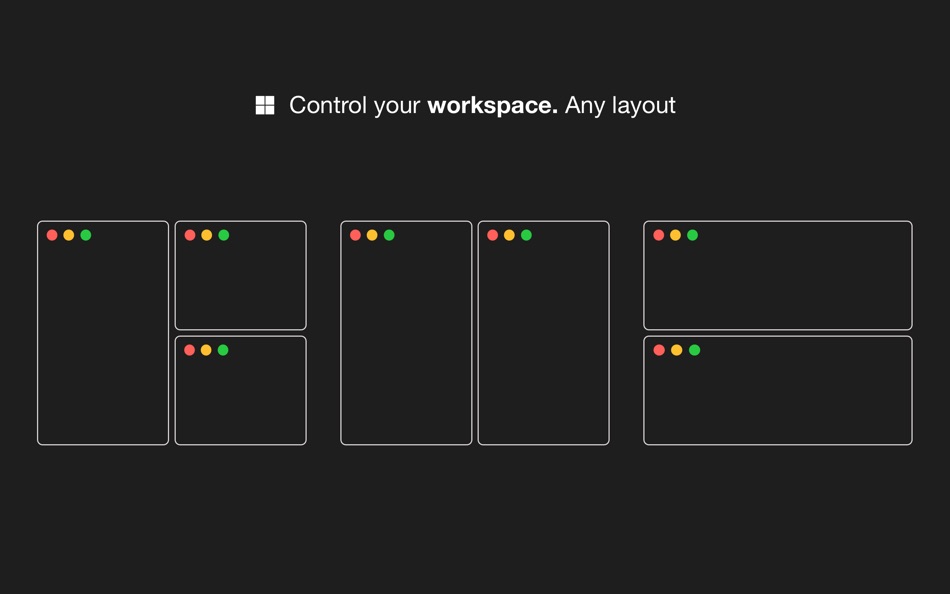
With Windows Grid you can organise your workspace the way you want it. Put windows side by side, tile, stack, compare and multitask. Select from predefined layouts, use keyboard shortcuts or transform windows by dragging them to one of the screen's edges.
HOW TO USE IT
• Use a keyboard shortcut or press the menubar icon to show the possible layouts on your screen or in the Touch Bar. Clicking on any option will move and resize your front window
• You can also transform windows with a keyboard shortcut directly
• Or you can drag any window to one of the screen's edges to resize and snap it fast
FEATURES
• Make multitasking easier and faster
• Show all the possible layouts with a keyboard shortcut (Alt + Enter by default and customisable) or by clicking the menubar icon
• Transform windows with keyboard shortcuts
• Drag windows to any screen edge or corner and snap it half screen
• Put windows side by side, tile, stack, move and resize
• Single app focus: focus on one app, hide the others
• Easy to use and access, quick and elegant, no complicated options
We read your support emails every day, day by day.
Write with confidence any question, feedback or complaint and you will receive an answer in a very short period of time.
We offer two auto-renewing subscription and a one time payment option:
• Basic, a 1 Month subscription
• Premium, a 12 Months subscription
• Lifetime access: one time payment only
Prices may vary by location.
Subscriptions will auto-renew unless canceled.
• Payment will be charged to iTunes Account at confirmation of purchase
• Subscription may be managed by the user and auto-renewal may be turned off by going to the user’s Account Setting after purchase.
• No cancellation of the current subscription is allowed during active subscription period.
• Subscription automatically renews unless auto-renew is turned off at least 24-hours before the end of the current period.
• Your account will be charged for renewal for the amount of your current subscription within 24-hours prior to the end of the current period. All cost for subscriptions are mentioned above.
Privacy Policy
https://alexdenk.eu/subscriptions-privacy-policy.html
Terms of Use
https://alexdenk.eu/subscriptions-terms-of-use.html
Ad
Skærmbilleder


Prishistorie
-
* Indkøb i appen - Nuværende pris: Gratis
- Minimum: Gratis
- Maksimalt: Gratis
Overvåg priser
Yderligere oplysninger
- Udgivelsesdato:
- Kategori:
macOS Apps›Hjælpeprogrammer - Operativsystem:
macOS,macOS 12.0 eller nyere - Størrelse:
20 Mb - Understøttet sprog:
Chinese,English,French,German,Japanese,Portuguese,Spanish - Indholdsklassificering:
4+ - Mac App Store Bedømmelse:
0 - Websted:
 https://alexdenk.eu/
Udvikler
- Denk Alexandru
- Platforme: iOS Apps (21) macOS Apps (45)
- Lister: 12 + 14
- Point: 219 + 1,139 ¡
- Rangeringer: 5 (1)
- Kommentarer: 0
- Rabatter: 0
- Videoer: 0
- RSS: Abonner
Lister (1)
- Windows Snap • Desktop manager

Point (8)
-

- 18,723 cahiba7911@agenra.com
- +1
-
- 534 MichaelTheGeek
- +1
-
- 767 Erin
- +1
-
- 474 QenTox
- +1
-
- 4 Gustavo
- +1
-
- 6 Alain croizier
- +1


Rangeringer (1)
-
- 4 Gustavo
- 5
Kommentarer (0)
Vær den første til at kommentere 🌟
«Windows Snap • Desktop manager». Platform: macOS. Kategori: Hjælpeprogrammer. Udvikler: «Denk Alexandru». Første udgivelse: . Sidste opdatering: . Nuværende pris: gratis. AppAgg-bedømmelse: 5 / 5. Stemmer: 1. Brugeranmeldelser: 1. Lister: offentlige 1, private 0. Sporede punkter: bekræftede 8, indirekte 0. Tilgængelige sprog: Chinese, English, French, German, Japanese, Portuguese, Spanish. AppAgg sporer prishistorik, vurderinger og brugerfeedback for «Windows Snap • Desktop manager». Følg fremtidige rabatter og opdateringer via RSS. AppAgg hoster ikke applikationer eller distribuerer software. Alle varemærker, logoer og skærmbilleder tilhører deres respektive ejere.
Windows Snap • Desktop manager Kort webadresse: Kopieret!- 🌟 Del
- Mac App Store
Lignende
- Ny
- SpaceNames: Desktop Manager
- macOS Apps: Hjælpeprogrammer Ved: Muhmmad Taimoor
- * Gratis
- Lister: 0 0 0
- Point: 1 Version: 1.0 Supercharge your Mac workflow with SpaceNames! Tired of losing track of your open windows across generic "Desktop 1" and "Desktop 2" spaces? SpaceNames is the ultimate, incredibly ... ⥯
-
- Desktop Lens
- macOS Apps: Hjælpeprogrammer Ved: Pavel Kosykh
- $1.99
- Lister: 0 + 1 0 0
- Point: 19 Version: 6.1.5 Desktop Lens is a lightweight desktop magnifier designed for simple and efficient zooming of on-screen content. The app provides a floating lens that magnifies any area of the screen ... ⥯
-
- Desktop Cleaner Pro
- macOS Apps: Hjælpeprogrammer Ved: Cederic Schmid
- * Gratis
- Lister: 0 0 0
- Point: 0 Version: 1.0 Desktop Cleaner Pro helps you keep your Mac organized with one click. It scans your desktop and sorts files into tidy folders by type or date, turning clutter into clarity instantly. ... ⥯
-
- Desktop Wrestler
- macOS Apps: Hjælpeprogrammer Ved: Cyrus M Keck
- $2.99
- Lister: 0 0 0
- Point: 0 Version: 1.9.0 Desktop Wrestler keeps your Mac s desktop and downloads folder tidy without effort. It quietly watches for new files, sorting screenshots and downloads into organized folders. You can ... ⥯
-
- Desktop Space Renamer
- macOS Apps: Hjælpeprogrammer Ved: TGFMedia
- $4.99
- Lister: 0 0 0
- Point: 0 Version: 10.0 Bring order to your Mission Control. Desktop Space Renamer is a lightweight macOS menu bar app that lets you assign custom names and emoji labels to your Desktop Spaces, so you can ... ⥯
-
- Desktop Ghost Pro
- macOS Apps: Hjælpeprogrammer Ved: App Tyrant Corp
- $3.99
- Lister: 0 0 0
- Point: 2 Version: 2.3 Is your desktop overwhelmed with files and folders? Introducing Desktop Ghost Pro the ultimate solution to instantly declutter your workspace. With a single click or a customizable ... ⥯
-
- Desktop Revealer
- macOS Apps: Hjælpeprogrammer Ved: Ori Roniger
- $0.99
- Lister: 0 0 0
- Point: 3 Version: 1.05 Introducing "Desktop Revealer," a user-friendly app that simplifies the process of revealing your desktop with just one click. With Desktop Revealer, you can easily access your desktop ⥯
-
- Desktop Director
- macOS Apps: Hjælpeprogrammer Ved: Shugang Guo
- $1.69
- Lister: 0 0 0
- Point: 0 Version: 2.0.0 Desktop Director is a utility application to help you manage your desktop. 1. Desktop Director can gather your files or folders in the desktop by using the build-in rules (i.e. the ... ⥯
-
- Snap Prompt: AI Chat
- macOS Apps: Hjælpeprogrammer Ved: An Sinh Pham
- Gratis
- Lister: 0 0 0
- Point: 0 Version: 1.2 Snap Prompt brings the power of AI to your fingertips with instant access from anywhere on your Mac. No more switching between apps or losing your train of thought simply press your ... ⥯
-
- Desktop Organizer - File Zones
- macOS Apps: Hjælpeprogrammer Ved: 建利 陈
- * Gratis
- Lister: 0 0 0
- Point: 5 Version: 3.1.2 Desktop Organization Master - Keep Your Workspace Organized 【Core Features】 File Zones: Organize desktop files into designated areas, maintaining a clean and tidy workspace Quick ... ⥯
-
- Desktop Folder - Organize File
- macOS Apps: Hjælpeprogrammer Ved: 裕涛 兰
- Gratis
- Lister: 0 0 0
- Point: 1 Version: 1.0.3 Desktop Folder is a lightweight macOS utility that lets you bookmark frequently used folders and access them directly from your desktop. No more digging through Finder windows just add ⥯
-
- Snap Disk Space Scanner
- macOS Apps: Hjælpeprogrammer Ved: Christopher Williams
- $2.99
- Lister: 0 0 0
- Point: 0 Version: 1.5 Snap Disk Space Scanner is a powerful disk analysis utility for macOS. Instantly scan your entire system to find the largest files, folders, and duplicates consuming your storage. Key ... ⥯
-
- Desktop Calendar Popup
- macOS Apps: Hjælpeprogrammer Ved: 仁超 张
- $1.99
- Lister: 0 0 0
- Point: 3 Version: 3.5.2 Desktop Calendar Popup, a modern desktop calendar and task management app, helps you efficiently manage your daily schedule, meeting reminders, and to-dos. Whether it's for personal ... ⥯
-
- Desktop Blurrifier
- macOS Apps: Hjælpeprogrammer Ved: Foil, Graphics, & More
- $4.99
- Lister: 0 0 0
- Point: 1 Version: 2.0.4 Desktop Blurrifier exists for one reason: to make your desktop pictures blurry so you can see your icons easier! And it keeps you focussed on work with less "desktop distraction". ... ⥯