
기술

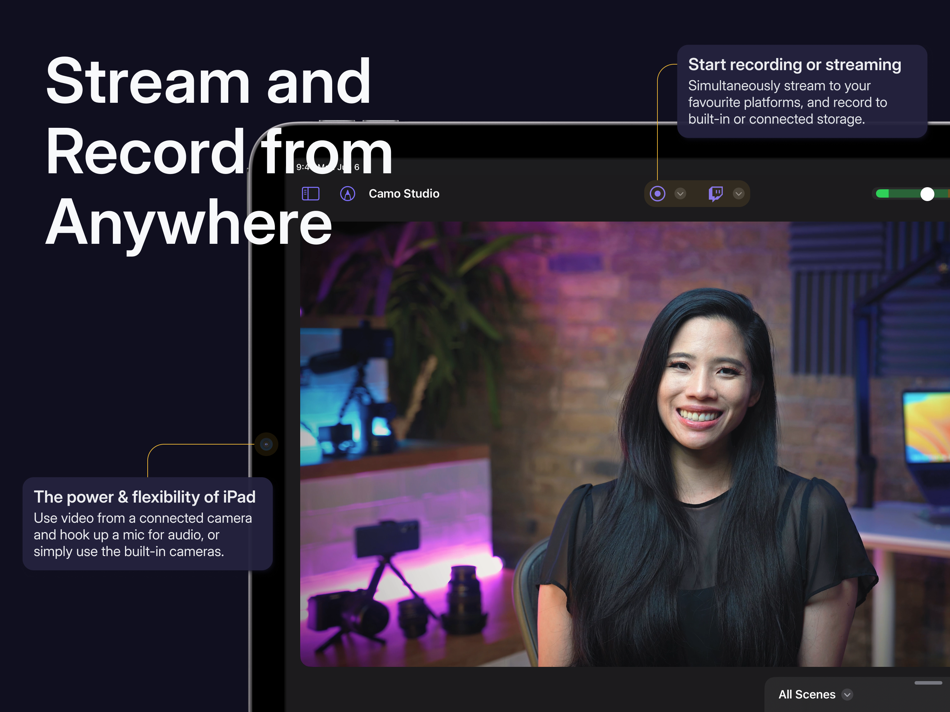
— STREAM & RECORD FROM ANYWHERE —
Connect a camera and mic to your iPad and start streaming on the move, and simultaneously record your video to built-in storage or a connected SD card for editing and uploading high-quality content later.
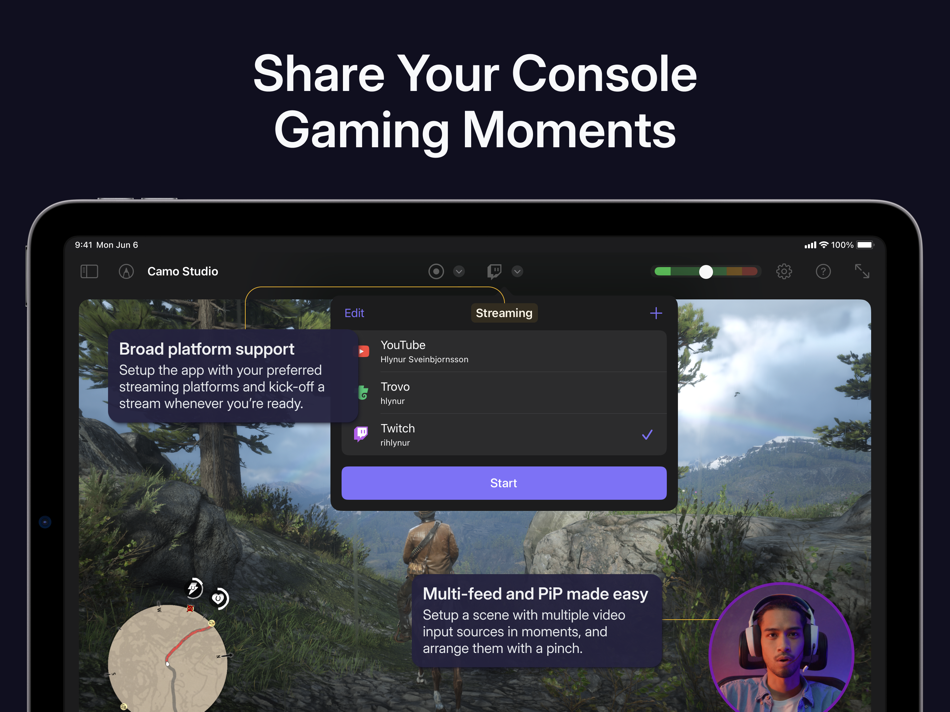
— SHARE YOUR CONSOLE GAMING MOMENTS —
Stream console games with a capture card to Twitch, YouTube, Trovo and more. Setup your scene with tactile controls that make multi-feed and PiP (picture-in-picture) simple to configure. Take your streams to another level with web overlays, and always stay in control with integrated stream controls.
— SEE MORE OF YOUR GAMES & LIVE VIDEO —
Connect your iPad to your portable console, such as a Nintendo Switch, via a dongle or USB hub and use it as a bigger, sharper screen to heighten your gaming experience when you’re on the road. Or, if you’re looking to get a better viewfinder for your camera, plug it into your iPad and use it as a video monitor through Camo Studio.
— SWITCH UP YOUR SCENES —
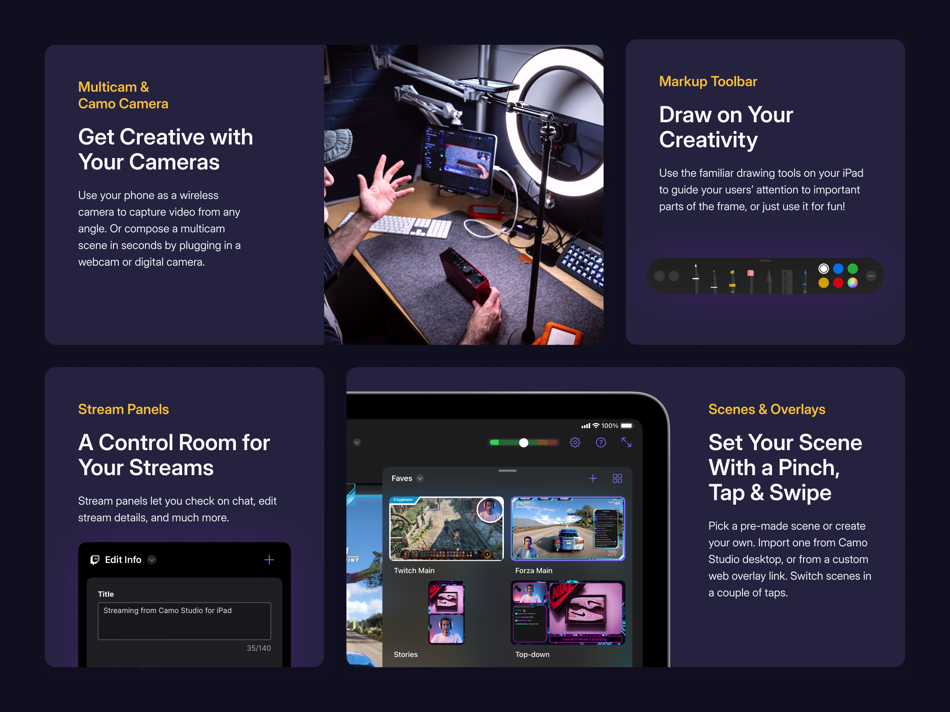
Quickly switch between a collection of built-in or custom scenes with a tap to help engage your audience or show a different shot. Each scene can be configured individually with different cameras, video and audio sources, and output profiles.
— PRO STREAMS WITH WEB OVERLAYS —
Imbue your streams with your personal aesthetic, or a professional touch, with support for web overlays from StreamElements, Streams Labs, Uno Overlays and more. Import template or custom web overlays, with live content, alerts, embedded control panels, and a wide array of other widgets.
— A ONE-APP STREAM CONTROL CENTRE —
Stay in touch with your chat, trigger in-stream events, and check on your mods, all through Camo Studio’s stream panels. Add exactly the panels you need – each is custom to the streaming service you use, and gives you powerful controls for your livestreams.
— POWERFUL VIDEO ENHANCEMENTS & ADJUSTMENTS —
Camo Studio comes loaded with functionality that helps you stand out. Easily apply a subtle “Bokeh” effect to your background, or replace it or remove it entirely! Adjust the framing and orientation of each input feed, including Auto-framing modes that help you stay in-shot.
— MAKE THE MOST OF YOUR IPAD —
Your iPad supports connecting a breadth peripherals, external devices and cameras; making Camo Studio for iPad the most versatile Camo experience yet. M1 and M2 powered iPads can even run Camo Studio in the background while streaming or recording, capturing the device’s screen at the same time, and can integrate with your Stream Deck.
— SECURITY AND PRIVACY FIRST —
Camo Studio transmits your video directly to the streaming services of your choosing, and all recordings are entirely local to your iPad, connected storage device or selected storage service. Your data is your business, not ours.
— NOT ONLY BUT ALSO! —
- Pro-quality video in a range of resolutions, including 4K UHD, 1080p HD, and 720p
- Built-in galleries come preloaded with backgrounds and filters to try in your videos
- Work in landscape or portrait orientations, great for TikTok-style shots at 9:16 aspect ratio
- Use your iPad’s front and back cameras as part of your scene
- Looks great in light and dark mode
- No ads in the app, ever
— WE’RE HERE TO HELP —
With millions of users trying our apps over the last decade, Reincubate is one of the UK’s most-loved software companies.
We’re fanatical about supporting our users, and we’d love to help you make the most of Camo Studio on your iPad. Reach out to us any time: support@reincubate.com
— LEARN MORE —
About us: https://reincubate.com/camo/ipad/
How to make the most of Camo: https://reincubate.com/support/camo-ipad/how-to-use-camo-ipad/
FAQ: https://reincubate.com/support/camo-ipad/camo-ipad-faq/
Ad
스크린샷

가격 내역
- 오늘: 무료
- 최소: 무료
- 최대: 무료
가격 추적
새로운 기능
- 버전: 2.4.1
- 업데이트:
- Today’s update brings a reworked screen capture experience, a new audio input device picker on iPadOS 26, better support for using the app while multitasking, and a host of fixes and improvements.
The changes to screen capture include two key changes:
Firstly, we no longer use the system PiP element to show a secondary video source’s feed when one is set up in the scene, and now render it in the output as it is set up in the scene. This gives more control of how secondary feeds are positioned and presented in your scene and removes a common source of confusion for users.
Second, a screen capture widget is now shown when a recording or stream using screen capture is active and the app is in the background. This is necessary to keep the app’s video processing pipeline running.
For more information on the changes we’re making to screen capture, check out the new guide for the feature in the app – which is shown the first time you go to use it.
As always, let us know what you think by using the in-app feedback mechanism or at support@reincubate.com. We’d love to help and hear from you.
Feature - Support background removal with Camo Camera for iOS
Feature - Allow choice between “aspect fill” and “aspect fit” for video layers
Feature - Support resizing the Studio app window when multitasking
Improvement - Rework the iPad screen capture experience
Improvement - Include audio from video backgrounds in output
Improvement - Improve reliability of YouTube streaming
Improvement - Save in-progress recordings on next launch if Studio is closed unexpectedly
Improvement - Use the new iPadOS 26 audio input picker for simpler microphone selection
Fix - Fix crash when streaming to YouTube and switching audio device
Fix - Fix background videos getting stuck when looping
Fix - Fix no audio if you change the audio source input while streaming
Fix - Fix lag issues on recordings with graphics-heavy games when using screen capture
Fix - Fix undoing an image layer resize stretching the image
Fix - Fix keyboard shortcuts for switching scenes
Fix - Fix out of sync audio/video in recordings
Fix - Fix double tapping to fill canvas respecting aspect ratio lock
Fix - Fix background videos appearing upside down
Fix - Fix streaming to Twitch having delayed audio
Fix - Fix drawing tools causing recordings to cut off
Fix - Fix a crash when rearranging layers
Fix - Fix a crash when updating the audio level indicators
Fix - Fix a crash when automatically updating the current scene thumbnail
Fix - Fix a crash when updating the scene gallery after a scene thumbnail is changed
댓글 (0)
가장 먼저 댓글을 남겨주세요 🌟
개발자
포인트 (1)
-

- 4,800 mohb
- +1

순위 (0)
0 ☹️

리뷰 (0)
첫 번째 리뷰를 남겨보세요 🌟
추가 정보
주소록
 https://reincubate.com/camo/ipad/
 «Camo Studio – Stream & Record». 플랫폼: iOS. 카테고리: 사진 및 비디오. 개발자: «Reincubate». 첫 번째 릴리스: . 마지막 업데이트: . 현재 가격: 무료. 이 타이틀은 아직 AppAgg에서 평가나 리뷰를 받지 못했습니다. 목록: 공개: 1, 비공개: 0. 추적된 포인트: 확인됨: 1, 간접: 1,926. 매장: App Store. 매장 평가: 4.5. 투표: 1,926. 사용 가능한 언어: English. AppAgg는 «Camo Studio – Stream & Record»의 가격 기록, 평점 및 사용자 피드백을 추적합니다. 향후 할인 및 업데이트 받기: RSS에서 확인할 수 있습니다. AppAgg는 애플리케이션을 호스팅하거나 소프트웨어를 배포하지 않습니다. 모든 상표, 로고 및 스크린샷은 해당 소유자의 자산입니다.
Camo Studio – Stream & Record 단축 URL: 복사됨!- 🌟 공유하기
- App Store
Ad
유사 항목
-
- Stream Tracker for Twitch Live
- iOS 앱: 사진 및 비디오 게시자: Edouard Barbier
- 무료
- 목록: 0 + 1 순위: 0 리뷰: 0
- 포인트: 3 + 17,886 (4.7) 0 버전: 2026.1 Stream Tracker helps you track your Twitch progress, compare yourself with other Streamers and promote your stream better on Social Media to get a boost of viewers at every stream. How ⥯
-
- Stream_Vision
- iOS 앱: 사진 및 비디오 게시자: Yukon Advanced Optics Worldwide
- 무료
- 목록: 1 + 0 순위: 0 리뷰: 0
- 포인트: 0 + 397 (3.9) 0 버전: 4.6.5 Stream Vision is an application that provides connection of your mobile devices with observation devices of Yukon or Pulsar via integrated WiFi interface. The application provides full ⥯
-
- Social Print Studio
- iOS 앱: 사진 및 비디오 게시자: Social Print Studio
- 무료
- 목록: 0 + 0 순위: 0 리뷰: 0
- 포인트: 0 + 26,102 (4.8) 0 버전: 18.3.2 The best way to print your iPhone and Instagram photos! Get quality prints, photobooks and more, delivered direct to your door - wherever you are in the world. Print Studio has been ... ⥯
-
- Record In - V Screen Recorder
- iOS 앱: 사진 및 비디오 게시자: Muhammad Abdullah
- 무료
- 목록: 0 + 0 순위: 0 리뷰: 0
- 포인트: 3 + 332 (4.4) 0 버전: 3.3 The all-in-one screen recording app is designed to meet your screen video recording needs. Whether you're a content creator, a gamer, or simply looking to record your screen for any ... ⥯
-
- FaceSwap Studio: Video + Photo
- iOS 앱: 사진 및 비디오 게시자: FaceSwap Creative Studio. AI Face Swap Video - change, replace & swap faces
- 무료
- 목록: 0 + 0 순위: 0 리뷰: 0
- 포인트: 1 + 1,432 (4.1) 0 버전: 2.2.9 Turn Your Dreams into Reality with Face Swap Studio! Swap faces effortlessly using our exclusive, high-quality templates, bringing a fun and creative experience like never before. Our ... ⥯
-
- AI Studio - Video Maker
- iOS 앱: 사진 및 비디오 게시자: App Studio Yazılım Hizmetleri LTD STI
- 무료
- 목록: 0 + 0 순위: 0 리뷰: 0
- 포인트: 2 + 1,906 (4.5) 0 버전: 2.4 Create amazing AI Videos with the most advanced AI Video Generator. AI Video uses the latest AI models to help you generate AI videos. It's very easy to create stunning AI-generated ... ⥯
-
- Glitch Art Studio: Cam Effects
- iOS 앱: 사진 및 비디오 게시자: NET Sigma
- 무료
- 목록: 1 + 1 순위: 0 리뷰: 0
- 포인트: 4 + 14,359 (4.7) 0 버전: 5.42 Add glitches to your photos and videos! Glitch Art Studio offers an extensive library of exclusive effects to distort your photos and videos in creative ways. Effects: - Analog Noise - ⥯
-
- Photo Studio by Square
- iOS 앱: 사진 및 비디오 게시자: Block, Inc.
- 무료
- 목록: 0 + 0 순위: 0 리뷰: 0
- 포인트: 0 + 3,817 (4.8) 0 버전: 1.4.7 Just snap, style, and sell. That s how remarkably easy the Square Photo Studio app is. Snap an ecommerce photo. Style your photo and remove the background. Sell your items instantly ... ⥯
-
- LUT Studio: Color Grade App
- iOS 앱: 사진 및 비디오 게시자: Georgy Romelashvili
- 무료
- 목록: 0 + 0 순위: 0 리뷰: 0
- 포인트: 3 + 415 (4.7) 0 버전: 3.0.8 LUT Studio - Cinematic Video LUTs & Film Look Editor Transform your footage with cinematic color grading using LUT Studio - the ultimate video color correction and editing app for ... ⥯
-
- Plotagon Studio
- iOS 앱: 사진 및 비디오 게시자: Plotagon
- 무료
- 목록: 0 + 0 순위: 0 리뷰: 0
- 포인트: 0 + 541 (4.5) 0 버전: 1.6.0 With this app, we aspire to enable anyone with an idea to effortlessly make professional-looking animated videos. Our customers have used this app to create fan fiction, original ... ⥯
-
- Stop Motion Studio
- iOS 앱: 사진 및 비디오 게시자: CATEATER, LLC
- 무료
- 목록: 2 + 0 순위: 0 리뷰: 0
- 포인트: 1 + 72,486 (4.6) 0 버전: 25.12 Join 25 million creators making stop motion animation with ease. Stop Motion Studio is the Apple-featured app for creating stunning stop motion films. Enjoy powerful creative tools ... ⥯
-
- Screen Recorder & Record Video
- iOS 앱: 사진 및 비디오 게시자: Blue Bike LLC
- 무료
- 목록: 1 + 0 순위: 0 리뷰: 0
- 포인트: 2 + 3,693 (4.3) 0 버전: 11.4 Record your screen no matter which app are you using! Film your favorite videogames, and create extraordinary gameplays; You are also able to record your reaction to any video in your ... ⥯
-
- Green Screen Live Video Record
- iOS 앱: 사진 및 비디오 게시자: Yohann Taieb
- 무료
- 목록: 0 + 0 순위: 0 리뷰: 0
- 포인트: 1 + 2,499 (3.7) 0 버전: 16.13 Record Videos with Any Background Effortlessly with Green Screen Live Recording Join over 12 million users who trust Green Screen Live Recording to create stunning videos with seamless ⥯
-
- Retrica: Vintage Camera Studio
- iOS 앱: 사진 및 비디오 게시자: Retrica, Inc.
- * 무료
- 목록: 10 + 4 순위: 5 (1) 리뷰: 0
- 포인트: 3 + 33,622 (4.7) 0 버전: 9.1.1 Transform Your Moments with Retrica Retrica is your creative companion for turning everyday moments into timeless memories. From capturing the vibrant motion of daily life to embracing ⥯