
Gespeichert
Wähle den Namen, der im Menü Gespeichert angezeigt werden soll.
Fertig!
| Entwickler: | Ram Patra (7) | ||
| Preis: | $2.99 | ||
| Klassifizierungen: | 5 (1) | ||
| Kommentare: | 0 Kommentar posten | ||
| Listen: | 1 + 0 | ||
| Punkte: | 2 + 0 ¡ | ||
| Mac App Store | |||
Beschreibung

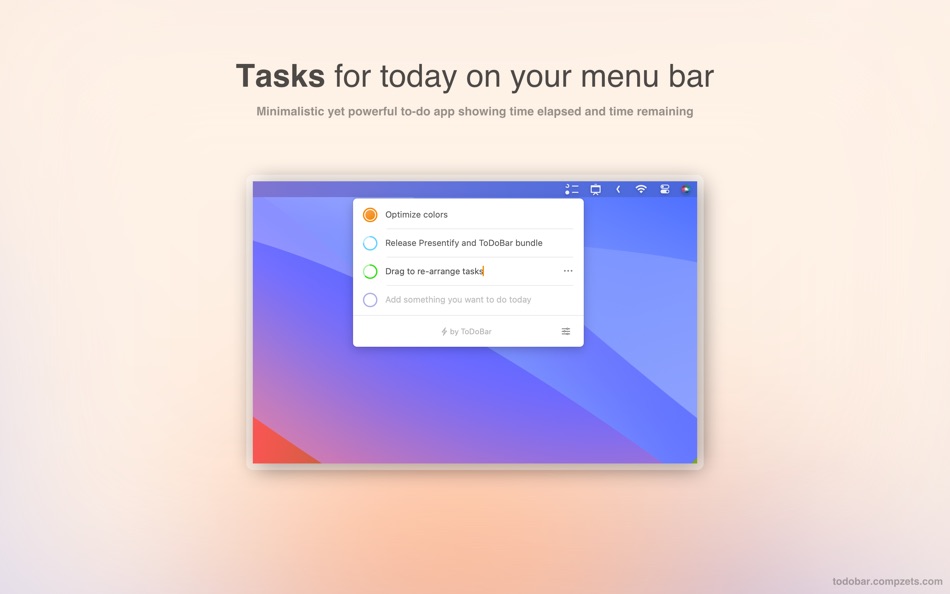
ToDoBar offers a seamless way to manage your tasks for today and boost your efficiency. Being a menu bar app, it keeps things clutter-free, providing quick access to your tasks without disrupting your workflow. It comes packed with powerful features, allowing you to create, prioritize, and check off tasks smoothly. It sends you notifications, ensuring you never miss an important deadline. Its simple and intuitive interface with customizable options makes it a versatile tool for professionals, students, or anyone looking to supercharge their productivity.
FEATURES
• Minimalistic design for distraction-free task management.
• Simply type in your task and press Enter to add it to the list.
• Quick access to your to-do list from the menu bar.
• Visualize the elapsed and remaining time for each task with an elegant, colourful ring.
• Notifications to complete tasks before their deadline.
• See the number of pending tasks for today on your menu bar (instead of the app icon).
• Control each task exclusively.
• Optionally display the next pending task on your menu bar.
• Reorder tasks easily by clicking on the up or down arrow.
• Lots of customizable options to make the app your own.
• Export the data as a CSV file.
• All data stays on the device. Nothing gets uploaded to the cloud.
• A one-time payment for lifetime access.
ToDoBar is your go-to solution if you're looking for a simple app to jot down your tasks for today without worrying too much about folders, sub-folders, notes, tags, etc.
PRO-TIP
• Go to System Settings > Notifications > ToDoBar and change the notification type to "Alert" if you want sticky notifications.
CONTACT
• Click on the support link here - https://todobarapp.com
• Reach out to the developer on X - https://x.com/rampatra_
Ad
Screenshots


Preisentwicklung
- Heute: $2.99
- Mindestens: $1.99
- Maximale: $2.99
Preise beobachten
Neue Funktionen
- Version: 2.1.0
- Aktualisiert:
- • UX improvements
• Fix bug where the notifications were not shown properly in higher macOS versions
Weitere informationen
- Veröffentlichungsdatum:
- Kategorie:
macOS Apps›Produktivität - Betriebssysteme:
macOS,macOS 13.0 oder höher - Größe:
1 Mb - Unterstützte Sprachen:
Chinese,English,German,Russian,Slovak,Spanish - Altersfreigabe:
4+ - Mac App Store Bewertung:
0 - Webseite:
 https://todobarapp.com
Entwickler
- Ram Patra
- Plattformen: iOS Spiele (1) macOS Apps (6)
- Listen: 1 + 3
- Punkte: 10 + 0 ¡
- Klassifizierungen: 5 (4)
- Kommentare: 0
- Rabatte: 0
- Videos: 0
- RSS: Abonnieren
Listen (1)
- ToDoBar-Tasks on your menu bar

Punkte (2)
-

- 1,808 sam
- +1
-
- 534 MichaelTheGeek
- +1


Klassifizierungen (1)
-
- 23 Ram Patra
- 5
Kommentare (0)
Seien Sie der Erste, der einen Kommentar abgibt 🌟
«ToDoBar-Tasks on your menu bar». Plattform: macOS. Kategorie: Produktivität. Entwickler: «Ram Patra». Erste Veröffentlichung: . Letzte Aktualisierung: . Aktueller Preis: $2.99. Niedrigster aufgezeichneter Preis: $1.99 (). Höchster aufgezeichneter Preis: $2.99 (). AppAgg-Bewertung: 5 / 5. Stimmen: 1. Listen: öffentliche 1, private 0. Verfolgte Punkte: bestätigte 2, indirekte 0. Verfügbare Sprachen: Chinese, English, German, Russian, Slovak, Spanish. AppAgg verfolgt den Preisverlauf, Bewertungen und Benutzerfeedback für «ToDoBar-Tasks on your menu bar». Verfolgen Sie zukünftige Rabatte und Updates über RSS. AppAgg hostet keine Anwendungen und vertreibt keine Software. Alle Marken, Logos und Screenshots gehören ihren jeweiligen Eigentümern.
ToDoBar-Tasks on your menu bar Kurz-URL: Kopiert!- 🌟 Teilen
- Mac App Store
Ähnliches
-
- DuDuReminder: Menu Bar Tasks
- macOS Apps: Produktivität Von: 栋 王
- * Kostenlos
- Listen: 0 + 0 0 0
- Punkte: 1 + 0 Version: 1.3.2 Your Apple Reminders, always one click away - right in your Mac's menu bar. INSTANT MENU BAR ACCESS Stop switching between apps. Click the menu bar icon to instantly view, complete, ... ⥯
-
- Daily Menu - To-do and Tasks
- macOS Apps: Produktivität Von: Marcos Morais
- Kostenlos
- Listen: 0 + 0 0 0
- Punkte: 2 + 0 Version: 1.0.1 To-Do Lists and Tasks can be frightening, and even more if you have to always keep track of what you have to do and how many tasks you have to tackle. That's where Daily Menu comes in ... ⥯
-
- Singularity: To Do List, Tasks
- macOS Apps: Produktivität Von: SINGULARITYAPP LLP
- * Kostenlos
- Listen: 0 + 0 0 0
- Punkte: 9 + 0 Version: 12.1.3 SingularityApp brings together everything you need to manage your tasks, projects, and daily schedule. A to-do list and calendar, daily planner and notepad, habit tracker, checklist, ... ⥯
-
- SideList: Quick Menu Bar Tasks
- macOS Apps: Produktivität Von: Francisco Sierra Cuerva
- $2.99
- Listen: 0 + 0 0 0
- Punkte: 0 + 0 Version: 1.1.2 Stop switching windows just to jot down a task. SideList lives in your menu bar for instant, distraction-free task management. Capture ideas before they fade click, type, done. Most ... ⥯
-
- Sublime To Do: Focused Tasks
- macOS Apps: Produktivität Von: Daniel Dewar
- Kostenlos
- Listen: 0 + 0 0 0
- Punkte: 3 + 0 Version: 1.5.1 Sublime Todo brings the beloved efficiency of Sublime Text to task management. With its clean, monospaced interface and keyboard-first design, it's the perfect todo app for developers ... ⥯
-
- Menu AI: Ask AI in menu bar.
- macOS Apps: Produktivität Von: INII Co., Ltd.
- * Kostenlos
- Listen: 0 + 0 0 0
- Punkte: 1 + 0 Version: 1.2.0 Menu AI - Ask AI in menu bar. Menu AI is a powerful AI chat assistant that lives in your menu bar, providing instant access to both GPT and Claude AI capabilities. With its sleek and ... ⥯
-
- Menu Bar Quick Calc
- macOS Apps: Produktivität Von: Mark Huber
- $0.99
- Listen: 0 + 0 0 0
- Punkte: 0 + 0 Version: 1.0 Menu Bar Calculator is a lightweight, always-accessible calculator that lives in your Mac's menu bar. Perfect for quick calculations without interrupting your workflow. Features: ... ⥯
-
- Menu Bar Calendar
- macOS Apps: Produktivität Von: Sindre Sorhus
- Kostenlos
- Listen: 1 + 1 0 0
- Punkte: 4 + 0 Version: 1.7.0 Quickly access a monthly calendar from your menu bar. You can click a date in the calendar to reveal it in the Calendar app or Google Calendar. The calendar displays dates and days in ... ⥯
- Neuer
- Menu Quotes
- macOS Apps: Produktivität Von: Tyler Durette
- Kostenlos
- Listen: 0 + 0 0 0
- Punkte: 1 + 0 Version: 1.0 A lightweight, simple app built natively for macOS Tahoe. Keeps and rotates through your favorite quotes in your menu bar throughout the day. Open source on GitHub: ... ⥯
-
- Menu QuickNote
- macOS Apps: Produktivität Von: Oyvind Snekkestad
- * Kostenlos
- Listen: 0 + 0 0 0
- Punkte: 0 + 0 Version: 1.1.2 Menu QuickNote - Quick Notes for Your Mac Menu Bar Transform your note-taking experience with Menu QuickNote, the elegant and lightweight app that puts beautiful, colorful notes right ... ⥯
-
- Menu Bar Timer
- macOS Apps: Produktivität Von: Efe Ertugrul
- $0.99
- Listen: 0 + 0 0 0
- Punkte: 1 + 0 Version: 2.4.5 Menu Bar Timer adds a Stopwatch or a Timer to your menu bar so you can keep track of time whatever you've been working on without an extra app icon on your dock. You can choose ... ⥯
-
- Any.do for Safari
- macOS Apps: Produktivität Von: Any.DO
- Kostenlos
- Listen: 1 + 0 0 0
- Punkte: 0 + 0 Version: 4.4.8 Easily manage your personal tasks, family projects, and team s work with Any.do for Safari. Trusted by +40M people. The world's #1 to-do list by WSJ, Any.do is trusted by over 40 ... ⥯
-
- InstaCal - Menu Bar Calendar
- macOS Apps: Produktivität Von: Higher Bar, LLC
- $4.99
- Listen: 1 + 2 0 0
- Punkte: 2 + 0 Version: 1.9.8 InstaCal is the missing menu bar calendar macOS deserves. InstaCal is an affordable, yet powerful calendar app that puts all your events right at your fingertips, always available in ... ⥯
-
- Menu bar Launcher
- macOS Apps: Produktivität Von: Pawan Dixit
- $1.99
- Listen: 1 + 1 0 0
- Punkte: 3 + 0 Version: 1.4 This is a simple menu bar utility to keep your frequent Files and Apps right into the menu bar so that you can quickly launch them when you want to work on them without locating then ... ⥯