
Kaydedilenler
Kaydedilenler menünüzde görünecek adı seçin.
Tamamlandı!
| Geliştirici: | Mayank Sharma (2) | ||
| Fiyat: | $12.99 | ||
| Sıralamalar: | 0 | ||
| Yorumlar: | 0 Yorum gönderin | ||
| Puan: | $7,540 | ||
| Listeler: | 3 + 2 | ||
| Puanlar: | 3 + 0 ¡ | ||
| +1 Puanlar | |||
Açıklama

Enlarge images without losing quality (and actually adding more quality!). It's almost like magic!
Featuring an intuitive interface, Upscayl allows users to easily upload their images and witness the remarkable transformation brought about by its advanced upscaling algorithms. Whether you're dealing with low-resolution images or looking to improve the clarity and sharpness of your visuals, Upscayl is your go-to solution.
Key Features:
1. AI-powered Image Upscaling: Leverage the power of cutting-edge artificial intelligence to enhance the resolution of your images while preserving their original quality.
2. User-Friendly Interface: Enjoy a seamless and intuitive user experience with simple controls and straightforward navigation, making image upscaling accessible to all.
3. AI-powered Batch Upscaling: Efficiently process multiple images at once, saving time and effort while maintaining optimal upscaling quality.
4. Custom Model Additions: Integrate and utilize custom AI models, providing flexibility for users to leverage specific algorithms for their unique upscaling requirements.
5. Side-by-Side Comparison View: Visualize the before and after effects of upscaling with a convenient side-by-side comparison view, allowing users to assess the transformation accurately.
6. Double Upscaling: Achieve even higher resolution results with the option to apply a double upscaling feature, ideal for demanding projects that require the utmost precision and clarity.
7. Compatibility: Upscayl is optimized for MacOS, ensuring smooth performance and compatibility with various MacOS versions, guaranteeing a reliable upscaling experience.
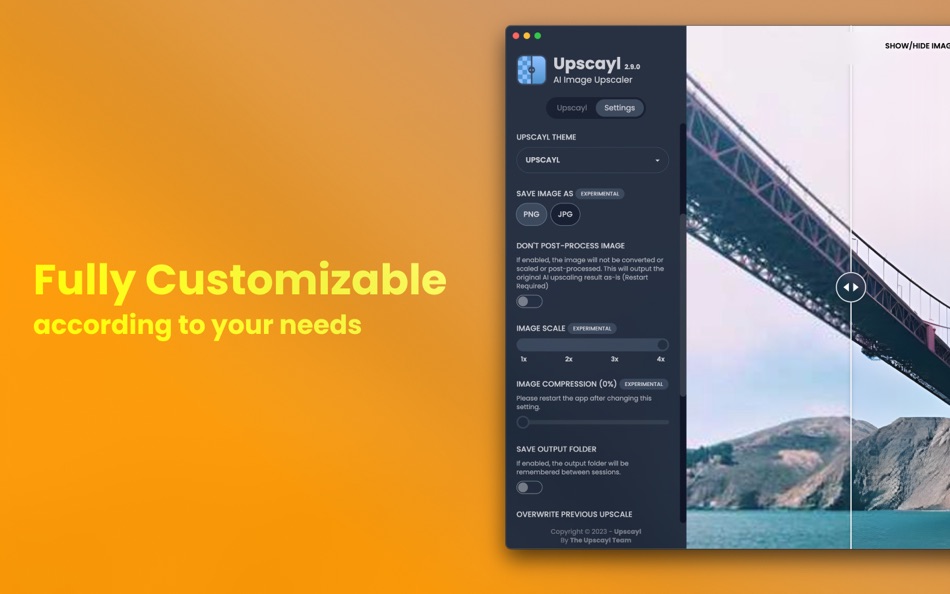
8. Customization Options: Tailor your image upscaling preferences with customizable settings, allowing you to adjust parameters according to your specific requirements.
Upscayl is designed to meet the diverse needs of image upscaling, whether you're an amateur photographer, graphic designer, or simply someone passionate about refining visual content. Download Upscayl now and experience the seamless integration of advanced AI technology, user-friendly design, and comprehensive customization options, all in one powerful app.
Ekran görüntüleri


Fiyat Geçmişi
- Güncel fiyat: $12.99
- En az: $12.99
- Maksimum: $19.99
Fiyatları takip et
AppAgg Puanı
Bu uygulama için tahmini puan
$7,540
Daha yüksek puanlar genellikle AppAgg üzerinde daha güçlü sinyaller anlamına gelir.
Şunlara göre: 🔥 popülerlik · ⭐ kullanıcı puanları · 🕒 güncellik · 🏷️ fırsatlar · 🏬 mağaza verileri · 👥 topluluk etkinliği
Bu puan yalnızca bilgilendirme amaçlıdır. Gerçek bir fiyat, satış teklifi veya piyasa değerlemesi değildir.
Kısa URL: Kopyalandı!
Ad
Yenilikler
- Sürüm: 2.15.0
- Son güncelleme:
- Exciting New Updates in Upscayl New Year Update!
- Revamped Interface: An all-new, refreshed UI for an even better experience.
- Multi-Language Support: Upscayl now speaks your language! We've added translations for English, Russian, Japanese, French, Spanish, Portuguese, Vietnamese, Indonesian, and Chinese.
- New AI Model – High Fidelity: Introducing a state-of-the-art model designed for unparalleled quality.
- Lens Viewer: Explore your images like never before with the brand-new Lens Viewer feature.
- Clipboard Integration: You can now paste and upscale images directly from your clipboard—special thanks to @abhishek-gaonkar for making this possible.
- Onboarding Dialog: A guided setup to help you configure Upscayl before getting started.
- Usage Stats: View stats like total images upscaled, average processing time, and more in the right sidebar.
- Codebase Overhaul: The codebase has been refactored for improved performance and maintainability.
- UI Enhancements: The "More Options" drawer in the right sidebar has been updated for a cleaner, more intuitive look.
- TTA Mode: Added for advanced users—Google it if you're curious!
- System Info: Check detailed system information and logs in the Settings tab.
- Model Selection Preview: AI model selection now includes example images and descriptions for easy understanding.
- JFIF Format Support: Support for JFIF image format is now available.
- Auto-Update Settings: You can now disable the auto-update check directly from the app.
- You can now email Upscayl Support with logs and details pre-filled, directly from the app.
- Help Us Improve: Optionally share anonymized stats like GPU models and usage data to help improve Upscayl—no personal data is collected.
- Tutorial Video: A short introduction video has been added to the onboarding screen to get you started.
- Language Switcher: Quickly switch languages during onboarding.
- Improved Error Screen: Enhanced error handling for client-side issues.
Every detail has been carefully crafted to enhance your experience. Thank you for being a part of Upscayl's journey!
Ek Bilgi
- Satışa çıkış tarihi:
- Kategori:
macOS Uygulamalar›Fotoğraf ve Video - İşletim Sistemleri:
macOS,macOS 12.0.0 ve sonrası - Boyut:
545 Mb - Desteklenen diller:
English - İçerik Derecelendirmesi:
4+ - Mac App Store Kullanıcı Oyu:
0 - Web sitesi:
 https://upscayl.org
Geliştirici
- Mayank Sharma
- Platformlar: iOS Uygulamalar (1) macOS Uygulamalar (1)
- Listeler: 3 + 2
- Puanlar: 3 + 0 ¡
- Sıralamalar: 0
- Yorumlar: 0
- İndirimler: 0
- Video: 0
- RSS: Abone ol
Listeler (3)
- Upscayl


Puanlar (3)
-

- 3,766 Dragon
- +1
-
- 321 pantype
- +1
-
- 697 Leonard Hofstadter
- +1


Sıralamalar (0)
0 ☹️
Yorumlar (0)
İlk yorum yapan siz olun 🌟
«Upscayl». Platform: macOS. Kategori: Fotoğraf ve Video. Geliştirici: «Mayank Sharma». İlk sürüm: . Son güncelleme: . Güncel fiyat: $12.99. Kaydedilen en düşük fiyat: $12.99 (). Kaydedilen en yüksek fiyat: $19.99 (). Bu başlık henüz AppAgg'de derecelendirme veya inceleme almadı. Listeler: genel 3, özel 2. Takip edilen noktalar: onaylandı 3, dolaylı 0. Mevcut diller: English. AppAgg, «Upscayl» için fiyat geçmişini, derecelendirmeleri ve kullanıcı geri bildirimlerini takip eder. Gelecekteki indirimler ve güncellemeler: RSS. AppAgg uygulamaları barındırmaz veya yazılım dağıtmaz. Tüm ticari markalar, logolar ve ekran görüntüleri ilgili sahiplerine aittir.
Upscayl Kısa URL: Kopyalandı!- 🌟 Paylaş
- Mac App Store
Benzerleri
- -100%
- After Focus - Photo Background Blur Bokeh Effects
- macOS Uygulamalar: Fotoğraf ve Video Göre: 秀英 朱
- ▼ Ücretsiz
$2.99-100% - Listeler: 0 + 1 0 0
- Puanlar: 32 + 0 Puan: $11k Sürüm: 1.5.5 On Sale. Original $29.99. Don't forget to download "Super PhotoCut" - A great photo background eraser. 50% OFF! After Focus professionally adds focus and depth to your photos without ... ⥯
- -100%
- My Splash Effects
- macOS Uygulamalar: Fotoğraf ve Video Göre: effectmatrix
- ▼ Ücretsiz
$2.99-100% - Listeler: 0 + 1 0 0
- Puanlar: 22 + 0 Puan: $10k Sürüm: 1.6.0 On sale. Original $9.99. Download it Now. Don't forget to download "Super PhotoCut" which replace photo background within 1 min. 50% OFF! Do you like digital animation or wants to make ⥯
-
- Hot Viewer
- macOS Uygulamalar: Fotoğraf ve Video Göre: Jupiter Valley LLC
- Ücretsiz
- Listeler: 1 + 2 0 0
- Puanlar: 16 + 0 Puan: $6k Sürüm: 1.6.1 Hot Viewer is keyboard and mouse controlled viewer intended to make viewing of files easy. Inspired by good ol' Irfan view it uses simply shortcuts: - space to move to next file in ... ⥯
-
- Movavi Screen Recorder
- macOS Uygulamalar: Fotoğraf ve Video Göre: Movavi Emea LLC
- * Ücretsiz
- Listeler: 0 + 1 0 0
- Puanlar: 13 + 0 Puan: $9k Sürüm: 24.7.1 Record any screen action you want with our handy app Movavi Screen Recorder! Capture video of your display and grab sound. Add a personal touch with webcam overlays. Engage your ... ⥯
-
- Minitube for YouTube
- macOS Uygulamalar: Fotoğraf ve Video Göre: Flavio Tordini
- * Ücretsiz
- Listeler: 0 + 1 0 0
- Puanlar: 13 + 0 Puan: $5k Sürüm: 4.0.3 Minitube is a lightweight and elegant YouTube application for your Mac. With Minitube you can watch YouTube videos in a new way: you type a keyword, Minitube gives you an endless video ⥯
-
- Photo Pixel Filter
- macOS Uygulamalar: Fotoğraf ve Video Göre: Jan Nutbroek
- Ücretsiz
- Listeler: 0 + 2 0 0
- Puanlar: 11 + 0 Puan: $7k Sürüm: 1.9 Unleash Your Creativity with Our User-Friendly Photo Editing App! Master the art of photo editing with ease using our intuitive application, designed to eliminate the learning curve. ... ⥯
-
- Normally
- macOS Uygulamalar: Fotoğraf ve Video Göre: Gustav Gaidelevicius
- * Ücretsiz
- Listeler: 0 + 1 0 0
- Puanlar: 11 + 0 Puan: $6k Sürüm: 2026.04.24 If you download videos, you know the problem: audio levels are all over the place. One file barely audible, the next painfully loud. Normally fixes this automatically. Point it at your ⥯
-
- Video Subtitler
- macOS Uygulamalar: Fotoğraf ve Video Göre: Anand
- Ücretsiz
- Listeler: 0 + 1 0 0
- Puanlar: 10 + 0 Puan: $4k Sürüm: 3.0 Super simple to use. Just 3 steps: 1. Drag & Drop any video. 2. Add Subtitle(s). 3. Save Video. That s it! Two Modes. Switch between them just with a click of a button. Hard Subtitle ... ⥯
-
- Image Converter - Kompressor
- macOS Uygulamalar: Fotoğraf ve Video Göre: Lucas Fischer
- * Ücretsiz
- Listeler: 0 + 2 0 0
- Puanlar: 9 + 0 Puan: $8k Sürüm: 1.3.1 Kompressor makes image conversion a breeze! For ease of use, you can drag n' drop to convert between over 50 supported image formats like JPEG, HEIC, AVIF, WebP, PNG, camera raw ... ⥯
-
- HistoryInFilm
- macOS Uygulamalar: Fotoğraf ve Video Göre: OurBigAdventure, LLC
- Ücretsiz
- Listeler: 0 + 1 0 0
- Puanlar: 9 + 0 Puan: $6k Sürüm: 1.9 Cataloging your film archive has never been easier, with HistoryInFilm you can mark scene breaks and annotate your films with a clean visual interface. After annotating you can export ... ⥯
Şunları da beğenebilirsiniz
Son görüntülenenler
Son güncelleme:
AppAgg'de kullanabileceğiniz arama operatörleri