
저장됨
저장됨 메뉴에 표시할 이름을 선택하세요.
완료!
| 개발자: | Linearity GmbH (2) | ||
| 가격: | * 무료 | ||
| 순위: | 0 | ||
| 댓글: | 0 댓글 게시 | ||
| 목록: | 2 + 2 | ||
| 포인트: | 3 + 150 (4.5) ¡ | ||
| App Store | |||
기술

Linearity Move is a motion design app for iPad and Mac that transforms static visuals into dynamic animations — fast, intuitive, and built for designers, marketers, and anyone who wants to create professional motion graphics without a steep learning curve.
Whether you're creating motion graphics for brand visuals, social media, explainer videos, or logo reveals, Move gives you everything you need to design, animate, and export — all in one motion design tool.
CREATE MOTION GRAPHICS EFFORTLESSLY
Turn vector art, illustrations, or text into expressive motion graphics in just a few steps. Start with artwork from Figma, Illustrator, Sketch, or Linearity Curve — Move keeps all your layers and groups intact for total control over every element.
Adjust keyframes directly on the canvas to craft your motion design frame by frame. Every change updates in real time so you can fine-tune timing and rhythm as you work.
POWERFUL MOTION DESIGN CONTROLS
From simple fades to complex morphs, Move gives you professional motion graphics tools that feel intuitive.
Morphing: Transform one shape into another for seamless logo or icon animations.
Pinning: Anchor start and end points for fluid, natural movement.
Animation presets: Apply ready-made motion effects with a single tap, then customize every detail.
Custom timing curves: Fine-tune easing with precise numeric controls for a cinematic feel.
Real-time keyframing: Every tweak updates automatically on the canvas.
Add images, videos, and audio with full timeline control over music, sound effects, and voiceovers to create rich motion graphics with sound.
ONE INTERFACE FOR DESIGN AND ANIMATION
Switch between Design mode to edit shapes, nodes, and text, and Animate mode to craft motion graphics with precise control. Import your Linearity Curve files directly to start animating without rebuilding your designs.
No need to jump between separate design and motion graphics apps — everything happens in one intuitive interface optimized for touch and desktop.
MOTION DESIGN FOR EVERYONE
Choose from ready-made motion graphics templates for social stories, ads, product demos, and logo animations to get started in minutes. Every template is fully editable, so you can adapt it to your brand and publish fast.
FLEXIBLE EXPORTS FOR EVERY PLATFORM
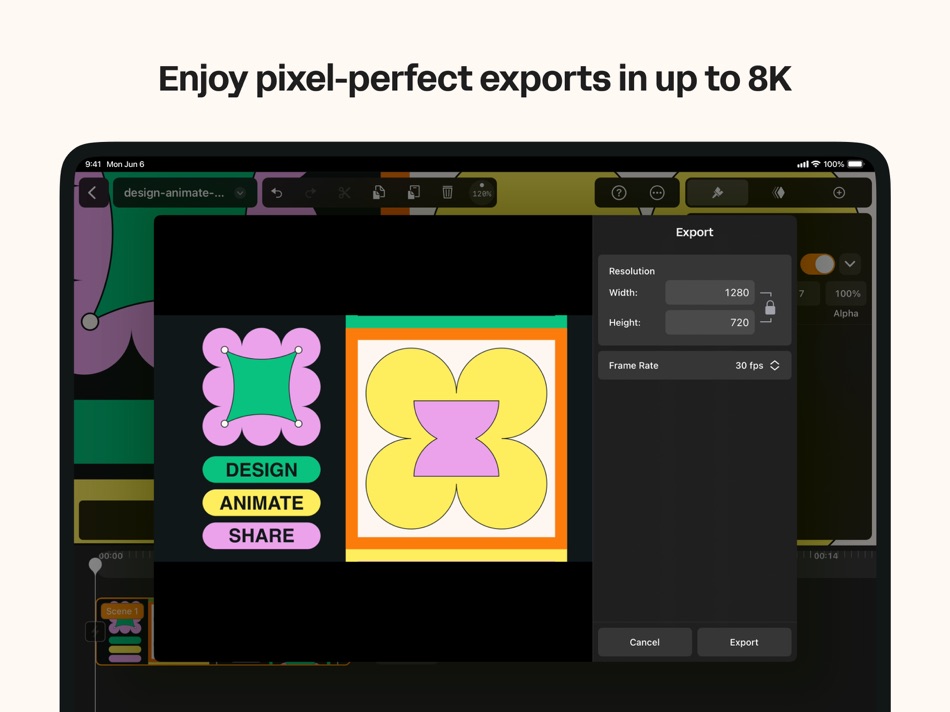
Export your motion graphics in MP4, MOV, or GIF, up to 4K resolution and 120 fps, with transparent background support — ready for social media, video production, or digital signage.
NEW: Export as Lottie files in JSON format for lightweight, scalable vector animations on web and mobile. Lottie files load instantly and integrate seamlessly into websites, apps, and digital products — no heavy video files needed.
S
EAMLESS SYNC AND COLLABORATION
Start your motion design on Mac, continue on iPad with identical tools and synced progress. Collaborate with teammates or switch devices mid-project without missing a frame.
WHO IT'S FOR
Motion designers: Professional-grade motion graphics, faster than ever.
Graphic designers & illustrators: Add motion to vector artwork with zero learning curve.
Marketing teams & agencies: Produce motion graphics in-house, from ads to social stories.
Product & web teams: Create lightweight Lottie animations for UI and web experiences.
Beginners & students: Learn motion design through intuitive tools and templates.
Contact: support@linearity.io
Privacy: linearity.io/privacy-policy
Follow us: @linearityhq
Ad
스크린샷



가격 내역
-
* 인앱 구매 - 오늘: 무료
- 최소: 무료
- 최대: 무료
가격 추적
새로운 기능
- 버전: 6.9.1
- 업데이트:
- This update includes bug fixes and performance improvements.
—
We’re on a mission to empower designers with the ultimate tools for bringing ideas to life. Our software is constantly evolving, but we need your feedback to improve even more. Whether you have a question, opinion, or an idea, we want to hear it! Contact us directly in the Linearity Forum or email us at support@linearity.io. If you enjoy using Linearity Move, please rate the app and share your review. Thank you for being part of our community!
추가 정보
 https://linearity.io/move
목록 (2)
- Motion Graphics Linearity Move

포인트 (3)
-

- 22 Randall Douglas
- +1
-
- 2,106 CrashTestDanny
- +1
-
- 727 Ali Latif
- +1



순위 (0)
0 ☹️
댓글 (0)
가장 먼저 댓글을 남겨주세요 🌟
«Motion Graphics Linearity Move». 플랫폼: iOS. 카테고리: 그래픽 및 디자인. 개발자: «Linearity GmbH». 첫 번째 릴리스: . 마지막 업데이트: . 현재 가격: 무료. 이 타이틀은 아직 AppAgg에서 평가나 리뷰를 받지 못했습니다. 목록: 공개: 2, 비공개: 2. 추적된 포인트: 확인됨: 3, 간접: 150. 매장: App Store. 매장 평가: 4.5. 투표: 150. 사용 가능한 언어: Chinese, English, French, German, Italian, Japanese, Korean, Norwegian, Portuguese, Russian, Spanish, Turkish. AppAgg는 «Motion Graphics Linearity Move»의 가격 기록, 평점 및 사용자 피드백을 추적합니다. 향후 할인 및 업데이트 받기: RSS에서 확인할 수 있습니다. AppAgg는 애플리케이션을 호스팅하거나 소프트웨어를 배포하지 않습니다. 모든 상표, 로고 및 스크린샷은 해당 소유자의 자산입니다.
Motion Graphics Linearity Move 단축 URL: 복사됨!- 🌟 공유하기
- App Store
유사 항목
-
- Linearity Curve Graphic Design
- iOS 앱: 그래픽 및 디자인 게시자: Linearity GmbH
- * 무료
- 목록: 6 + 5 5 (1) 0
- 포인트: 8 + 14,387 (4.5) 버전: 6.9.1 Professional vector art and graphic design software on iPad and iPhone! Linearity Curve (formerly Vectornator) is a powerful vector graphics editor built for iPad, Mac, and iPhone. ... ⥯
-
- Motion Blur - Photo Effect
- iOS 앱: 그래픽 및 디자인 게시자: One Pixel Studio
- * 무료
- 목록: 0 + 0 0 0
- 포인트: 0 + 13 (4.5) 버전: 1.1.0 Experience the next level of photographic creativity with Motion Blur - Photo Effect, a cutting-edge mobile app that redefines the art of capturing dynamic moments. Elevate your photos ⥯
-
- Motion Blur Effect - Blurry
- iOS 앱: 그래픽 및 디자인 게시자: Vaghani Keyur
- 무료
- 목록: 0 + 0 0 0
- 포인트: 0 + 2 (5.0) 버전: 1.0.1 BlurEffect allows you to add blur to photo. Blur Background helps to blur the background of any picture of yours with just few taps. - Motion blur - Gaussian blur - Crystalize - Soft ... ⥯
-
- Motion Ninja Video Editor
- iOS 앱: 그래픽 및 디자인 게시자: 立亚 林
- 무료
- 목록: 0 + 0 0 0
- 포인트: 3 + 1,502 (4.5) 버전: 4.8.5 Motion Ninja provides FREE multi-layer editing, 3D camera & 3D scene building, and fully custom keyframe & curves editing. Motion Ninja is a must-have app for AMV, MAD, and fan edits ... ⥯
- Ad
-
- Motion Blur Photo Effect Maker
- iOS 앱: 그래픽 및 디자인 게시자: Andrey Balakin
- * 무료
- 목록: 0 + 0 0 0
- 포인트: 1 + 0 버전: 1.0.3 Motion Blur App is one of the best photo blurring apps for iPhone and iPad to create amazing blur background effect pictures. This app also helps you to get pixelated or censored faces ⥯
-
- Motion Design with AI — Plays
- iOS 앱: 그래픽 및 디자인 게시자: Animo Apps Ltd
- 무료
- 목록: 2 + 0 0 0
- 포인트: 2 + 277 (4.6) 버전: 3.3.0 Unleash Your Creativity with Plays Plays is your go-to app for crafting eye-catching motion designs effortlessly. Whether you're a content creator, marketer, or designer, Plays ... ⥯
-
- Motion Blur Photo Background
- iOS 앱: 그래픽 및 디자인 게시자: Piotr Zabielski
- 무료
- 목록: 0 + 0 0 0
- 포인트: 0 + 18 (4.2) 버전: 1.0 Blur Photo Editor - Complete Photo Editing with Stunning Blur Effects and Trendy Filters Transform your photos with Blur Photo Editor, the ultimate tool for comprehensive photo ... ⥯
-
- Photo blur - Add Motion Effect
- iOS 앱: 그래픽 및 디자인 게시자: NextPixel apps
- 무료
- 목록: 0 + 0 0 0
- 포인트: 2 + 10 (4.9) 버전: 1.8 Blurry : Blur photo editor is all in one motion effect app. This app can be helpful in a situation where you want to hide faces of your or other people in pictures. You can censor ... ⥯
-
- Motionly : AI Motion Control
- iOS 앱: 그래픽 및 디자인 게시자: CODEPILOT YAZILIM TICARET LIMITED SIRKETI
- 무료
- 목록: 0 + 0 0 0
- 포인트: 1 + 15 (4.2) 버전: 7.0 Experience a new way to control and create using advanced motion detection technology. This app turns your movements into precise, real-time controls, allowing you to interact without ... ⥯
-
- AI Character Motion Swap VIORA
- iOS 앱: 그래픽 및 디자인 게시자: Munure Tuzun
- 무료
- 목록: 0 + 0 0 0
- 포인트: 2 + 9 (4.6) 버전: 1.5 Viora is your personal AI video studio. Turn ideas into stunning videos in seconds no editing experience required. WHAT MAKES VIORA SPECIAL Text to Video Type what you want to see, and ⥯
-
- AmberPaint - Motion Brush
- iOS 앱: 그래픽 및 디자인 게시자: ALVICOMP OU
- 무료
- 목록: 0 + 0 0 0
- 포인트: 0 + 80 (4.3) 버전: 1.0.6 AmberPaint: Motion-Powered Digital Art AmberPaint redefines creativity with motion brushes each stroke is animated, bringing your artwork to life with expressive movement. Whether ... ⥯
- 새로운
- Spatial Motion
- iOS 앱: 그래픽 및 디자인 게시자: Filip Vabrousek
- 무료
- 목록: 0 + 0 0 0
- 포인트: 0 + 0 버전: 3.0 Explore motion design using Spatial Motion! Add fields, effectors, and let your imagination run wild! You can also export your motion design and share the file with others. ⥯
-
- AI Face Animator – Move pics
- iOS 앱: 그래픽 및 디자인 게시자: out thinking limited
- 무료
- 목록: 0 + 0 0 0
- 포인트: 1 + 2 (2.0) 버전: 1.0 Turn any photo into a living, moving video with AI Face Animator Move pics. In just one tap, make faces sing, talk, laugh, or dance using the power of AI. Perfect for creating funny ... ⥯
-
- Message hug Animals Move 2
- iOS 앱: 그래픽 및 디자인 게시자: kazuya fujinami
- $0.99
- 목록: 0 + 0 0 0
- 포인트: 0 + 0 버전: 2.0 A moving animal sticker to attach to your messages ⥯