
| ผู้พัฒนา: | Stash Software (2) | ||
| ราคา: | * ฟรี | ||
| การจัดอันดับ: | 0 | ||
| ความเห็น: | 0 เขียนความเห็น | ||
| รายการ: | 1 + 0 | ||
| แต้มแล: | 2 + 0 ¡ | ||
| Mac App Store | |||
คำอธิบาย

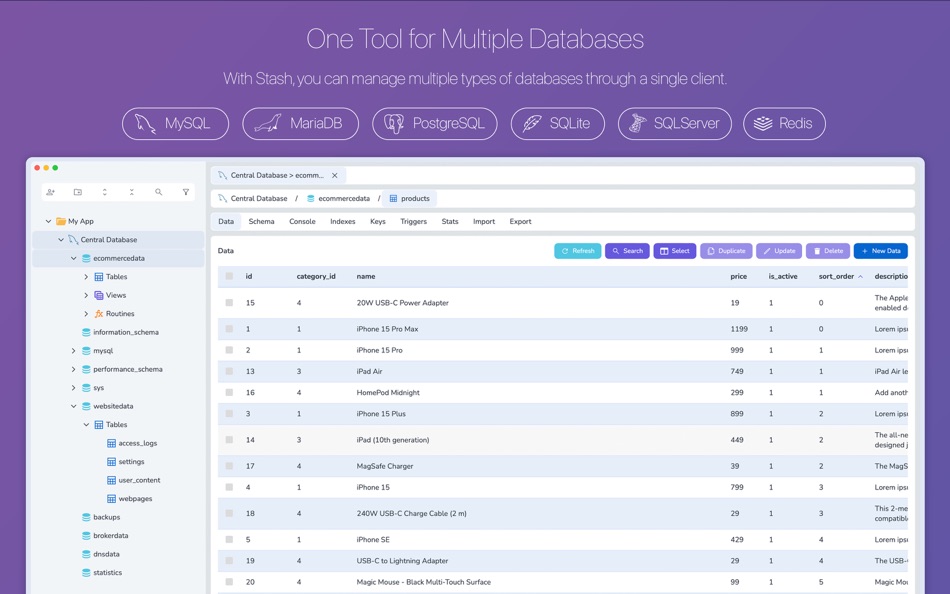
Stash enables you to meet all your database management needs by connecting to multiple database servers through a single interface. You can manage multiple local or remote database systems simultaneously and perform all data search and update operations.
AI Assistant with Context Awareness:
The Stash AI assistant supports multiple AI models including local Ollama support. With its advanced context awareness capabilities, it understands your database structures and suggests and executes appropriate queries accordingly. It can retain the entire conversation history, allowing for more effective interactions related to your database structures or data analysis tasks. If you prefer, it can also directly retrieve data from your tables and perform the desired data analysis operations.
Stash runs entirely on your computer and connects directly to the AI provider of your choice. Your database connection credentials or your data are never sent to or processed by any third-party server / provider.
Stash supports the following database systems:
- MySQL
- MariaDB
- PostgreSQL
- SQLServer
- SQLite
- Redis
Advanced Search:
Stash provides a robust search capability, enabling you to quickly locate tables, views, or routines within a specific database or server. This feature eliminates the need to navigate through various servers, databases, screens and removes the requirement for SQL queries.
Organize with Folders:
You can manage and organize all your database connections from a single section and arrange them under folders. The sidebar comprehensively manages all your database connections and Docker containers created through the application. You can group all related connections with folders and search across all your databases.
Get Help from AI:
Do you need to write complex queries? Or do you just need help with SQL? Stash introduces all your table structures to AI and enables you to generate SQL commands tailored to your table structures based on the instructions you provide.
All Details at a Glance:
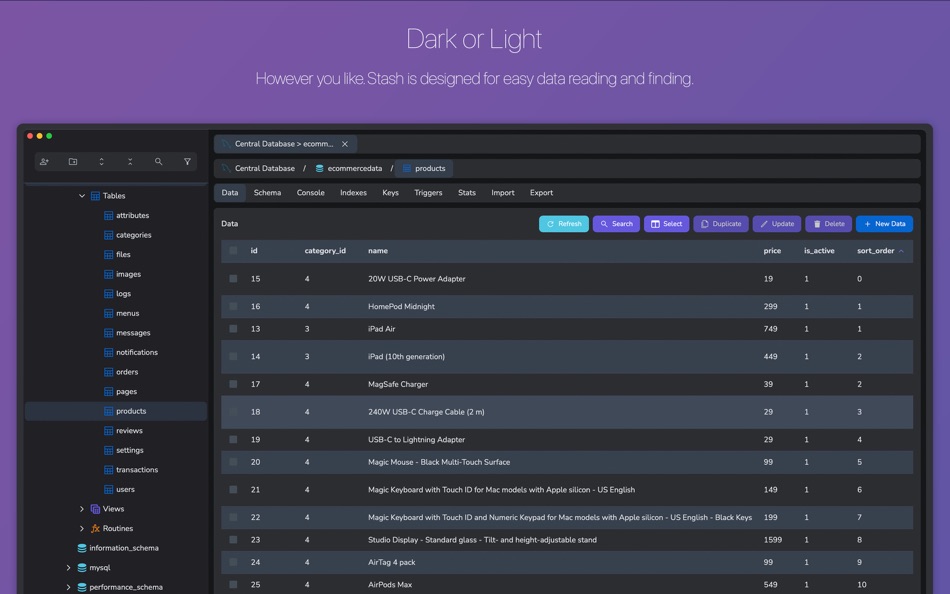
Stash provides various screens to access comprehensive details about your databases. You can navigate between different screens and sections to explore all your database information and data. Using toolboxes, you can swiftly perform all insert, delete, and update operations.
You can open the different screens in multiple tabs simultaneously to easily view the details without having to navigate back and forth through the screens and without losing your changes.
Multiple Tabs on the Same Screen:
Stash allows you to work by opening multiple tabs side by side as many as you want. You can open your databases, schemas, or query consoles from different servers side by side and work by viewing them on the same screen at once.
Diagrams:
With the advanced diagram editor, you can quickly design your tables, view your entire database structure and the relationships between your tables at once, and automatically generate SQL code after completing all your work.
Free for the first 30 days:
Stash is free for the first 30 days. After that, you can continue using it by choosing either a monthly or yearly subscription option. Stash does not charge you any fees other than the payment made through Apple. The payment is processed through Apple's in-app purchase system, and your card information is stored only by Apple. When your 30-day trial period ends, your subscription will be automatically renewed by Apple.
Terms of Use: https://stashsql.com/terms-of-use.html
ภาพหน้าจอ





ราคา
-
* การซื้อภายในแอพ - วันนี้: ฟรี
- ต่ำสุด: ฟรี
- มากที่สุด: ฟรี
ติดตามราคา
ผู้พัฒนา


การจัดอันดับ
0 ☹️
รายการ
- Stash - Database Manager

ความเห็น
แสดงรีวิวเป็นคนแรกเลย 🌟
ข้อมูลเพิ่มเติม
- เวอร์ชัน: 1.0.17
- หมวดหมู่:
macOS แอป›เครื่องมือ - ระบบปฏิบัติการ:
macOS,macOS 12.4 และสูงกว่า - ขนาด:
9 Mb - ภาษาที่สนับสนุน:
English - การจัดประเภทเนื้อหา:
4+ - Mac App Store คะแนนโดย:
0 - อัปเดต:
- วันที่วางจำหน่าย:
รายชื่อติดต่อ
- เว็บไซท์:
 https://stashsoftware.com/
Stash - Database Manager URL แบบสั้น: คัดลอกแล้ว!- 🌟 แชร์
- Mac App Store
คุณอาจชอบ
-
- Database Studio
- macOS แอป: เครื่องมือ โดย: 腾 崔
- $3.99
- รายการ: 0 + 0 การจัดอันดับ: 0 ความเห็น: 0
- แต้มแล: 0 + 0 เวอร์ชัน: 1.5.0 Database Studio let you design your data schema in the UI with inline editing experience, and 1-click to generate source code for you to maximize your development productivity. In ... ⥯
-
- Database Pro
- macOS แอป: เครื่องมือ โดย: 强 李
- * $2.99
- รายการ: 0 + 0 การจัดอันดับ: 0 ความเห็น: 0
- แต้มแล: 2 + 0 เวอร์ชัน: 7.2.9 You can view and edit Access Database and SQLite database on Mac with this App. Support Access database 2000~2016. This App has in-app purchase products features to enable connect to ... ⥯
-
- Native SQLite Manager
- macOS แอป: เครื่องมือ โดย: Krystian Kolodziej
- $1.99
- รายการ: 0 + 1 การจัดอันดับ: 0 ความเห็น: 0
- แต้มแล: 9 + 0 เวอร์ชัน: 1.31.1 Native SQLite Manager is an minimalist SQLite database manager. Application features: - support for many versions of SQLite - support for SQLCipher - SQLite extensions support - ... ⥯
-
- RoboDB MySQL Manager
- macOS แอป: เครื่องมือ โดย: Global Web SRL
- ฟรี
- รายการ: 0 + 0 การจัดอันดับ: 0 ความเห็น: 0
- แต้มแล: 0 + 0 เวอร์ชัน: 1.5.0 RoboDB MySQL Database Manager is an effective app that allows you to manage your MySQL databases and users. The app provides a graphical interface simplify the process of managing ... ⥯
-
- Provisioning Profile Manager
- macOS แอป: เครื่องมือ โดย: Alin Radut
- $2.99
- รายการ: 1 + 2 การจัดอันดับ: 0 ความเห็น: 0
- แต้มแล: 1 + 0 เวอร์ชัน: 3.0 Sporting a slick but powerful interface with advanced search options, this app will put you in the driver's seat when it comes to managing your provisioning profiles. With the ... ⥯
-
- D1 Manager
- macOS แอป: เครื่องมือ โดย: i-kikata inc.
- ฟรี
- รายการ: 0 + 0 การจัดอันดับ: 0 ความเห็น: 0
- แต้มแล: 0 + 0 เวอร์ชัน: 1.0.2 D1 Managerは、Cloudflare D1データベースを安全に管理するためのネイティブデスクトップクライアントです。 【主な機能】 マルチ接続対応 - 複数のD1データベースをタブで管理 テーブルブラウザ - スキーマ確認、データ閲覧・編集 SQLエディタ - シンタックスハイライト付きクエリ実行 データエクスポート - CSV、JSON、SQL形式に対応 ... ⥯
-
- Snip : Snippets Manager
- macOS แอป: เครื่องมือ โดย: Pictarine
- ฟรี
- รายการ: 1 + 2 การจัดอันดับ: 0 ความเห็น: 0
- แต้มแล: 2 + 0 เวอร์ชัน: 1.7 Snip is a native code snippets manager built in SwiftUI and Combine for macOS exclusively, aiming to be a light and simple tool for developers. Save your personal notes, work notes, ... ⥯
-
- Craftify Recipe Manager
- macOS แอป: เครื่องมือ โดย: Dave Van Cauwenberghe
- ฟรี
- รายการ: 0 + 0 การจัดอันดับ: 0 ความเห็น: 0
- แต้มแล: 0 + 0 เวอร์ชัน: 1.0.4 Craftify Recipe Manager is a utility designed for administrators to manage recipes and track associated reports within a CloudKit-backed database. This app provides a streamlined ... ⥯
-
- Flycut (Clipboard manager)
- macOS แอป: เครื่องมือ โดย: General Arcade (Pte. Ltd.)
- ฟรี
- รายการ: 1 + 1 การจัดอันดับ: 0 ความเห็น: 0
- แต้มแล: 2 + 0 เวอร์ชัน: 1.9.6 Flycut is a clean and simple clipboard manager for developers. It based on an open-source app called Jumpcut. Flycut is also open source too: http://github.com/TermiT/flycut Every time ⥯
-
- Docker Manager GUI - WhaleDeck
- macOS แอป: เครื่องมือ โดย: Florian Seida
- * ฟรี
- รายการ: 1 + 1 การจัดอันดับ: 0 ความเห็น: 0
- แต้มแล: 2 + 33 (4.2) เวอร์ชัน: 3.1.0 WhaleDeck is your all-in-one Docker environment manager. Reduce complexity and stay productive with a visual dashboard that centralizes performance metrics, container logs, and actions ⥯
-
- Pricetag - App Pricing Manager
- macOS แอป: เครื่องมือ โดย: Thomas Brandstaetter
- * ฟรี
- รายการ: 0 + 2 การจัดอันดับ: 0 ความเห็น: 0
- แต้มแล: 2 + 0 เวอร์ชัน: 1.7.2 Pricetag is a native macOS app, that uses the App Store Connect API to automatically set app, In-App Purchase, or subscription prices for all territories based on a selected Purchasing ⥯
-
- MCP Server Manager
- macOS แอป: เครื่องมือ โดย: Nikhil Anand
- ฟรี
- รายการ: 0 + 0 การจัดอันดับ: 0 ความเห็น: 0
- แต้มแล: 0 + 0 เวอร์ชัน: 3.2 Manage Claude Code + Gemini CLI in One App (also compatible with Claude Desktop, Cursor, Windsurf, Cline, and any other configs that share the same format) Always free, no ads, data ... ⥯
-
- Git Credential Manager
- macOS แอป: เครื่องมือ โดย: 兰桂 吴
- $2.99
- รายการ: 0 + 1 การจัดอันดับ: 0 ความเห็น: 0
- แต้มแล: 0 + 0 เวอร์ชัน: 1.1 Git Credential Manager (GCM) simplifies authentication with your Git repositories. Don't like to type the Git username/password again and again? Git Credential Manager fills the Git ... ⥯
-
- SES Template Manager
- macOS แอป: เครื่องมือ โดย: Himanshu Visroliya
- * ฟรี
- รายการ: 0 + 0 การจัดอันดับ: 0 ความเห็น: 0
- แต้มแล: 0 + 0 เวอร์ชัน: 1.0 SES Template Manager is a privacy-first Mac app built for developers and teams who use Amazon Simple Email Service (SES). It s 100% local! Your AWS credentials, templates, and data ... ⥯