
| Desarrollador: | Matthias Gansrigler-Hrad (11) | ||
| Precio: | * $8.99 | ||
| Clasificaciones: | 0 | ||
| Opiniones: | 0 Escribir una opinión | ||
| Comentarios: | 0 Publicar comentario | ||
| Listas: | 6 + 12 | ||
| Puntos: | 10 + 0 ¡ | ||
| Mac App Store | |||
Descripción

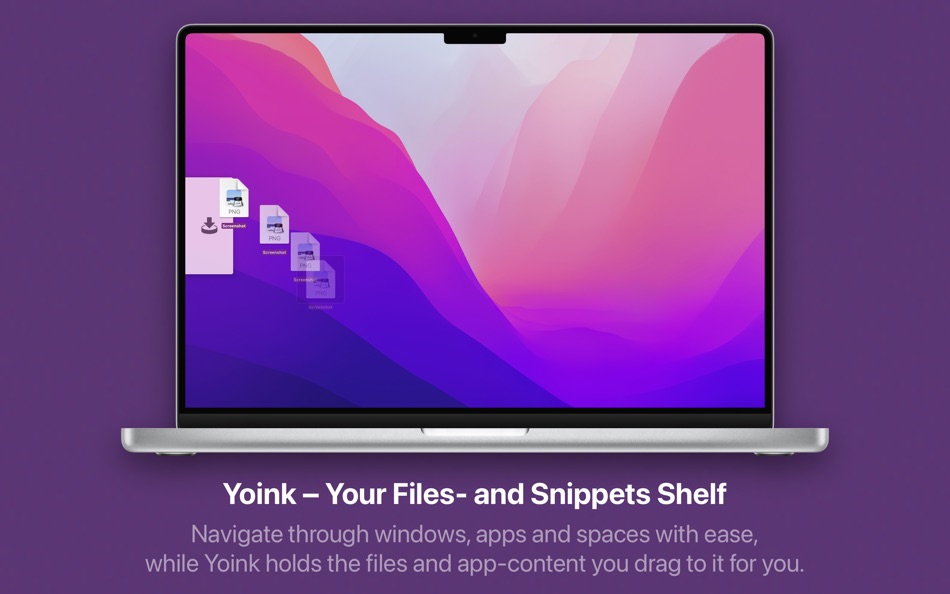
It frees up your mouse, enabling you to navigate more comfortably to the destination of your files.
When you start dragging files in Finder or content from an application, Yoink fades in at the edge of your screen, allowing you to drag to it.
While Yoink is holding on to your files for you, you can more easily and comfortably navigate to the destination of your files, without having to keep the mouse button clicked the entire time.
Overview of Yoink's main features:
- A "shelf" at the edge of your screen for files and app-content you'd like to move or copy, which behaves like Finder (regarding moving and copying)
- Yoink follows you everywhere - windows, spaces and (fullscreen-) apps
- Icons are created using QuickLook, allowing easy identification
- Multiple files dragged to Yoink at once are condensed into a Stack, making it easy to drag them out together
- System Services, the Quick Action and Share extensions allow storing files in Yoink without having to use drag and drop
- Handoff to transfer files between all the Macs, iPads and iPhones you're using Yoink on
- Clipboard History, which lets you store previously copied content in Yoink, or copy again
- Highly customizable - you decide where, when and if Yoink appears
- "Share" to and from Yoink
- Build workflows with Yoink's Shortcuts integration
For further information and usage tips for getting the most out of Yoink, please visit its website.
Here's what customers say about Yoink:
"Essential. One of the few apps I use all the time." - Kraznoff, US App Store
"Simple, elegant, perfect. This is a fantastic app. It works flawlessly". - Benwiggy, UK App Store
"Handiest utility I ever purchased." - Nrgwise, US App Store
Here's what members of the press say about Yoink:
"Yoink is a terrific utility" - John Gruber, DaringFireball.net
"Yoink is a fantastic way to enhance drag'n'drop. Highly recommended." - Federico Viticci, MacStories.net
"Yoink is an awesome drag and drop utility for the Mac and is instrumental to me when working with full screen apps." - Jeff Benjamin, iDownloadBlog
"I absolutely love this little utility, it's one of the few I've come across that has had staying powers on my Macs." - James Dempsey, The Graphic Mac
Some features may require a more recent version of macOS, or the separately available Yoink app for iOS:
Handoff to/from iPad or iPhone requires separately available Yoink app for iOS
Quick Action and Continuity Camera requires macOS Mojave 10.14
If you have any feedback or questions, please do not hesitate to write me by mail at support@eternalstorms.at, or on twitter at @YoinkApp or @eternalstorms.
Thank you.
Ad
Capturas...


Historial de precios
-
* Compras en la aplicación - Hoy: $8.99
- Mínimo: $1.99
- Máximo: $8.99
Realizar un seguimiento de los precios
Novedades
- Versión: 3.7
- Actualizado:
- Yoink v3.7 (2026.01.28) contains the following improvements and bug fixes:
= IMPROVEMENTS =
- Improves the “hold down fn to toggle Yoink on-the-fly” functionality
- When double-clicking a file in Yoink to open it, the opening app now reliably becomes the frontmost app
- Improves how screen changes are handled (i.e., resolution changes, removing or adding displays, wake-from-sleep)
- On macOS 14 “Sonoma” and later, the clipboard history can now hold up to 200 items
- Now uses the new Share sheet on macOS 13 Ventura and newer
- Improves Yoink's behavior on Macs with multiple screens
- Improves the way the Clipboard History widget looks in background modes
- When Yoink isn't showing, and you drag something that you don't drop to Yoink, it will now hide again
- Improves the way Yoink behaves during drags in general
- Improves support for drags from private windows in Firefox
- Improves the reachability of Yoink's contextual menu, as you can now also right-click between the two buttons at the bottom to open it
- Improved the overall stability, reliability and performance of the app
- Changed the order of items in the contextual menu for improved clarity
- Double-clicking files in Yoink has been improved, as it now respects selected files, and better supports folders.
Hold down the command key (⌘) to reveal double-clicked files in Finder.
- You can now hide and show Yoink also from its icon in the menu bar
- Placing Yoink's window by moving it around has been improved
- Made Yoink's file list and window a little more appealing
- You can now mute the “Files in the Trash” warning for an hour, the day, or until Yoink is quit
- Yoink now displays a “Trash” symbol for files that are in the Trash
= BUG FIXES =
- Fixes a few memory leaks
- Fixes a potential crash of the Clipboard History widget
- Fixes a UI issue in the Settings window's toolbar, when the Extensions tab was selected
- The “Continue” button in the Splash screen now goes through every page before closing the window
- Fixes a bug where sometimes Yoink would hide even though a file was dropped on it
- Slightly increased the window corner radius on macOS 26 “Tahoe”
- Fixes an issue where the Continuity Camera menu item was shown in certain menus it didn't belong in
- Fixes a bug where, in rare cases, files within special folders would not be remembered over relaunches of Yoink or restarts of the Mac
- Fixes an issue where on rare occasions Quick Look-ing a file didn't work
- Removed the “resolve alias” functionality. While the alias could successfully be resolved to the original file, the resulting file path could not be used in the macOS app sandbox environment
- Fixes and improves some strings and localizations
- Fixes an issue with auto-sizing Yoink's window, where the list would grow way larger than it needed to be
Thank you for using Yoink for Mac. I hope you're enjoying the app!
If you have some time and if it's not too much to ask, please consider leaving a rating or review of Yoink on the Mac App Store - it would help me out a lot!
If you'd like to get in touch or connect with me, please visit https://eternalstorms.at/contact for all options.
Yours truly,
Matthias
Comentarios (0)
Sé el primero en comentar 🌟
Desarrollador
- Matthias Gansrigler-Hrad
- Plataformas: iOS Aplicaciones (4) macOS Aplicaciones (7)
- Listas: 19 + 19
- Puntos: 32 + 1,077 ¡
- Clasificaciones: 0
- Opiniones: 0
- Comentarios: 0
- Descuentos: 0
- Vídeos: 0
- RSS: Suscribirse





Clasificaciones (0)
0 ☹️
Listas (6)
- Yoink - Better Drag and Drop


Opiniones (0)
Sé el primero en escribir una reseña 🌟
Información adicional
- Versión: 3.7
- Categoría:
macOS Aplicaciones›Utilidades - Sistemas operativos:
macOS,macOS 10.13 y versiones posteriores - Tamaño:
13 Mb - Idiomas admitidos:
Chinese,English,French,German,Italian,Japanese,Korean,Portuguese - Clasificación de contenido:
4+ - Mac App Store Puntuación:
0 - Actualizado:
- Fecha de lanzamiento:
Contactos
 https://www.eternalstorms.at/yoink/mac
 «Yoink - Better Drag and Drop». Plataforma: macOS. Categoría: Utilidades. Desarrollador: «Matthias Gansrigler-Hrad». Primer lanzamiento: . Última actualización: . Precio actual: $8.99. Precio más bajo registrado: $1.99 (). Precio más alto registrado: $8.99 (). Este título aún no ha recibido calificaciones ni reseñas en AppAgg. Listas: públicas 6, privadas 12. Puntos rastreados: confirmados 10, indirectos 0. Idiomas disponibles: Chinese, English, French, German, Italian, Japanese, Korean, Portuguese. AppAgg rastrea el historial de precios, las calificaciones y los comentarios de los usuarios para «Yoink - Better Drag and Drop». Siga futuros descuentos y actualizaciones a través de RSS. AppAgg no aloja aplicaciones ni distribuye software. Todas las marcas comerciales, logotipos y capturas de pantalla pertenecen a sus respectivos propietarios.
Yoink - Better Drag and Drop URL corta: Copiado!- 🌟 Compartir
- Mac App Store
Ad
Similares
-
- Better Resource Monitor
- macOS Aplicaciones: Utilidades De: Alex Pedersen
- Gratis
- Listas: 0 + 0 Clasificaciones: 0 Opiniones: 0
- Puntos: 1 + 0 0 Versión: 1.1.1 Better Resource Monitor puts real-time system stats in your macOS menu bar (CPU, memory, GPU, and network) without asking for your admin password, installing a privileged helper, or ... ⥯
-
- Drag to Scroll
- macOS Aplicaciones: Utilidades De: Sargun Vohra
- $4.99
- Listas: 0 + 0 Clasificaciones: 0 Opiniones: 0
- Puntos: 0 + 0 0 Versión: 1.1 Drag to Scroll brings middle-click-and-drag scrolling to macOS. Hold your middle mouse button and move the mouse to scroll in any direction. Particularly useful for trackball users who ⥯
-
- Drag and Drop Manager
- macOS Aplicaciones: Utilidades De: Wise Tech Labs Private Limited
- * Gratis
- Listas: 1 + 1 Clasificaciones: 0 Opiniones: 0
- Puntos: 14 + 0 0 Versión: 1.9 Drag and Drop Manager app enables a new drag-and-drop experience on your Mac. Drag and Drop Manager is a useful utility that makes Dragging and Dropping files and folders and other ... ⥯
-
- Better Trash
- macOS Aplicaciones: Utilidades De: 栋 陈
- $6.99
- Listas: 0 + 1 Clasificaciones: 0 Opiniones: 0
- Puntos: 10 + 0 0 Versión: 1.8.0 Better Trash is a trash tool app on macOS, it's designed to help you solve problems that Trash can't be emptied, clean up the trash automatically, view the original location of the ... ⥯
-
- Better Rename 11
- macOS Aplicaciones: Utilidades De: publicspace.net
- $29.99
- Listas: 3 + 0 Clasificaciones: 0 Opiniones: 0
- Puntos: 2 + 0 0 Versión: 11.63 Better Rename 11 is the most complete renaming solution available on the market today. That s why, since 1996, tens of thousands of hobbyists, professionals and businesses depend on ... ⥯
-
- Better Battery 2: Stats & Info
- macOS Aplicaciones: Utilidades De: agross Software e.U.
- * Gratis
- Listas: 1 + 2 Clasificaciones: 0 Opiniones: 0
- Puntos: 4 + 0 0 Versión: 2.10 Better Battery 2 shows information and stats of your MacBook battery in the menu bar. So you are always aware of the current battery stats, battery time and health. Standard Edition: ... ⥯
-
- Drag 2 Temp
- macOS Aplicaciones: Utilidades De: Christian Ahrweiler
- $3.99
- Listas: 0 + 0 Clasificaciones: 0 Opiniones: 0
- Puntos: 0 + 0 0 Versión: 1.0.8 Drag 2 Temp creates lightweight Finder workspaces inside your Downloads folder so you can quickly experiment, unpack, reorganize, or share files without cluttering your Desktop. How it ⥯
-
- Better OSD
- macOS Aplicaciones: Utilidades De: 宇 张
- Gratis
- Listas: 0 + 0 Clasificaciones: 0 Opiniones: 0
- Puntos: 1 + 0 0 Versión: 1.0.6 Better OSD is a macOS utility designed for users who are accustomed to the volume indicator from older macOS versions. It provides more intuitive and less distracting visual feedback, ... ⥯
-
- Better Battery Indicator
- macOS Aplicaciones: Utilidades De: Pawan Dixit
- $0.99
- Listas: 0 + 0 Clasificaciones: 0 Opiniones: 0
- Puntos: 0 + 0 0 Versión: 1.0.2 Better Battery Indicator shows you how much time is remaining before your Mac runs out of juice. This brings back the loved estimated time reaming feature to your system battery ... ⥯
-
- Drag Widget– Pocket Essentials
- macOS Aplicaciones: Utilidades De: 星一 曲
- * Gratis
- Listas: 0 + 0 Clasificaciones: 0 Opiniones: 0
- Puntos: 0 + 0 0 Versión: 1.1 Dino is dedicated to managing your daily information. Its unique drag-and-drop operation makes it easier than ever to use your system. 1. If you are handling many lightweight files in ... ⥯
-
- Better Wallpapers 2
- macOS Aplicaciones: Utilidades De: Sebastian Ojeda
- Gratis
- Listas: 0 + 1 Clasificaciones: 0 Opiniones: 0
- Puntos: 4 + 0 0 Versión: 1.1 Transform your desktop into a personalized work of art with Better Wallpapers - the ultimate app for customizable high-resolution wallpapers. With a vast selection of stunning designs, ⥯
-
- Pixibly – Drag & Drop Uploader
- macOS Aplicaciones: Utilidades De: Schopenlaam LLC
- Gratis
- Listas: 0 + 0 Clasificaciones: 0 Opiniones: 0
- Puntos: 0 + 0 0 Versión: 1.0.0 Pixibly is a simple yet powerful image uploader for macOS and iOS. Designed for developers, designers, and content creators, it allows you to quickly upload images by simply dragging ... ⥯
-
- Menu Drop
- macOS Aplicaciones: Utilidades De: Sindre Sorhus
- Gratis
- Listas: 0 + 0 Clasificaciones: 0 Opiniones: 0
- Puntos: 2 + 0 0 Versión: 1.0.2 AirDrop files simply by dragging them onto the app's menu bar icon. You can drop files, images, and links. Note: The app uses the system AirDrop dialog. It has no control over the ... ⥯
-
- Mic Drop • Mute Manager
- macOS Aplicaciones: Utilidades De: Octopus Think
- * Gratis
- Listas: 0 + 2 Clasificaciones: 0 Opiniones: 0
- Puntos: 7 + 0 0 Versión: 2.2.1 Ever been in a video call and needed to turn off your microphone, but couldn t find the mute button quickly enough? Mic Drop allows you to quickly mute and unmute yourself using a ... ⥯