
기술

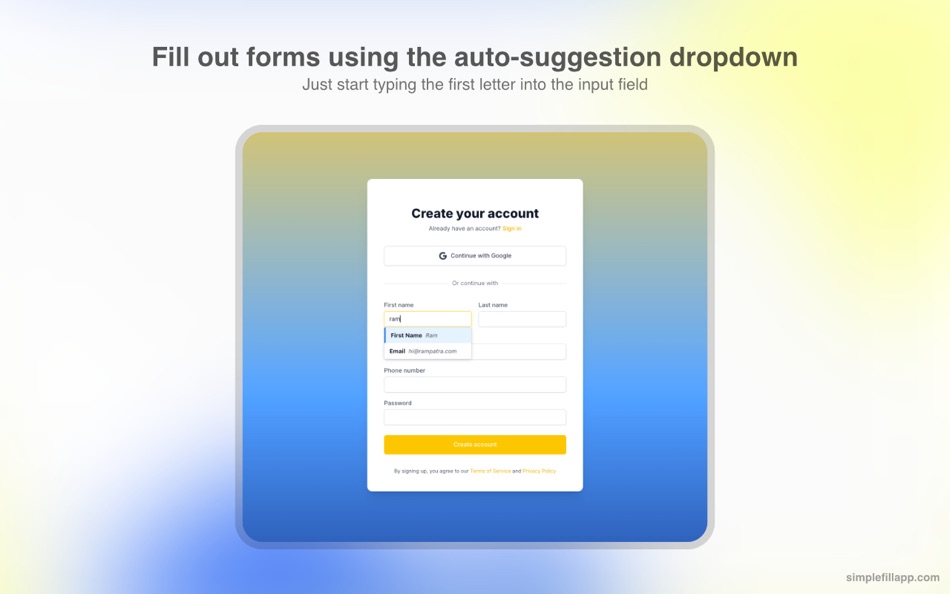
• Auto-suggestions in dropdowns as you start typing.
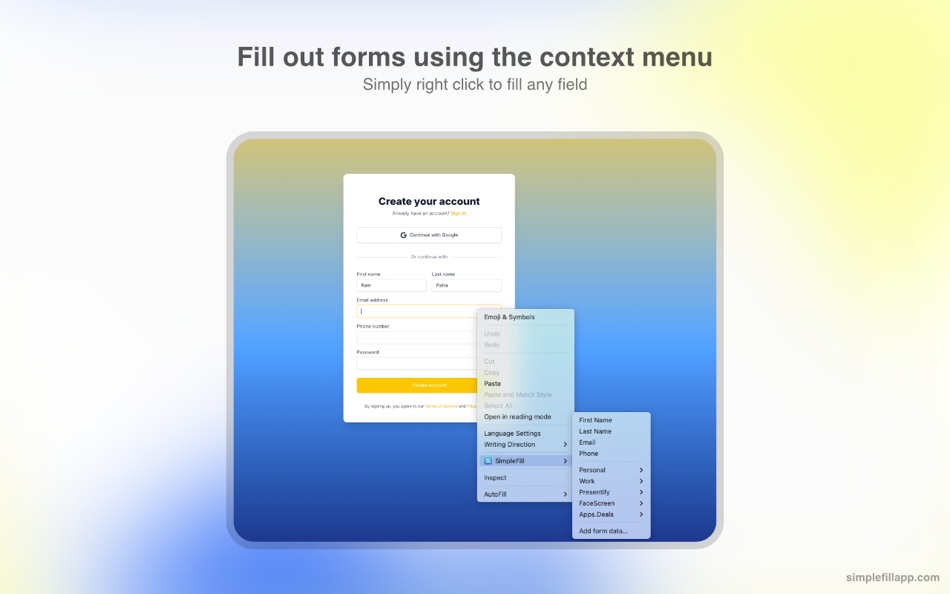
• Autofill any field using your context menu.
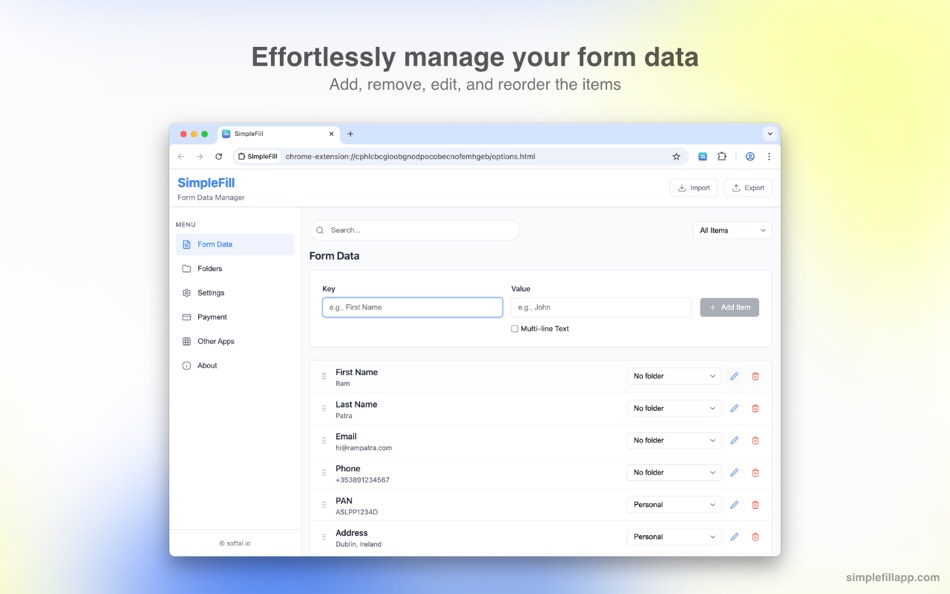
• Add, edit, remove, and reorder your data as you wish.
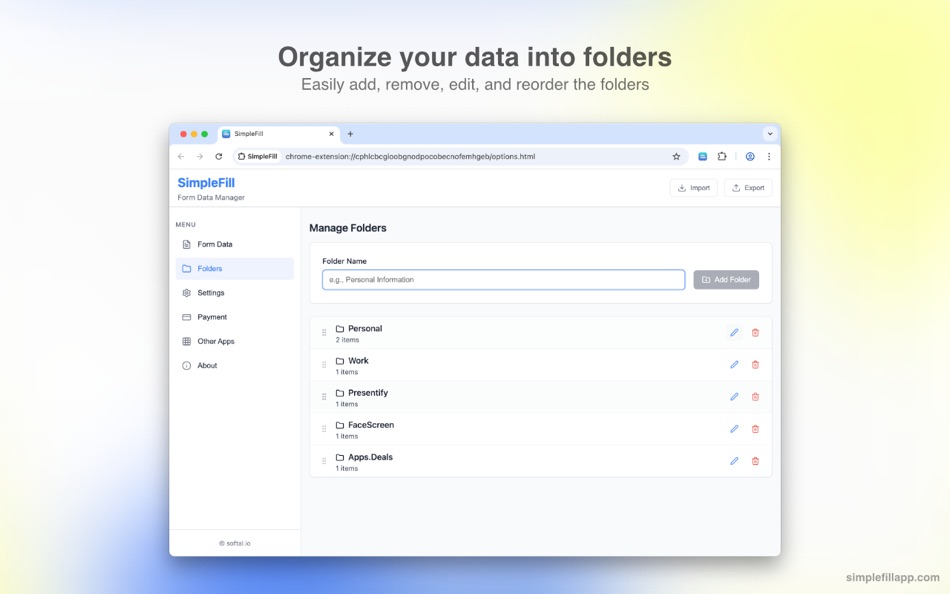
• Organize your data in folders.
• All data is stored locally in your browser storage.
• Import/export your data to a file.
Why Use SimpleFill
• On average, it takes 12 seconds to type out a name, email, and address. With SimpleFill, it takes a maximum of 3 seconds.
• The default browser autofill isn't accurate most of the time, and browsers don't allow you to edit the saved information.
• Without SimpleFill, you can't fill out forms using your right-click context menu, which is super handy.
• The default browser autofill do not work with large blocks of text, such as emails.
Some Use Cases
• Marketers: Quickly fill out campaign sign-up forms, lead gen tools, and demo requests.
• Customer Support: Auto-fill repetitive ticket forms, canned responses, or internal tools.
• Sales Teams: Speed through CRM entry, contact forms, and follow-up request pages.
• Recruiters: Autofill job board listings or candidate submission forms across platforms.
• QA Engineers: Instantly populate test forms with dummy data during website testing.
• Freelancers & Consultants: Save time filling proposals, invoices, and registration forms.
• Product Managers: Quickly submit feedback or bug reports across multiple tools.
• HR Teams: Fill internal employee forms or vendor onboarding forms effortlessly.
• Job Seekers: Apply faster by autofilling job applications, profile info, and cover letter fields.
Getting Started
• It's quite simple (no pun intended) to use SimpleFill.
• Install the extension by clicking the 'Install' button on the Mac App Store.
• Right-click on any input field and select SimpleFill > Add form data...
• Enter your details and click on the "Add" button.
• As you type in any input field, SimpleFill will automatically suggest relevant entries. Alternatively, right-click on an input field and select your saved data directly from the SimpleFill context menu to instantly fill the form.
Contact
• Website - https://simplefillapp.com
• X - https://x.com/softal_io or https://x.com/rampatra_
Extras
• Faq - https://simplefillapp.com/faq
• Privacy - https://simplefillapp.com/privacy
Faq
• If you purchase SimpleFill on the Apple App Store, you can use it on as many devices as you want, as long as you use the same Apple ID.
• Purchasing SimpleFill on the Apple App Store gives you access to SimpleFill only on Safari. To use SimpleFill on other browsers, please purchase a license from the SimpleFill website.
Ad
스크린샷
가격 내역
- 오늘: $3.99
- 최소: $1.99
- 최대: $3.99
가격 추적
새로운 기능
- 버전: 3.1.1
- 업데이트:
- • Fix a minor bug where the Enter key was not working on some websites when autosuggestions were disabled.
댓글 (0)
가장 먼저 댓글을 남겨주세요 🌟
개발자
포인트 (1)
-

- 23 Ram Patra
- +1

순위 (1)
-
- 23 Ram Patra
- 5
리뷰 (0)
첫 번째 리뷰를 남겨보세요 🌟
추가 정보
«SimpleFill - Autofill Forms». 플랫폼: macOS. 카테고리: 생산성. 개발자: «Ram Patra». 첫 번째 릴리스: . 마지막 업데이트: . 현재 가격: $3.99. 최저 기록 가격: $1.99 (). 최고 기록 가격: $3.99 (). AppAgg 등급: 5 / 5. 투표: 1. 목록: 공개: 1, 비공개: 0. 추적된 포인트: 확인됨: 1, 간접: 0. 사용 가능한 언어: English. AppAgg는 «SimpleFill - Autofill Forms»의 가격 기록, 평점 및 사용자 피드백을 추적합니다. 향후 할인 및 업데이트 받기: RSS에서 확인할 수 있습니다. AppAgg는 애플리케이션을 호스팅하거나 소프트웨어를 배포하지 않습니다. 모든 상표, 로고 및 스크린샷은 해당 소유자의 자산입니다.
SimpleFill - Autofill Forms 단축 URL: 복사됨!- 🌟 공유하기
- Mac App Store
Ad
유사 항목
-
- Simple Calculator+
- macOS 앱: 생산성 게시자: UNB SYSTEMS PTY LTD
- * 무료
- 목록: 0 + 0 순위: 0 리뷰: 0
- 포인트: 0 + 0 0 버전: 1.41 This calculator while simple has many useful features. You can make it easy to launch as a Menu bar item by enabling this in Settings/Preferences. The calculator displays a paper tape ... ⥯
-
- Simple Todo Bar
- macOS 앱: 생산성 게시자: Subkhan Sarif
- $1.99
- 목록: 0 + 0 순위: 0 리뷰: 0
- 포인트: 2 + 0 0 버전: 1.3.0 (New) Added Pasteboards feature to easily manage copied texts. Creating and managing todo-list never gets easier. Simple Todo Bar will show up in your menu bar, making it easy to keep ... ⥯
-
- Simple Mouse Locator
- macOS 앱: 생산성 게시자: Code Race
- $2.99
- 목록: 0 + 0 순위: 0 리뷰: 0
- 포인트: 0 + 0 0 버전: 1.13 Stop hunting for your mouse! Computers with multiple high resolution displays present us with the "where is my mouse" problem. Simple Mouse Locator reveals the mouse position via a ... ⥯
-
- Simple Calendar: Work Calendar
- macOS 앱: 생산성 게시자: 裕涛 兰
- 무료
- 목록: 0 + 0 순위: 0 리뷰: 0
- 포인트: 1 + 0 0 버전: 1.0.3 Simple Calendar is a lightweight application that lets you quickly and easily access a monthly calendar. Features: - Click the menu bar icon to access a monthly calendar - Customize ... ⥯
-
- Simple NotePad
- macOS 앱: 생산성 게시자: Tamas Iuliu
- $0.99
- 목록: 0 + 0 순위: 0 리뷰: 0
- 포인트: 0 + 0 0 버전: 1.1 Simple NotePad is a basic and easy-to-use text editor for writing and saving articles, memos, papers and speeches. Simple NotePad allows importing, saving and editing txt, html ... ⥯
- 새로운
- Simple PDF Pro
- macOS 앱: 생산성 게시자: A Plus Communications
- $4.99
- 목록: 0 + 0 순위: 0 리뷰: 0
- 포인트: 0 + 0 0 버전: 1.0 Simple PDF Pro helps you read and manage PDFs on Mac without clutter. Open documents quickly, keep multiple files in tabs, and move through pages with smooth controls designed for ... ⥯
-
- Simple Snippets - Text Library
- macOS 앱: 생산성 게시자: Sai Praneeth
- $3.99
- 목록: 0 + 0 순위: 0 리뷰: 0
- 포인트: 0 + 0 0 버전: 2.1.4 Simple Snippets is the easiest text snippets app you will ever use. Simply add frequently used text phrases such as emails, names, addresses, etc in the preferences window and use a ... ⥯
-
- Simple Sides
- macOS 앱: 생산성 게시자: Erik Osterberg
- $29.99
- 목록: 0 + 0 순위: 0 리뷰: 0
- 포인트: 0 + 0 0 버전: 1.15 Simple Sides helps production managers, coordinators and production assistants in their daily work of extracting and distributing the next day's script pages. Simple Sides is like that ⥯
-
- Simple Backup Contacts
- macOS 앱: 생산성 게시자: Giacomo Guglielmi
- $1.99
- 목록: 0 + 0 순위: 0 리뷰: 0
- 포인트: 0 + 0 0 버전: 2.2 Simple Backup Contacts is the easiest way to backup and restore your contacts. You can backup all your contacts with a single touch and send yourself as a .vcf attachment via email. ... ⥯
-
- Simple Screenshot
- macOS 앱: 생산성 게시자: F J L Geenen
- $4.99
- 목록: 0 + 0 순위: 0 리뷰: 0
- 포인트: 3 + 0 0 버전: 3.1 Take stunning screenshots seamlessly integrated into macOS, enhancing your productivity with ease. Simple Screenshot is designed to save you time, allowing you to focus on your tasks. ... ⥯
-
- Simple Mail Box for Gmail
- macOS 앱: 생산성 게시자: Muhammad Arham
- * 무료
- 목록: 0 + 0 순위: 0 리뷰: 0
- 포인트: 0 + 0 0 버전: 1.3 AI Email Creator Powerful AI Tools for Smarter Communication AI Email Creator is a productivity-focused macOS app that brings together a powerful suite of AI-driven tools to streamline ⥯
-
- Simple MenuBar Todo
- macOS 앱: 생산성 게시자: ChangJae Mun
- 무료
- 목록: 0 + 0 순위: 0 리뷰: 0
- 포인트: 0 + 0 0 버전: 1.0 A Simple MenuBar Todo App with no miscellaneous functions ⥯
-
- Simple Sleep Control
- macOS 앱: 생산성 게시자: Antoine Chosson
- 무료
- 목록: 0 + 0 순위: 0 리뷰: 0
- 포인트: 0 + 0 0 버전: 1.6 A lightweight, super easy to use Sleep Control app for your Mac. Nothing fancy, do what it is supposed to do. ** Languages support: Chinese, German, French, Spanish, Japanese ** ** ... ⥯
-
- Simple Text Compare
- macOS 앱: 생산성 게시자: Ebey Tech LLC
- $2.99
- 목록: 0 + 0 순위: 0 리뷰: 0
- 포인트: 0 + 0 0 버전: 1.0 Compare two bodies of text for word differences. ⥯