
Uložené
Zvolte název, který se bude zobrazovat v nabídce Uložené.
Hotovo!
| Vývojář: | LogiBeam (1) | ||
| Cena: | $9.99 | ||
| Hodnocení: | 0 | ||
| Komentáře: | 0 Přidat komentář | ||
| Seznamy: | 1 + 0 | ||
| Body: | 2 + 0 ¡ | ||
| Mac App Store | |||
Popis

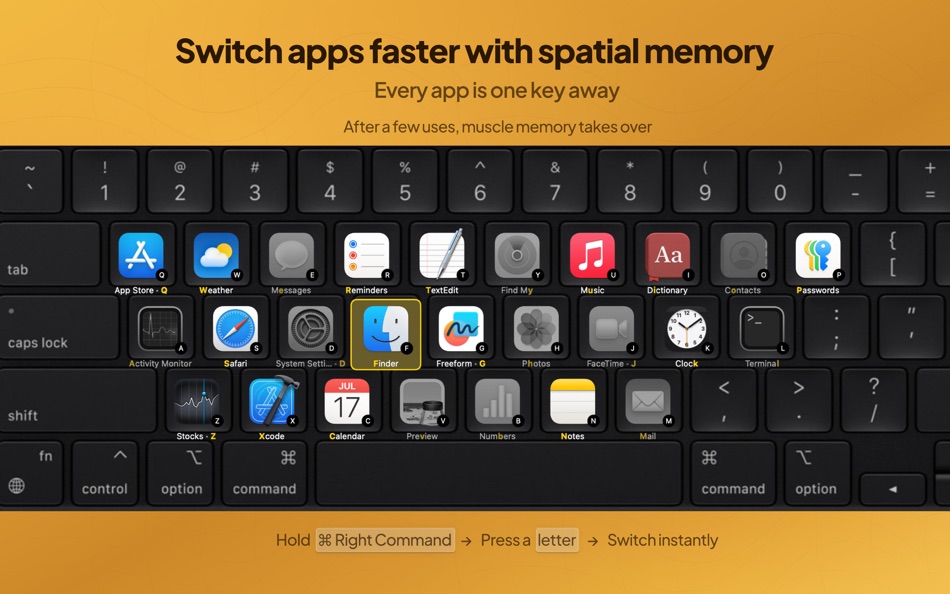
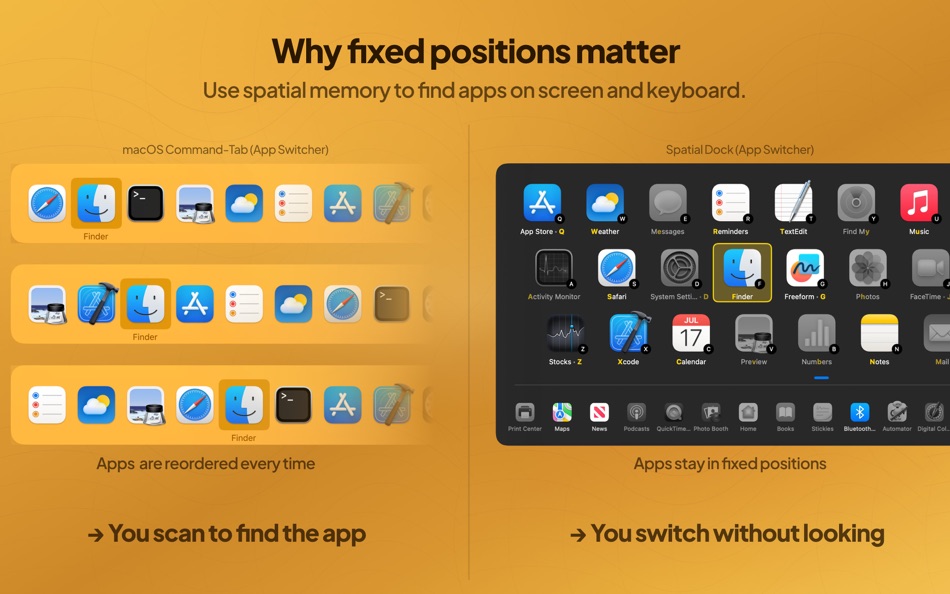
Unlike Command-Tab or Mission Control, Spatial Dock keeps apps in fixed positions across sessions. Shortcuts stay consistent, muscle memory takes over, and switching gets faster every time you use it.
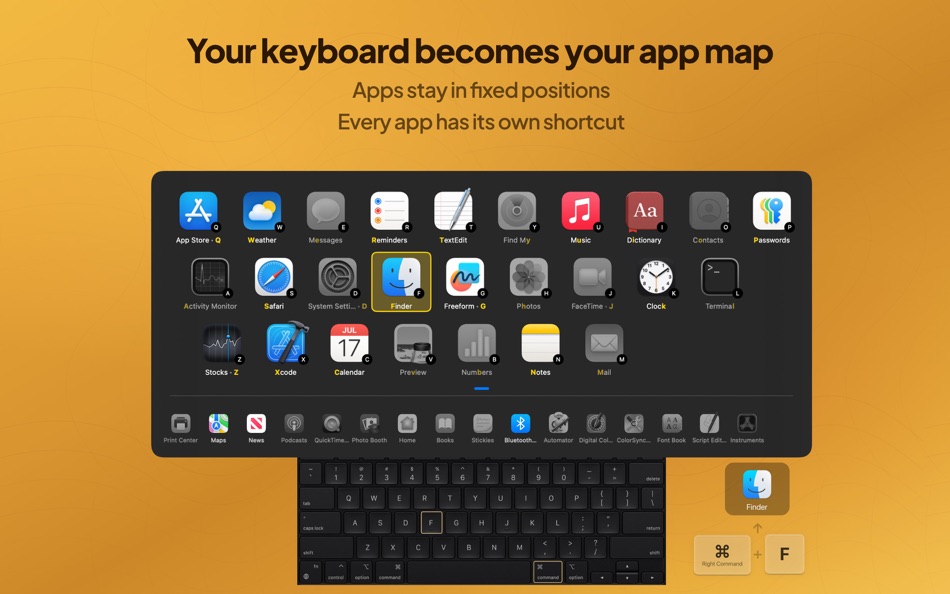
How it works: Hold your activation key, press a letter, and you're there, instantly. After a few uses, your fingers just know. No scanning, no searching.
Why Spatial Dock is different:
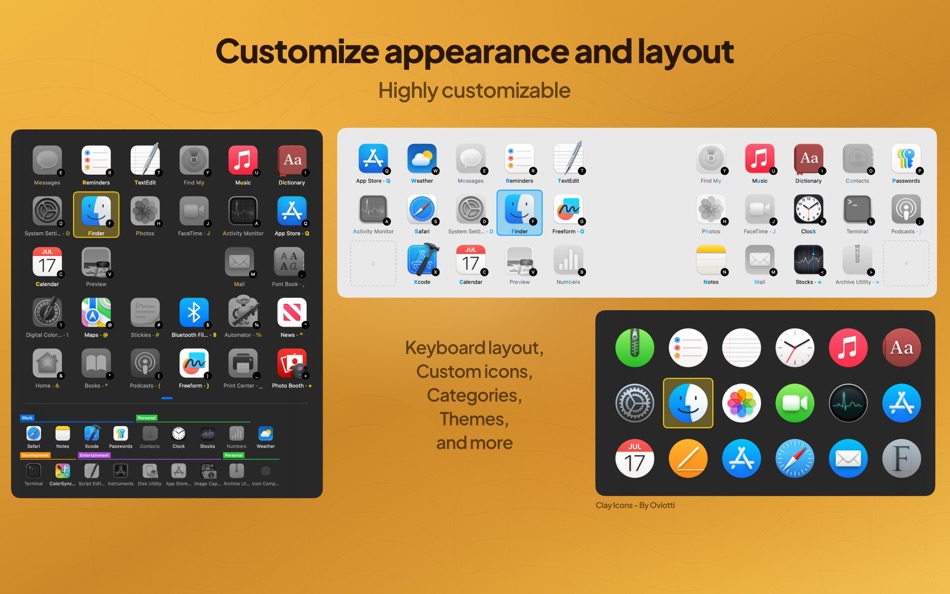
- Keyboard-mapped layout: apps are arranged to match your keyboard layout for direct, muscle-memory-based switching
- Fixed positions across sessions: apps stay where you expect them instead of being constantly reordered
- More ways to navigate: click icons, use Tab for recent apps, or use arrow keys for spatial navigation
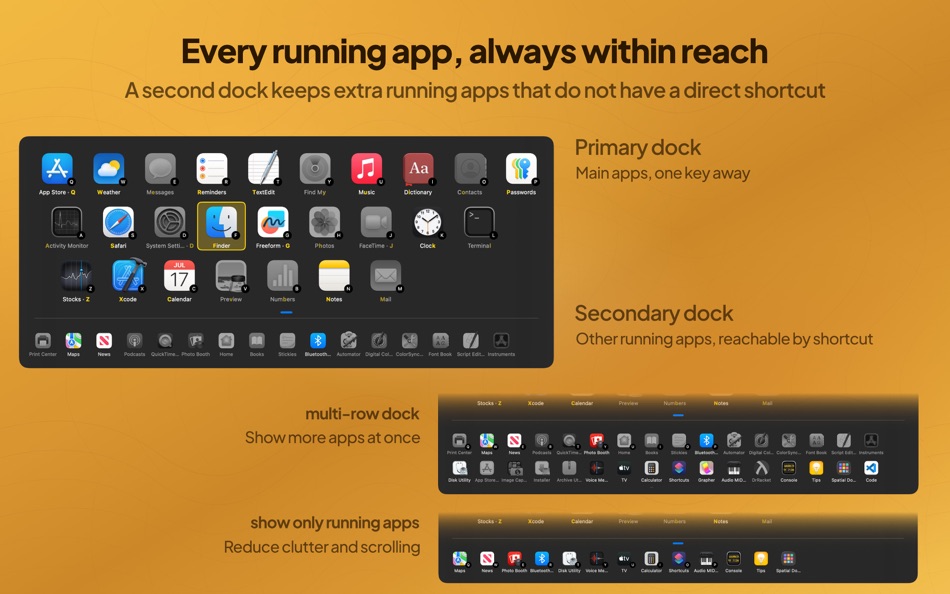
- Primary and secondary docks: keep main apps one key away and extra running apps within reach
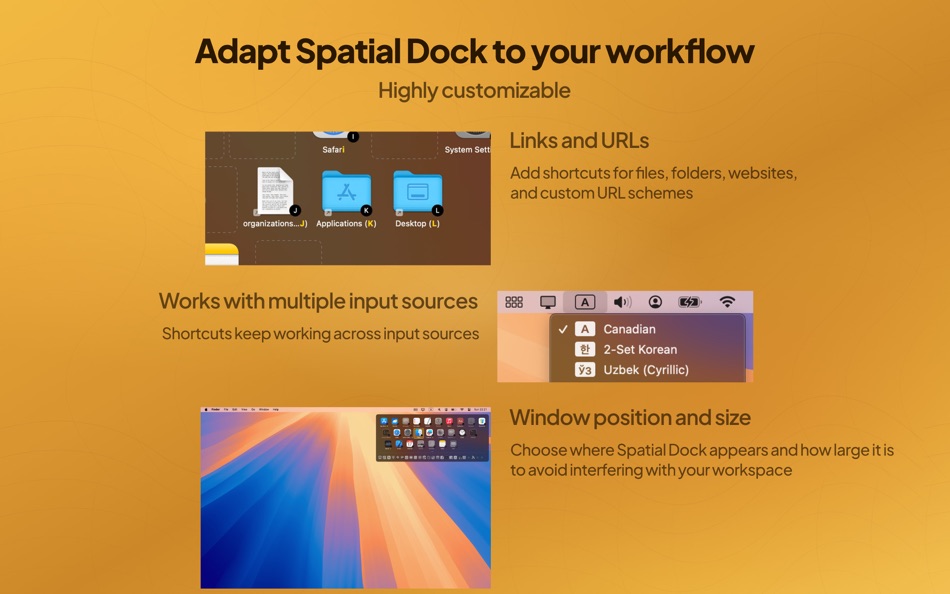
- Custom keyboard layouts and input sources: works with QWERTY, Colemak, Dvorak, and more
- Flexible workflow: choose activation methods, switching behavior, window position and size, themes, icons, and categories
- More than apps: add shortcuts for files, folders, websites, and custom URL schemes
- Multi-screen support: choose where Spatial Dock appears across displays
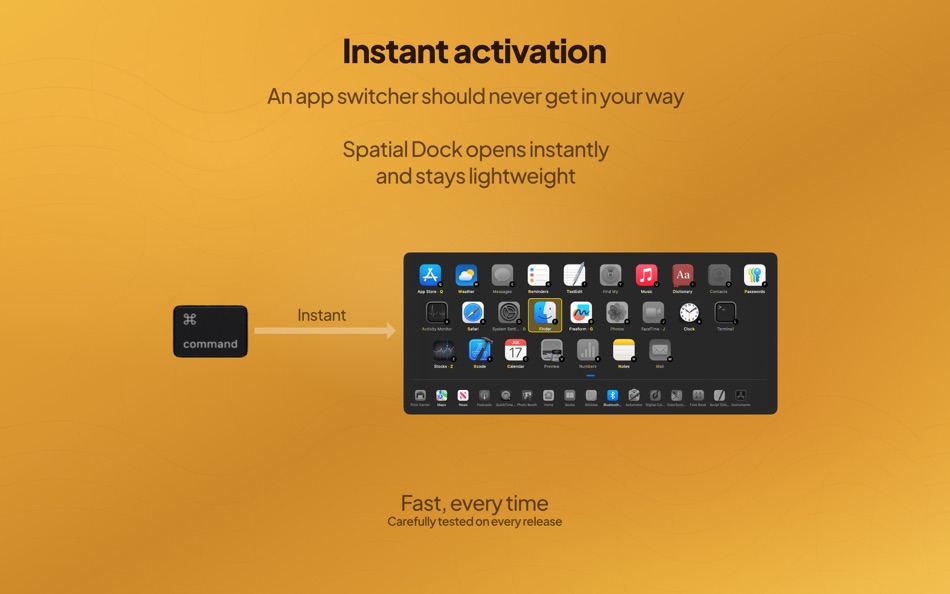
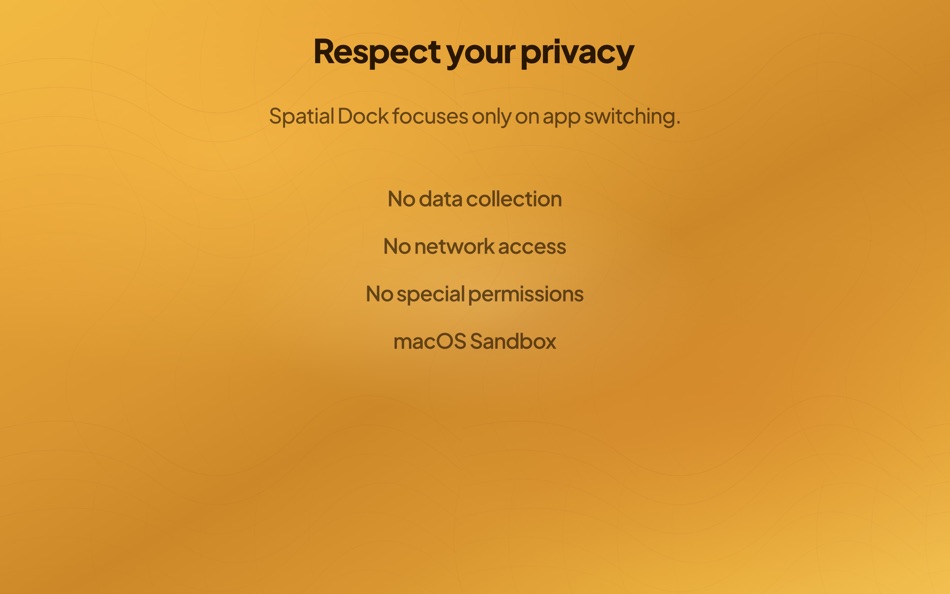
- Fast and private: instant activation, low resource usage, no data collection, no network access, no special permissions, sandboxed on macOS
Spatial Dock is built for people who switch constantly and want app switching on Mac to feel instant, spatial, and effortless.
Ad
Snímky obrazovky
Historie cen
- Dnes: $9.99
- Minimální: $9.99
- Maximální: $9.99
Sledovat ceny
Novinky
- Verze: 1.4.0
- Aktualizováno:
- # SpatialDock Release Notes - v1.4.0
SpatialDock 1.4 adds new features to stay out of your way while switching apps, so you can keep your focus.
## Improved Switching Experience
**Show Only Running Apps in Secondary Dock**
You can now set Secondary Dock to display only currently running apps. This helps keep the dock compact, reduces scrolling, and can avoid multi-row layouts.
You can enable this in Secondary Dock settings and toggle it anytime with a shortcut.
**Edge Layout**
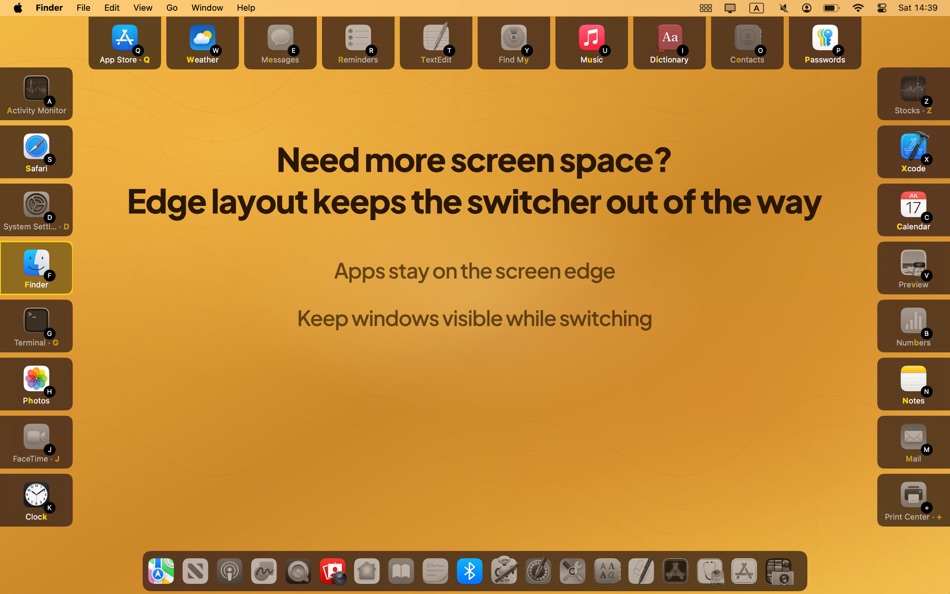
Apps can now be organized along screen edges, so your windows and desktop stay visible while switching. Spatial consistency is preserved, with less visual obstruction than the classic keyboard grid.
**Delayed SpatialDock visibility (optional)**
When you already know your app shortcuts, SpatialDock can stay nearly invisible during quick switches. If you hold the modifier key longer, the overlay appears.
**UI Size Presets**
Choose **Normal**, **Large**, or **Very Large** for better readability across different display sizes.
## Performance Improvements
**Faster activation**
Spatial Dock overlay show speed has been optimized for a noticeably snappier experience
**Faster arrow-key navigation**
Selection movement with arrow keys is now more responsive.
## Other Improvements
### Option+Tab and Modifier + Trigger
- Press `Option+Tab` or your `Modifier + Trigger` shortcut again to close SpatialDock instantly.
- You can keep navigating after opening SpatialDock, without continuously holding modifier keys.
### Secondary Dock
- The secondary dock now follows your active/selected app so it stays in view automatically.
- Arrow-key navigation is smoother and supports clearer up/down movement.
### Configuration Improvements
- New **Apps** settings tab dedicated to managing app dock assignment and app settings.
- Organizing app categories is quicker and easier.
- Importing apps without icons loads them now from macOS.
- Fix SpatialDock icon size
Další informace
- Datum vydání:
- Kategorie:
macOS Aplikace›Produktivita - OS:
macOS,macOS 14.0 a vyšší - Velikost:
2 Mb - Podporovaný jazyk:
English - Hodnocení obsahu:
4+ - Mac App Store Hodnocení:
0
 https://logibeam.com/spatialdock
Vývojář
- LogiBeam
- Platformy: macOS Aplikace (1)
- Seznamy: 1 + 0
- Body: 2 + 0 ¡
- Hodnocení: 0
- Komentáře: 0
- Slevy: 0
- Videa: 0
- RSS: Odebírat
Seznamy (1)
- Spatial Dock - App Switcher

Body (2)
-

- 17,822 cahiba7911@agenra.com
- +1
-
- 2 nia
- +1


Hodnocení (0)
0 ☹️
Komentáře (0)
Buďte první, kdo okomentuje 🌟
«Spatial Dock - App Switcher». Platforma: macOS. Kategorie: Produktivita. Vývojář: «LogiBeam». První vydání: . Poslední aktualizace: . Aktuální cena: $9.99. Nejnižší zaznamenaná cena: $9.99. Nejvyšší zaznamenaná cena: $9.99. Tento titul zatím na AppAgg nezískal hodnocení ani recenze. Seznamy: veřejné 1, soukromé 0. Sledované body: potvrzené 2, nepřímé 0. Dostupné jazyky: English. AppAgg sleduje historii cen, hodnocení a zpětnou vazbu od uživatelů «Spatial Dock - App Switcher». Sledujte budoucí slevy a aktualizace prostřednictvím RSS. AppAgg nehostuje aplikace ani nedistribuuje software. Všechny ochranné známky, loga a snímky obrazovky patří jejich příslušným vlastníkům.
Spatial Dock - App Switcher Krátká adresa URL: Zkopírováno!- 🌟 Sdílet
- Mac App Store
Podobné
-
- Dock Shortcut
- macOS Aplikace: Produktivita Podle: Michal Witkowski
- $7.99
- Seznamy: 0 + 0 0 0
- Body: 0 + 0 Verze: 1.0.44 Dock Keyboard Shortcuts opens apps with one key tap. The recommended way ... First app in dock opens with (option) ⌥ + 1. - Create custom shortcuts in Settings - Hides into Menu Bar ... ⥯
- Novinka
- Spatial.
- macOS Aplikace: Produktivita Podle: 44 X
- * Zdarma
- Seznamy: 0 + 0 0 0
- Body: 0 + 0 Verze: 1.0.6 Welcome to your private visual repository. Your digital shoebox, if you will. For keeping what you see, think and want to remember. Designed for thinking through ideas, collecting ... ⥯
-
- rcmd • App Switcher
- macOS Aplikace: Produktivita Podle: THE LOW-TECH GUYS SRL
- Zdarma
- Seznamy: 5 + 3 0 0
- Body: 12 + 0 Verze: 2.7.0 Re-imagined Command-Tab. Switch apps instantly just by their first letter! Hold down the right side |⌘ command| and press the first letter of the app name to focus apps instantly The ... ⥯
-
- Applight – Smart App Switcher
- macOS Aplikace: Produktivita Podle: Seungwoo Choe
- * Zdarma
- Seznamy: 0 + 3 0 0
- Body: 13 + 0 Verze: 1.1 A smarter, faster way to switch apps. Instead of endless Command-Tabs or Spotlight searches, Applight learns your workflow and predicts what you ll need next so you can jump to the ... ⥯
- Ad
-
- DockTimer - Timer in your Dock
- macOS Aplikace: Produktivita Podle: Kohei Nomura
- $2.99
- Seznamy: 0 + 1 0 0
- Body: 6 + 0 Verze: 3.0 Live timer in your Dock DockTimer adds a timer directly to your Dock and shows the remaining time at a glance. You can keep track of progress even while the app runs in the background, ⥯
-
- Quick Switcher-Set Resolution
- macOS Aplikace: Produktivita Podle: 雅 田
- $1.99
- Seznamy: 1 + 1 0 0
- Body: 10 + 0 Verze: 1.4.2 Use Quick Switcher to hide desktop icons with one click, prevent computer from sleeping, modify computer screen resolution (support HIDPI (Retina) and non-HIPID (non-Retina) settings), ⥯
-
- App Switcher and Launcher
- macOS Aplikace: Produktivita Podle: Wise Tech Labs Private Limited
- * Zdarma
- Seznamy: 0 + 0 0 0
- Body: 1 + 0 Verze: 1.8 App Switcher and Launcher Smarter app switching. Faster launching. Less frustration. Whether you're juggling 4 or 14 apps in your daily workflow, switching between them shouldn't slow ... ⥯
-
- Smart Language Switcher
- macOS Aplikace: Produktivita Podle: Ihor Prodan
- * Zdarma
- Seznamy: 1 + 1 0 0
- Body: 4 + 0 Verze: 3.14.0 Lang Switcher automatic keyboard layout switching on macOS Lang Switcher is an intelligent keyboard layout switcher for macOS that automatically detects the language you re typing in ... ⥯
-
- Dory - App Switcher
- macOS Aplikace: Produktivita Podle: Segev Sherry
- $9.99
- Seznamy: 2 + 0 0 0
- Body: 7 + 0 Verze: 1.6.4 Dory is an app switcher and launcher for people who can t remember shortcuts. Just click your middle mouse button (or right Command key) and start typing the app name. Type the first ... ⥯
-
- Launchy: App Launcher Switcher
- macOS Aplikace: Produktivita Podle: Ivan Sapozhnik
- * Zdarma
- Seznamy: 0 + 0 0 0
- Body: 4 + 0 Verze: 1.3.0 Unlock a new level of productivity on macOS with Launchy! Launchy is the ultimate app launcher and switcher, combining speed, simplicity, and customization. Featuring a sleek radial ... ⥯
-
- iLove Drag Dock
- macOS Aplikace: Produktivita Podle: 平 吕
- * Zdarma
- Seznamy: 0 + 1 0 0
- Body: 6 + 0 Verze: 3.5.0 Mac users may find it cumbersome to drag and drop files between windows, apps, spaces and full-screen apps. iLove Drag Dock will make things easy. When you start dragging a file that ... ⥯
-
- Add To Dock
- macOS Aplikace: Produktivita Podle: 经纬 宛
- Zdarma
- Seznamy: 0 + 1 0 0
- Body: 4 + 0 Verze: 1.4 This App was developed to solve such problems. It provides you with something similar to the "Dock Folder". You can add as many items as you want to this folder, so that it can be ... ⥯
-
- Openly Pro - Browser Switcher
- macOS Aplikace: Produktivita Podle: Fokusek Enterprise
- * Zdarma
- Seznamy: 1 + 1 0 0
- Body: 1 + 0 Verze: 1.3.4 Openly Pro - Browser Switcher is the perfect choice if you want to open a web page in a different browser, such as Chrome, Safari, Firefox, Brave and even Edge or other browsers. ... ⥯
- -25%
- AltTab Switcher
- macOS Aplikace: Produktivita Podle: 方成 印
- ▼ $2.99
$3.99-25% - Seznamy: 0 + 0 0 0
- Body: 1 + 0 Verze: 1.3 AltTab Switcher - Bring Alt + Tab Window Switching to macOS AltTab Switcher brings the familiar and powerful Alt + Tab window switching experience from Windows to macOS. With just a ... ⥯