
저장됨
저장됨 메뉴에 표시할 이름을 선택하세요.
완료!
기술

Organize chat history, web pages, tutorials, receipts, and social media images with a fast, local workflow.
Key features
• Long screenshot stitching
Select consecutive screenshots and automatically remove overlapping areas as they are stitched into one long image. Open any seam for precise manual adjustment when needed.
• Scrolling screen capture
Use the system screen broadcast to capture scrolling content and create a long screenshot. Frames are analyzed on your device and are not uploaded to a server.
• Grid image splitting
Split one photo into 2×2, 3×3, and other grid layouts. Adjust grid size, spacing, aspect ratio, and shapes for social media layouts and image slicing.
• Photo collages
Combine multiple photos into horizontal, vertical, or grid layouts. Adjust spacing, color, ratio, and crop position.
• Flexible export
Export as PNG, JPEG, HEIC, or PDF. Save to Photos, export to Files, or share with the system share sheet.
Privacy first
Photo processing, screen-recording frame analysis, and long screenshot stitching happen locally on your device. Screen capture starts only after you explicitly confirm the system screen broadcast.
Core features are available to use. GridQuilt Pro adds larger grids, higher output limits, and higher-quality screen-recording long screenshots.
스크린샷




가격 내역
-
* 인앱 구매 - 현재 가격: 무료
- 최소: 무료
- 최대: 무료
광고
AppAgg 평가
8,910
AppAgg 예상 평가:
GridQuilt: Collage & Split
개발자: 文阳 贺
8,910 골드
평가가 높을수록 보통 AppAgg에서 더 강한 신호를 의미합니다.
기준: 인기 · 사용자 평점 · 최신성 · 딜 · 스토어 데이터 · 커뮤니티 활동
최신 AppAgg 데이터를 바탕으로 매일 다시 계산됩니다.
단축 URL: 복사됨!
새로운 기능
- 버전: 2.1
- 마지막 업데이트:
- This update makes collages, image splitting, and long screenshots easier to create.
• New collage templates with photo reordering, cropping, and editing for a variety of layouts.
• A unified template picker for collages and image splitting makes layouts easier to find.
• Improved long screenshots from screen recordings to better preserve the final frames before recording stops.
• Fixed an issue where automatic screenshot ordering could leave out images in some cases.
• Improved high-resolution export: unlock Pro while editing, keep your edits, and continue exporting.
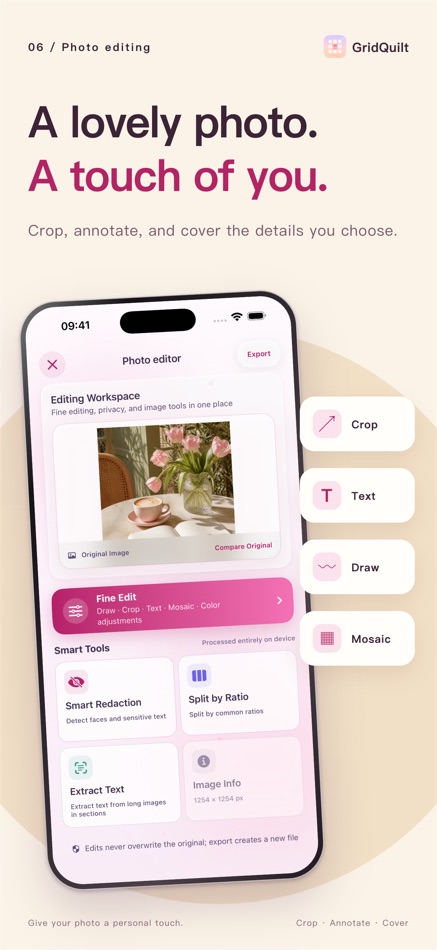
• Improved text and crop tools and photo selection, and fixed inaccurate photo selection in iPad collages.
추가 정보
 https://gridquilt.cutedge.site
목록 (1)
- GridQuilt: Collage & Split

포인트 (0)
0
순위 (0)
0
댓글 (1)
요약
GridQuilt: Collage & Split 단축 URL: 복사됨!- 공유하기
- App Store
AppAgg에서 앱 ‘GridQuilt: Collage & Split’의 정보를 확인할 수 있습니다. 개발자: 文阳 贺. 플랫폼: iOS. 카테고리: 그래픽 및 디자인. AppAgg 평가: 8,910 (골드). 이 앱의 AppAgg 포인트: 확인된 포인트 0, 간접 포인트 1. 이 앱이 포함된 공개 목록: 1개. 비공개 목록에 저장한 사용자: 1명. AppAgg 사용자가 아직 이 앱에 별점을 남기지 않았습니다. 이 앱에 달린 댓글 수: 1개. 확인된 포인트는 로그인한 AppAgg 사용자가 스토어로 이동한 기록을 반영합니다. 간접 포인트는 스토어 데이터를 바탕으로 합니다. 두 숫자는 공개 목록 수와 비공개 목록에 저장한 사용자 수를 나타냅니다. 이 앱의 최초 출시일은 입니다. 이 앱의 마지막 업데이트 날짜는 입니다. 이 앱은 현재 무료로 이용할 수 있습니다. 이 앱의 현재 App Store 평점은 5.0이며, 투표 수는 1입니다. 이 앱은 다음 언어를 지원합니다: Chinese, English, French, German, Japanese, Spanish. 가격 기록을 확인하거나 앱을 목록에 추가하고 개발자를 팔로우할 수 있습니다. 이 앱의 향후 할인과 업데이트는 RSS 피드에서 확인할 수 있습니다. AppAgg는 이 앱을 호스팅하거나 배포하지 않습니다. 이 앱과 관련된 모든 상표, 로고 및 스크린샷은 각 소유자에게 귀속됩니다.


LIFETIME FREE
Install and open the app.
Tab the Continues
Tab “PRO” 0.00