
저장됨
저장됨 메뉴에 표시할 이름을 선택하세요.
완료!
| 개발자: | Martin Bocker Dr (3) | ||
| 가격: | $4.99 | ||
| 평가: | 1,410 실버 | ||
| 순위: | 0 | ||
| 댓글: | 0 댓글 게시 | ||
| 목록: | 1 + 0 | ||
| 포인트: | 0 + 0 ¡ | ||
| +1 포인트 | |||
기술

Unicode Companion puts the entire Unicode standard at your fingertips. Browse every block, search by name or value, inspect detailed properties, and copy characters in the exact notation your code or document requires — all in a clean, native interface built for iPhone, iPad, and Mac.
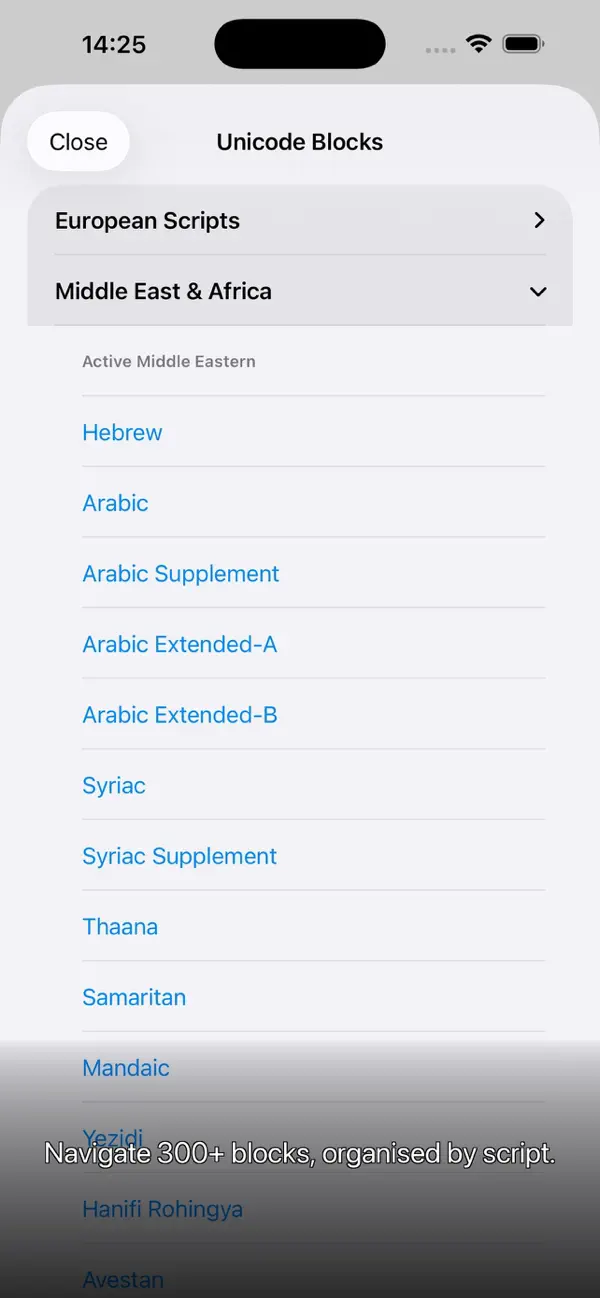
BROWSE THE WHOLE STANDARD
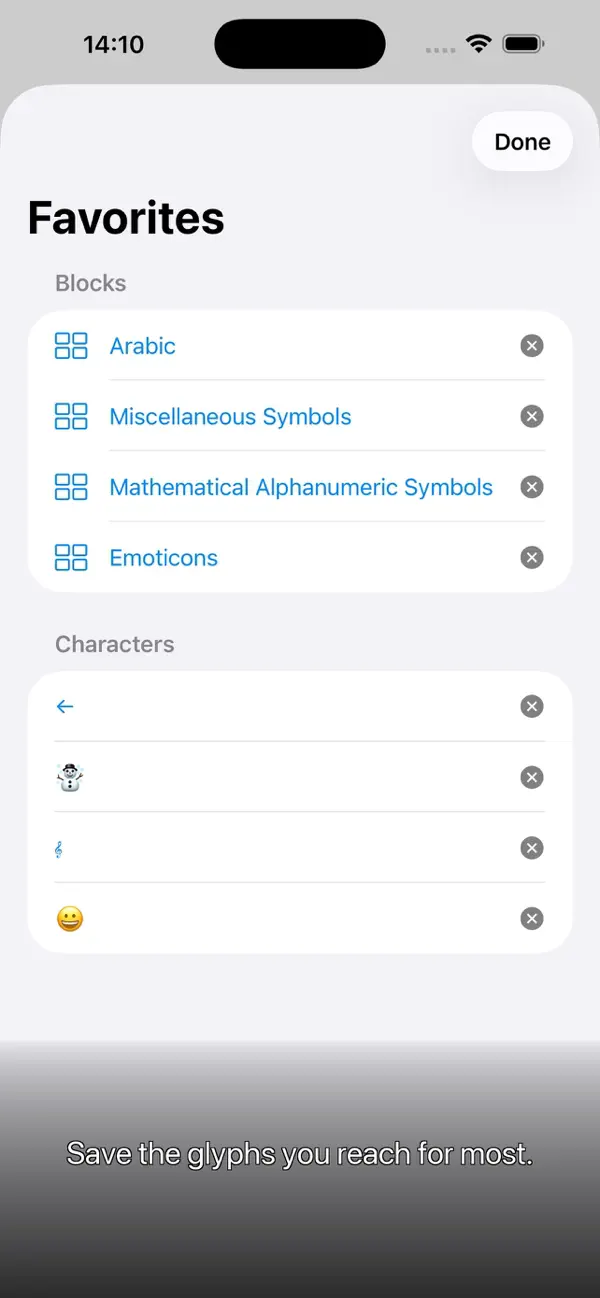
Every Unicode block is organised into clear categories with an expandable accordion list. Jump straight to Basic Latin, Mathematical Operators, Ancient Egyptian Hieroglyphs, or any of the hundreds of other blocks in seconds. Mark blocks you visit often as favourites so they're always one tap away.
FIND EXACTLY WHAT YOU'RE LOOKING FOR
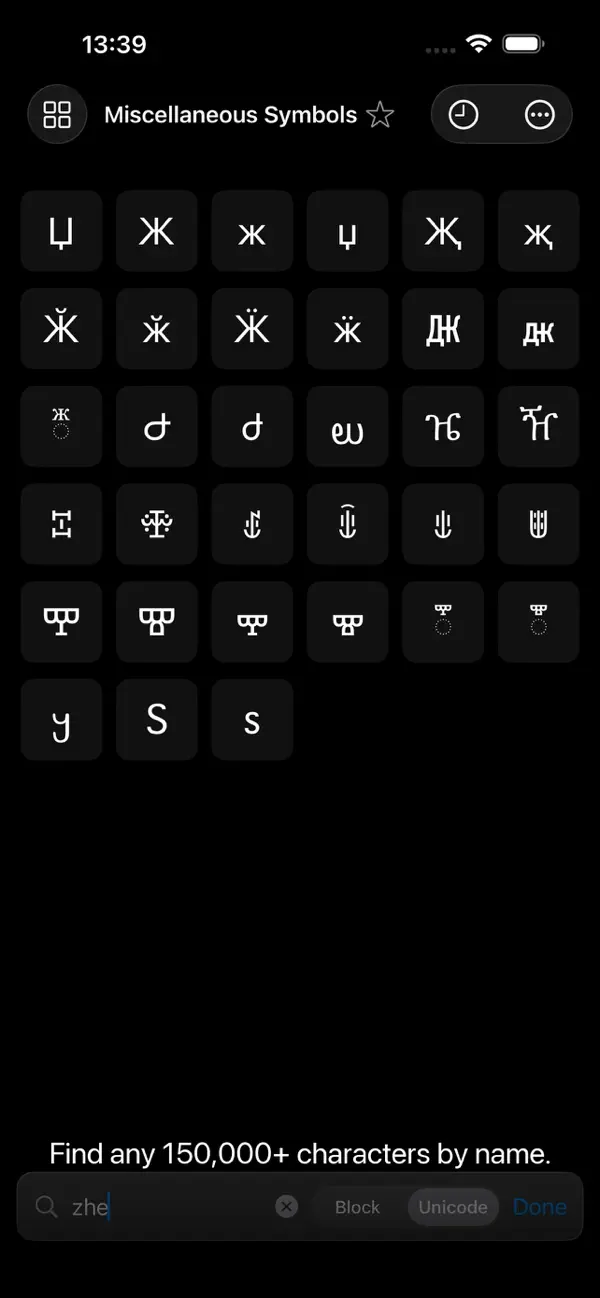
• Search within the current block as you type
• Switch to global search to scan all 150,000+ characters at once
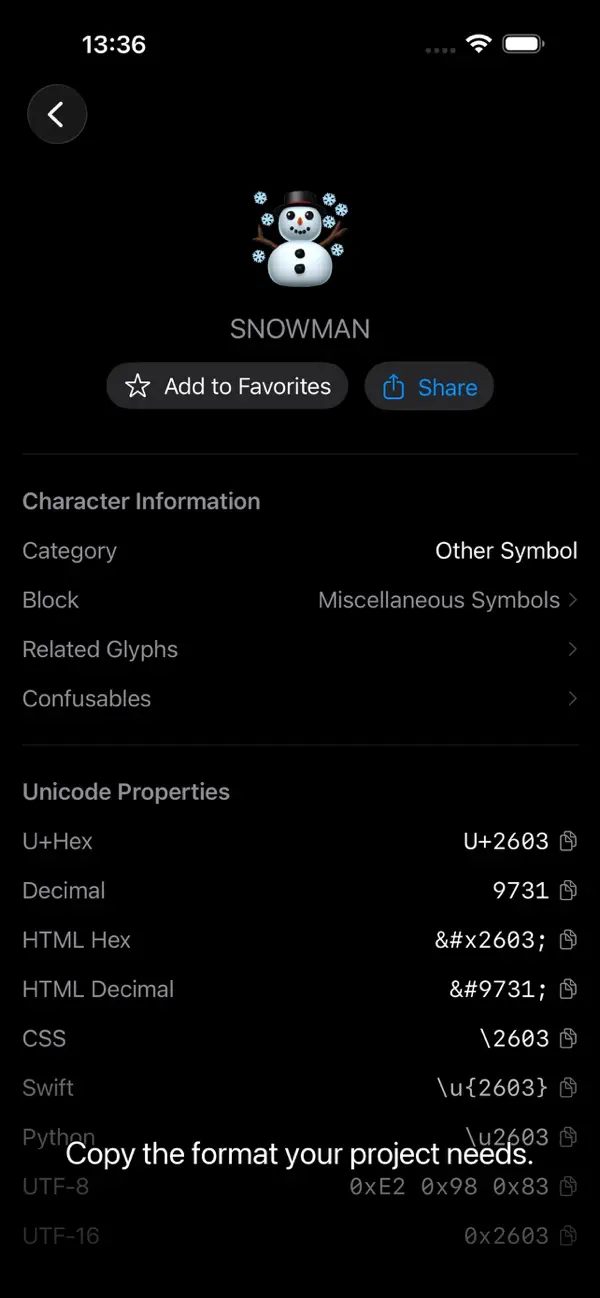
• Search by character name, code point, or notation (type U+2603 and land directly on the snowman glyph)
INSPECT EVERY DETAIL
Tap any character to open a full detail view showing:
• Large glyph preview with left/right navigation
• Unicode name, block, category, and numeric value
• Every useful encoding: U+Hex, Decimal, HTML Hex, HTML Decimal, HTML Named entity, CSS escape, Swift literal, Python literal, UTF-8 bytes, UTF-16 code units
• Related glyphs (NFD decompositions, directional variants)
• Confusable characters (Unicode TR39 lookalikes — invaluable for security and accessibility work)
Tap any encoding row to copy it instantly. Tap the Block name to jump straight to that block in the grid.
COPY IN THE FORMAT YOU NEED
Long-press any character in the grid to copy it as Character, U+Hex, Decimal, HTML Hex, HTML Decimal, CSS escape, Swift literal, or Python literal. Set your preferred default format in Settings — it's used every time you select a character.
SCAN REAL-WORLD TEXT
Point your camera at a sign, book page, or screenshot and Unicode Companion identifies every character it contains, grouped by Unicode block. On Mac, drop or paste any image to run the same OCR analysis. Perfect for identifying unfamiliar scripts or tracking down unusual glyphs in the wild.
BUILT FOR EVERY APPLE PLATFORM
• iPhone — full-screen grid with floating search bar, toolbar menus for blocks, favourites, and recents
• iPad — adaptive three-column layout in landscape; push navigation in portrait; floating glass block header
• Mac — three-column NavigationView, keyboard shortcuts, native Settings window, image-based text scanner
FAVOURITES AND RECENTS
Star individual characters or whole blocks. Your last ten selections appear in the Recents list, each tappable to jump straight back. Everything persists across launches.
THOUGHTFUL DETAILS
• Liquid Glass interface on iOS/iPadOS 26 and macOS 26
• Full Dynamic Type and accessibility support
• Share any character with its name and code point in one tap
• Tips carousel on first launch to help you discover every feature
Ad
스크린샷

가격 내역
- 현재 가격: $4.99
- 최소: $4.99
- 최대: $4.99
AppAgg 평가
1,410
AppAgg 예상 평가:
Unicode Companion
1,410 실버
평가가 높을수록 보통 AppAgg에서 더 강한 신호를 의미합니다.
기준: 인기 · 사용자 평점 · 최신성 · 딜 · 스토어 데이터 · 커뮤니티 활동
최신 AppAgg 데이터를 바탕으로 매일 다시 계산됩니다.
단축 URL: 복사됨!
새로운 기능
- 버전: 1.3
- 마지막 업데이트:
- • Your favorites and recently used characters now sync across your devices via iCloud – optional, toggle it in Settings.
• iPhone/iPad: a tidier Recents view.
• Mac: larger opening window with better-balanced columns.
• Minor bug fixes and improvements
추가 정보
개발자
- Martin Bocker Dr
- 플랫폼: iOS 앱 (3)
- 목록: 1 + 0
- 포인트: 0 + 0 ¡
- 순위: 0
- 댓글: 0
- 할인: 0
- 동영상: 0
- RSS: 구독
- 팔로워: 0
목록 (1)
- Unicode Companion

포인트 (0)
0
순위 (0)
0
댓글 (0)
가장 먼저 댓글을 남겨주세요
요약
Unicode Companion 단축 URL: 복사됨!- 공유하기
- App Store
«Unicode Companion». 플랫폼: iOS. 카테고리: 개발자 도구. 개발자: «Martin Bocker Dr». 첫 번째 릴리스: . 마지막 업데이트: . 현재 가격: $4.99. 최저 기록 가격: $4.99. 최고 기록 가격: $4.99. 이 타이틀은 아직 AppAgg에서 평가나 리뷰를 받지 못했습니다. 목록: 공개: 1, 비공개: 0. 사용 가능한 언어: English. AppAgg는 «Unicode Companion»의 가격 기록, 평점 및 사용자 피드백을 추적합니다. AppAgg는 애플리케이션을 호스팅하거나 소프트웨어를 배포하지 않습니다. 모든 상표, 로고 및 스크린샷은 해당 소유자의 자산입니다. 향후 할인 및 업데이트 받기: RSS에서 확인할 수 있습니다
유사 항목
-
- K2 Companion
- iOS 앱: 개발자 도구 게시자: LZTEK, LLC
- 무료
- 목록: 0 + 1 0 0
- 포인트: 0 + 0 560 · 브론즈 버전: 1.0.1 K2 Companion App is the mobile remote connection app for the K2 Desktop app!
-
- Beam Companion
- iOS 앱: 개발자 도구 게시자: Orange Pill Ltd.
- 무료
- 목록: 0 + 1 0 0
- 포인트: 0 + 5 1K · 실버 버전: 2.0.0 The Beam Companion app is designed for gamers on the Beam network. It provides a straightforward solution to manage multiple in-game accounts from various games within the Beam ...
-
- Claude Cursor Companion
- iOS 앱: 개발자 도구 게시자: Oseme Ochei
- $24.99
- 목록: 0 0 0
- 포인트: 1 + 0 600 · 브론즈 버전: 1.1 Claude Cursor is a companion app for managing persistent terminal sessions on your Claude Cursor server. Access running terminals, create new sessions, and stay connected to your work ...
-
- M-Trust Companion
- iOS 앱: 개발자 도구 게시자: EMD Digital Inc.
- 무료
- 목록: 0 0 0
- 포인트: 0 + 0 500 · 브론즈 버전: 1.3.8 Download the Companion app to make use of your M-Trust™ Companions and start verifying objects. Together with the M-Trust™ Developer Kit, our reader devices, and crypto anchors, this ...
-
- Cicero: A Unicode® Tool
- iOS 앱: 개발자 도구 게시자: Yan Li
- $2.99
- 목록: 0 + 1 0 0
- 포인트: 1 + 10 9K · 골드 버전: 1.8 Cicero provides a few intuitive ways to access the Unicode® character data: Block and Plane View - Browse through Unicode blocks and planes Grapheme View - Segregate user-perceived ...
-
- Ad Revenue Companion for AdMob
- iOS 앱: 개발자 도구 게시자: Innervate
- * 무료
- 목록: 0 0 0
- 포인트: 0 + 0 600 · 브론즈 버전: 1.5.0 Admob Companion - Keep easy Track of Your Admob Earnings With the Admob Companion app, you can always stay on top of your Admob earnings, anytime and anywhere! Our app provides a ...
-
- Remote Terminal Companion
- iOS 앱: 개발자 도구 게시자: Pierre CARRON DE LA CARRIERE
- $7.99
- 목록: 1 0 0
- 포인트: 1 + 0 1K · 실버 버전: 1.1.0 Manage Your Mac from Your iPhone Remote Terminal provides a convenient way to interact with your Mac s command-line environment and browse files directly from your iPhone. Designed for
-
- Proxee Companion
- iOS 앱: 개발자 도구 게시자: Piotr Dubrowski
- 무료
- 목록: 0 0 0
- 포인트: 1 + 0 790 · 실버 버전: 1.0.2 Proxee Companion lets you preview and control local web projects from your iPhone while using Proxee on your Mac. IMPORTANT: This app is a companion for Proxee for macOS. It does not ...
-
- SwiftUI Companion
- iOS 앱: 개발자 도구 게시자: Nishat Majid
- $0.99
- 목록: 0 0 0
- 포인트: 0 + 0 700 · 브론즈 버전: 1.0 Welcome to SwiftUI Companion! Are you a SwiftUI developer looking for a quick and effortless way to preview system elements in action? Whether you're fine-tuning your UI or ...
-
- LeetCode Companion: LeetTrack
- iOS 앱: 개발자 도구 게시자: HUSEYIN CEM OZTURK
- 무료
- 목록: 0 0 0
- 포인트: 1 + 2 1K · 실버 버전: 1.1.0 Your personal LeetCode companion for profile analytics, streak tracking, and interview prep. Track your profile, monitor progress, and stay motivated from a beautiful, customizable ...
-
- VibeCheck - Limits Companion
- iOS 앱: 개발자 도구 게시자: Baturay Berker Ceylan
- 무료
- 목록: 0 + 1 0 0
- 포인트: 0 + 1 1K · 실버 버전: 0.8.3 Stop guessing how much AI you have left. VibeCheck shows real-time usage limits, reset times, and cost history for every AI coding tool you use -- Claude Code, Cursor, Windsurf, Codex ...
-
- Claude Code Notifier Companion
- iOS 앱: 개발자 도구 게시자: TouchTap
- 무료
- 목록: 0 0 0
- 포인트: 0 + 7 1K · 실버 버전: 1.1.0 Your Claude Code sessions shouldn't stop when you step away. You started Claude on a major refactor. Confident it would run for a while, you stepped out - grabbed coffee, joined a ...
- 새로운
- Octodoge GitHub Companion
- iOS 앱: 개발자 도구 게시자: Ilias Karim
- 무료
- 목록: 0 0 0
- 포인트: 1 + 0 1K · 실버 버전: 1.1 Octodoge GitHub Companion is a native iOS app for browsing GitHub on your iPhone repos, profiles, commits, and activity without opening a browser. SEARCH & EXPLORE Find users and ...
-
- Quill - Posthog companion
- iOS 앱: 개발자 도구 게시자: William Taylor
- * 무료
- 목록: 0 0 0
- 포인트: 0 + 0 570 · 브론즈 버전: 1.1 Stay on top of what matters on the go. Quill is the perfect PostHog companion to give you quick and easy access to your most important metrics, dashboards, and insights, right from ...

