
Saved
Choose the name that will be shown in your Saved menu.
Done!
| Developer: | Aptonic LLC (3) | ||
| Price: | * Free | ||
| Score: | 1,770 Gold | ||
| Rankings: | 0 | ||
| Comments: | 0 Add a comment | ||
| Lists: | 1 + 0 | ||
| Points: | 1 + 0 ¡ | ||
| +1 Points | |||
Description

Dropzone 5 is a major update that completely redesigns the app with full support for macOS Tahoe and Liquid Glass.
New multi-grid support makes Dropzone more powerful than ever. Keep collections of the apps, folders, and actions you use most, and switch between them effortlessly.
Dropzone also includes Drop Bar - a place to stash files you'll need later. Just drop files on the Drop Bar icon in the grid and they'll stick there until you're ready to use them. With multi-grid support, you can create multiple Drop Bars to organize files into separate collections.
A fully customizable grid puts your most-used apps, folders, and actions right where you need them.
Features
• Fully updated and optimized for macOS Tahoe.
• Display customized folder icons with colors, symbols, or emojis using Tahoe's new folder icon style.
• Set up multiple grids to keep different collections of apps, folders, and actions at your fingertips.
• Pop out Drop Bar into a floating file shelf that stays on top, ready to drag files wherever you need them.
• Open apps, move and copy files faster than ever.
• Shorten any URL instantly with TinyURL. Select a URL, press Ctrl+Option+Cmd+S, and the short link is copied to your clipboard.
• Send files and folders to nearby Macs with built-in AirDrop support.
• Upload images to Imgur and get a shareable link in seconds.
• Convert images between formats like PNG, JPEG, TIFF, and more.
• Resize images to preset dimensions with a single drop.
• Upload files to Amazon S3 (Dropzone Pro feature).
• Upload files to your SFTP server (Dropzone Pro feature).
• Run multiple tasks simultaneously and track each one through the in-grid status area.
• Monitor task progress at a glance from the animated menu bar icon.
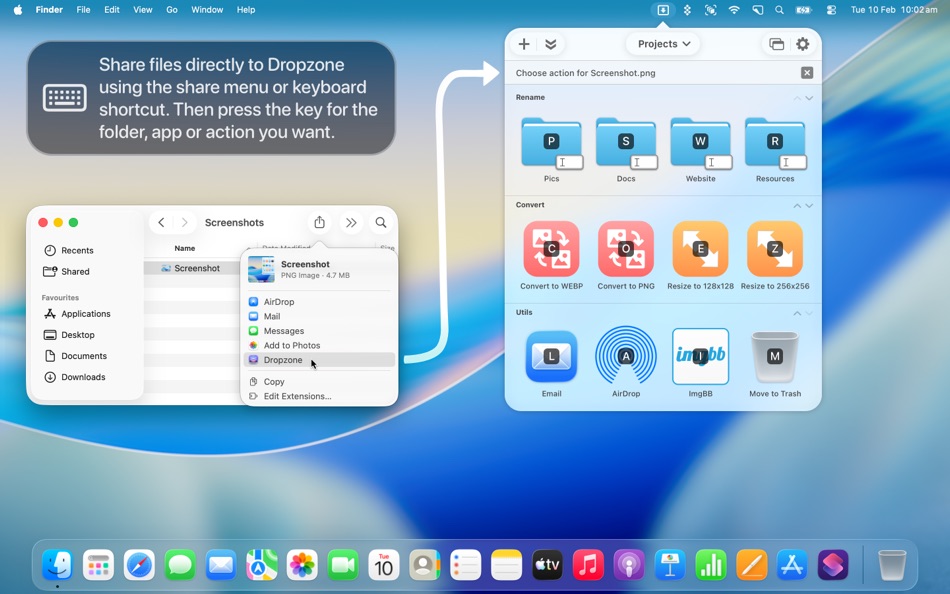
• Launch actions with customizable keyboard shortcuts (Dropzone Pro feature).
• Add apps, folders, or actions to your grid by dragging and dropping them onto the Add to Grid area.
DROPZONE 5 PRO SUBSCRIPTION INFO
• Dropzone 5 offers an optional subscription that includes regular action updates and enhancements, all app updates (including major ones) delivered automatically, access to all new features, and advanced capabilities including Amazon S3 uploading, SFTP uploading, macOS service integration, action keyboard shortcuts, and more.
• Launch Dropzone and choose 'Subscribe to Dropzone 5 Pro...' from the settings menu to begin your 14-day free trial. You can cancel at any point during the trial and you won't be charged.
• After 14 days, you'll automatically be billed 4.99 USD per month (or the equivalent in your country) through an auto-renewing subscription.
• An active subscription entitles you to unlimited app updates, including minor updates and new features.
• You can cancel your subscription at any time. If you do, Dropzone actions and advanced features will no longer be available. You can restart your subscription at any time to regain access.
See our full Terms of Use for Dropzone 5 here:
https://aptonic.com/5/terms
We're always working to improve Dropzone with feature updates and new actions. We'd love to hear what you think - get in touch via the App Store "Support" link.
Advertisement
Screenshots


Price History
-
* In-App Purchases - Current price: Free
- Minimum: Free
- Maximum: Free
Track prices Add to a list to get discount alerts by email or push
AppAgg Score
1,770
Estimated AppAgg Score for
Dropzone 5: Drag & Drop Magic
Developer: Aptonic LLC
1,770 Gold
Higher scores usually reflect better results across AppAgg’s indicators.
Based on: popularity · ratings · freshness · deals · store data · community signals
Recalculated daily using fresh AppAgg data.
Share AppAgg Score
Short URL: Copied! Badge for your website: What's new
- Version: 5.1.3
- Last Updated:
- • Improved drag handling on macOS 27
• Fixed duplicate lines in the Settings toolbar on macOS 27
• Fixed issue where clicking the menu bar icon could fail to toggle the grid on macOS 27
• Improved Drop Bar auto-close animation
Additional Information
- Release Date:
- Category:
macOS Apps›Productivity - OS:
macOS,macOS 13.0 and up - Size:
54 Mb - Supported Languages:
Chinese,English,French,German,Italian,Japanese,Korean,Polish,Thai - Content Rating:
4+ - Mac App Store Rating: ¡
0 - Website:
 https://aptonic.com
Developer
- Aptonic LLC
- Followers: 0
- Platforms: macOS Apps (3)
- Deals: 0
- Lists: 2 + 1
- Points: 8 + 0 ¡
- Rankings: 0
- Comments: 0
- Videos: 0
- RSS: Subscribe
Lists (1)
- Dropzone 5: Drag & Drop Magic

Points (1)
-

- 202 Taban Bovin
- +1
Rankings (0)
0
Comments (0)
Be the first to comment
Summary
Dropzone 5: Drag & Drop Magic Short URL: Copied!- Mac App Store
On AppAgg, you can track the macOS app “Dropzone 5: Drag & Drop Magic” by Aptonic LLC, listed under Productivity. AppAgg Score: 1,770 (Gold). AppAgg Points for the app — confirmed: 1; indirect: 0. Public lists containing the app: 1. Users who have saved it in private lists: 0. AppAgg users have not rated the app yet. Confirmed Points record visits to a store by signed-in AppAgg users; indirect Points are based on store data. AppAgg counts public lists containing an app or game and users who have saved it in private lists. The app was first released on . The app was last updated on . The app is currently available for free. The app is available in these languages: Chinese, English, French, German, Italian, Japanese, Korean, Polish, Thai. Explore the price history, add the app to a list, or follow its developer. Follow future deals and updates for the app via its RSS feed. AppAgg does not host or distribute the app. All trademarks, logos, and screenshots related to the app belong to their respective owners.

