
| Udvikler: | Automata Labs (7) | ||
| Pris: | $19.99 | ||
| Rangeringer: | 0 | ||
| Anmeldelser: | 0 Skriv en anmeldelse | ||
| Kommentarer: | 0 Skriv kommentar | ||
| Lister: | 1 + 0 | ||
| Point: | 0 + 0 ¡ | ||
| Windows Store | |||
Beskrivelse

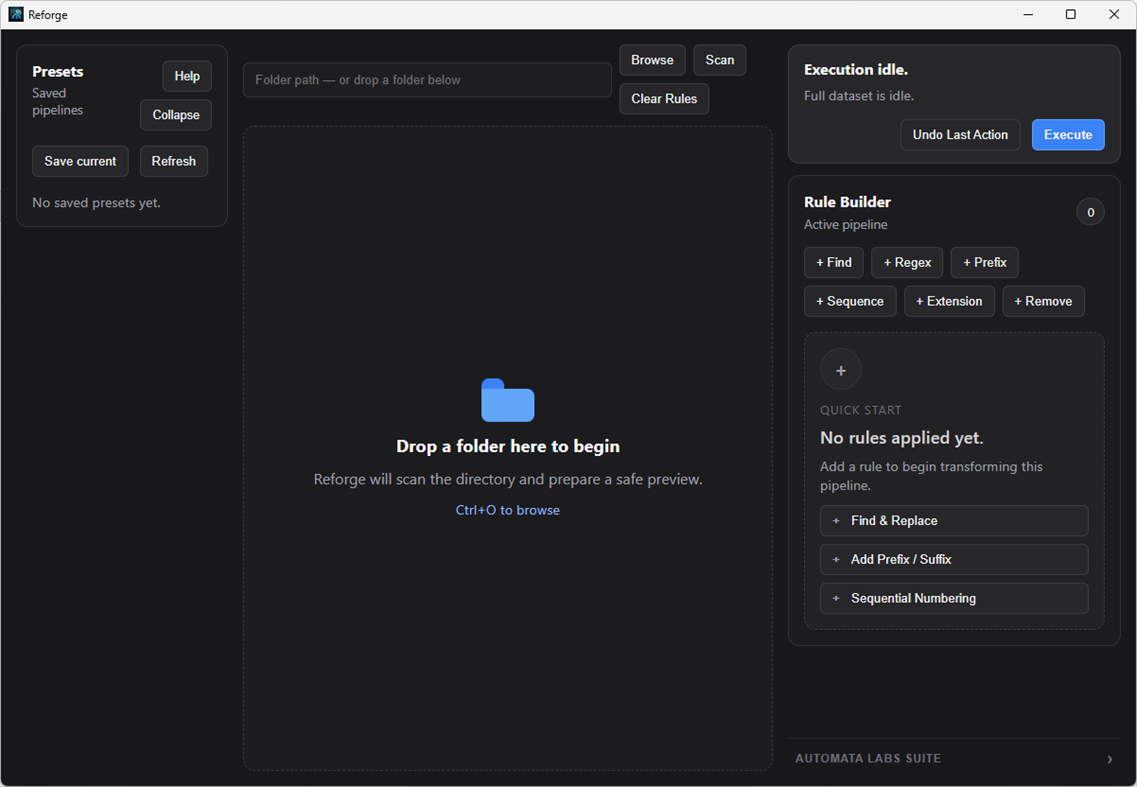
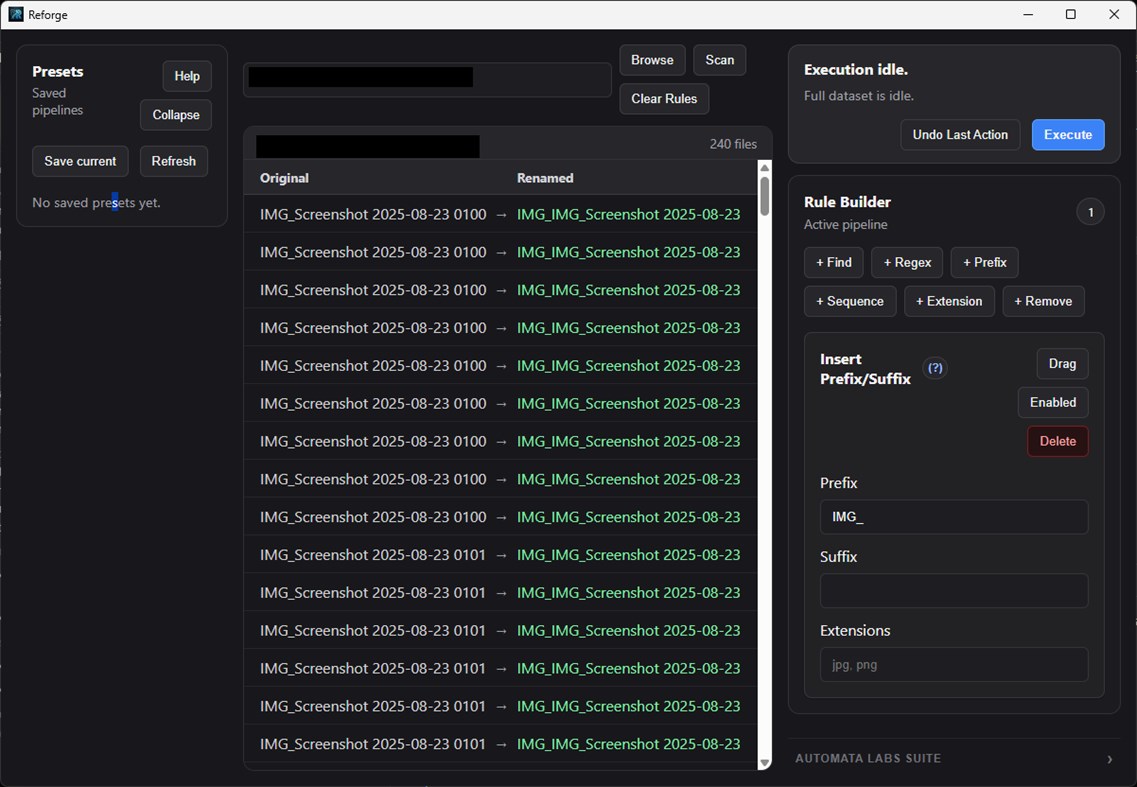
Reforge is a deterministic file transformation engine built for power users, data hoarders, archivists, and professionals who demand absolute control over their local file systems. Whether you are normalizing 10,000 supplier assets, organizing a massive photography backlog, or cleaning up years of downloaded chaos, Reforge replaces clunky UI tools and brittle scripts with a single, blazing-fast application.
Powered by a highly optimized Rust backend, Reforge bypasses Windows Explorer bottlenecks to process vast directory trees in parallel. It uses a lightning-fast token rule engine (e.g., /{Date:YYYY}/{Extension}/{Filename}_v2) that lets you build incredibly complex renaming and routing logic simply by typing.
Total Control. Zero Risk.
Process Massive Libraries: Drop a folder of 50,000 mixed files into the app and watch them sort into perfect hierarchies in seconds.
Write Once, Run Anywhere: Build custom routing rules using dynamic tokens (Dates, Extensions, Increments) and save them as repeatable presets.
100% Local & Private: Zero telemetry, no cloud accounts, and absolutely no ads. Your filesystem data never leaves your machine.
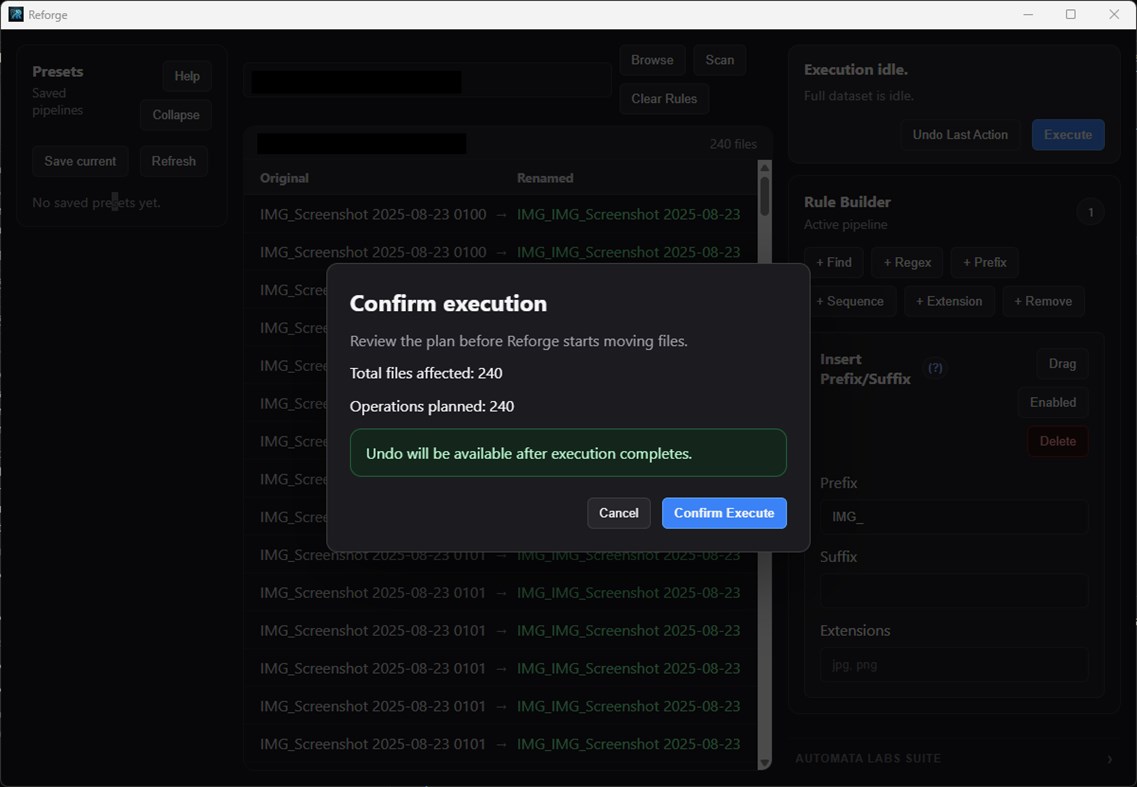
Bulletproof Safety: See exactly what will happen before you click execute.
Ad
Skærmbilleder
Prishistorie
- I dag: $19.99
- Minimum: $19.99
- Maksimalt: $19.99
Overvåg priser
Nyheder
- Version: PC
- Opdateret:
Kommentarer (0)
Vær den første til at kommentere 🌟
Udvikler
- Automata Labs
- Platforme: Windows Apps (7)
- Lister: 1 + 0
- Point: 0 + 0 ¡
- Rangeringer: 0
- Anmeldelser: 0
- Kommentarer: 0
- Rabatter: 0
- Videoer: 0
- RSS: Abonner
Point (0)
0 ☹️
Rangeringer (0)
0 ☹️
Lister (1)
- Reforge: Batch File Renamer

Anmeldelser (0)
Vær den første til at gennemgå 🌟
Yderligere oplysninger
- Version: PC
- Kategori:
Windows Apps›Produktivitet - Operativsystem:
PC - Størrelse:
4 Mb - Understøttet sprog:
English - Indholdsklassificering:
EVERYONE - Windows Store Bedømmelse:
0 - Opdateret:
- Udgivelsesdato:
Kontaktpersoner
- Websted:
 https://automatalabs.ca
«Reforge: Batch File Renamer». Platform: Windows. Kategori: Produktivitet. Udvikler: «Automata Labs». Første udgivelse: . Sidste opdatering: . Nuværende pris: $19.99. Laveste registrerede pris: $19.99. Højeste registrerede pris: $19.99. Denne titel har endnu ikke modtaget vurderinger eller anmeldelser på AppAgg. Lister: offentlige 1, private 0. Tilgængelige sprog: English. AppAgg sporer prishistorik, vurderinger og brugerfeedback for «Reforge: Batch File Renamer». Følg fremtidige rabatter og opdateringer via RSS. AppAgg hoster ikke applikationer eller distribuerer software. Alle varemærker, logoer og skærmbilleder tilhører deres respektive ejere.
Reforge: Batch File Renamer Kort webadresse: Kopieret!- 🌟 Del
- Windows Store
Ad
Lignende
-
- Batch Smart File Renamer
- Windows Apps: Produktivitet Ved: EvlarSoft LLC
- $1.99
- Lister: 0 + 0 Rangeringer: 0 Anmeldelser: 0
- Point: 0 + 0 0 Version: PC Simplify file organization and naming with Batch Smart File Renamer, a powerful application designed for efficiently renaming multiple files in one go. This user-friendly tool offers ... ⥯
-
- File Renamer
- Windows Apps: Produktivitet Ved: Aftnet
- Gratis
- Lister: 0 + 0 Rangeringer: 0 Anmeldelser: 0
- Point: 2 + 109 (2.8) 0 Version: PC File Renamer makes it easy to rename large number of files in in a few clicks. Have a large picture library and wished files were called something more descriptive than ... ⥯
-
- Cool File Viewer - open rar, docx and more
- Windows Apps: Produktivitet Ved: Cool File Viewer
- * Gratis
- Lister: 12 + 2 Rangeringer: 5 (1) Anmeldelser: 1 (1)
- Point: 36 + 51,157 (4.5) 0 Version: PC Cool File Viewer allows you to view any file on your PC. Simply select any file via the program window without first having to decide which application should be used to open a file. ... ⥯
-
- File Analyzer Plus
- Windows Apps: Produktivitet Ved: Bitberry Software
- Gratis
- Lister: 0 + 0 Rangeringer: 0 Anmeldelser: 0
- Point: 0 + 53 (2.7) 0 Version: PC File Analyzer Plus recognizes more than 15,000 file formats. Let File Analyzer Plus examine your file if you cannot open it. After identifying the file format, it will show you ... ⥯
-
- File Counter
- Windows Apps: Produktivitet Ved: Ivan Makaruskin
- * Gratis
- Lister: 0 + 0 Rangeringer: 0 Anmeldelser: 0
- Point: 0 + 2 (3.0) 0 Version: PC File Counter is an easy-to-use application that can automatically count all files in directories you specify.It has only a couple of options that can be easily figured out by users. ... ⥯
-
- File Opener Plus
- Windows Apps: Produktivitet Ved: Yellow Elephant Productions
- $2.99
- Lister: 0 + 0 Rangeringer: 0 Anmeldelser: 0
- Point: 0 + 49 (4.3) 0 Version: PC File Opener Plus - Universal, Simple and Smart! Movies, music, books, photos, docs - Everything in one app! ️ Photo Editing: BMP, PNG, JPEG. ️ Audio Formats: MP3, AAC, WMA, AC3. ️ ... ⥯
-
- File Sieve
- Windows Apps: Produktivitet Ved: Nikolai Belai
- $17.49
- Lister: 0 + 0 Rangeringer: 0 Anmeldelser: 0
- Point: 0 + 0 0 Version: PC File sieve - sort files by folders. Capabilities: Sorting files by folders by extensions. Sorting files by folders by types. Sorting files by folders by dates. Files with same name ... ⥯
-
- File Optimizer
- Windows Apps: Produktivitet Ved: Dezeiraud Gaëtan
- $1.99
- Lister: 0 + 0 Rangeringer: 0 Anmeldelser: 0
- Point: 0 + 0 0 Version: PC Introducing File Optimizer, the ultimate solution for reducing file sizes without compromising quality. Ideal for professionals, developers, and content creators, this powerful tool ... ⥯
-
- Batch Resize Photo
- Windows Apps: Produktivitet Ved: y8ngl
- $4.44
- Lister: 0 + 0 Rangeringer: 0 Anmeldelser: 0
- Point: 0 + 0 0 Version: PC 1.add photo file to photo list. support to delete / up / down items of photo list, save photo list to ini file and load photo list from ini file. 2.add resize setup to photo list. ... ⥯
-
- File Format Converter Plus
- Windows Apps: Produktivitet Ved: NewSystem
- $2.99
- Lister: 0 + 0 Rangeringer: 0 Anmeldelser: 0
- Point: 0 + 0 0 Version: PC This tool provides file format conversion facility from (.DOCX) to (.PDF) including the ability to bulk convert the files at once instead of one by one. ⥯
-
- Installer - App Manager & Batch Uninstaller
- Windows Apps: Produktivitet Ved: IO Lab
- * Gratis
- Lister: 0 + 0 Rangeringer: 0 Anmeldelser: 0
- Point: 2 + 13 (4.8) 0 Version: PC Batch uninstall, auto-start with Windows and manage your applications with ease. MAIN FEATURES Batch Uninstall: Remove multiple apps at once unlimited in Premium, up to 64MB/app in ... ⥯
-
- S Renamer - Rename Multiple Files and Folders
- Windows Apps: Produktivitet Ved: JPT Games and Apps
- $3.99
- Lister: 0 + 1 Rangeringer: 0 Anmeldelser: 0
- Point: 2 + 5 (3.4) 0 Version: PC Want to rename your photos, videos, and any other files and folders with multiple rules to organize them properly and to enable searching them quickly? Introducing, S Renamer - a bulk ... ⥯
-
- Paste to File
- Windows Apps: Produktivitet Ved: Whitewater Foundry
- $1.99
- Lister: 0 + 1 Rangeringer: 0 Anmeldelser: 0
- Point: 1 + 0 0 Version: PC Pastes an image directly to a temporary file and copies its path back. Are you tired of copying an image, pasting it in a program, looking for where to save the file, remembering where ⥯
-
- Sider: AI File Analyst — Deeply Understand Anything
- Windows Apps: Produktivitet Ved: Vidline Inc.
- * Gratis
- Lister: 1 + 1 Rangeringer: 0 Anmeldelser: 0
- Point: 4 + 94 (4.2) 0 Version: PC Sider helps you deeply understand complex files with AI-powered insights. Why Choose Sider In today's world of information overload, accessing data is effortless but achieving true ... ⥯