
Saved
Choose the name that will be shown in your Saved menu.
Done!
| Developer: | Automata Labs (10) | ||
| Price: | $3.49 | ||
| Score: | 600 Bronze | ||
| Rankings: | 0 | ||
| Comments: | 0 Add a comment | ||
| Lists: | 1 + 0 | ||
| Points: | 0 + 0 ¡ | ||
| +1 Points | |||
Description

Whether you are compiling code, giving a presentation, or just stepping away to make coffee, StayGreen ensures your screen stays on and your chat status stays active.
Unlike cheap "mouse jigglers" that drain your battery, waste CPU cycles, or trigger corporate IT security alerts, StayGreen is engineered specifically for professionals. It uses native Windows power requests to keep your session alive safely, invisibly, and efficiently.
Why Choose StayGreen?
Zero CPU Overhead: StayGreen doesn't constantly poll your system or fake mouse movements. It uses event-driven Win32 hooks to operate at 0.0% CPU, saving your system resources for actual work.
Smart Thermal Guardrails: Never worry about your laptop overheating in your bag. StayGreen automatically drops to "Paused" mode the second you unplug your charger or close your laptop lid.
Clamshell Mode Support: Using an external monitor with your laptop closed? StayGreen natively detects active displays and safely allows keep-awake to function.
Corporate IT-Safe: StayGreen respects forced IT session locks and intelligently requests PowerCfg overrides to navigate aggressive Group Policy sleep restrictions without triggering security alarms.
Pay Once, Own Forever: Stop paying monthly for basic utilities. StayGreen includes a 14-day unrestricted free trial, followed by a single, $4.99 perpetual license.
How It Works:
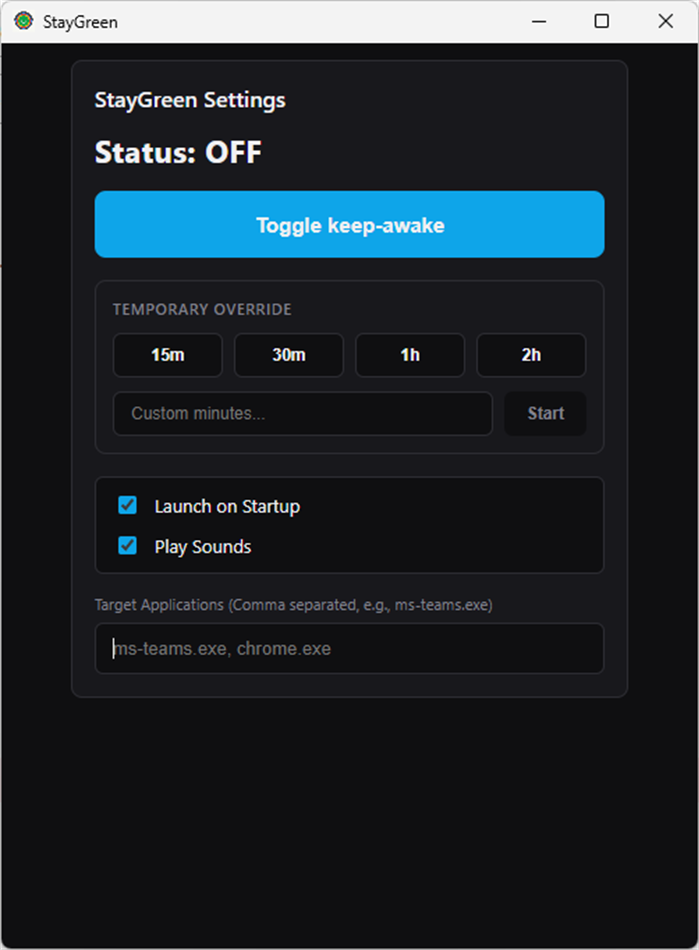
Per-App Auto Mode: Add apps like ms-teams.exe or slack.exe to your Target List. StayGreen will automatically turn on when those apps are in focus, and turn off when they aren't.
The Premium Boost Timer: Need your PC awake for exactly 45 minutes while a download finishes? Use the sleek Boost Dashboard to set a custom timer. Once the time expires, your PC's normal sleep settings automatically resume.
Engineered for reliability. Built for professionals. Stay active with StayGreen.
Screenshots
Ad
Price History
- Current price: $3.49
- Minimum: $2.99
- Maximum: $3.49
Track prices
AppAgg Score
600
Estimated AppAgg Score for
StayGreen: Keep Screen Awake
600 Bronze
Higher scores usually mean stronger signals on AppAgg.
Based on: popularity · ratings · freshness · deals · store data · community signals
Recalculated daily using fresh AppAgg data.
Short URL: Copied!
What's new
- Version: PC
- Last Updated:
Additional Information
- Release Date:
- Category:
Windows Apps›Productivity - OS:
PC - Size:
4 Mb - Supported Languages:
English - Content Rating:
EVERYONE - Windows Store Rating:
0 - Website:
 https://automatalabs.ca
Developer
- Automata Labs
- Platforms: Windows Apps (10)
- Lists: 1 + 0
- Points: 0 + 0 ¡
- Rankings: 0
- Comments: 0
- Deals: 4
- Videos: 0
- RSS: Subscribe
Lists (1)
- StayGreen: Keep Screen Awake

Points (0)
0
Rankings (0)
0
Comments (0)
Be the first to comment
Summary
StayGreen: Keep Screen Awake Short URL: Copied!- Share
- Windows Store
«StayGreen: Keep Screen Awake» is a Productivity app for Windows, developed by «Automata Labs». It was first released on and last updated on . The lowest historical price was $2.99 on , and the highest was $3.49 on . This app has not yet received any ratings on AppAgg. It has been added to 1 public lists and 0 private lists created by users. Available languages: English. AppAgg continuously tracks the price history, ratings, and user feedback for «StayGreen: Keep Screen Awake». AppAgg does not host applications or distribute software. All trademarks, logos and screenshots belong to their respective owners. Subscribe to this app or follow its RSS feed to get notified about future deals or updates.
Similar
-
- Screen Recorders
- Windows Apps: Productivity By: Screen Recorder
- Free
- Lists: 0 0 0
- Points: 0 + 9 590 Version: PC Screen Recorder is a easy-to-use screen recorder that allows you to record your computer screen in high quality. It is perfect for creating tutorials, demos, or just recording your ... ⥯
-
- Screen Recorder Lite
- Windows Apps: Productivity By: Yellow Elephant Productions
- * Free
- Lists: 0 + 1 0 0
- Points: 1 + 6,878 27K Version: PC Screen Recorder Lite - Your wonderful video & audio capture! 100% Easy and Fast! The software provides you all needed functions to record full screen, games, podcasts, films, active ... ⥯
- New
- Keep Software Alive
- Windows Apps: Productivity By: VOVSOFT
- * Free
- Lists: 0 0 0
- Points: 0 + 0 560 Version: PC Keep Software Alive ensures your critical applications never stay down for long. It continuously monitors selected processes and services, automatically restarting them if they crash, ... ⥯
- New
- Awake for Widget Launcher
- Windows Apps: Productivity By: Chan Software Solutions
- Free
- Lists: 0 0 0
- Points: 0 + 0 830 Version: PC Awake is a lightweight, user-friendly Widget Launcher extension that prevents your PC from sleeping. This utility stickied to your desktop can be enabled to keep your PC awake by ... ⥯
-
- Screen Recorder - Video Recorder for Windows 11
- Windows Apps: Productivity By: Queenloft
- * Free
- Lists: 0 0 0
- Points: 2 + 67 11K Version: PC Screen Recorder is an app to Record Screen and Take Screenshots anywhere. NO watermark NO recording time limit Screen Recorder helps you capture smooth & clear screen videos, ... ⥯
-
- Screen Time Guardian
- Windows Apps: Productivity By: Matt Birch
- Free
- Lists: 0 0 0
- Points: 0 + 0 600 Version: PC Screen Time Guardian helps you stay focused and mindful of your screen time with customizable timers, gentle break reminders, and productivity features. Set personalized time limits, ... ⥯
-
- Keep Up: to-dos and notes
- Windows Apps: Productivity By: Anas Latique, Inc
- Free
- Lists: 0 0 0
- Points: 0 + 0 690 Version: PC Keep Up with your to-dos and notes in an intuitive and clean way, so that it's easy for you to stay on track of whatever you want to do. Keep Up helps you manage your daily to-dos and ... ⥯
-
- Keep Score
- Windows Apps: Productivity By: Sunlight Info Tech
- * Free
- Lists: 0 0 0
- Points: 0 + 5 6K Version: PC Keep Score is an app that makes keeping score in card games (and board games) fun and easy. Keep score does the math for you as you score a game. It also tracks your history and ... ⥯
-
- Keep note
- Windows Apps: Productivity By: Carlos A Goering
- $0.99
- Lists: 0 0 0
- Points: 0 + 0 590 Version: PC Keep notes, it's an app for creating notes. In the future I will put more functions, depending on the development of the app. The logo is a fox, because the application is fast ;) ... ⥯
-
- Screen Recorder - Game Capture by Nero
- Windows Apps: Productivity By: Nero AG
- * Free
- Lists: 0 + 1 0 0
- Points: 1 + 8 12K Version: PC The user-friendly screen and gaming recorder. Create screen recordings according to your ideas with one click. Whether you're a gamer, educator, vlogger, or simply someone who wants to ⥯
-
- Screen Recorder+
- Windows Apps: Productivity By: Mobilty in Life Applications TEAM
- Free
- Lists: 0 0 0
- Points: 0 + 719 10K Version: PC Record any screen activity with sound on your Windows 10 device, with or without the mouse pointer! You are free to record/capture any action that appears on the screen and any sound ... ⥯
-
- Screen text getter
- Windows Apps: Productivity By: AKATSUKI, LIMITED LIABILITY CO.
- $4.99
- Lists: 0 0 0
- Points: 1 + 0 830 Version: PC Extract text from screen screenshots. for when you need to extract text from uncopyable photos, videos, or PDFs! Simple 3-step operation, multi-language support. Extract text by OCR ... ⥯
-
- Screen Mirroring - Cast to TV
- Windows Apps: Productivity By: Niente
- $4.99
- Lists: 0 0 0
- Points: 0 + 0 640 Version: PC TV Screen Mirroring is a powerful and versatile Windows application designed to cast your local media files and PC screen directly to your smart TV or supported devices. It supports ... ⥯
-
- Screen Recorder - Lite
- Windows Apps: Productivity By: InnovativeCrunch
- Free
- Lists: 0 0 0
- Points: 0 + 14 570 Version: PC Now record your screen with microphone audio, pause and resume recording whenever you want. Features: Records screen Supports microphone audio Pause and resume recording Assign hotkeys ⥯