
Saved
Choose the name that will be shown in your Saved menu.
Done!
| Developer: | 志琼 羊 (10) | ||
| Price: | * Free | ||
| Score: | 1,320 Silver | ||
| Rankings: | 0 | ||
| Comments: | 0 Add a comment | ||
| Lists: | 1 + 0 | ||
| Points: | 0 + 0 ¡ | ||
| +1 Points | |||
Description

PERFECT FOR FINDING DEVICES NEARBY
Most lost devices aren't far away - they're hiding somewhere close. Ping is designed for those frustrating moments when you know your device is nearby but can't see it:
Under couch cushions or between furniture
Buried in your bag or backpack
Lost in bed sheets or blankets
Behind your desk or office clutter
Somewhere in your car
Around your home or office
HOW IT WORKS
Ping detects Bluetooth signals from nearby devices. For best results:
1: Device must be OUT of its case and powered on
2:Works with devices that actively broadcast Bluetooth Low Energy signals
DEVICE COMPATIBILITY
Works with BLE devices: AirPods, Galaxy Buds, Beats, smartwatches, fitness trackers, AirTag, Tile
Works best with earbuds OUT of case or trackers that always broadcast
Won't detect: devices in closed cases, powered-off devices, or devices beyond Bluetooth range
Limited detection: over-ear headphones and Bluetooth speakers (use classic Bluetooth, not BLE)
All Bluetooth scanning happens locally on your device for maximum privacy.
FREE FEATURES
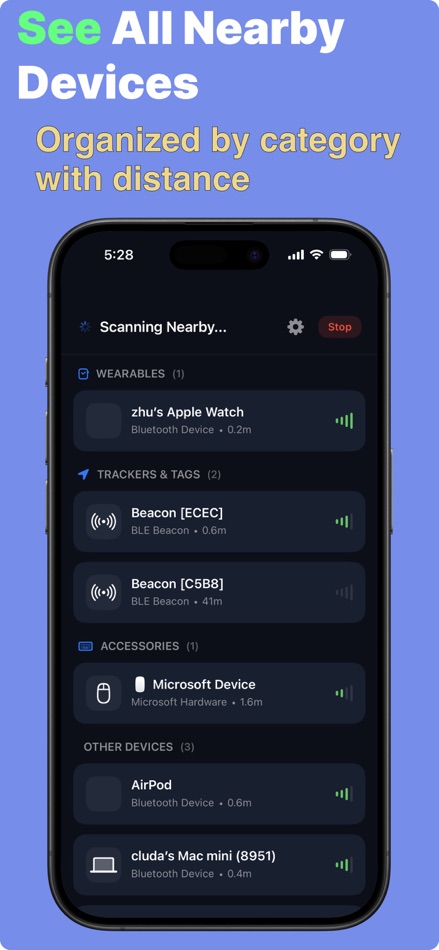
Bluetooth Device Scanner - Detect all nearby BLE devices instantly
Signal Strength Bars - See how close you are at a glance
Distance Estimation - Approximate distance in meters or feet
Device Grouping - Organized by category (Audio, Wearables, Trackers, etc.)
PREMIUM FEATURES
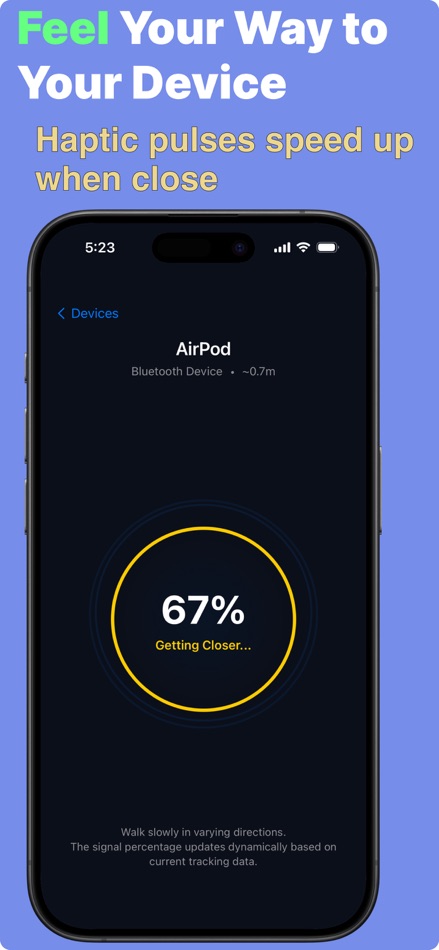
Precision Radar View - Visual radar with animated pulse rings
Real-Time Proximity - See exact proximity percentage (0-100%)
Geiger Counter Haptics - Feel faster pulses as you get closer
Advanced Filtering - Smooth, accurate signal processing
Unlimited Tracking - Find devices as many times as you need
HOW TO USE
1. Make sure your lost device is OUT of its case (if applicable)
2. Open Ping and tap the blue scanning button
3. Find your device in the list - sorted by distance
4. Tap to upgrade to Premium for radar tracking
5. Follow the proximity meter and haptic pulses
6. Physically search the area - the app guides you!
WORKS WITH BLUETOOTH LOW ENERGY (BLE) DEVICES
AirPods (all models), AirPods Pro, AirPods Max
Beats, Galaxy Buds, Sony WF earbuds, Jabra
Apple Watch, Galaxy Watch, Fitbit, Garmin, Whoop
AirTag, Tile, Galaxy SmartTag, Chipolo
Mi Band, Oura Ring, fitness trackers
BLE-enabled keyboards, mice, game controllers
WHY PING?
No login or account required
Works instantly - no setup needed
Privacy-first - no data collection or tracking
Beautiful dark mode interface
Multi-brand support (works beyond Apple ecosystem)
Unit selection (meters or feet)
PRIVACY
Your privacy matters. Ping scans for Bluetooth devices locally on your iPhone. No personal information is collected, no data is transmitted to external servers, and no tracking or analytics are used.
IMPORTANT NOTES
• Device must be powered on and OUT of case to be detected
• Distance accuracy depends on obstacles and interference
• This app is a TOOL to assist in locating nearby devices, not a guarantee
• Cannot find devices that are truly far away, dead, or in sleep mode
• Works best in open spaces with minimal interference
REALISTIC USE CASES
Finding AirPods that fell under your couch
Locating a single lost earbud in your room
Tracking down headphones buried in your bag
Finding your Apple Watch somewhere at home
Locating fitness trackers around the house
Finding AirTag or Tile trackers
Download Ping today - perfect for finding devices hiding nearby!
Support: https://tinygiantapps.com/ping/support
Privacy Policy: https://tinygiantapps.com/ping/privacy
Terms of Use: https://tinygiantapps.com/ping/terms
Advertisement
Screenshots


Price History
-
* In-App Purchases - Current price: Free
- Minimum: Free
- Maximum: Free
Track prices Add to a list to get discount alerts by email or push
AppAgg Score
1,320
Estimated AppAgg Score for
Ping - Device Finder
Developer: 志琼 羊
1,320 Silver
Higher scores usually mean stronger signals on AppAgg.
Based on: popularity · ratings · freshness · deals · store data · community signals
Recalculated daily using fresh AppAgg data.
Short URL: Copied!
What's new
- Version: 2.0
- Last Updated:
- 1:improve the ui.
Additional Information
Developer
Lists (1)
- Ping - Device Finder

Points (0)
0
Rankings (0)
0
Comments (0)
Be the first to comment
Summary
Ping - Device Finder Short URL: Copied!- App Store
On AppAgg, you can track the iOS app “Ping - Device Finder” by 志琼 羊, listed under Utilities. AppAgg Score: 1,320 (Silver). AppAgg Points for the app — confirmed: 0; indirect: 0. Public lists containing the app: 1. Users who have saved it in private lists: 0. AppAgg users have not rated the app yet. Confirmed Points record visits to a store by signed-in AppAgg users; indirect Points are based on store data. AppAgg counts public lists containing an app or game and users who have saved it in private lists. The app was first released on . The app was last updated on . The app is currently available for free. The app is available in these languages: English. Explore the price history, add the app to a list, or follow its developer. Follow future deals and updates for the app via its RSS feed. AppAgg does not host or distribute the app. All trademarks, logos, and screenshots related to the app belong to their respective owners.

