
Saved
Choose the name that will be shown in your Saved menu.
Done!
| Developer: | Saranya Sivakumar (1) | ||
| Price: | * Free | ||
| Score: | 7,220 Platinum | ||
| Rankings: | 0 | ||
| Comments: | 0 Add a comment | ||
| Lists: | 1 + 1 | ||
| Points: | 4 + 0 ¡ | ||
| +1 Points | |||
Description
It is the memory layer your Mac was missing.
Stop saving temporary snippets to Apple Notes, TextEdit windows, or unsaved scratchpads. Just copy it. L2cache securely stores and indexes everything automatically, so it's instantly searchable and ready when you need it.
Every line of code you fixed. Every URL you meant to revisit. Every prompt that worked. Every terminal command you executed. Every error trace, screenshot, table, and color spec that passed through your hands — captured, understood, and recalled in 100ms.
The problem
You've already found the answer. You just can't find it again.
Developers fix the same bug twice. AI engineers lose prompts that worked perfectly. DevOps engineers lose complex Docker commands, AWS ARNs, and connection strings they spent 20 minutes constructing. We copy logs, references, and specifications, but lose the connections between them.
Your clipboard has history. But history is not memory.
L2cache is memory.
How it works
L2cache runs silently in your menu bar. Every time you copy something, it captures it and uses on-device AI to understand what it actually is — not just what it says.
• Code gets titled by what it does: "Validate JWT token and return user claims" — not "Swift snippet".
• Shell history gets indexed: Search, copy, and safely replay terminal commands directly in your favorite terminal app.
• Context gets connected: L2cache links related clips together. Click a button to bundle terminal logs, code blocks, and error traces into a unified diagnostic report or PDF.
• Screenshots get read by OCR: Find images by searching for the text inside them.
• Tables get detected: Offered as clean CSV or Markdown.
• Colors get named: Convertible instantly between Hex, RGB, HSL, and Tailwind.
Screenshot Albums
L2cache automatically organizes your screenshots into intelligent albums using on-device AI. Xcode error logs. Figma mockups. Research screenshots. Receipts. Each album is named by what your screenshots actually contain — not by date.
Smart Copier
Press ⌥V on any clip to transform it before you use it. L2cache includes dozens of built-in smart actions:
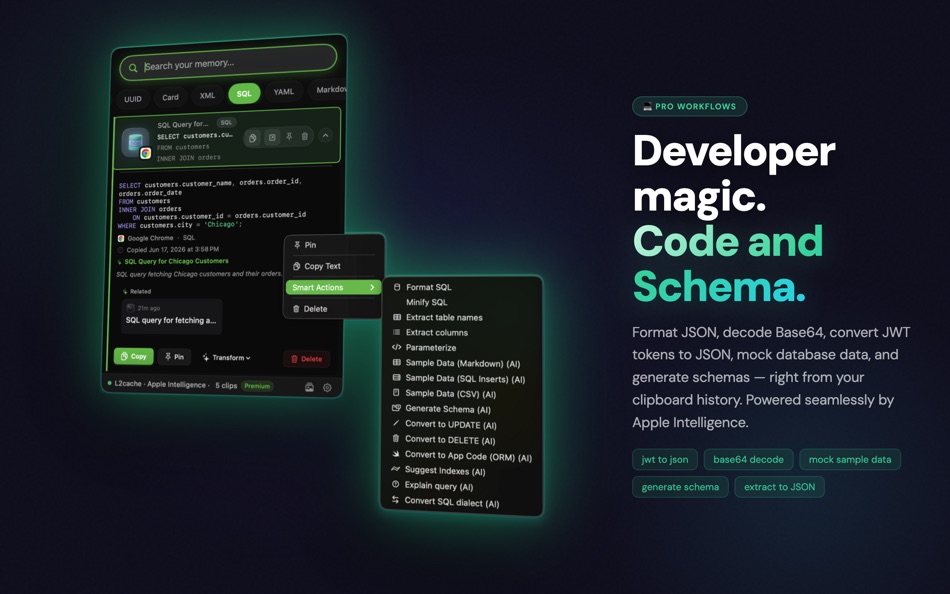
• Text & Code: Strip markdown fences from AI output, fix grammar, minify/format JSON, or explain code.
• Tables & Spreadsheets: Convert CSVs directly to clean Markdown tables, JSON arrays, or extract headers.
• URLs & Links: Strip UTM tracking tags or automatically generate APA/MLA citations.
• Prompts: Restructure into a system prompt, extract code blocks, or improve clarity.
• Colors: Convert instantly between Hex, RGB, HSL, Tailwind, CSS variables, and SwiftUI.
• Images & Screenshots (via OCR): Extract text, pull receipts into structured JSON, explain crash logs, or convert visual tables into Markdown.
All transforms run locally on your device.
Completely private
On-device AI processes everything locally. Your memories never leave your Mac. No account required. No cloud sync. No telemetry. Passwords and sensitive keys are filtered automatically.
100% Free. No subscription. Ever.
```
Advertisement
Screenshots




Price History
-
* In-App Purchases - Current price: Free
- Minimum: Free
- Maximum: $6.99
Track prices Add to a list to get discount alerts by email or push
AppAgg Score
7,220
Estimated AppAgg Score for
L2Cache - AI Clipboard Pro
Developer: Saranya Sivakumar
7,220 Platinum
Higher scores usually mean stronger signals on AppAgg.
Based on: popularity · ratings · freshness · deals · store data · community signals
Recalculated daily using fresh AppAgg data.
Short URL: Copied!
What's new
- Version: 1.2.7
- Last Updated:
- • Terminal History Search: Automatically capture, search, and replay terminal commands with full directory and timestamp context.
• Smart Shell Aliases: Intelligent detection of frequent commands with one-click shell alias creation.
• Supercharged ⌘C & Smart Actions: Instant contextual actions appear beside your cursor to decode JWTs, execute cURL, test live Regex, and format JSON/SQL.
• Custom Scripts: Transform clipboard content on the fly with custom Shell, Ruby, and Python scripts.
• Searchable Screenshots: AI auto-naming and OCR text extraction make all copied screenshots searchable.
• Performance & Stability: Instant sub-100ms panel loading and overall reliability improvements.
Additional Information
- Release Date:
- Category:
macOS Apps›Utilities - OS:
macOS,macOS 13.0 and up - Size:
17 Mb - Supported Languages:
Chinese,English,French,German,Italian,Japanese,Korean,Portuguese,Russian,Spanish,Tamil,Vietnamese - Content Rating:
4+ - Mac App Store Rating:
0 - Website:
 https://l2cache.amvo.store/en
Developer
- Saranya Sivakumar
- Followers: 0
- Platforms: macOS Apps (1)
- Deals: 0
- Lists: 1 + 1
- Points: 4 + 0 ¡
- Rankings: 0
- Comments: 0
- Videos: 0
- RSS: Subscribe
Lists (1)
- L2Cache - AI Clipboard Pro

Points (4)
-

- 3,277 Alan
- +1
-
- 570 Vlad P
- +1
-
- 6,746 Brain_vv
- +1
-
- 12,944 Simon Chan
- +1




Rankings (0)
0
Comments (0)
Be the first to comment
Summary
L2Cache - AI Clipboard Pro Short URL: Copied!- Share
- Mac App Store
“L2Cache - AI Clipboard Pro” is an app in the Utilities category for macOS. The app was developed by “Saranya Sivakumar”, first released on , and last updated on . The app is currently available for free. The app has not yet received any ratings on AppAgg. User lists containing the app — public: 1; private: 1. AppAgg Points for the app — confirmed: 4; indirect: 0. The app is available in these languages: Chinese, English, French, German, Italian, Japanese, Korean, Portuguese, Russian, Spanish, Tamil, Vietnamese. AppAgg tracks the price history, ratings, and user feedback for the app “L2Cache - AI Clipboard Pro”. AppAgg does not host or distribute the app. All trademarks, logos, and screenshots related to the app belong to their respective owners. Follow future deals and updates for the app via RSS feed.
Similar
-
- Clippy: Your AI Clipboard
- macOS Apps: Utilities By: Simone Giammusso
- $0.99
- Lists: 0 0 0
- Points: 0 + 0 590 · Bronze Version: 1.0.2 ClippyManager remembers everything you copy and gives it back in seconds. It lives in your menu bar and drops down from the notch as a beautiful glass shelf so your clipboard history ...
-
- Invisible AI Interview Coder
- macOS Apps: Utilities By: AI Agent
- * Free
- Lists: 0 0 0
- Points: 0 + 0 590 · Bronze Version: 0.4 AI Interview Coder is a powerful analytical tool designed to deepen your understanding of coding interview questions. It dissects each problem by offering detailed explanations, ...
-
- Clipboard Manager
- macOS Apps: Utilities By: Arsenii Borodin
- $2.99
- Lists: 0 0 0
- Points: 0 + 0 680 · Silver Version: 1.2 CLIPBOARD MANAGER Clipboard Manager saves everything you copy text, links, images, and more. All data stored locally on your Mac. KEY FEATURES - Unlimited Clipboard History Access your
-
- AI TransGo
- macOS Apps: Utilities By: Acer gadget Inc.
- Free
- Lists: 0 0 0
- Points: 0 + 0 790 · Silver Version: 2.0.3 AI TransGo must be used along with Acer AI TransBuds. AI TransGo supports real-time call translation, video translation with subtitle, meeting transcription, and offline translation ...
-
- AI Shortcut Actions
- macOS Apps: Utilities By: Alexander Moritz Weichart
- Free
- Lists: 0 0 0
- Points: 0 + 0 580 · Bronze Version: 1.0 AI Shortcuts adds powerful AI actions to Apple s Shortcuts app, so you can use Siri, automations, and workflows to write, summarize, generate images, transcribe audio, and create ...
-
- AI HEIC Converter: JPG PNG PDF
- macOS Apps: Utilities By: Usama Daood
- * Free
- Lists: 0 0 0
- Points: 0 + 0 570 · Bronze Version: 1.0 AI HEIC Converter JPG PNG & Image Compressor Convert HEIC photos to JPG, PNG, JPEG and more in seconds. Optimize, compress, and manage images easily on Mac with a fast and secure ...
-
- Clipboard Privacy
- macOS Apps: Utilities By: ALF STEINBACH
- Free
- Lists: 0 0 0
- Points: 0 + 0 560 · Bronze Version: 2.0 Protect your digital footprint with Clipboard Privacy, the intelligent menu bar app that automatically sanitizes URLs as you copy them. Say goodbye to invasive tracking parameters and ...
-
- AI Assistant for Clax
- macOS Apps: Utilities By: Muhammad Umar
- * Free
- Lists: 1 0 0
- Points: 0 + 0 1K · Gold Version: 2.1 It is a powerful AI assistant that helps you search the web, analyze files, write code, and get instant answers all in one place. Whether you're learning, researching, or building ...
-
- Clipboard - Copy Paste & Notes
- macOS Apps: Utilities By: 啸 胡
- Free
- Lists: 0 + 1 0 0
- Points: 10 + 0 1K · Gold Version: 1.5.2 Record and manage your clipboard history to find the text you have copied at any time. More importantly, it can sync data in real-time across Mac, Android, and the web. Visit the ...
-
- Clipboard Manager:Text Clipper
- macOS Apps: Utilities By: Stanislav Duplinskiy
- Free
- Lists: 0 + 1 0 0
- Points: 2 + 0 1K · Gold Version: 0.1 Tired of copying one thing at a time? Clipboard Manager is the ultimate limitless productivity booster for your Mac that lives right in your menu bar. KEY FEATURES Multiple Clipboards:
-
- AI Popover
- macOS Apps: Utilities By: 谦 陈
- $7.99
- Lists: 0 0 0
- Points: 0 + 0 730 · Silver Version: 1.2 IMPORTANT: AI Popover does NOT provide AI services it only connects to them. You must supply your own API credentials from services like Anthropic, DeepSeek, Llama or any other ...
-
- AI Transcribe: Pro Note Taker
- macOS Apps: Utilities By: Muhammad Moazzam
- * Free
- Lists: 0 0 0
- Points: 1 + 0 960 · Silver Version: 3.6 Transcribe and Translate App Effortlessly convert speech to text and translate it into any language all in one powerful app. Perfect for meetings, conversations, and breaking language ...
-
- AI SnapText 智慧的截圖文字辨識助手
- macOS Apps: Utilities By: 雷杰 郭
- * Free
- Lists: 0 0 0
- Points: 0 + 0 540 · Bronze Version: 1.0.7 使用AI驅動的OCR 快速截取螢幕文字並智慧提取。支援框選/全螢幕、自動壓縮上傳、自訂大模型提示詞 輸出可直接複製貼上。內建實驗與訂閱 讓您持續獲得最新的大模型OCR能力。
-
- Clipboard mini
- macOS Apps: Utilities By: Kai Luo
- $4.99
- Lists: 0 0 0
- Points: 2 + 0 670 · Silver Version: 3.0.2 Clipboard mini is a full featured clipboard management application. It's lightweight, it's easy to use. Features - Search with keywords combination - Filters by keywords or ...

