
Preferiti
Scegli il nome che verrà mostrato nel tuo menu dei preferiti.
Completato!
| Sviluppatore: | Alexander Blach (3) | ||
| Prezzo: | $9.99 | ||
| Classificazioni: | 0 | ||
| Commenti: | 0 Pubblica commento | ||
| Listes: | 4 + 4 | ||
| Punti: | 2 + 0 ¡ | ||
| Mac App Store | |||
Descrizione

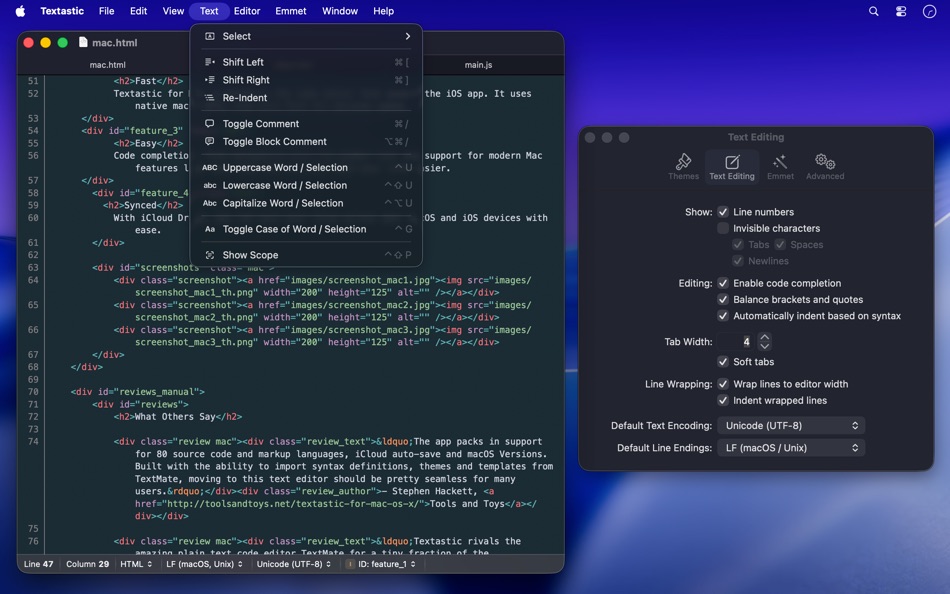
• Syntax highlighting of more than 80 programming and markup languages
• Supported file types include HTML, JavaScript, CSS, XML, Markdown, Objective-C, Swift, C++, PHP, Perl, Python, SQL, shell scripts and many more
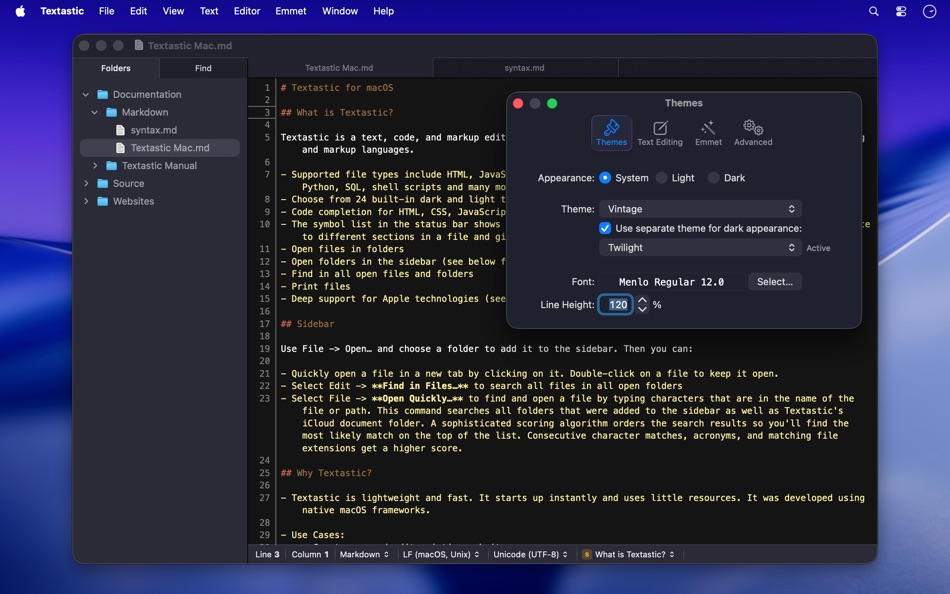
• Compatible with TextMate 1 and Sublime Text 3 syntax definitions and themes
• Code completion for HTML, CSS, JavaScript, PHP, C, and Objective-C
• Open files in tabs
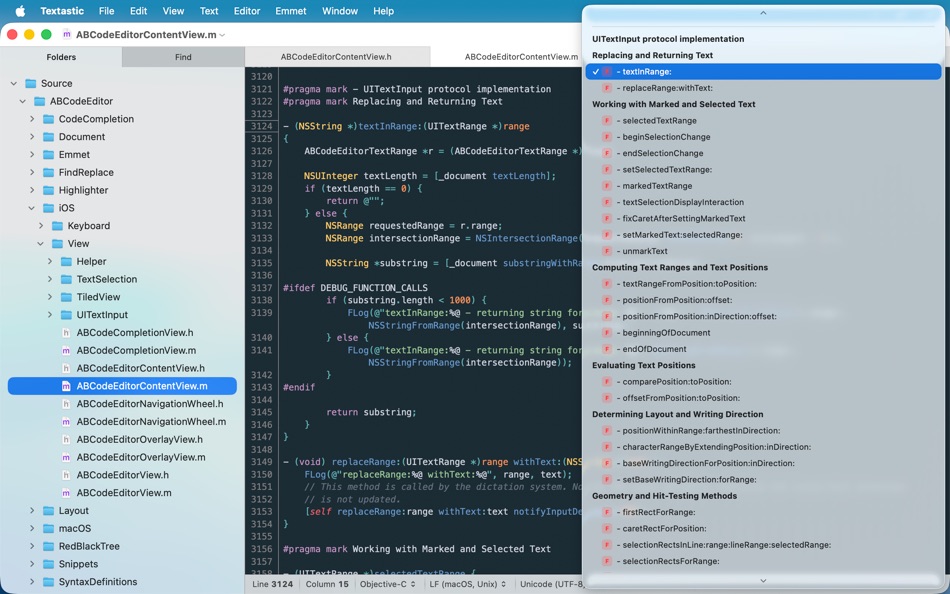
• Open folders in a sidebar
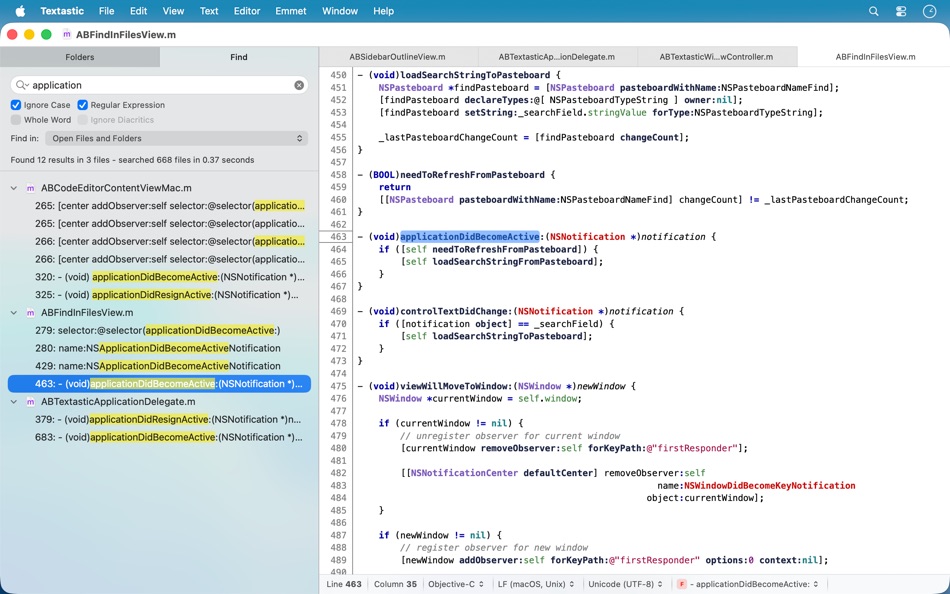
• Find in files
• Print files
• Symbol list to quickly navigate in a file
• Emmet support built-in
• Auto Save and Versions
• iCloud document sync
• Full support for Dark Mode
Please note: You can use Textastic for iPad and iPhone to sync files between the Mac, iOS, and iPadOS versions of Textastic using iCloud Drive.
Ad
Screenshot


Cronologia dei prezzi
- Oggi: $9.99
- Minimo: $7.99
- Massimo: $9.99
Monitora prezzi
Novità
- Versione: 7.0
- Aggiornata:
- Textastic 7.0 adds full support for macOS Tahoe 26 and the Liquid Glass design, with a refreshed user interface and an updated app icon.
New:
- macOS Tahoe: fully updated for compatibility with the latest version of macOS.
- Added images to menu items on macOS 26.
Fixed:
- Updated the HTML5 template and removed outdated HTML 4.01 and XHTML templates. The HTML5 template now matches what Emmet inserts when typing "!" and pressing Tab.
- Fixed an issue where closing a window with an edited, untitled file did not prompt the user to save the file.
- Fixed an issue where printing sometimes produced an unwanted additional page due to a rounding error.
- Improved file and folder name sort order in the sidebar to match Finder's behaviour and improve support for numbers in file and folder names.
- Fixed an issue with the cursor and text selection in Dark Mode on macOS 26.
- Resolved a bug where internal syntax definitions that were meant to be hidden could be selected if the syntax definition was not yet fully loaded (e.g., "Make Output", "Cargo Build Results", "PHP Source", "Swift Standard Library", etc.).
- Improved automatic closing of quotes: quotes are no longer closed after a backslash (e.g., when entering umlauts in LaTeX), and are now properly closed before semicolons and commas in CSS files.
- HTML script tag code completion no longer inserts the type and src attributes by default. The src attribute can be added manually or using the "script:src" Emmet abbreviation.
- Disabled auto-pairing of single quotes in LaTeX and TeX math environments.
- Other minor improvements.
Informazioni aggiuntive
- Data di uscita:
- Categoria:
macOS App›Sviluppatori - Sistemi operativi:
macOS,macOS 15.0 e versioni successive - Dimensioni:
3 Mb - Lingue supportate:
English - Classificazione contenuti:
4+ - Mac App Store Voto:
0 - Sito web:
 https://www.textasticapp.com/mac.html
Sviluppatore
- Alexander Blach
- Piattaforme: iOS App (2) macOS App (1)
- Listes: 16 + 14
- Punti: 22 + 2,429 ¡
- Classificazioni: 0
- Commenti: 0
- Sconti: 0
- Video: 0
- RSS: Sottoscrivi
Listes (4)
- Textastic





Classificazioni (0)
0 ☹️
Commenti (0)
Sii il primo a commentare 🌟
«Textastic». Piattaforma: macOS. Categoria: Sviluppatori. Sviluppatore: «Alexander Blach». Prima uscita: . Ultimo aggiornamento: . Prezzo attuale: $9.99. Prezzo più basso registrato: $7.99 (). Prezzo più alto registrato: $9.99 (). Questo titolo non ha ancora ricevuto valutazioni o recensioni su AppAgg. Elenchi: pubblici 4, privati 4. Punti tracciati: confermati 2, indiretti 0. Lingue disponibili: English. AppAgg tiene traccia della cronologia dei prezzi, delle valutazioni e del feedback degli utenti per «Textastic». Segui futuri sconti e aggiornamenti tramite RSS. AppAgg non ospita applicazioni né distribuisce software. Tutti i marchi, loghi e screenshot appartengono ai rispettivi proprietari.
Textastic URL breve: Copiato!- 🌟 Condividi
- Mac App Store
Simili
-
- Sitemap Plus
- macOS App: Sviluppatori di: OurBigAdventure, LLC
- Gratis
- Listes: 1 + 1 0 0
- Punti: 26 + 0 Versione: 2.4 Sitemap Plus is designed for web developers, to build a list of pages on websites that they own, the server status at the time of the crawl and the download time for each page. Sitemap ⥯
-
- DevTools - Smarter coding
- macOS App: Sviluppatori di: Anh Nguyen
- * Gratis
- Listes: 2 + 3 0 0
- Punti: 22 + 0 Versione: 1.2.3 DevTools is an all-in-one offline application that provides developers with essential tools for daily tasks and ensures data security. The app has been trusted by over 15,000 ... ⥯
-
- Klipped
- macOS App: Sviluppatori di: Andrew Drake
- Gratis
- Listes: 0 + 2 0 0
- Punti: 19 + 0 Versione: 3.0.2 Beauty in simplicity. Klipped is a minimalist scratch pad that is a buddy for all your other apps. Write ideas down. Paste text and use as a clipboard; delete when you re done. No ... ⥯
-
- 18 Strings
- macOS App: Sviluppatori di: Remote Sunrise LTD
- Gratis
- Listes: 0 + 1 0 0
- Punti: 17 + 0 Versione: 2022.6 Hate doing localization for your project? Now you can hate it a little less: Save tons of money by doing automatic translation using strings from your other projects you have already ... ⥯
-
- SnippetsLab
- macOS App: Sviluppatori di: Renfei Song
- Gratis
- Listes: 6 + 8 5 (1) 0
- Punti: 13 + 0 Versione: 2.6.4 Mac App Store Best of 2015 Featured in App Store editorial All Your Code, Brilliantly Organized , Keep Your Code at Your Fingertips and Welcome to the Mac App Store! Featured app in ... ⥯
-
- Anycode: Code Snippet to Image
- macOS App: Sviluppatori di: 宏旭 朱
- Gratis
- Listes: 0 + 2 0 0
- Punti: 10 + 0 Versione: 0.7.0 Anycode is a document-based app that helps you manage your code snippets. - Supports syntax highlighting for Bash, C, C++, C#, Clojure, Dart, Go, Java, JavaScript, JSON, Kotlin, ... ⥯
-
- Network Debugger
- macOS App: Sviluppatori di: 志健 袁
- * Gratis
- Listes: 0 + 1 0 0
- Punti: 10 + 0 Versione: 1.2.0 Professional network debugging tool for macOS Network Debugger helps developers and testers quickly build TCP and UDP connections, send and inspect messages, and automate repetitive ... ⥯
-
- Eplist - convert data to plist
- macOS App: Sviluppatori di: HuMinghua
- * Gratis
- Listes: 1 + 2 0 0
- Punti: 10 + 0 Versione: 2.0.1 Eplist for Excel is a lightweight conversion tool to help developers to improve development efficiency. You can convert your datas or configuration from excel(.xls and .xlsx) document ... ⥯
-
- Netutilus: Network Utility
- macOS App: Sviluppatori di: Oleksandr Kozlovskyi
- * Gratis
- Listes: 0 + 1 0 0
- Punti: 9 + 0 Versione: 1.1 A modern replacement for the classic macOS Network Utility - with powerful extras. 10 essential network tools in one streamlined app: Ping, Traceroute, Visual Traceroute, Speed Test, ... ⥯
-
- LocalizApp: Translate your app
- macOS App: Sviluppatori di: Dimitri Giani
- * Gratis
- Listes: 0 + 3 0 0
- Punti: 9 + 0 Versione: 3.1 Make app localization effortless with LocalizApp. Harness the power of AI and smart translation tools to transform your development workflow. Key features: AI-Powered Translation with ... ⥯
-
- KeyPad - Keyboard and Remote
- macOS App: Sviluppatori di: Toolbunch LLC
- * Gratis
- Listes: 0 + 0 0 0
- Punti: 9 + 0 Versione: 2.00.1 Use your Mac keyboard to control all your devices. From smartphones and tablets to TVs and even the raspberry pi, KeyPad turns your Mac into a powerful universal Bluetooth keyboard, ... ⥯
-
- RocketSim for Xcode Simulator
- macOS App: Sviluppatori di: SwiftLee
- * Gratis
- Listes: 1 + 3 0 0
- Punti: 9 + 0 Versione: 15.0.2 RocketSim enhances the Xcode Simulator for iOS and iPadOS development: boost productivity and streamline your workflow with capture, networking, build insights, and quick actions ... ⥯
-
- FrameBuddy - Screenshot Frames
- macOS App: Sviluppatori di: Florian Schweizer
- Gratis
- Listes: 0 + 4 0 0
- Punti: 9 + 0 Versione: 1.3 Quickly add a device frame to your screenshots. FrameBuddy is a super simple utility that automatically adds iPhone frames to your (Simulator) screenshots. Iphone icon created by ... ⥯