
저장됨
저장됨 메뉴에 표시할 이름을 선택하세요.
완료!
| 개발자: | Chengdu Everimaging Science and Technology Co., Ltd (8) | ||
| 가격: | * 무료 | ||
| 순위: | 5 (1) | ||
| 댓글: | 0 댓글 게시 | ||
| 목록: | 1 + 1 | ||
| 포인트: | 5 + 0 ¡ | ||
| Mac App Store | |||
기술
Designed for Mac, Fotor opens directly from your desktop and gives you powerful AI tools to create stunning photos and videos—no editing skills required.
Fotor was mentioned as the 'lite Photoshop' by BBC and it will cater all your photography needs.
"I found Fotor to be simple and intuitive to use… I think many photographers will like Fotor Photo Editor." – TUAW
"If you're looking for an easy to use photo editor with lots of editing options and effects, look no further than Fotor" -- Softpedia.com
"Fotor might be the perfect solution for many amateur photographs, which is completely free to download and use." – Macreview.com
People everywhere are getting their edit on with Fotor’s solid photo editor for Mac!
*** #1 free photography app in more than 70 countries ***
*** In the top 5 free apps overall in more than 50 countries ***
【Design】
Brand-new function - Fotor designs. Everyone can be a creator.
Make design complexities simple: You don't need to have any design experience or draw one stroke at a time. You only need to choose a template created by a professional designer, and then simply edit it with a few clicks, saving both time and energy. You can realize your vision!
Fotor design tools offer dozens of design sizes, including Facebook Covers/Twitter Covers/YouTube Channel Art/Mobile Wallpapers/Logos/Posters/Cards/Resumes/Planners/Invitations across over 100,000 designs with rich scenes, styles, themes, meeting your various needs in your personal lives, professional lives, and entertainment.
Fotor design offers over 200,000 carefully selected design resource elements, including fonts, graphic shapes, icons, illustrations, backgrounds, textures, symbols, and signs, which can help you create stunning designs.
【Portraits Touch Up】
No matter whether you want smooth skin, to reshape your face, or make the way you look in portraits more lifelike, the touch up function helps you with all of that—deftly, and in double quick time.
【Batch】
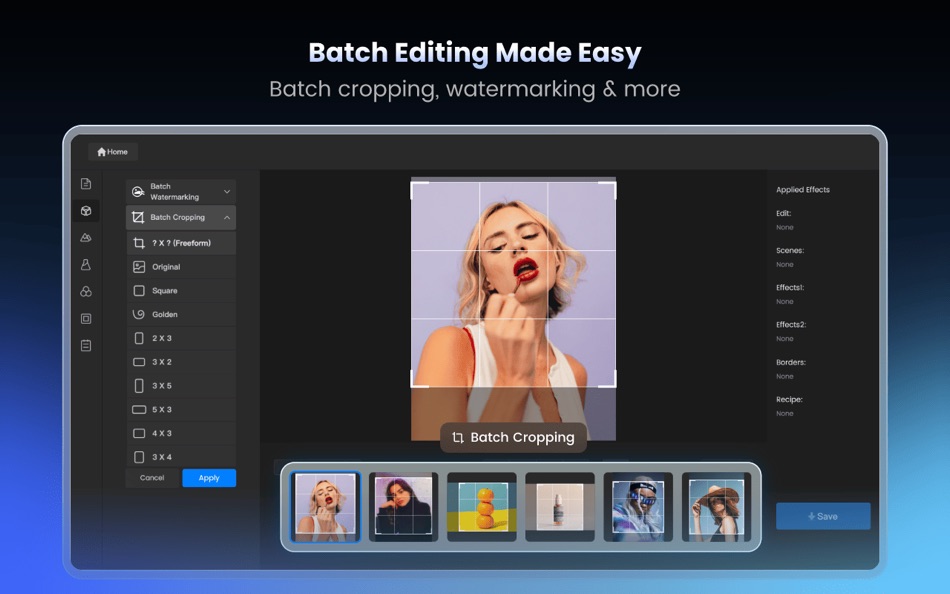
Quickly process dozens of photos to save time and efforts. Batch processing can help apply Scenes, Effects, and Borders with one click, and can also quickly complete Batch resizing, renaming, and file format conversion.
【Collage】
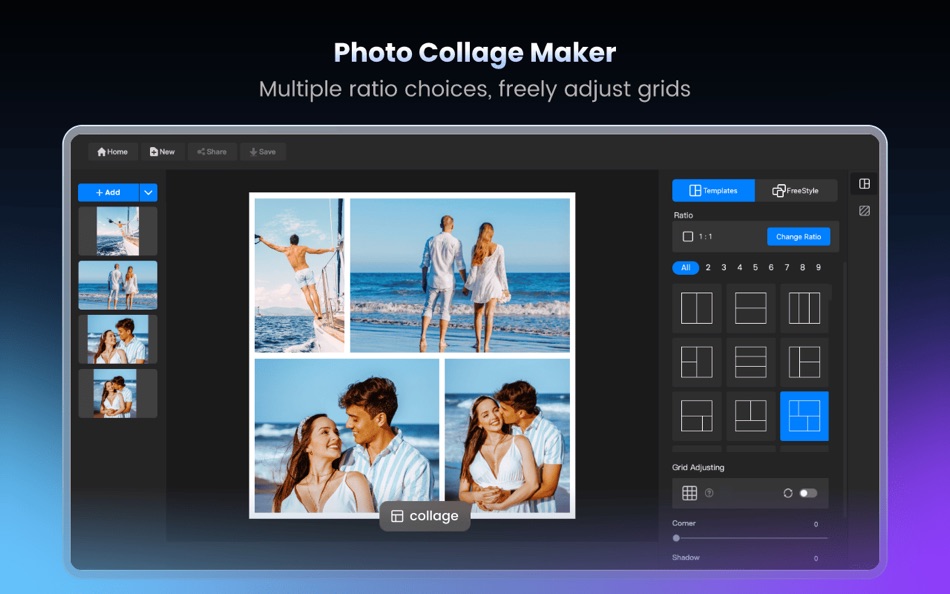
Versatile collage feature gives you a ton of flexibility to create and customize! Select from over 80 templates up to 9 photos at a time, or use Free Style to move photos around whatever you want with 26 unique backgrounds to choose from. Finish off your masterpiece with the border color that catches your eye, or select from 10 border designs. Even adjust border width, add a shadow effect or round off the corners.
【Photo Editing】
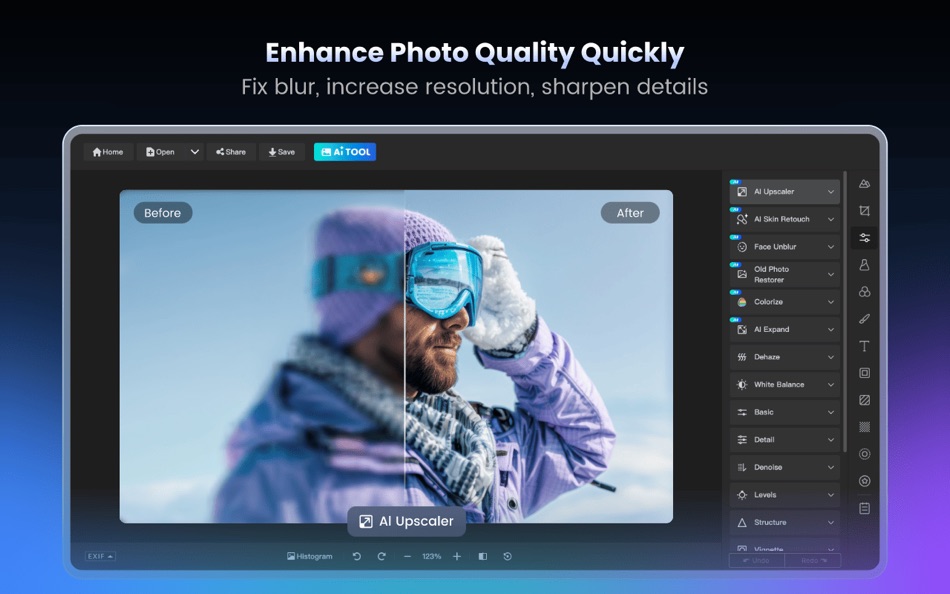
Fotor's state-of-the-art photo processing engine makes it easy to process high quality photos quickly. Adjust exposure, brightness, contrast, white balance, and saturation, sharpen/blur, highlights/shadows, HSL, add a vignette or film grain, remove red eye, reduce image noise, or crop, straighten, rotate, fix image distortion or correct lens distortion.
Effects & Borders
Fotor comes loaded with over 150 effects, including Classic, Retro, Lomo, B&W, and new popular packs of Cinematic, Disposable, Mono, Filmatic, Lighting Leaking, Groovy, Mellow, Spring, Warm Winter, Solar and Serenity. Over 60 styles of frames, including Simple lines, Borders, Artico, Styled, Floral, Old School, Holiday, Lovers, Gallery and Stamp.
***Fotor Pro***
- Unlimited premium assets like effects, borders, textures etc.
- keep adding new features
- Price may vary by location. Subscriptions will be charged to your credit card through your iTunes account. Your subscription will automatically renew unless canceled at least 24 hours before the end of the current period. You will not be able to cancel the subscription once activated. Manage your subscriptions in Account Settings after purchase.
https://www.apple.com/legal/internet-services/itunes/dev/stdeula/
Ad
스크린샷



가격 내역
-
* 인앱 구매 - 현재 가격: 무료
- 최소: 무료
- 최대: 무료
가격 추적
추가 정보
 http://www.fotor.com/mac/index.html
개발자
목록 (1)
- Fotor: AI Photo Editor, Design

포인트 (5)
-

- 1 Árpi bácsi Prof.
- +1
-
- 383 gilbert
- +1
-
- 11 Arthur Nunziata
- +1
-
- 65 Kai Lee
- +1
-
- 2,979 바람처어럼
- +1




순위 (1)
-
- 119,190 AppAgg
- 5

댓글 (0)
가장 먼저 댓글을 남겨주세요 🌟
«Fotor: AI Photo Editor, Design». 플랫폼: macOS. 카테고리: 사진 및 비디오. 개발자: «Chengdu Everimaging Science and Technology Co., Ltd». 첫 번째 릴리스: . 마지막 업데이트: . 현재 가격: 무료. AppAgg 등급: 5 / 5. 투표: 1. 목록: 공개: 1, 비공개: 1. 추적된 포인트: 확인됨: 5, 간접: 0. 사용 가능한 언어: English. AppAgg는 «Fotor: AI Photo Editor, Design»의 가격 기록, 평점 및 사용자 피드백을 추적합니다. 향후 할인 및 업데이트 받기: RSS에서 확인할 수 있습니다. AppAgg는 애플리케이션을 호스팅하거나 소프트웨어를 배포하지 않습니다. 모든 상표, 로고 및 스크린샷은 해당 소유자의 자산입니다.
Fotor: AI Photo Editor, Design 단축 URL: 복사됨!- 🌟 공유하기
- Mac App Store
유사 항목
-
- Luminar Neo - AI Photo Editor
- macOS 앱: 사진 및 비디오 게시자: Skylum
- * 무료
- 목록: 1 0 0
- 포인트: 3 버전: 1.26.1 Luminar Neo is a powerful RAW photo editor with cutting-edge AI tools and other incredible features. Achieve professional-quality results effortlessly with this next-gen picture ... ⥯
-
- Meitu-AI Photo Editor & Design
- macOS 앱: 사진 및 비디오 게시자: Xiamen Meitu Technology Co., Ltd.
- * 무료
- 목록: 0 0 0
- 포인트: 0 버전: 2.2.16 Meitu is the simplest image processing tool that can quickly achieve professional-level photo editing effects. AI tools are constantly updated, and everyone can make good pictures! AI ... ⥯
-
- Irix HDR: AI Photo Editor
- macOS 앱: 사진 및 비디오 게시자: Binaire
- * 무료
- 목록: 0 0 0
- 포인트: 0 버전: 2.3.58 Irix HDR Classic brings true to life HDR photo editing offering one click edits to full scale pro editing toolset. Sky Replacement (SkyXpress)- Replace skies and introduce weather. ... ⥯
-
- Photo Editor
- macOS 앱: 사진 및 비디오 게시자: Codeway
- * 무료
- 목록: 0 0 0
- 포인트: 0 버전: 1.1 Fotoris AI Photo Editor is your ultimate creative powerhouse packed with advanced AI tools to transform any photo into something extraordinary. Create, design, edit, and imagine ... ⥯
-
- Photo Editor for Seedream
- macOS 앱: 사진 및 비디오 게시자: Yasir Islam
- * 무료
- 목록: 0 0 0
- 포인트: 0 버전: 1.3 Photo Editor for Seedream is an all-in-one AI photo editing app that turns your imagination into art. Create stunning visuals with Text to Image or transform existing photos using ... ⥯
-
- AI Photo Restore
- macOS 앱: 사진 및 비디오 게시자: HIG Studio
- $16.99
- 목록: 0 0 0
- 포인트: 0 버전: 1.1.7 AI Photo Restore is the best and most modern photo restoration software available as it uses the latest machine learning technology. The technology behind the app is a state-of-the-art ⥯
-
- Photo Editor: Presets, Filters
- macOS 앱: 사진 및 비디오 게시자: TS Technology
- * 무료
- 목록: 0 0 0
- 포인트: 0 버전: 1.2 Photo Editor - AI Background Eraser offers everything you want to edit pictures on this pics art tour. 100+ stylish effects, filters, photo collage, blur photo, grids, change ... ⥯
-
- AI Video & AI Photo Generator
- macOS 앱: 사진 및 비디오 게시자: Syeda Aneesha Tanseer
- * 무료
- 목록: 0 0 0
- 포인트: 0 버전: 2.0 AI Video & AI Photo Generator Create stunning AI generated videos and photos in seconds. Unleash your creativity with AI Video & Photo Generator, the fastest and most powerful tool for ⥯
-
- AI Face Editor: Perfect Selfie
- macOS 앱: 사진 및 비디오 게시자: AppCurrent, LLC
- * 무료
- 목록: 0 0 0
- 포인트: 0 버전: 1.3.2 Enhance your photos using AI and editing tools! Turn your photos into beautiful portraits and selfies in one touch with the help of AI Face Editor - Photo Enhancer. There is no need to ⥯
-
- Photo Editor: Filters & Frames
- macOS 앱: 사진 및 비디오 게시자: HESHAM ABDEL GAWAD
- $14.99
- 목록: 0 0 0
- 포인트: 0 버전: 1.0.3 Transform Your Photos with Our Powerful Photo Editor! Unlock your creativity with our all-in-one photo editor App,Choose from multiple one click Filters,Frames and Overlays and your ... ⥯
-
- AI Photo Enhancer : RAZE AI
- macOS 앱: 사진 및 비디오 게시자: Dzine Media
- * 무료
- 목록: 0 0 0
- 포인트: 1 버전: 1.0.5 Make your photos look better in a single click. Our RAZE - AI photo enhancer transforms your ordinary pictures into masterpieces. Perfect for personal or professional use. How to Use ... ⥯
-
- Photo 360 Pro - Amazing Photo Editor and Stylish Filters Effects
- macOS 앱: 사진 및 비디오 게시자: LI HUNG WANG
- $29.99
- 목록: 0 0 0
- 포인트: 0 버전: 1.0 Photo 360 brings your amazing collection of filters and photo effects on the Mac App Store, provides 260 filter effects beloved by professional photographers. Photo 360 themes vary ... ⥯
-
- Photo Editor: Cut Out Shapes
- macOS 앱: 사진 및 비디오 게시자: Any Case Solutions
- * 무료
- 목록: 0 0 0
- 포인트: 2 버전: 4.3.1 Enhance your favorite pictures and selfies with our fast & efficient photo eraser! Remove, change, blur background and unnecessary objects by using adjustable brushes. Use a wide range ⥯
-
- AI Background Editor | Eraser
- macOS 앱: 사진 및 비디오 게시자: Hira Razzaq
- * 무료
- 목록: 0 0 0
- 포인트: 0 버전: 1.0 Remove Backgrounds. Perfect Your Photos. Turn any photo into a professional-looking masterpiece with our AI-powered image editor. Remove unwanted elements, enhance details, and make ... ⥯