
| 개발자: | INTSIG Information Co., Ltd (4) | ||
| 가격: | * 무료 | ||
| 순위: | 0 | ||
| 리뷰: | 0 리뷰 작성 | ||
| 댓글: | 0 댓글 게시 | ||
| 목록: | 2 + 2 | ||
| 포인트: | 11 + 1,775,733 (4.9) ¡ | ||
| App Store | |||
기술

Trusted by 300M+ users
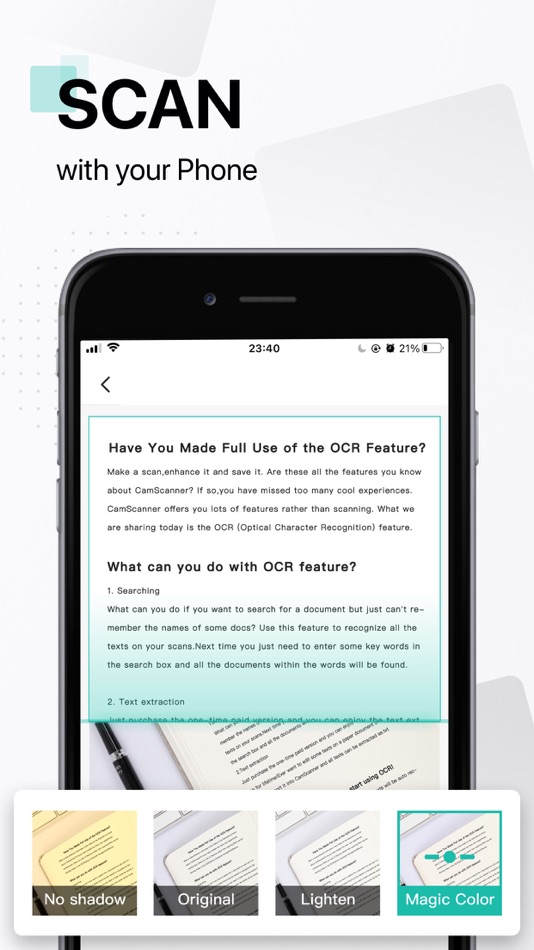
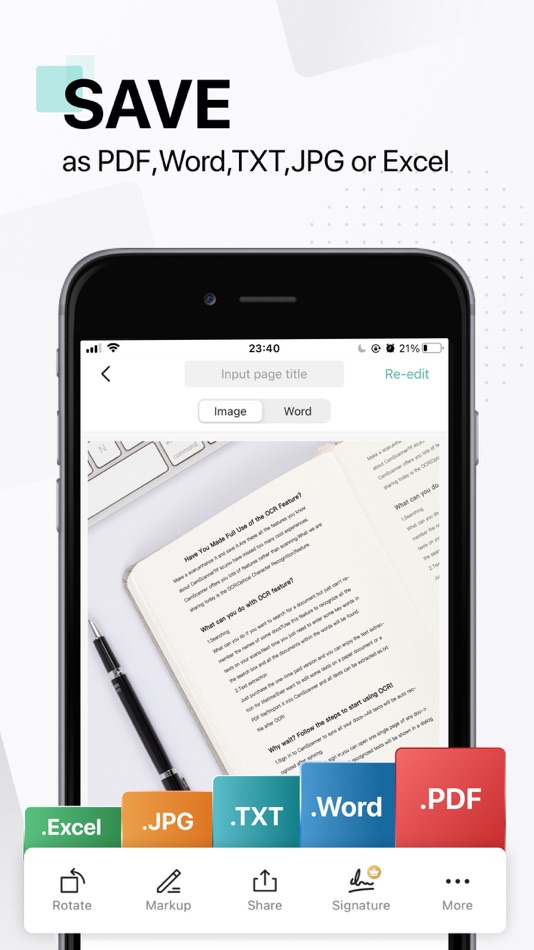
CamScanner is an all-in-one scanner app. It turns your mobile device into a powerful portable scanner that recognizes text automatically (OCR) and improves your productivity to save your time. Download this scanner app for free to instantly scan, save, and share any document in PDF, JPG, Word, or TXT formats.
Would you like to keep your entire office in your pocket and increase your productivity at work? Use the CamScanner scanner app to handle your paperwork with ease. Say goodbye to huge and heavy copy machines and get this ultra-fast scanner app for free now.
DOCUMENT SCANNER
This free-of-charge yet powerful scanner app is a must-have for students and anyone involved in business: accountants, realtors, managers, or lawyers. With this PDF scanner, scan anything you need, receipts, contracts, paper notes, fax papers, books, and store your scans as multipage PDF or JPG files.
VARIOUS SCANNING MODES
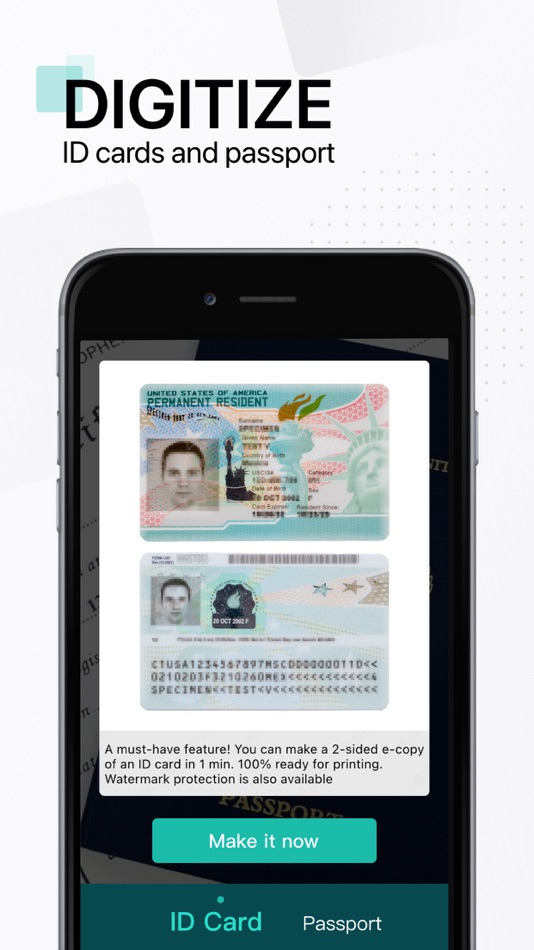
–ID CARD & PASSPORT: A mode specifically designed for fast and convenient scans of ID documents.
–QR CODE: Scan any QR code with the camera on your mobile device.
PDF CONVERTER
–PDF Converter: This PDF scanner enables you to create PDF from a website, and convert documents in multiple formats to PDF.
–Supported file formats: PDF, JPG, DOC, DOCX, TXT, XLS, XLSM, XLSX, CVS, PPT, PPTM, PPTX.
SHARE AND COLLABORATE
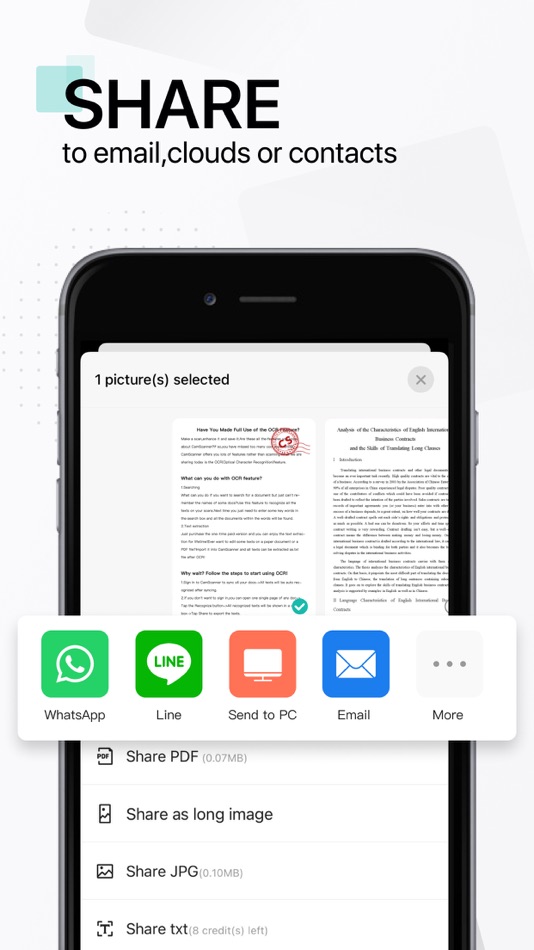
–Share files for commenting or viewing in WhatsApp, iMessage, Microsoft Teams.
–Collect comments from multiple people in one file online.
–Speed document reviews by responding to each other's comments.
–Receive activity notifications for the files you share.
INNOVATIVE PDF SCANNER
–Scan documents and photos to PDF, JPG, or TXT.
–Easily scan multiple pages into one document.
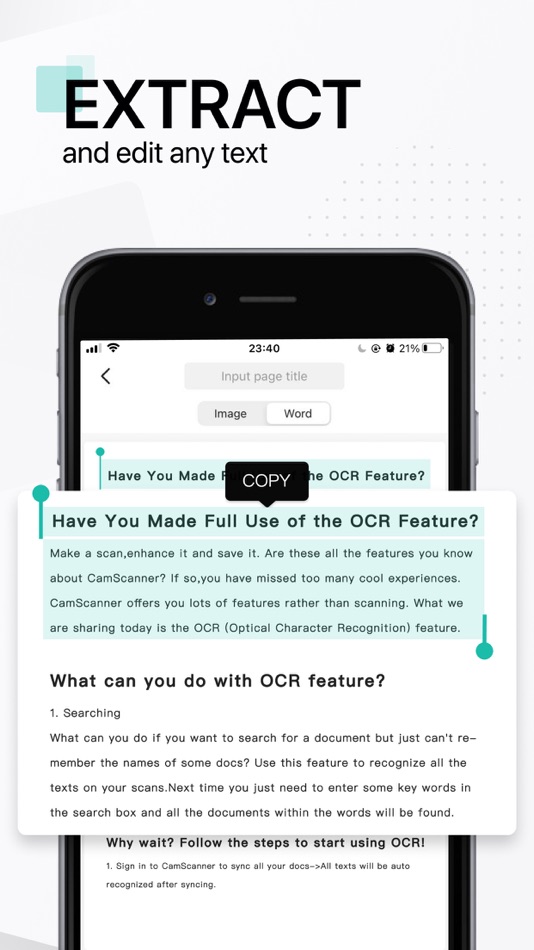
–Extract text from any scannable object with text recognition (OCR).
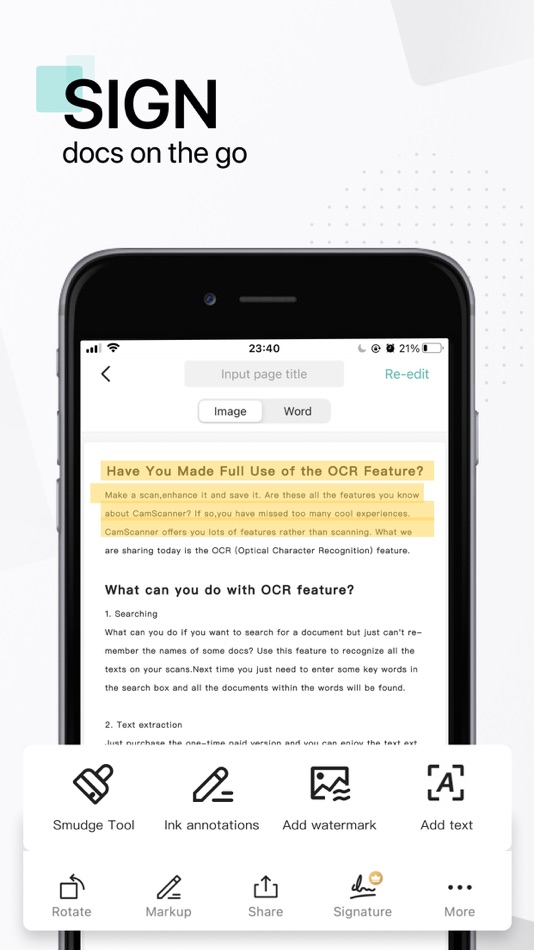
–Create and add your own e-signature on documents.
HANDY DOCUMENT EDITOR & FILE MANAGER
–Edit scans with filters and the feature of noise removal.
–Manage files with folders, drag & drop to reorder, and enjoy other document editing features.
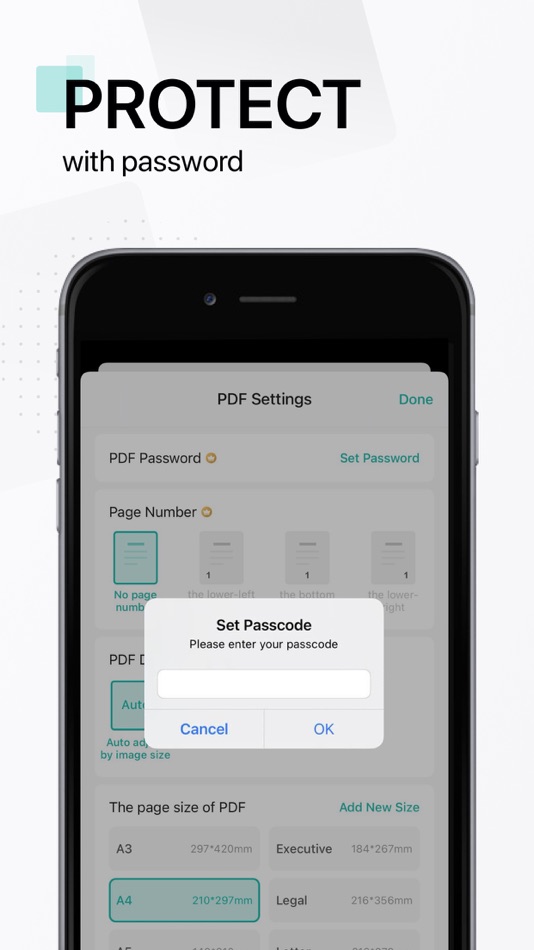
–Protect your confidential scans by locking folders and files with passwords.
EASILY SEND DOCUMENT
–Scan, save and send documents in just a few taps.
–Email with attachments or send document links.
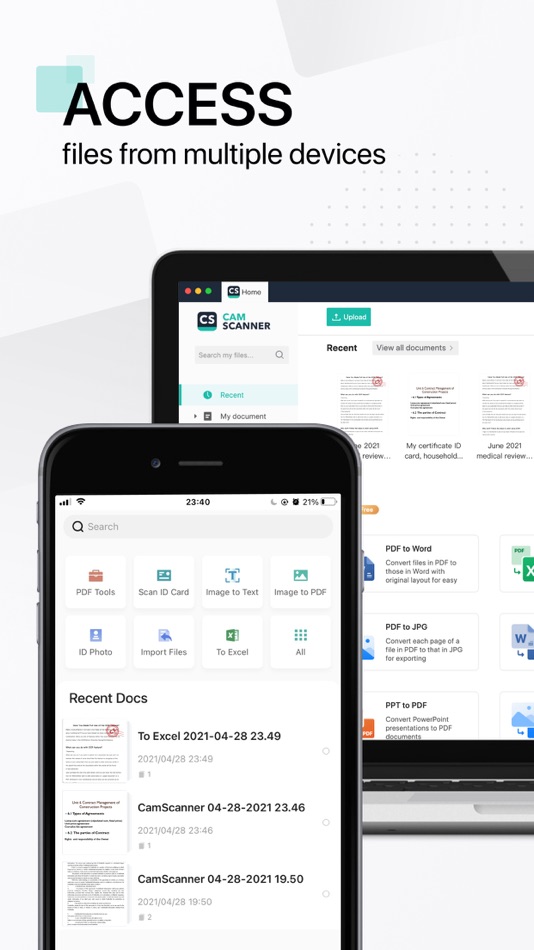
–Upload scanned documents to cloud services like Dropbox, Google Drive, Evernote, and OneDrive.
–Print PDF files, such as contracts and invoices, right from the scanner app.
–Send files quickly and securely. Scanning or sharing is achieved with no intervention from the CamScanner scanner app team or any third party. Documents are safely stored on your mobile devices.
UNLIMITED ACCESS MEMBERSHIP SUBSCRIPTION
–You can subscribe to get unlimited access to all features of the scanner app.
–Subscriptions are billed weekly, monthly, quarterly, or annually at the rate based on the subscription plan.
–Payment will be charged to iTunes Account at confirmation of purchase.
–Subscription renews automatically unless auto-renew is turned off at least 24 hours before the end of the current period.
–Account will be charged for renewal within 24 hours prior to the end of the current period. The cost depends on the selected plan.
–Subscriptions may be managed by the user, and auto-renewal may be turned off by going to the user's Account Settings after purchase.
–Any unused portion of the free trial will be forfeited when the user purchases a subscription.
For Terms of Use, please visit
https://www.camscanner.com/app/service?language=en-us
For Privacy Policy, please visit
https://www.camscanner.com/app/privacy?language=en-us
We'd love to hear your feedback: isupport@camscanner.com
Follow us on X: @CamScanner
Like us on Facebook: @CamScanner UA
Follow us on Instagram: @CamScanner_Official
Follow us on YouTube: @CamScanner_Official
Check out other products of INTSIG:
CamCard - Business Card Reader
Ad
스크린샷

가격 내역
-
* 인앱 구매 - 오늘: 무료
- 최소: 무료
- 최대: 무료
가격 추적
개발자
포인트 (11)
-

- 8 Nizar Salha
- +1
-
- 1,189 Buca
- +1
-
- 2,056 Luciole
- +1
-
- 1 Sudhir Gavane
- +1
-
- 55 Sergey Nevagno
- +1




순위 (0)
0 ☹️
목록 (2)
- CamScanner - PDF Scanner App

리뷰 (0)
첫 번째 리뷰를 남겨보세요 🌟
추가 정보
- 버전: 7.14.0
- 카테고리:
iOS 앱›생산성 - 운영체제:
iPad,iPhone,iOS 13.0 이상 - 크기:
344 Mb - 지원되는 언어:
Albanian,Arabic,Armenian,Azerbaijani,Bengali,Bosnian,Bulgarian,Burmese,Chinese,Croatian,Danish,Dutch,English,Estonian,Finnish,French,Georgian,German,Greek,Hebrew,Hindi,Hungarian,Icelandic,Indonesian,Italian,Japanese,Kazakh,Khmer,Kinyarwanda,Korean,Lao,Latvian,Lithuanian,Luxembourgish,Macedonian,Malay,Maltese,Mongolian,Nepali,Norwegian,Polish,Portuguese,Romanian,Russian,Serbian,Sinhala,Slovenian,Spanish,Swahili,Swedish,Thai,Turkish,Ukrainian,Urdu,Uzbek,Vietnamese - 콘텐츠 등급:
4+ - App Store 개의 평가:
4.9(1,775,733) - 업데이트:
- 출시일:
주소록
- Facebook: CamScanner
 https://www.camscanner.com
 «CamScanner - PDF Scanner App». 플랫폼: iOS. 카테고리: 생산성. 개발자: «INTSIG Information Co., Ltd». 첫 번째 릴리스: . 마지막 업데이트: . 현재 가격: 무료. 이 타이틀은 아직 AppAgg에서 평가나 리뷰를 받지 못했습니다. 목록: 공개: 2, 비공개: 2. 추적된 포인트: 확인됨: 11, 간접: 1,775,733. 매장: App Store. 매장 평가: 4.9. 투표: 1,775,733. 사용 가능한 언어: Albanian, Arabic, Armenian, Azerbaijani, Bengali, Bosnian, Bulgarian, Burmese, Chinese, Croatian, Danish, Dutch, English, Estonian, Finnish, French, Georgian, German, Greek, Hebrew, Hindi, Hungarian, Icelandic, Indonesian, Italian, Japanese, Kazakh, Khmer, Kinyarwanda, Korean, Lao, Latvian, Lithuanian, Luxembourgish, Macedonian, Malay, Maltese, Mongolian, Nepali, Norwegian, Polish, Portuguese, Romanian, Russian, Serbian, Sinhala, Slovenian, Spanish, Swahili, Swedish, Thai, Turkish, Ukrainian, Urdu, Uzbek, Vietnamese. AppAgg는 «CamScanner - PDF Scanner App»의 가격 기록, 평점 및 사용자 피드백을 추적합니다. 향후 할인 및 업데이트 받기: RSS에서 확인할 수 있습니다. AppAgg는 애플리케이션을 호스팅하거나 소프트웨어를 배포하지 않습니다. 모든 상표, 로고 및 스크린샷은 해당 소유자의 자산입니다.
댓글 (0)
가장 먼저 댓글을 남겨주세요 🌟
CamScanner - PDF Scanner App 단축 URL: 복사됨!- 🌟 공유하기
- App Store
Ad
유사 항목
-
- PDF Expert: Editor & Converter
- iOS 앱: 생산성 게시자: Readdle Technologies Limited
- 무료
- 목록: 6 + 5 순위: 0 리뷰: 0
- 포인트: 11 + 214,113 (4.7) 0 버전: 7.25.3 Unlock your potential with a fast and easy PDF Expert app with all the features you need in a well-designed and intuitive user interface. BEST FOR iPHONE, iPAD, MAC & VISION PRO Read ... ⥯
-
- Notability: AI Notes & PDF app
- iOS 앱: 생산성 게시자: Ginger Labs
- * 무료
- 목록: 30 + 19 순위: 5 (2) 리뷰: 0
- 포인트: 28 + 444,012 (4.8) 0 버전: 16.0 From your first lecture to your next big meeting, Notability helps you think, learn, and work better. Take handwritten notes, annotate documents, record audio, and stay organized in ... ⥯
-
- Goodnotes: AI Notes, Docs, PDF
- iOS 앱: 생산성 게시자: Goodnotes Limited
- 무료
- 목록: 42 + 32 순위: 0 리뷰: 0
- 포인트: 33 + 411,552 (4.7) 0 버전: 7.0.44 Goodnotes has always been the place to capture your ideas from quick notes to big plans. Now, it goes further. With powerful AI and new ways to capture information, Goodnotes helps you ⥯
-
- Speechify – Text to Speech PDF
- iOS 앱: 생산성 게시자: Speechify Inc.
- * 무료
- 목록: 0 + 1 순위: 0 리뷰: 0
- 포인트: 2 + 463,718 (4.7) 0 버전: 5.0.31 Speechify is the Text to Speech reader you have always wanted. It reads books, PDFs, images, and articles aloud, types as you speak, and answers questions instantly. Or take a photo of ⥯
-
- Microsoft 365 Copilot
- iOS 앱: 생산성 게시자: Microsoft Corporation
- * 무료
- 목록: 3 + 4 순위: 0 리뷰: 0
- 포인트: 10 + 1,240,751 (4.7) 0 버전: 2.108.2 The Microsoft 365 Copilot app is your all-in-one, AI-first productivity app for work: create content, explore ideas, get answers, and more. The Microsoft 365 Copilot app is your ... ⥯
-
- Docusign - Upload & Sign Docs
- iOS 앱: 생산성 게시자: Docusign
- 무료
- 목록: 2 + 1 순위: 0 리뷰: 0
- 포인트: 4 + 805,381 (4.9) 0 버전: 3.43.0 Docusign eSignature is the world s #1 way for businesses and individuals to securely send and sign agreements from practically anywhere, at any time, from almost any device. The ... ⥯
-
- Evernote Scannable
- iOS 앱: 생산성 게시자: Evernote Corporation
- 무료
- 목록: 0 + 1 순위: 0 리뷰: 0
- 포인트: 1 + 418,074 (4.9) 0 버전: 3.2.4 Scannable moves paper forward. Scan contracts, receipts, business cards, and any paper that comes your way. Save or share documents instantly and move on. Automatically capture ... ⥯