
Sparade
Välj namnet som ska visas i menyn Sparade.
Gjort!
| Utvecklare: | Lumary Labs LLC (2) | ||
| Pris: | $14.99 | ||
| Betyg: | 0 | ||
| Kommentarer: | 0 Skriv kommentar | ||
| Listor: | 0 + 0 | ||
| Poäng: | 0 + 0 ¡ | ||
| Mac App Store | |||
Beskrivning

ScreenAnnotations is a native macOS menu bar app for screen annotation, whiteboarding, presentations, and AI-assisted diagramming. It gives you a transparent overlay on top of any app plus a dedicated whiteboard workspace for diagrams, notes, teaching, demos, and visual explanations.
NEW IN 1.2
- import saved `.screenannotation` files directly into the All Boards gallery
- drag and drop saved board files into the gallery
- branded Finder icon plus direct open from Finder for saved board files
- new layout tools: align, distribute, row, column, flow, and tree
- scene-based presentation with a dedicated Scene Manager
- scene thumbnails, drag reorder, duplicate, multi-delete, and animated transitions
- new board history with snapshots, restore, and duplicate-as-board
- expanded local MCP support for boards, scenes, presentation control, and snapshots
- clearer settings organization and stronger whiteboard workflow polish
DRAW ON YOUR SCREEN
Use Screen Overlay mode to draw directly on top of your desktop, browser, design tool, IDE, or presentation:
- Pen, Highlighter, Arrow, Line, Shape, Text, Formula, Image, Eraser, Laser Pointer, Select, and Hand
- keyboard shortcuts for fast tool switching
- color, width, stroke, and fill controls
- straight, curved, and elbow arrows
WHITEBOARD WORKSPACE
Switch to fullscreen or windowed whiteboard mode when you want a clean canvas:
- infinite pan and zoom
- multiple boards with an All Boards gallery
- save, rename, organize, import, and reopen boards
- 4 background patterns: Blank, Dots, Grid, and Lines
WHITEBOARD CONTENT
Whiteboard mode supports more than freehand drawing:
- sticky notes with editable text and colors
- editable tables with add row/add column, autogrow, fill, and text color
- rich link cards with preview image, icon, title, and host
DIAGRAMS, STEM, AND TEACHING
ScreenAnnotations includes 135+ shapes across 20 categories, including:
- general drawing and flowchart symbols
- architecture and computer science shapes
- science and lab shapes
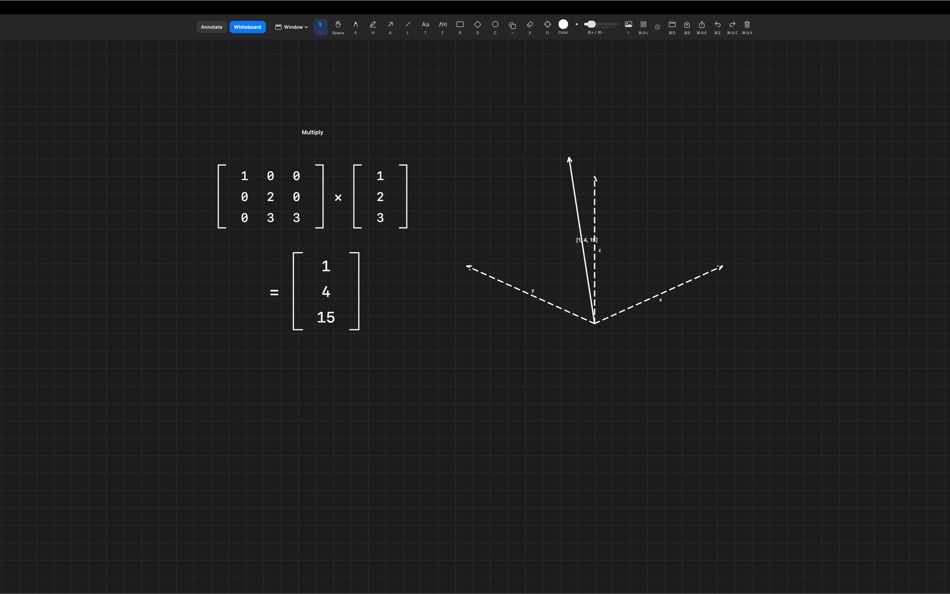
- math, physics, electronics, vectors, matrices, and graphing tools
- LaTeX-style formula rendering
LAYOUT TOOLS
Clean up diagrams faster:
- align left, center, right, top, middle, bottom
- distribute horizontally or vertically
- arrange items into rows or columns
- graph-aware flow and tree layouts
- connected arrows stay attached as nodes move
PRESENTATION MODE
Build and present scene-based whiteboards:
- create scenes from the current view or selection
- manage scenes in a dedicated Scene Manager
- rename, duplicate, reorder, update, switch, and delete scenes
- use scene thumbnails and multi-select cleanup
- animate transitions between scenes, including Fade and Dip to Black
BOARD HISTORY
Whiteboards now include local history tools:
- save manual snapshots
- automatic snapshots while you work
- restore an earlier board state
- duplicate a snapshot as a new board
- configure snapshot retention
LOCAL AI / MCP
ScreenAnnotations includes local MCP support for AI-assisted whiteboard and screen drawing:
- draw shapes, arrows, formulas, text, academic objects, and full diagrams
- create and manage boards
- create, reorder, present, and transition scenes
- save, list, restore, and duplicate snapshots
SAVE, EXPORT, AND WORK LOCALLY
- save as `.screenannotation` files
- export transparent PNGs
- multi-display support
- configurable global hotkeys
- menu bar app with no dock icon
- no cloud, no analytics, no tracking, no account
macOS 15.0 or later.
Ad
Skärmbilder




Prishistorik
- Aktuellt pris: $14.99
- Minsta: $14.99
- Maximalt: $14.99
Bevaka priser
Ytterligare information
- Utgivningsdatum:
- Kategori:
macOS Appar›Verktyg - OS:
macOS,macOS 15.0 och senare - Storlek:
12 Mb - Språk som stöds:
English - Innehållsrankning:
4+ - Mac App Store Betyg:
0 - Webbplats:
 https://screenannotations.com/
Nya
- Version: 1.2
- Uppdaterad:
- ScreenAnnotations 1.2
What’s new in this release:
- Import saved `.screenannotation` files directly into the All Boards gallery
- Drag and drop saved board files into the gallery
- Saved board files now use a branded Finder icon and open directly in ScreenAnnotations from Finder
- New whiteboard layout tools: align, distribute, row, column, flow, and tree
- Connected arrows stay attached when nodes move through layout actions
- New scene-based presentation workflow for whiteboards
- Create scenes from the current view or current selection
- Dedicated Scene Manager window for adding, renaming, duplicating, reordering, updating, switching, and deleting scenes
- Scene Manager shows scene thumbnails and supports multi-select deletion
- Animated scene transitions with multiple styles, including Fade and Dip to Black
- New board history with automatic and manual snapshots
- Restore snapshots, delete snapshots, or duplicate a snapshot as a new board
- Configurable snapshot retention limit
- Expanded Settings window with a dedicated Whiteboard tab, more defaults, and clearer previews
- MCP support now includes boards, scenes, presentation controls, and snapshots
- New empty-space right-click action: `Fit Nearby in View`
- Whiteboard label editing, text placement, and tool switching are more stable and predictable
- Shape picker recents now show as a flat recent-use section instead of regrouping by category
This file is still a working draft and should be updated again if additional `1.2` work is finalized.
Utvecklare
- Lumary Labs LLC
- Plattformar: macOS Appar (2)
- Listor: 0 + 0
- Poäng: 1 + 0 ¡
- Betyg: 0
- Kommentarer: 0
- Rabatter: 0
- Videor: 0
- RSS: Prenumerera
Listor (0)
0 ☹️
- Annotate Screen
Poäng (0)
0 ☹️
Betyg (0)
0 ☹️
Kommentarer (0)
Var den första att kommentera 🌟
«Annotate Screen». Plattform: macOS. Kategori: Verktyg. Utvecklare: «Lumary Labs LLC». Första utgåvan: . Senaste uppdateringen: . Aktuellt pris: $14.99. Lägsta registrerade pris: $14.99. Högsta registrerade pris: $14.99. Den här titeln har ännu inte fått betyg eller recensioner på AppAgg. Tillgängliga språk: English. AppAgg spårar prishistorik, betyg och användarfeedback för «Annotate Screen». Följ framtida rabatter och uppdateringar via RSS. AppAgg är inte värd för applikationer eller distribuerar programvara. Alla varumärken, logotyper och skärmdumpar tillhör sina respektive ägare.
Annotate Screen Kort webbadress: Kopierad!- 🌟 Dela
- Mac App Store
Liknande
-
- Mirror Phone Screen
- macOS Appar: Verktyg Av: Rodrigo Velazquez Tapia
- $5.99
- Listor: 0 0 0
- Poäng: 0 Version: 1.02 Transform your Mac into a powerful hub for your iOS devices. Mirror Phone Screen is a professional, lightweight utility designed to mirror, capture, and record video feeds from ... ⥯
-
- Echo: Easy Screen Mirroring
- macOS Appar: Verktyg Av: Alexis Rondeau
- Gratis
- Listor: 0 0 0
- Poäng: 0 Version: 1.6.1 Tired of configuring your external displays every time? Echo makes it effortless instantly sync all your displays with just one click. - One-Click Mirroring: Mirror the largest, ... ⥯
-
- Biaoji
- macOS Appar: Verktyg Av: Yee Pin New
- Gratis
- Listor: 0 0 0
- Poäng: 0 Version: 2.0.0 Vision and Language Annotation Tool - Streamline Your ML Dataset Labeling Efficiently build high-quality machine learning datasets with our advanced Annotation Tool. Designed for data ... ⥯
-
- Klipped
- macOS Appar: Verktyg Av: Andrew Drake
- Gratis
- Listor: 0 + 2 0 0
- Poäng: 19 Version: 3.0.2 Beauty in simplicity. Klipped is a minimalist scratch pad that is a buddy for all your other apps. Write ideas down. Paste text and use as a clipboard; delete when you re done. No ... ⥯
-
- RocketSim for Xcode Simulator
- macOS Appar: Verktyg Av: SwiftLee
- * Gratis
- Listor: 1 + 3 0 0
- Poäng: 9 Version: 15.1.0 RocketSim enhances the Xcode Simulator for iOS and iPadOS development: boost productivity and streamline your workflow with capture, networking, build insights, and quick actions ... ⥯
-
- xScope 4
- macOS Appar: Verktyg Av: The Iconfactory
- $49.99
- Listor: 3 + 3 0 0
- Poäng: 0 Version: 4.7.2 Created specifically for designers & developers, xScope is a powerful set of tools that are ideal for measuring, inspecting & testing on-screen graphics and layouts. xScope s tools ... ⥯
-
- Color Picker - Pikka
- macOS Appar: Verktyg Av: Ruslan Sayfutdinov
- * Gratis
- Listor: 2 + 1 0 0
- Poäng: 6 Version: 4.0.4 ** Apple's pick for Apps And Games We Love Right Now ** Pikka - Color Picker is an easy-to-use color picker and palette generator for developers and designers that works well with ... ⥯
-
- Expressions
- macOS Appar: Verktyg Av: Apptorium
- $7.99
- Listor: 2 + 3 0 1 (1)
- Poäng: 1 Version: 1.3.9 Expressions allows to play with regular expressions*. Just type your pattern and some text to test it. All the changes are updated while you're typing text or pattern. App highlights ... ⥯
-
- Vulcan: generator for SwiftUI
- macOS Appar: Verktyg Av: Pure Creek
- * Gratis
- Listor: 0 + 2 0 0
- Poäng: 7 Version: 2.14 Vulcan allows developers to generate the SwiftUI code for an entire iOS app in minutes. Vulcan is not a design tool. It's objective is to generate all the tedious bolierplate for the ... ⥯
-
- AnnotationCreater
- macOS Appar: Verktyg Av: Weida Fan
- Gratis
- Listor: 0 0 0
- Poäng: 1 Version: 1.8 Generate createML annotations which can be trained by createML. Feature: Annotate based on a trained model Go to Annotate > based on model... and drop a trained model. (.mlmodel or ... ⥯
-
- devPad
- macOS Appar: Verktyg Av: John Taverna
- $7.99
- Listor: 1 0 5 (1)
- Poäng: 1 Version: 1.9 devPad is a slide-out utility panel for macOS that gives you instant access to a browser, code editor, AI assistant, and developer tools-all triggered by moving your cursor to the ... ⥯
-
- Frame Array: Video to AI
- macOS Appar: Verktyg Av: Jose Manuel Jacas Saez-Merino
- $9.99
- Listor: 0 0 0
- Poäng: 0 Version: 1.0 Launch Special 50% OFF for a limited time! Frame Array helps you turn any video into a structured, easy-to-read contact sheet. Perfect for giving visual context to tools that can t ... ⥯
- -100%
- ExactShot
- macOS Appar: Verktyg Av: Konstantin Kolomeitsev
- ▼ Gratis
$1.99-100% - Listor: 0 + 1 0 0
- Poäng: 5 Version: 1.0.0 ExactShot Editable Screenshots for macOS Capture screenshots you can clean up and adjust after the shot. Remove distractions, move UI elements, and export layered PSD files. A normal ... ⥯