
ที่บันทึกไว้
เลือกชื่อที่จะแสดงในเมนูที่บันทึกไว้ของคุณ
เสร็จแล้ว
| ผู้พัฒนา: | Omer UCEL (15) | ||
| ราคา: | $0.99 | ||
| การจัดอันดับ: | 0 | ||
| ความเห็น: | 0 โพสต์ความคิดเห็น | ||
| รายการ: | 0 + 1 | ||
| แต้มแล: | 3 + 0 ¡ | ||
| Mac App Store | |||
คำอธิบาย

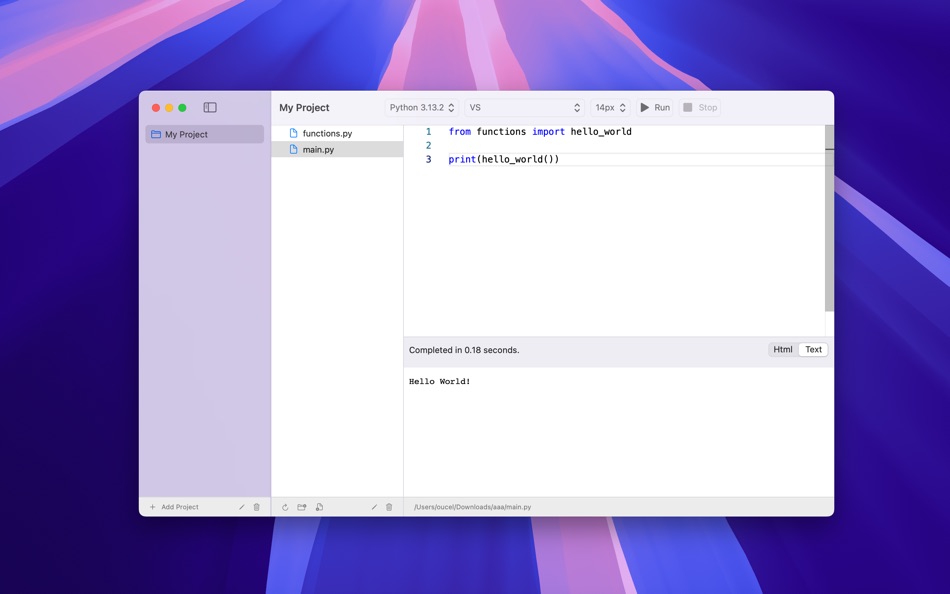
- Write and run Python code directly on your device and see the results immediately.
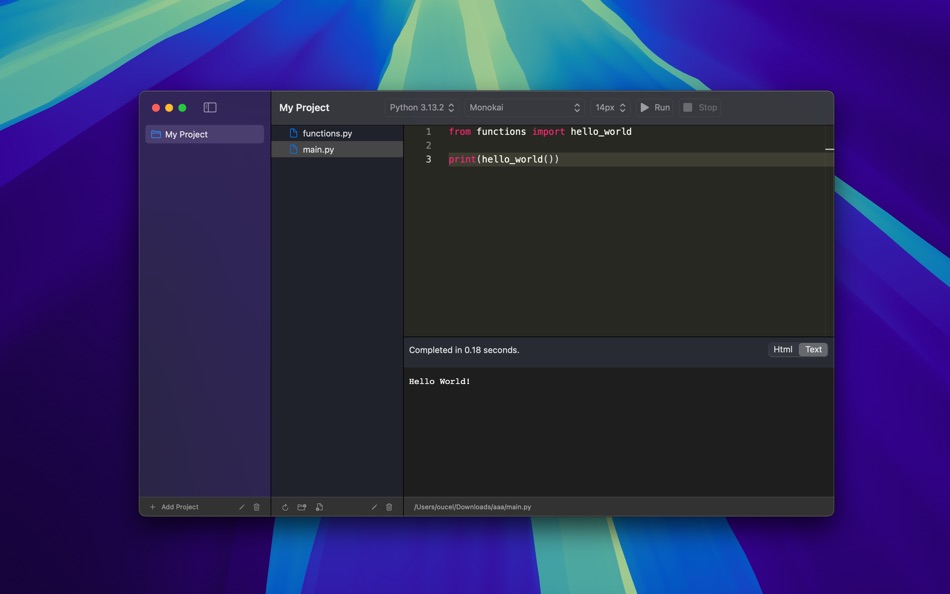
- Enjoy coding with a built-in editor featuring essential syntax highlighting for Python.
- Quickly test algorithms, functions, or small scripts without needing a full development environment.
- Clean and straightforward design gets you coding without distraction.
Who is Code Runner for Python for?
- Students & Beginners, A fantastic tool to practice Python coding exercises.
- Developers, A handy utility for quick tests and proof-of-concepts on the move.
- Hobbyists, Experiment with Python ideas anytime, anywhere.
Ad
ภาพหน้าจอ
ประวัติราคา
- ราคาปัจจุบัน: $0.99
- ต่ำสุด: ฟรี
- มากที่สุด: $4.99
ติดตามราคา
ข้อมูลเพิ่มเติม
- วันที่วางจำหน่าย:
- หมวดหมู่:
macOS แอป›เครื่องมือ - ระบบปฏิบัติการ:
macOS,macOS 14.0 และสูงกว่า - ขนาด:
34 Mb - ภาษาที่สนับสนุน:
English - การจัดประเภทเนื้อหา:
4+ - Mac App Store คะแนนโดย:
0
ผู้พัฒนา
รายการ (0)
0 ☹️
- Code Runner for Python
แต้มแล (3)
-

- 284 Serg Romashov
- +1
-
- 11,268 Simon Chan
- +1
-
- 2,346 Kras-s-savchiK
- +1


การจัดอันดับ (0)
0 ☹️
ความเห็น (0)
เป็นคนแรกที่แสดงความเห็น 🌟
«Code Runner for Python». แพลตฟอร์ม: macOS. หมวดหมู่: เครื่องมือ. ผู้พัฒนา: «Omer UCEL». การเปิดตัวครั้งแรก: . อัปเดตล่าสุด: . ราคาปัจจุบัน: $0.99. ราคาต่ำสุดที่บันทึกไว้: $0.00 (). ราคาสูงสุดที่บันทึกไว้: $4.99 (). ชื่อนี้ยังไม่ได้รับการให้คะแนนหรือบทวิจารณ์บน AppAgg จุดที่ติดตาม: ยืนยันแล้ว 3, ทางอ้อม 0. ภาษาที่ใช้ได้: English. AppAgg ติดตามประวัติราคา การให้คะแนน และคำติชมของผู้ใช้ «Code Runner for Python». ส่วนลดและอัปเดตในอนาคต: RSS. AppAgg ไม่ได้โฮสต์แอปพลิเคชันหรือแจกจ่ายซอฟต์แวร์ เครื่องหมายการค้า โลโก้ และภาพหน้าจอทั้งหมดเป็นของเจ้าของที่เกี่ยวข้อง
Code Runner for Python URL แบบสั้น: คัดลอกแล้ว!- 🌟 แชร์
- Mac App Store
คล้ายกัน
-
- Code Runner for PHP
- macOS แอป: เครื่องมือ โดย: Omer UCEL
- ฟรี
- รายการ: 0 + 1 0 0
- แต้มแล: 3 เวอร์ชัน: 5.0 Code Runner for PHP is your personal PHP sandbox, perfect for learning, experimenting, and quickly testing code snippets wherever you are. Ditch the complex server setup for simple ... ⥯
-
- Python Runner
- macOS แอป: เครื่องมือ โดย: 兰桂 吴
- $1.99
- รายการ: 0 0 0
- แต้มแล: 0 เวอร์ชัน: 1.5.6 Write and run Python code instantly! Python Runner is a handy tool for learning Python or running Python script for daily tasks. Simply type Python code and press "Command-R" to run ... ⥯
- ใหม่
- Code Meter: Session Usage Rate
- macOS แอป: เครื่องมือ โดย: StreetCoding Ltd
- * ฟรี
- รายการ: 0 0 0
- แต้มแล: 0 เวอร์ชัน: 1.2 Every Claude Code developer has been there: you're deep in a session, things are flowing, then your requests start failing: quota refreshes in a few hours... Code Meter lives in your ... ⥯
-
- Code Cleaner
- macOS แอป: เครื่องมือ โดย: Andre Yonadam
- $1.99
- รายการ: 0 0 0
- แต้มแล: 0 เวอร์ชัน: 1.0 Clean your HTML, CSS and Javascript files with Code Cleaner! Also great for making minified HTML, CSS and Javascript files easier to read again! Clean your code at your command within ... ⥯
-
- Code Replay
- macOS แอป: เครื่องมือ โดย: Aryaman Sharda
- ฟรี
- รายการ: 0 + 2 0 0
- แต้มแล: 3 เวอร์ชัน: 1.0 Code Replay is an innovative and powerful tool designed specifically for developers, presenters, and teachers. It enables you to record your coding session in Xcode for playback later. ⥯
-
- Code Peek+
- macOS แอป: เครื่องมือ โดย: Onder Kadagan
- * ฟรี
- รายการ: 0 0 0
- แต้มแล: 0 เวอร์ชัน: 1.0.3 Code Peek+ adds syntax-aware Quick Look previews for developer files on macOS. Preview source files, Markdown, Jupyter notebooks, and tabular text directly in Finder without opening an ⥯
-
- Code for SQLite3
- macOS แอป: เครื่องมือ โดย: ZeeZide GmbH
- $13.99
- รายการ: 0 0 0
- แต้มแล: 1 เวอร์ชัน: 1.0.4 Code for SQLite3 is a little macOS application that accepts either SQLite3 database files or SQL source code, and generates Swift source code for them. This is done for two main use ... ⥯
-
- Code Signing
- macOS แอป: เครื่องมือ โดย: Sergii Kryvoblotskyi
- $1.99
- รายการ: 0 0 0
- แต้มแล: 1 เวอร์ชัน: 1.0.7 Code Signing is a developer tool that reads files' signing information and validates the signature. There is no more need to use command-line tools, parse the results, or read the ... ⥯
-
- Code Architect
- macOS แอป: เครื่องมือ โดย: KeoGlobal
- ฟรี
- รายการ: 0 0 0
- แต้มแล: 0 เวอร์ชัน: 1.1 Code Architect is a Swift code navigation tool that helps developers understand and modify their codebase by providing a structured view of Swift files. It parses and displays the ... ⥯
-
- Python Playground: Live Coding
- macOS แอป: เครื่องมือ โดย: Jacob Hauberg Hansen
- $9.99
- รายการ: 0 0 0
- แต้มแล: 1 เวอร์ชัน: 1.19 Explore and experiment with Python and get instant results as you type. You can use Python Playground to quickly and conveniently try out ideas, learn things about Python or to simply ... ⥯
-
- Code Merger AI Assistant
- macOS แอป: เครื่องมือ โดย: TidalAurum, LLC
- ฟรี
- รายการ: 0 0 0
- แต้มแล: 0 เวอร์ชัน: 1.03 Swift File Merger - Streamline Your Code Organization Effortlessly combine multiple Swift files into a single, organized document for enhanced code review, sharing, and analysis. Key ... ⥯
-
- Py Editor for Python
- macOS แอป: เครื่องมือ โดย: Andromeda Corp LTD
- * ฟรี
- รายการ: 1 0 0
- แต้มแล: 2 เวอร์ชัน: 26.0.1 Python Editor is a native macOS application that lets you write and run Python code instantly, with no installation or configuration required. Python 3.11 is embedded directly in the ... ⥯
-
- Run Python
- macOS แอป: เครื่องมือ โดย: InSili.co
- $2.99
- รายการ: 0 0 0
- แต้มแล: 0 เวอร์ชัน: 1.0 The easiest and coolest Click'n'Run way to test your Python scripts! == Spinoff of the popular Peppermint editor == - Click'n'Run instantly in the built-in console (user input ... ⥯
-
- Clone in VS Code
- macOS แอป: เครื่องมือ โดย: Ahnaf Mahmud
- ฟรี
- รายการ: 0 0 0
- แต้มแล: 3 เวอร์ชัน: 1.4.1 A Safari extension to clone any GitHub, GitLab or Bitbucket repository in Visual Studio Code with just one click. All you need is Visual Studio Code installed on your Mac for this ... ⥯