
保存済み
保存済みメニューに表示する名前を選択してください。
完了
| デベロッパー: | Nikolai Krill (2) | ||
| 価格: | $22.99 | ||
| 評価: | 9,000 プラチナ | ||
| ランキング: | 0 | ||
| コメント: | 0 コメントを投稿する | ||
| リスト: | 4 + 3 | ||
| ポイント: | 9 + 0 ¡ | ||
| +1 ポイント | |||
説明

Run Your Code Instantly
• CodeRunner was built on the principle that you should be able to run your code instantly, in any language. CodeRunner can run code in 25 languages out-of-the-box, and can easily be extended to support other languages.
IDE-Level Code Completion
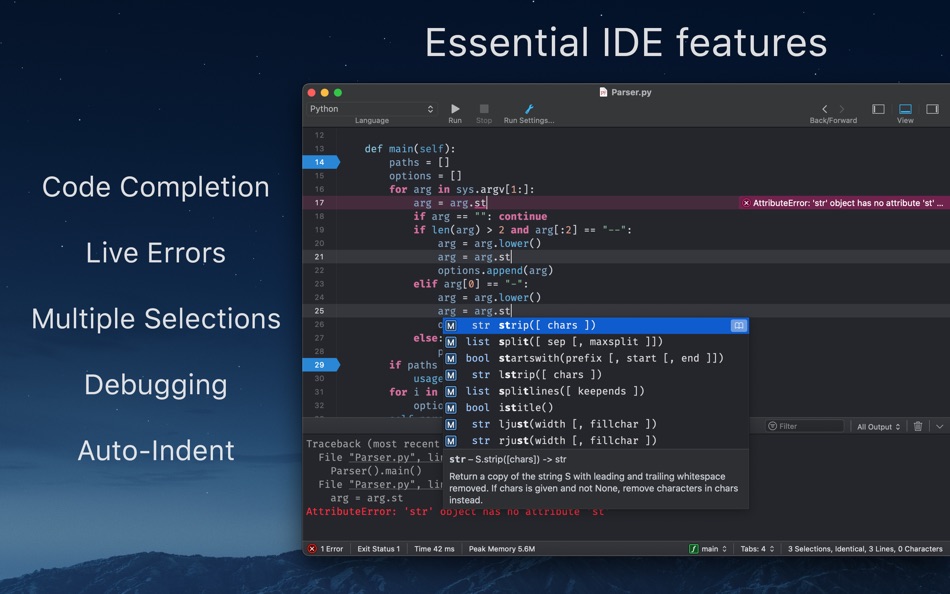
• Any programmer knows the importance of good code completion. CodeRunner's code completion is the best you'll find in any IDE for most languages, and supports completions beyond single words, extra-fuzzy search, documentation snippets, tab-selectable placeholders, and smart ranking of results.
Debugging with Breakpoints
• Don't clutter your code with print-statements for debugging. Instead, use CodeRunner's built-in debugging features to set breakpoints and step through your code. Just click the text margin to set a breakpoint and start debugging. Explore the call stack, view and edit variables, and interact with the debugger. Debugging code in any language has never been so quick and easy.
Live Errors and Linting
• Get instant feedback on your code as you write it. CodeRunner checks your document for syntax errors and common issues, displaying errors directly inline with your code. Compile and runtime issues from the console are also intelligently highlighted and included in the document.
First-Class Text Editor
• At the heart of CodeRunner lies a lightning-fast editor that is packed with useful coding features. Multiple selections save you time by eliminating repetitive edits. Auto-Indent not only perfectly indents existing blocks of code, but is deeply integrated into the editor and indents your code as you type. Best-in-class syntax highlighting is augmented with code tokenizers for local symbols and variables, allowing for unparalleled highlighting and variable renaming features.
File Browser, Search & Replace, and Documentation Sidebar
• CodeRunner's modern, single-window interface helps you keep your workspace organized. Use the built-in file browser when working on projects with lots of different files. Search & Replace across entire folders on the file system. Use the documentation sidebar to quickly check the online docs for classes and functions without ever leaving the app.
Supported Languages for Running Code
• AppleScript, C, C++, C#, Go, Haskell, HTML/CSS, Java, JavaScript, Kotlin, LaTeX, Lua, Markdown, Node.js, Objective-C/C++, Perl, PHP, Python, Ruby, Rust, Shell Script, Swift, TypeScript, and user-added languages.
For a full list of supported languages and features, please visit coderunnerapp.com
スクリーンショット



Ad
価格履歴
- 現在の価格: $22.99
- 最小値: $9.99
- 最大: $24.99
料金のチェック
AppAgg評価
9,000
AppAgg推定評価:
CodeRunner 4
9,000 プラチナ
評価が高いほど、AppAgg 上のシグナルが強い傾向があります。
基準: 人気 · ユーザー評価 · 新しさ · セール · ストアデータ · コミュニティ活動
最新のAppAggデータに基づいて毎日再計算されます。
短縮 URL: コピーしました!
新機能
- バージョン: 4.5
- 最終更新:
- Notable changes in this version include:
- Compatibility fixes for macOS Tahoe 26.
- Bug fixes and general improvements.
情報
- リリース日:
- カテゴリ:
macOS アプリ›開発ツール - オペレーティング システム:
macOS,macOS 10.15 以上 - サイズ:
72 Mb - サポートされる言語:
English - コンテンツのレーティング:
4+ - Mac App Store 評価:
0 - ウェブサイト:
 https://coderunnerapp.com
デベロッパー
- Nikolai Krill
- プラットフォーム: macOS アプリ (2)
- リスト: 4 + 5
- ポイント: 14 + 0 ¡
- ランキング: 0
- コメント: 0
- 割引: 0
- 動画: 0
- RSS: 購読する
リスト (4)
- CodeRunner 4


ポイント (9)
-

- 509 expat4i
- +1
-
- 18 Andrew
- +1
-
- 186 Brendon Cromwell
- +1
-
- 80 Randall Bruder
- +1
-
- 697 Leonard Hofstadter
- +1
-
- 2,930 바람처어럼
- +1





ランキング (0)
0
コメント (0)
最初にコメントしてください
概要
CodeRunner 4 短縮 URL: コピーしました!- シェア
- Mac App Store
«CodeRunner 4». プラットフォーム: macOS. カテゴリ: 開発ツール. 開発者: «Nikolai Krill». 最初のリリース: . 最終更新日: . 現在の価格: $22.99. 記録された最低価格: $9.99 (). 記録された最高価格: $24.99 (). このタイトルはまだ AppAgg で評価やレビューを受けていません。 リスト: 公開: 4, 非公開: 3. 追跡ポイント: 確認済み: 9, 間接: 0. 利用可能な言語: English. AppAgg は «CodeRunner 4»の価格履歴、評価、ユーザーフィードバックを追跡します。 AppAgg はアプリケーションをホストしたり、ソフトウェアを配布したりしません。 すべての商標、ロゴ、スクリーンショットはそれぞれの所有者に帰属します。 今後の値下げと更新をフォロー: RSS で確認できます
類似
-
- Code Runner for Python
- macOS アプリ: 開発ツール 作者: Omer UCEL
- $0.99
- リスト: 0 + 1 0 0
- ポイント: 3 + 0 1K バージョン: 4.0 Code Runner for Python is your personal Python sandbox, perfect for learning, experimenting, and quickly testing code snippets wherever you are. Ditch the complex server setup for ... ⥯
-
- Code Meter: Claude Codex Usage
- macOS アプリ: 開発ツール 作者: StreetCoding Ltd
- * フリー
- リスト: 0 0 0
- ポイント: 0 + 0 930 バージョン: 1.5 You're deep in a session, things are flowing, then your requests start failing: quota refreshes in a few hours. Again. Code Meter lives in your menu bar and tracks your AI coding quota ⥯
-
- Code Cleaner
- macOS アプリ: 開発ツール 作者: Andre Yonadam
- $1.99
- リスト: 0 0 0
- ポイント: 0 + 0 600 バージョン: 1.0 Clean your HTML, CSS and Javascript files with Code Cleaner! Also great for making minified HTML, CSS and Javascript files easier to read again! Clean your code at your command within ... ⥯
-
- Code Replay
- macOS アプリ: 開発ツール 作者: Aryaman Sharda
- フリー
- リスト: 0 + 2 0 0
- ポイント: 3 + 0 910 バージョン: 1.0 Code Replay is an innovative and powerful tool designed specifically for developers, presenters, and teachers. It enables you to record your coding session in Xcode for playback later. ⥯
-
- Code Peek+
- macOS アプリ: 開発ツール 作者: Onder Kadagan
- * フリー
- リスト: 0 0 0
- ポイント: 0 + 0 590 バージョン: 1.0.3 Code Peek+ adds syntax-aware Quick Look previews for developer files on macOS. Preview source files, Markdown, Jupyter notebooks, and tabular text directly in Finder without opening an ⥯
-
- Code for SQLite3
- macOS アプリ: 開発ツール 作者: ZeeZide GmbH
- $13.99
- リスト: 0 0 0
- ポイント: 1 + 0 730 バージョン: 1.0.4 Code for SQLite3 is a little macOS application that accepts either SQLite3 database files or SQL source code, and generates Swift source code for them. This is done for two main use ... ⥯
-
- Code Signing
- macOS アプリ: 開発ツール 作者: Sergii Kryvoblotskyi
- $1.99
- リスト: 0 0 0
- ポイント: 1 + 0 1K バージョン: 1.0.7 Code Signing is a developer tool that reads files' signing information and validates the signature. There is no more need to use command-line tools, parse the results, or read the ... ⥯
-
- Code Architect
- macOS アプリ: 開発ツール 作者: KeoGlobal
- フリー
- リスト: 0 0 0
- ポイント: 0 + 0 550 バージョン: 1.1 Code Architect is a Swift code navigation tool that helps developers understand and modify their codebase by providing a structured view of Swift files. It parses and displays the ... ⥯
-
- Code Merger AI Assistant
- macOS アプリ: 開発ツール 作者: TidalAurum, LLC
- フリー
- リスト: 0 0 0
- ポイント: 0 + 0 570 バージョン: 1.03 Swift File Merger - Streamline Your Code Organization Effortlessly combine multiple Swift files into a single, organized document for enhanced code review, sharing, and analysis. Key ... ⥯
-
- Clone in VS Code
- macOS アプリ: 開発ツール 作者: Ahnaf Mahmud
- フリー
- リスト: 0 + 1 0 0
- ポイント: 4 + 0 1K バージョン: 1.4.1 A Safari extension to clone any GitHub, GitLab or Bitbucket repository in Visual Studio Code with just one click. All you need is Visual Studio Code installed on your Mac for this ... ⥯
-
- CodeX: Code AI for Xcode
- macOS アプリ: 開発ツール 作者: Ayesha Javeed
- * フリー
- リスト: 0 0 0
- ポイント: 0 + 0 590 バージョン: 1.3 Your AI-Powered Xcode Companion This is a macOS app that supercharges Xcode with AI, featuring a Xcode Source Editor extension called code.ai and a desktop app with an AI assistant, ... ⥯
-
- Add Analytics Code
- macOS アプリ: 開発ツール 作者: Rene Rosendahl
- $2.99
- リスト: 0 0 0
- ポイント: 0 + 0 550 バージョン: 1.2 Need to add analytics tracking, e.g. for Google Analytics, to a bunch of html files? We hear you! With this app, you can select files and then process them by adding a code snippet in ... ⥯
- 新着
- Note Code Editor
- macOS アプリ: 開発ツール 作者: Cuma Gokhan GUNAL
- * フリー
- リスト: 0 0 0
- ポイント: 0 + 0 750 バージョン: 1.0 NoteCode Editor: Profesyonel Geliştiriciler İçin Tasarlandı Kod yazma deneyiminizi bir üst seviyeye taşıyın! NoteCode, hem masaüstünde hem de mobilde kusursuz bir IDE deneyimi sunmak ... ⥯
-
- Python Runner
- macOS アプリ: 開発ツール 作者: 兰桂 吴
- $1.99
- リスト: 0 0 0
- ポイント: 0 + 0 590 バージョン: 1.5.7 Write and run Python code instantly! Python Runner is a handy tool for learning Python or running Python script for daily tasks. Simply type Python code and press "Command-R" to run ... ⥯