
ที่บันทึกไว้
เลือกชื่อที่จะแสดงในเมนูที่บันทึกไว้ของคุณ
เสร็จแล้ว
| ผู้พัฒนา: | Ron Elemans (6) | ||
| ราคา: | $19.99 | ||
| การประเมิน: | 7,820 แพลทินัม | ||
| การจัดอันดับ: | 0 | ||
| ความเห็น: | 0 โพสต์ความคิดเห็น | ||
| รายการ: | 1 + 1 | ||
| แต้มแล: | 1 + 0 ¡ | ||
| +1 แต้มแล | |||
คำอธิบาย

Quick start
• Set up a new project in a few easy steps using the project assistant.
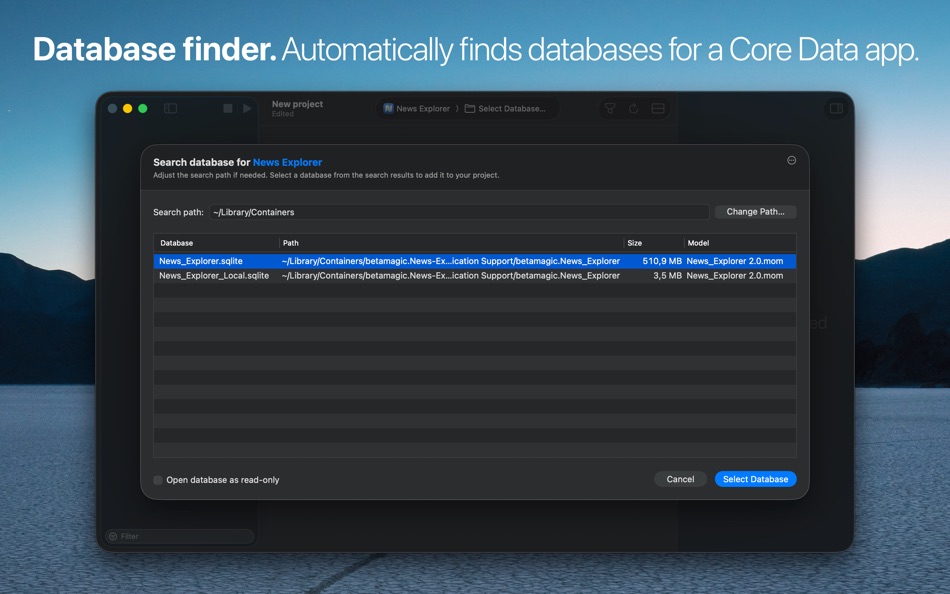
• Select an app or model file and let Core Data Lab search for a matching database.
• Or select a database file and let Core Data Lab search for matching apps.
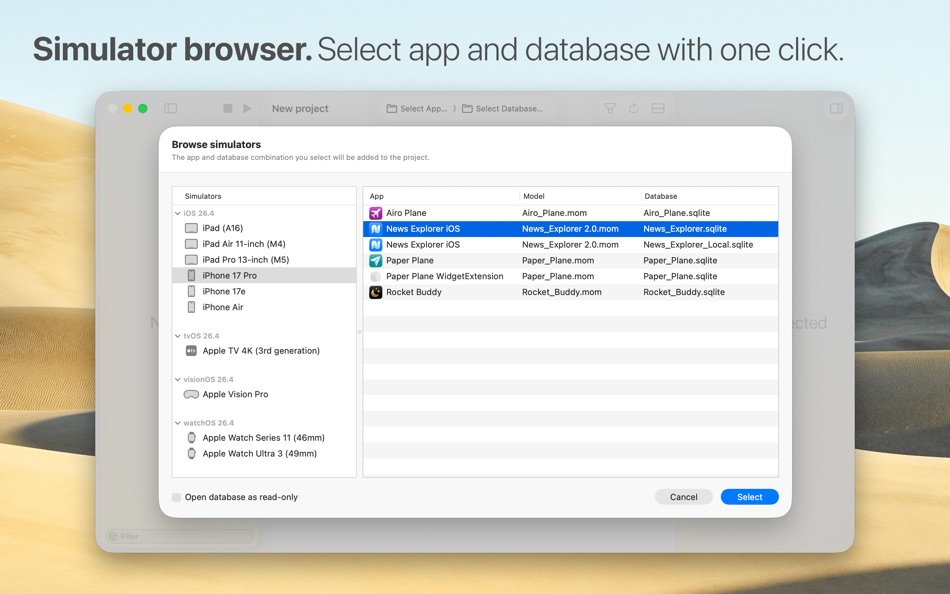
• Or use the simulator browser to select a database and app combination in one go.
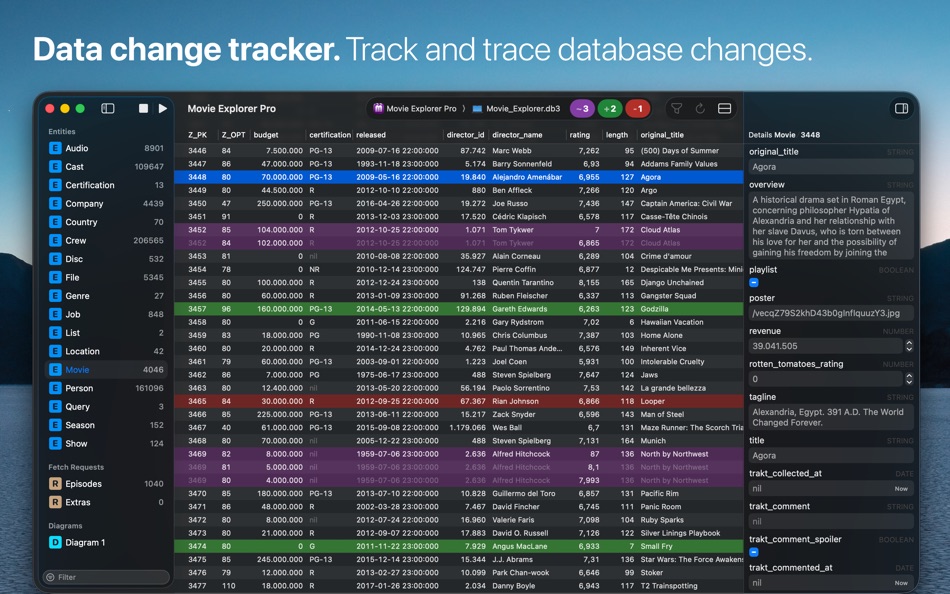
Data change tracker
• Hit the Play button on the toolbar to start tracking database changes.
• New, deleted, and changed data rows are displayed with distinct colors.
• Each previous row version is displayed individually, including all value changes.
• No need to change your project or implement special libraries.
• Works with macOS apps and apps running in an iOS, iPadOS, watchOS, tvOS or visionOS simulator.
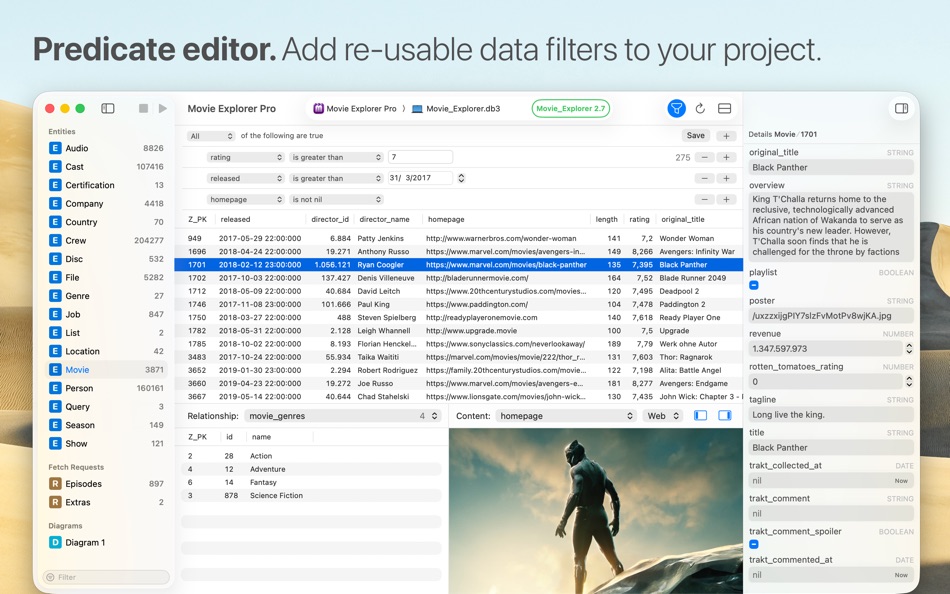
Data filter
• Use the built-in easy-to-use predicate editor to filter and query your data.
• Save predicates as part of a Core Data Lab project for easy access.
• Duplicate predicates to make quick variants of the same filter.
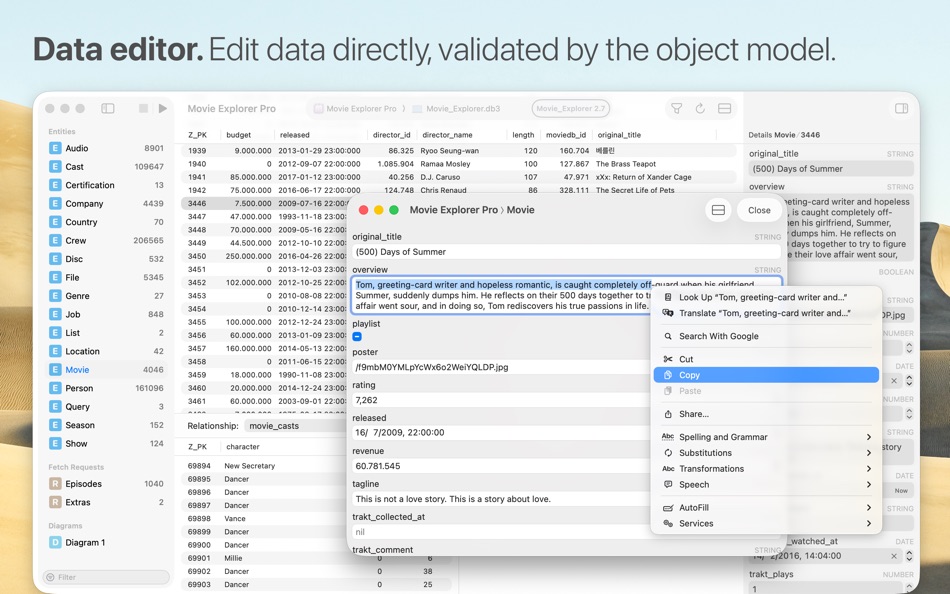
Data editor
• Edit and create data directly in the inspector panel or detail window.
• Delete rows directly in the data grid.
• Change, replace, or nullify data with batch updates.
• All data mutations are validated by the active Core Data Object model.
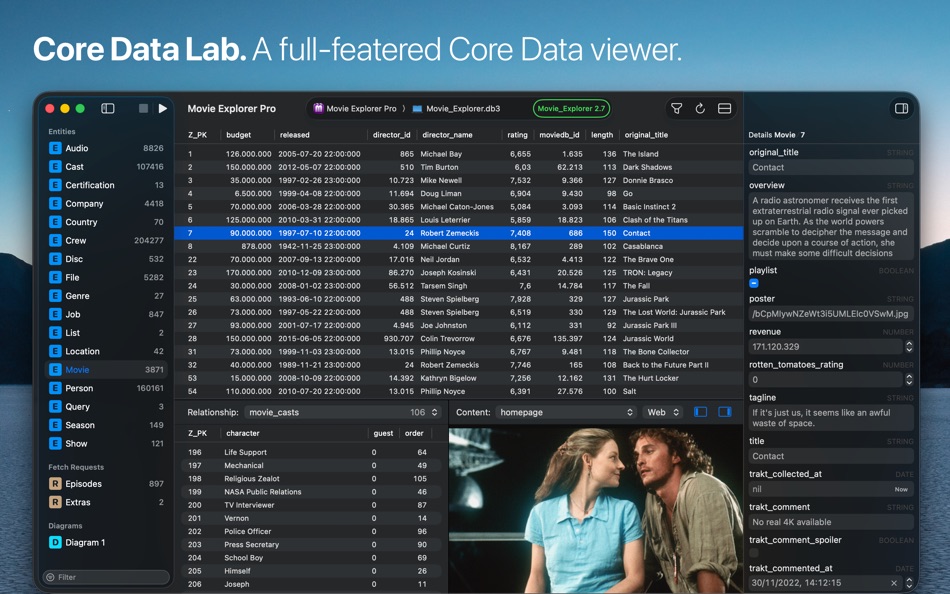
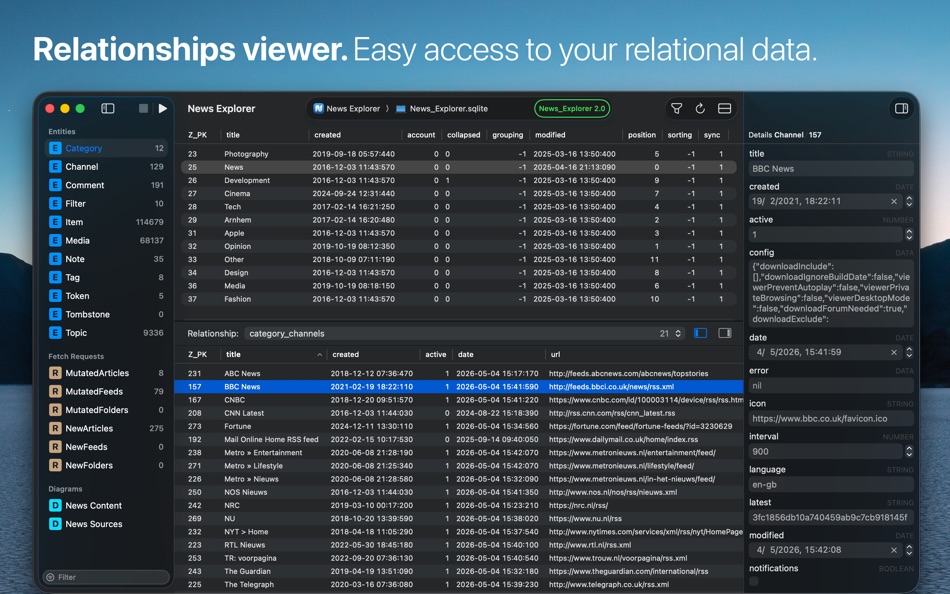
Relationships viewer
• View instantly all relationships and related data of a selected row.
• Easily switch to another relationship.
• Selecting a row in the relationship panel will show the data in the inspector panel.
Simulator browser
• Browse local iOS, iPadOS, watchOS, tvOS or visionOS simulators for Core Data apps and databases.
• Add app and database combinations with one click to your project.
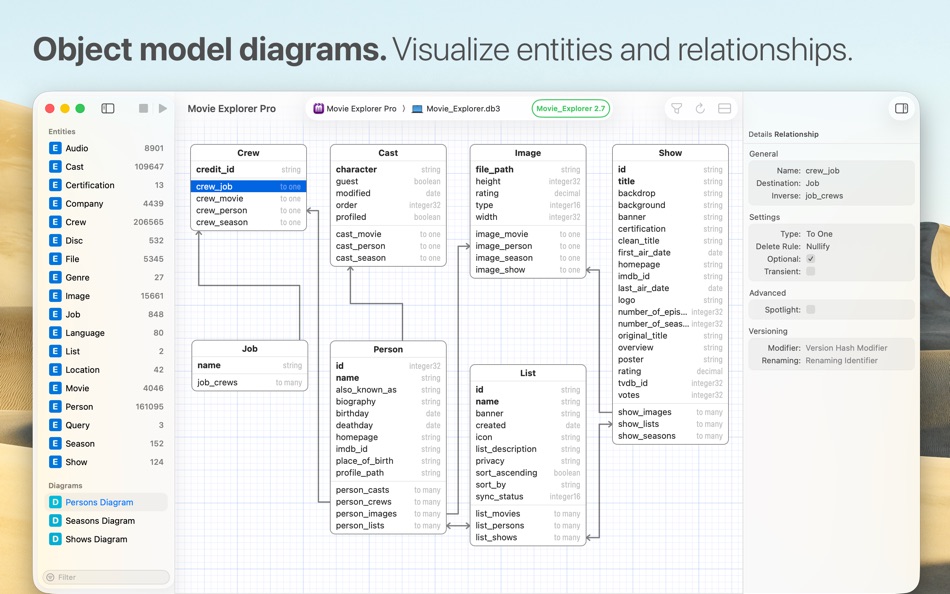
Object model diagrams
• Visualize your Core Data model in one or more diagrams, showing all entities, attributes, fetched properties, and relationships.
• Inspired by the ‘graph style’ editor of the data model designer tool in Xcode 13 and older.
• Exportable to PDF and clipboard.
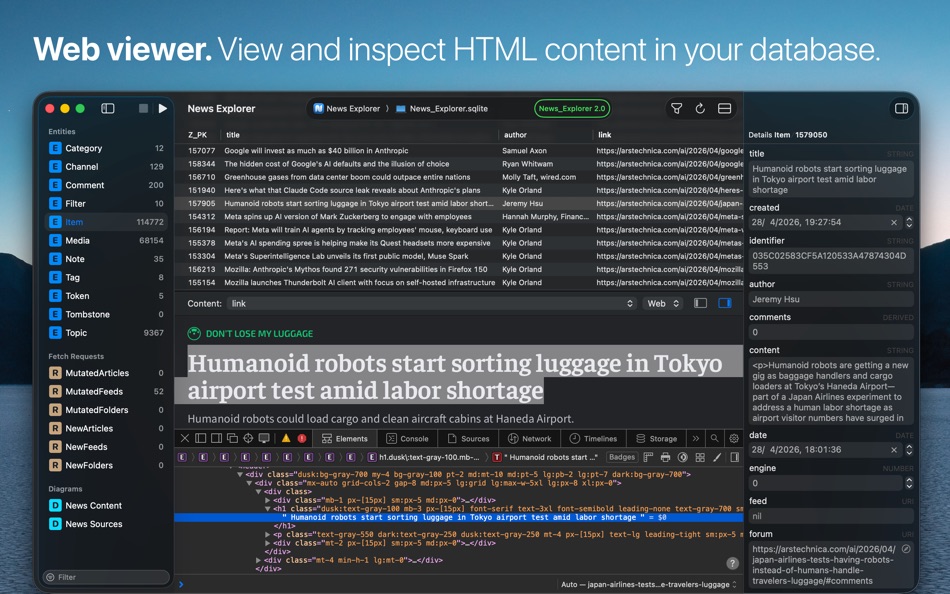
Content viewer
• Automatic detection and display of web links, image data, HTML content, PLIST objects, binary content, and more.
• Switch to Text view to inspect the HTML, XML, or JSON text content of web links.
• Built-in HTML debugger.
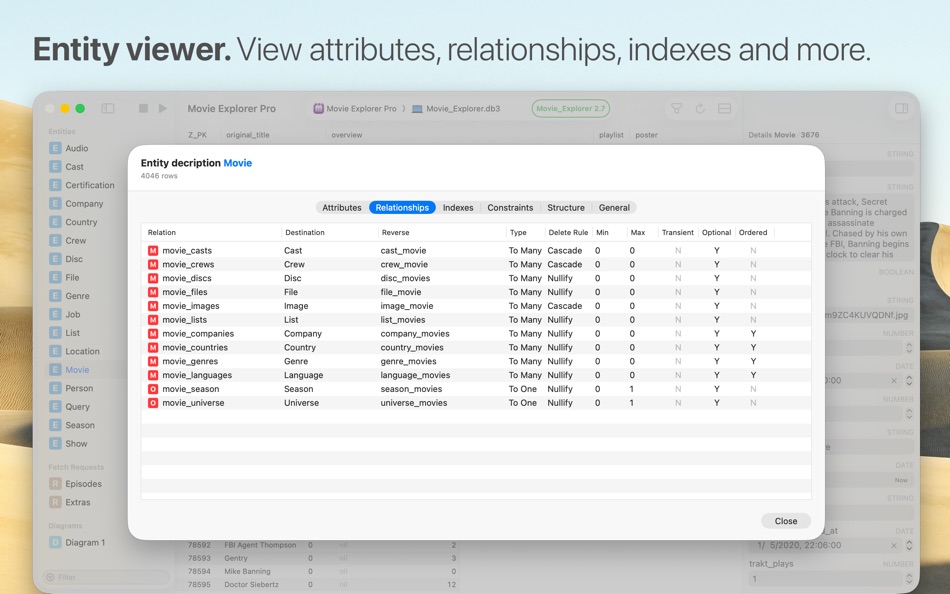
Entity description viewer
• View all details of all attributes of a selected Core Data entity.
• Inspect all other details like relationships, indexes, and constraints.
Raw data viewer
• Open and view SQLite databases without a Core Data object model.
• Support for opening SQLite files in the Finder.
Data import
• Import data using CSV or JSON files.
• JSON import supports relationship data and composite attributes.
• All data import happens under validation of the active Core Data Object model.
Data export
• Export a selected row or table to CSV or JSON.
• Export data tracking data to CSV or JSON including history data.
• JSON export supports relationship data and composite attributes.
• CSV data can be viewed and further processed in Excel or Numbers.
Project-based
• Your database, app, and model references are stored in a Core Data Lab project.
• Data filters, selections, sorting settings, and diagrams are also part of the same project.
• This makes it easy to stop and continue working with your data, without recreating anything.
• Projects are saved as standard NSDocument files, including tabbed windows, auto-save, and more.
Support
If you encounter problems with this app, then please take a look at the Core Data Lab help page at https://betamagic.nl/support/coredatalab/help.html. If this doesn’t provide the solution you are looking for, or you miss some essential features, just contact us at support@betamagic.nl.
ภาพหน้าจอ
Ad
ประวัติราคา
- ราคาปัจจุบัน: $19.99
- ต่ำสุด: $9.99
- มากที่สุด: $19.99
ติดตามราคา
การประเมิน AppAgg
7,820
การประเมิน AppAgg โดยประมาณสำหรับ
Core Data Lab
7,820 แพลทินัม
การประเมินที่สูงขึ้นมักหมายถึงสัญญาณบน AppAgg ที่แข็งแกร่งขึ้น
อิงจาก: ความนิยม · คะแนนจากผู้ใช้ · ความสดใหม่ · ดีล · ข้อมูลร้านค้า · กิจกรรมชุมชน
คำนวณใหม่ทุกวันจากข้อมูล AppAgg ล่าสุด.
URL แบบสั้น: คัดลอกแล้ว!
มีอะไรใหม่
- เวอร์ชัน: 3.0
- อัปเดตล่าสุด:
- • Full Liquid Glass support, including a new app icon with support for icon styles in macOS 26.
• Favorite Attributes let you put attributes in front or on top of other attributes in tables and forms, making it easier to identify and work with your data.
• Favorite Content controls which attributes should be displayed first in the content viewer panel.
• New Relationships panel in the Object editor window, which allows you to view the relationship data of multiple objects side-by-side.
• Visualize your data model with diagrams, heavily inspired by the ‘graph style’ editor of the data model designer tool in Xcode 13 and older.
Other improvements:
• Search within webpages in the content viewer.
• More supported image formats in the content viewer.
• Native document title display and editing features.
• Improved large text performance.
• Startup options in the app settings.
• Improved handling of canceling editing of data.
ข้อมูลเพิ่มเติม
- วันที่วางจำหน่าย:
- หมวดหมู่:
macOS แอป›เครื่องมือ - ระบบปฏิบัติการ:
macOS,macOS 15.6 และสูงกว่า - ขนาด:
5 Mb - ภาษาที่สนับสนุน:
English - การจัดประเภทเนื้อหา:
4+ - Mac App Store คะแนนโดย:
0
 https://betamagic.nl/products/coredatalab.html
ผู้พัฒนา
รายการ (1)
- Core Data Lab

แต้มแล (1)
-

- 61 Andrey
- +1

การจัดอันดับ (0)
0
ความเห็น (0)
เป็นคนแรกที่แสดงความเห็น
สรุป
Core Data Lab URL แบบสั้น: คัดลอกแล้ว!- แชร์
- Mac App Store
«Core Data Lab». แพลตฟอร์ม: macOS. หมวดหมู่: เครื่องมือ. ผู้พัฒนา: «Ron Elemans». การเปิดตัวครั้งแรก: . อัปเดตล่าสุด: . ราคาปัจจุบัน: $19.99. ราคาต่ำสุดที่บันทึกไว้: $9.99 (). ราคาสูงสุดที่บันทึกไว้: $19.99 (). ชื่อนี้ยังไม่ได้รับการให้คะแนนหรือบทวิจารณ์บน AppAgg รายการ: สาธารณะ 1, ส่วนตัว 1. จุดที่ติดตาม: ยืนยันแล้ว 1, ทางอ้อม 0. ภาษาที่ใช้ได้: English. AppAgg ติดตามประวัติราคา การให้คะแนน และคำติชมของผู้ใช้ «Core Data Lab». AppAgg ไม่ได้โฮสต์แอปพลิเคชันหรือแจกจ่ายซอฟต์แวร์ เครื่องหมายการค้า โลโก้ และภาพหน้าจอทั้งหมดเป็นของเจ้าของที่เกี่ยวข้อง ส่วนลดและอัปเดตในอนาคต: RSS
คล้ายกัน
-
- data~more
- macOS แอป: เครื่องมือ โดย: Wyesoftware
- ฟรี
- รายการ: 0 0 0
- แต้มแล: 0 + 0 500 เวอร์ชัน: 0.5 data~more is a browser extension that allows you to make HTTP/HTTPS requests from your browser. Postman alternative. ⥯
-
- Core Filter Browser
- macOS แอป: เครื่องมือ โดย: einstein's legacy v2.0, LLC
- ฟรี
- รายการ: 0 0 0
- แต้มแล: 0 + 0 500 เวอร์ชัน: 1.0.1 Core Filter Browser is a utility that enables you to see the available Core Image Filters in your development environment, along with the unique parameters for each filter. Filters can ⥯
-
- Core Tunnel
- macOS แอป: เครื่องมือ โดย: Codinn Technologies
- * ฟรี
- รายการ: 0 0 0
- แต้มแล: 1 + 0 750 เวอร์ชัน: 3.10.4 The missing ssh tunnel manager, compatible with OpenSSH, automatic and intuitive. Don't waste your time; be productive. ## Features OpenSSH Compatible Everything in OpenSSH, local / ... ⥯
-
- Core Image Filters
- macOS แอป: เครื่องมือ โดย: Denis Popov
- ฟรี
- รายการ: 0 0 0
- แต้มแล: 0 + 0 500 เวอร์ชัน: 1.0 Created by developers and for developers. You can experiment with Core Image Filters and parameters. You can export filters parameters for use in your apps on macOS, iOS and tvOS. ⥯
-
- Data Creator
- macOS แอป: เครื่องมือ โดย: Roberto Panetta
- $9.99
- รายการ: 0 0 0
- แต้มแล: 1 + 0 1K เวอร์ชัน: 1.10 Smart, fast, and realistic data generation for developers, testers, and power users. Data Creator is a powerful macOS app that lets you generate large volumes of custom, realistic data ⥯
-
- Eplist - convert data to plist
- macOS แอป: เครื่องมือ โดย: HuMinghua
- * ฟรี
- รายการ: 1 + 2 0 0
- แต้มแล: 10 + 0 5K เวอร์ชัน: 2.0.1 Eplist for Excel is a lightweight conversion tool to help developers to improve development efficiency. You can convert your datas or configuration from excel(.xls and .xlsx) document ... ⥯
-
- Screenshot Lab: AI App Mockup
- macOS แอป: เครื่องมือ โดย: Onat Cipli
- * ฟรี
- รายการ: 0 0 0
- แต้มแล: 0 + 0 800 เวอร์ชัน: 1.0 Stop wasting hours making screenshots in Figma. Screenshot Lab is the AI-powered macOS app that creates professional store listing screenshots automatically. WHAT MAKES IT DIFFERENT ... ⥯
-
- Maero Lab
- macOS แอป: เครื่องมือ โดย: Sharmendra Devkota
- * ฟรี
- รายการ: 0 0 0
- แต้มแล: 0 + 0 590 เวอร์ชัน: 1.2 Maero Lab helps you understand how your codebase fits together, privately on your Mac. Drop a project folder, .xcodeproj, or .xcworkspace to analyze Swift projects. You can also ... ⥯
- ใหม่
- Apertura Lab
- macOS แอป: เครื่องมือ โดย: Pier Giacomo Gurini
- * ฟรี
- รายการ: 0 0 0
- แต้มแล: 0 + 0 1K เวอร์ชัน: 1.1.1 Apertura Lab helps you create professional screenshots directly on your Mac, without dealing with complex software or fragmented workflows. Import your screenshots, choose a template ... ⥯
-
- Retro Palette Lab
- macOS แอป: เครื่องมือ โดย: Design Chaos Pty Ltd
- $9.99
- รายการ: 0 0 0
- แต้มแล: 0 + 0 800 เวอร์ชัน: 2026.3 Retro Palette Lab is a tool for developers working with retro systems to manage and create palettes in the required formats and color spaces. Primarily designed to manage the various ... ⥯
-
- XPane - Enjoy your data
- macOS แอป: เครื่องมือ โดย: 13apps
- ฟรี
- รายการ: 0 + 1 0 0
- แต้มแล: 0 + 0 1K เวอร์ชัน: 10.2 XPane MySQL Editor for Mac Connect to your MySQL databases, browse and edit data, run SQL, and manage tables all from a clean, native Mac app. What you can do Add and save multiple ... ⥯
-
- Navicat Data Modeler Lite
- macOS แอป: เครื่องมือ โดย: PremiumSoft CyberTech Ltd.
- ฟรี
- รายการ: 0 0 0
- แต้มแล: 1 + 0 830 เวอร์ชัน: 4.3.11 Navicat Data Modeler Lite is a powerful and easy-to-use database design tool for creating and manipulating data models. It supports various database systems, including MySQL, MariaDB, ... ⥯
-
- Excel to JSON - Game Data Tool
- macOS แอป: เครื่องมือ โดย: 翠芬 梁
- $1.99
- รายการ: 0 0 0
- แต้มแล: 0 + 0 590 เวอร์ชัน: 1.0.0 Excel to JSON is a professional data conversion tool designed for game developers, programmers and data analysts. It can quickly convert Excel table data into JSON format and ... ⥯