
| ผู้พัฒนา: | BULUTHAN AKPINAR (4) | ||
| ราคา: | $0.99 | ||
| การจัดอันดับ: | 0 | ||
| ความเห็น: | 0 เขียนความเห็น | ||
| รายการ: | 0 + 0 | ||
| แต้มแล: | 0 + 0 ¡ | ||
| Mac App Store | |||
คำอธิบาย

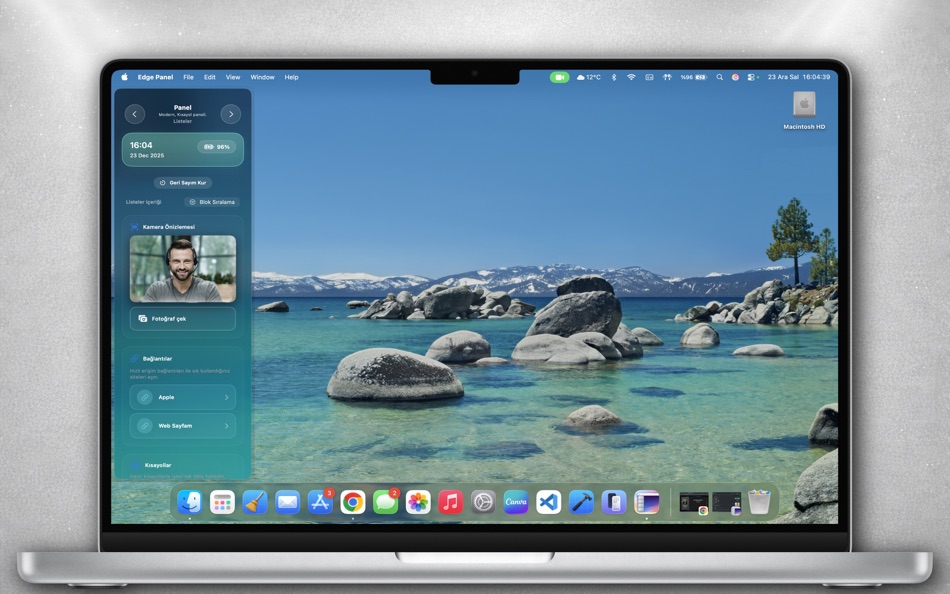
Her panel tamamen özelleştirilebilir: widget’lar, kısayollar, takvim etkinlikleri ve medya kontrolleri ile akışınıza uygun bir düzen oluşturun. Edge Panel, cihazınızda çoklu görev yaparken zamandan tasarruf etmenize yardımcı olur.
Karanlık/gündüz modları, hareketli geçişler ve performans odaklı tasarımıyla, Edge Panel hem günlük hem profesyonel kullanımda yanınızda. Deneyiminizi kişiselleştirerek verimliliğinizi artırın.
Ad
ภาพหน้าจอ


มีอะไรใหม่
- เวอร์ชัน: 2.6
- อัปเดต:
- Uygulamada tespit edilen hatalar düzeltilmiş, performans iyileştirmeleri yapılmıştır.
ราคา
- วันนี้: $0.99
- ต่ำสุด: $0.99
- มากที่สุด: $0.99
ติดตามราคา
ผู้พัฒนา
- BULUTHAN AKPINAR
- แพลตฟอร์ม: iOS แอป (1) macOS แอป (3)
- รายการ: 0 + 0
- แต้มแล: 0 + 0 ¡
- การจัดอันดับ: 0
- ความเห็น: 0
- ลดราคา: 0
- วิดีโอ: 0
- RSS: ติดตาม
Ad
แต้มแล
0 ☹️
การจัดอันดับ
0 ☹️
รายการ
0 ☹️
- Edge Panel
ความเห็น
แสดงรีวิวเป็นคนแรกเลย 🌟
ข้อมูลเพิ่มเติม
- เวอร์ชัน: 2.6
- หมวดหมู่:
macOS แอป›เครื่องมือ - ระบบปฏิบัติการ:
macOS,macOS 13.5 และสูงกว่า - ขนาด:
10 Mb - ภาษาที่สนับสนุน:
English - การจัดประเภทเนื้อหา:
4+ - Mac App Store คะแนนโดย:
0 - อัปเดต:
- วันที่วางจำหน่าย:
รายชื่อติดต่อ
- เว็บไซท์:
 https://buluthanakpinar.com.tr
Edge Panel URL แบบสั้น: คัดลอกแล้ว!- 🌟 แชร์
- Mac App Store
คุณอาจชอบ
-
- Interaction Panel
- macOS แอป: เครื่องมือ โดย: BULUTHAN AKPINAR
- $0.99
- รายการ: 0 + 0 การจัดอันดับ: 0 ความเห็น: 0
- แต้มแล: 0 + 0 เวอร์ชัน: 1.1 Description Interaction Panel, masaüstünüzü akıllı bloklar ile düzenlemenizi sağlar. Dosya ve klasörleri sürükleyip bırakın, kurallar belirleyin, hızlı erişim menüleriyle iş akışınızı ... ⥯
-
- SnippetsLab
- macOS แอป: เครื่องมือ โดย: Renfei Song
- ฟรี
- รายการ: 6 + 8 การจัดอันดับ: 5 (1) ความเห็น: 0
- แต้มแล: 13 + 0 เวอร์ชัน: 2.6.4 Mac App Store Best of 2015 Featured in App Store editorial All Your Code, Brilliantly Organized , Keep Your Code at Your Fingertips and Welcome to the Mac App Store! Featured app in ... ⥯
-
- devPad
- macOS แอป: เครื่องมือ โดย: John Taverna
- $7.99
- รายการ: 1 + 0 การจัดอันดับ: 5 (1) ความเห็น: 0
- แต้มแล: 1 + 0 เวอร์ชัน: 1.9 devPad is a slide-out utility panel for macOS that gives you instant access to a browser, code editor, AI assistant, and developer tools-all triggered by moving your cursor to the ... ⥯
-
- DevUtils.app
- macOS แอป: เครื่องมือ โดย: Dinh Quang Trung
- ฟรี
- รายการ: 2 + 3 การจัดอันดับ: 0 ความเห็น: 0
- แต้มแล: 8 + 0 เวอร์ชัน: 1.17.0 The free version includes 3 tools: - Unix Time Converter (+ Timezone support) - JSON Format/Validate - Base64 String Encode/Decode List of all current tools: - Unix Time Converter - ... ⥯
-
- More Info - File Checksums
- macOS แอป: เครื่องมือ โดย: Solaz Dazen srl
- $1.99
- รายการ: 2 + 2 การจัดอันดับ: 0 ความเห็น: 0
- แต้มแล: 9 + 0 เวอร์ชัน: 1.5 More Info shows you additional information about your files. "To sum up, More Info complements the OS X File Info panel with data about the item's checksum and HEX dump. The utility is ⥯
-
- BezierCode
- macOS แอป: เครื่องมือ โดย: WAN LUTFI WAN MD HATTA
- $2.99
- รายการ: 0 + 2 การจัดอันดับ: 0 ความเห็น: 0
- แต้มแล: 6 + 0 เวอร์ชัน: 1.32 Drawing manually using Xcode is tedious, if not hard. BezierCode is a full vector drawing application that will automatically translate your drawing into Objective C code. Its user ... ⥯
-
- Penguin - Plist Editor
- macOS แอป: เครื่องมือ โดย: Triplane
- * ฟรี
- รายการ: 1 + 2 การจัดอันดับ: 0 ความเห็น: 0
- แต้มแล: 6 + 0 เวอร์ชัน: 2.2 Looking for an easier way to edit plist files? Penguin lets you edit any plist file in a beautiful and easy to understand tree view. Drag, drop, expand, reorder and modify your plist ... ⥯
-
- XCStrings AI: AI Localization
- macOS แอป: เครื่องมือ โดย: Kai Chi Tsao
- $0.99
- รายการ: 0 + 1 การจัดอันดับ: 5 (1) ความเห็น: 0
- แต้มแล: 5 + 0 เวอร์ชัน: 1.0.2 ## Lightning-Fast Localization: Get Your App Supporting Global Languages in 5 Minutes! Streamline your iOS and macOS app localization workflow with XCStrings AI the ultimate AI-powered ⥯
-
- Core Data Lab
- macOS แอป: เครื่องมือ โดย: Ron Elemans
- $19.99
- รายการ: 1 + 1 การจัดอันดับ: 0 ความเห็น: 0
- แต้มแล: 1 + 0 เวอร์ชัน: 2.4.7 Core Data Lab lets you easily view, edit and analyse data of SQLite based Core Data and SwiftData apps. View, track and explore what s inside your Core Data database, including all ... ⥯
-
- Py Editor for Python
- macOS แอป: เครื่องมือ โดย: Andromeda Corp LTD
- * ฟรี
- รายการ: 1 + 0 การจัดอันดับ: 0 ความเห็น: 0
- แต้มแล: 2 + 0 เวอร์ชัน: 26.0.1 Python Editor is a native macOS application that lets you write and run Python code instantly, with no installation or configuration required. Python 3.11 is embedded directly in the ... ⥯
-
- Power JSON Editor
- macOS แอป: เครื่องมือ โดย: 基伟 徐
- $4.99
- รายการ: 1 + 2 การจัดอันดับ: 0 ความเห็น: 0
- แต้มแล: 2 + 0 เวอร์ชัน: 2.19.0 Power JSON Editor is a JSON editor for developers with Visual Tree View and multiple plugins like Array Table Editor and jq Processor, also with format converter plugins, it is easy to ⥯
-
- PLIST Editor
- macOS แอป: เครื่องมือ โดย: VDT LABS S.R.L.
- * $7.99
- รายการ: 1 + 0 การจัดอันดับ: 0 ความเห็น: 0
- แต้มแล: 3 + 0 เวอร์ชัน: 1.63 PLIST Editor is a side-by-side tree & text editor for property list (plist) data. In a clean and easy to use interface, it allows you to quickly create, inspect, modify and save your ... ⥯
-
- AnyMP4 AVCHD Converter Player
- macOS แอป: เครื่องมือ โดย: AnyMP4 Studio
- * $17.99
- รายการ: 0 + 1 การจัดอันดับ: 0 ความเห็น: 0
- แต้มแล: 7 + 0 เวอร์ชัน: 6.3.19 AnyMP4 AVCHD Converter lets you convert AVCHD video file MTS and M2TS to any popular video formats like MKV, MP4, MOV, M4V, AVI, MPEG, WMV, FLV, and WebM. Thus it becomes possible to ... ⥯
-
- myPoint Coordinates
- macOS แอป: เครื่องมือ โดย: Code Race
- $4.99
- รายการ: 0 + 0 การจัดอันดับ: 0 ความเห็น: 0
- แต้มแล: 0 + 0 เวอร์ชัน: 1.21 myPoint Coordinates displays the current mouse position and the size of the mouse drag zone. The information is shown in the menu bar extras and a flying panel. Tool features: Five ... ⥯