
ที่บันทึกไว้
เลือกชื่อที่จะแสดงในเมนูที่บันทึกไว้ของคุณ
เสร็จแล้ว
| ผู้พัฒนา: | .com Solutions Inc. (7) | ||
| ราคา: | $94.00 | ||
| การจัดอันดับ: | 0 | ||
| ความเห็น: | 0 โพสต์ความคิดเห็น | ||
| รายการ: | 0 + 0 | ||
| แต้มแล: | 0 + 0 ¡ | ||
| Mac App Store | |||
คำอธิบาย

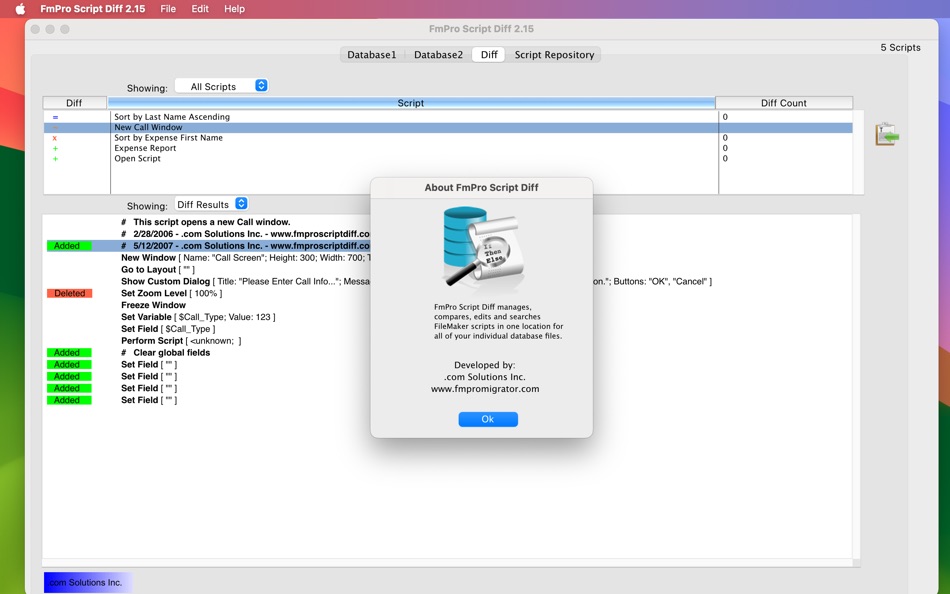
Display FileMaker Pro script structure at a glance:
Use the graphical control flow feature to instantly see the structure of your code (or someone else's) at a glance. Even with deeply nested code like the example shown here, you can quickly understand the structure. These marked up scripts can easily be printed or copied onto the clipboard as RTF text for pasting into word processing documents or email. The RTF format preserves the bold, italic, underline and colorized error text of the script.
This feature can also be a time saver for authors writing books/articles who need to copy the formatted script text into their publications.
Importing scripts into FmPro Script Diff is as easy as copying scripts via the clipboard from the FileMaker Script Workspace window into FmPro Script Diff. The Database1 tab represents the 1st version of scripts and the Database2 tab represents the 2nd version of the scripts. Click the = button to compare both sets of scripts.
Top 10 Features
[These features extend the capabilities of the built-in FileMaker Pro Script Workspace.]
1) Line by line script comparisons displayed with colorized result tags and interline highlighting.
2) Displays graphical control flow view showing script structure at a glance, easily exported as PDF files.
3) Search scripts for text strings, variables, fieldnames, and table occurrence names.
4) Counts and displays highlighted search terms.
5) Instantly copies stylized script text into other applications.
6) Jumps to highlighted errors or found search terms with the TAB key.
7) Exports scripts into a convenient packaged file for sharing among developers or archiving.
8) Facilitates database auditing and change management.
9) Supports the automatic generation of script definition XML via external tools.
10) Stores and exports scripts within open source SQLite3 database files.
A common requirement for regulatory compliance and industry certifications (including: Sarbanes-Oxley [aka: Sox, Sarbox], FDA 21 CFR Part 11, ISO 9000) is to maintain a verifiable audit trail for modifications made to IT systems. The unique line-by-line script comparison feature implemented by FmPro Script Diff enables developers to quickly document ScriptMaker changes between any two versions of a FileMaker database solution. Pressing the TAB key within the Diff screen enables an auditor to instantly advance through each of the changed script lines, potentially saving hours of work looking for these changes manually.
Ad
ภาพหน้าจอ


ประวัติราคา
- ราคาปัจจุบัน: $94.00
- ต่ำสุด: $94.00
- มากที่สุด: $94.00
ติดตามราคา
มีอะไรใหม่
- เวอร์ชัน: 2.16
- อัปเดต:
ข้อมูลเพิ่มเติม
- วันที่วางจำหน่าย:
- หมวดหมู่:
macOS แอป›เครื่องมือ - ระบบปฏิบัติการ:
macOS,macOS 10.13.6 และสูงกว่า - ขนาด:
21 Mb - ภาษาที่สนับสนุน:
English - การจัดประเภทเนื้อหา:
4+ - Mac App Store คะแนนโดย:
0
 https://www.FmProMigrator.com/products/fmpro_script_diff/index.html
ผู้พัฒนา
- .com Solutions Inc.
- แพลตฟอร์ม: macOS แอป (6) Windows แอป (1)
- รายการ: 0 + 0
- แต้มแล: 1 + 0 ¡
- การจัดอันดับ: 0
- ความเห็น: 0
- ลดราคา: 0
- วิดีโอ: 0
- RSS: ติดตาม
รายการ (0)
0 ☹️
- FmPro Script Diff
แต้มแล (0)
0 ☹️
การจัดอันดับ (0)
0 ☹️
ความเห็น (0)
เป็นคนแรกที่แสดงความเห็น 🌟
«FmPro Script Diff». แพลตฟอร์ม: macOS. หมวดหมู่: เครื่องมือ. ผู้พัฒนา: «.com Solutions Inc.». การเปิดตัวครั้งแรก: . อัปเดตล่าสุด: . ราคาปัจจุบัน: $94.00. ราคาต่ำสุดที่บันทึกไว้: $94.00. ราคาสูงสุดที่บันทึกไว้: $94.00. ชื่อนี้ยังไม่ได้รับการให้คะแนนหรือบทวิจารณ์บน AppAgg ภาษาที่ใช้ได้: English. AppAgg ติดตามประวัติราคา การให้คะแนน และคำติชมของผู้ใช้ «FmPro Script Diff». ส่วนลดและอัปเดตในอนาคต: RSS. AppAgg ไม่ได้โฮสต์แอปพลิเคชันหรือแจกจ่ายซอฟต์แวร์ เครื่องหมายการค้า โลโก้ และภาพหน้าจอทั้งหมดเป็นของเจ้าของที่เกี่ยวข้อง
FmPro Script Diff URL แบบสั้น: คัดลอกแล้ว!- 🌟 แชร์
- Mac App Store
คล้ายกัน
-
- Diff Pro Max - File Compare
- macOS แอป: เครื่องมือ โดย: Ryota Kimura
- * ฟรี
- รายการ: 0 0 0
- แต้มแล: 0 เวอร์ชัน: 1.4.1 Diff Pro Max is a professional-grade file comparison tool designed to be easy for anyone to use no technical expertise required. "What changed?" answered in seconds. Manually comparing ⥯
-
- Diff Diff
- macOS แอป: เครื่องมือ โดย: Sofia Swidarowicz
- ฟรี
- รายการ: 0 0 0
- แต้มแล: 0 เวอร์ชัน: 2.0 Diff Diff is a powerful yet elegant macOS app designed for developers, writers, editors, and anyone who needs to compare text quickly and accurately. Whether you're reviewing code ... ⥯
-
- Diff Forge
- macOS แอป: เครื่องมือ โดย: MARITIME MASTER LIMITED
- $3.99
- รายการ: 0 0 0
- แต้มแล: 0 เวอร์ชัน: 1.0 Diff Forge is a powerful, native text comparison and merge tool built for developers, writers, and anyone who works with text. Compare two files or text snippets instantly, view ... ⥯
-
- PullBar Pro
- macOS แอป: เครื่องมือ โดย: Pavel Makhov
- * ฟรี
- รายการ: 0 + 3 0 0
- แต้มแล: 6 เวอร์ชัน: 2.1 PullBarPro: GitHub Pull Requests in Your macOS Menu Bar Stay effortlessly connected to your GitHub workflow with PullBarPro. This powerful macOS menu bar app delivers real-time updates ⥯
-
- Integrity Pro
- macOS แอป: เครื่องมือ โดย: PeacockMedia
- $59.99
- รายการ: 2 + 1 0 0
- แต้มแล: 2 เวอร์ชัน: 12.11.4 All the features of Integrity Plus and more. Fast, efficient, accurate link checker. Manage multiple sites, search, filter, export. Export an xml sitemap for submission to the search ... ⥯
-
- Icon Generator Pro
- macOS แอป: เครื่องมือ โดย: Wicher B Donga
- $17.99
- รายการ: 0 0 0
- แต้มแล: 0 เวอร์ชัน: 2.01 Effortless Icon Design with Icon Generator Pro Icon Generator Pro revolutionises icon creation with its AI-driven technology. Perfect for designers and marketers, this tool simplifies ... ⥯
-
- Localizer Pro
- macOS แอป: เครื่องมือ โดย: ERLEND JOHNSRUD VAAGE
- ฟรี
- รายการ: 0 0 0
- แต้มแล: 0 เวอร์ชัน: 2.20 **Localizer Pro** is the perfect solution for Swift projects localization. Effortlessly manage translations across multiple languages with AI-powered automation that keeps your data ... ⥯
- สั่งซื้อล่วงหน้า
- IconForge Pro
- macOS แอป: เครื่องมือ โดย: 方俊 文
- ฟรี
- รายการ: 0 0 0
- แต้มแล: 0 เวอร์ชัน: 1.0.0 IconForge Pro is a professional icon conversion tool designed for Apple developers and designers, featuring "one-click multi-platform icon generation" and "standard output ready to ... ⥯
-
- AppTranslate Pro
- macOS แอป: เครื่องมือ โดย: Marcel Bucksch
- * ฟรี
- รายการ: 0 0 0
- แต้มแล: 0 เวอร์ชัน: 1.1 Take control of your app's global reach. AppTranslate Pro is the ultimate companion for iOS and macOS developers who want to streamline their localization process without compromising ... ⥯
-
- SerialPort(Net) Debug Asst Pro
- macOS แอป: เครื่องมือ โดย: 逊华 陆
- $8.99
- รายการ: 0 0 0
- แต้มแล: 0 เวอร์ชัน: 1.3.6 This product features, in addition to basic serial port, baud rate, parity bit, stop bit, data bit, character and hexadecimal sending and receiving, etc., it also supports script ... ⥯
-
- Easy Script Copier
- macOS แอป: เครื่องมือ โดย: Benjamin Lambinet
- $1.99
- รายการ: 0 0 0
- แต้มแล: 0 เวอร์ชัน: 1.0 Easy Script Copier is a small utility built to download a page and all necessary files. For example, you have found a demo page about a jQuery script and you want to get it, with all ... ⥯
-
- iRemote Pro: Desktop Manager
- macOS แอป: เครื่องมือ โดย: 明云 吉
- $39.99
- รายการ: 0 0 0
- แต้มแล: 1 เวอร์ชัน: 1.0.4 A Pro version of iRemote: Remote Desktop Client Privacy and Security We will not collect or share personal data in any form Multi-Protocol Support SSH SFTP Serial(com) Telnet ... ⥯
-
- Minipost Pro
- macOS แอป: เครื่องมือ โดย: Emre Oner
- $3.99
- รายการ: 0 0 0
- แต้มแล: 0 เวอร์ชัน: 3.0 MiniPost Pro is a modern, lightweight API client built natively for macOS. Designed for developers who want a fast and distraction-free way to test and debug REST APIs. Forget heavy, ... ⥯
-
- termcc pro - SSH & SFTP Client
- macOS แอป: เครื่องมือ โดย: 云海 赵
- $9.99
- รายการ: 0 0 0
- แต้มแล: 0 เวอร์ชัน: 4.1.0 termcc 专业版 (永久版), 无订阅, 长期版本 功能: 1、SSH连接与管理 2、方便的SFTP操作 3、钥匙串/代码/Port forwarding/x11 forwarding/VNC/RDP/ZOOKEEPER/K8S管理/服务器指标监控/中英文双语支持/多种风格皮肤 区别: termcc: 提供免费基础功能, 订阅模式, 订阅后可使用高级功能 ... ⥯