
ที่บันทึกไว้
เลือกชื่อที่จะแสดงในเมนูที่บันทึกไว้ของคุณ
เสร็จแล้ว
| ผู้พัฒนา: | HY System CO. Limited (1) | ||
| ราคา: | ฟรี | ||
| การจัดอันดับ: | 0 | ||
| ความเห็น: | 0 โพสต์ความคิดเห็น | ||
| รายการ: | 0 + 0 | ||
| แต้มแล: | 0 + 0 ¡ | ||
| +1 แต้มแล | |||
คำอธิบาย

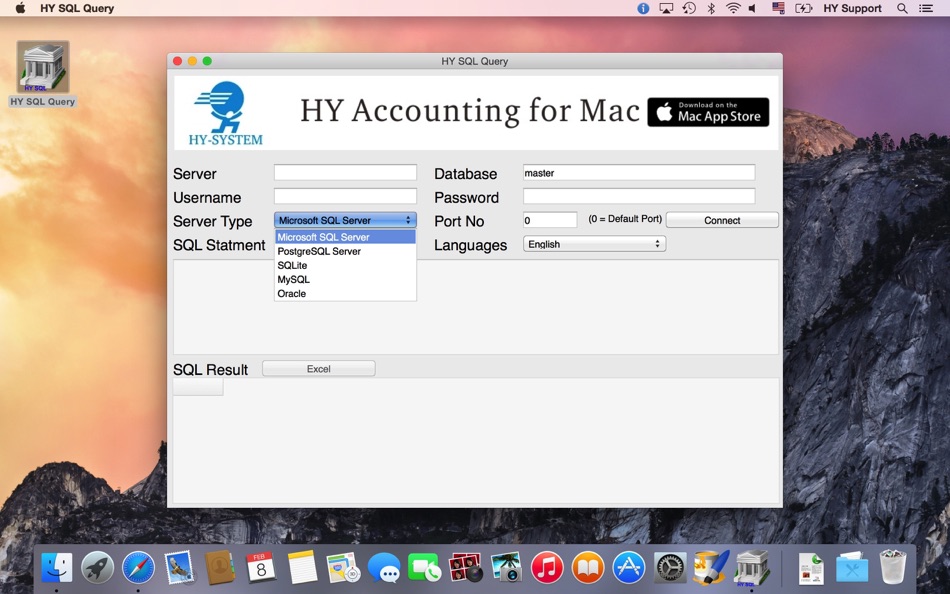
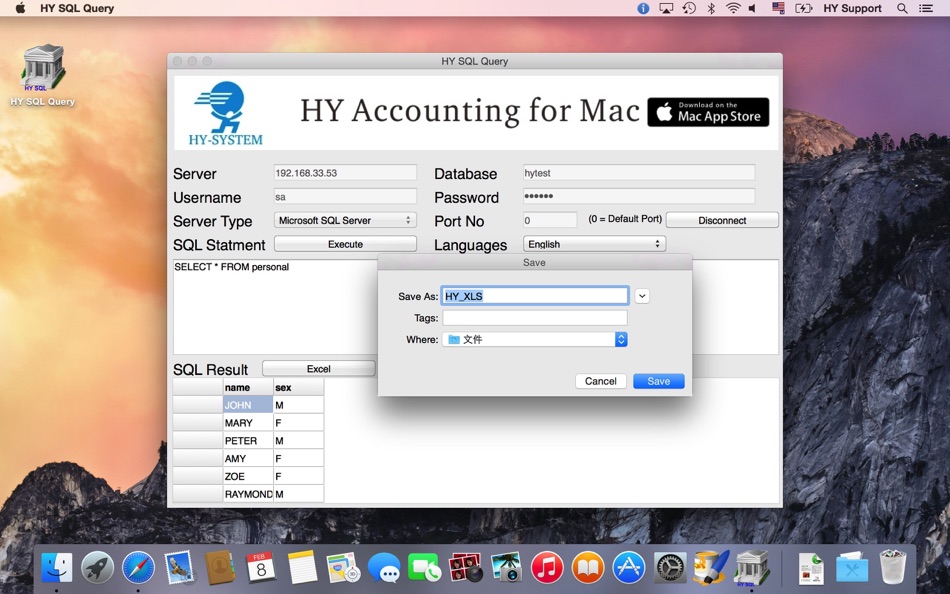
The below Database System:
Microsoft SQL Server
Microsoft Azure SQL Server
PostgreSQL Server
SQLite
MySQL
Oracle
Youtube:
http://youtu.be/IH6pChnd2Is
ภาพหน้าจอ
วิดีโอ
ประวัติราคา
- ราคาปัจจุบัน: ฟรี
- ต่ำสุด: ฟรี
- มากที่สุด: ฟรี
ติดตามราคา
Ad
ข้อมูลเพิ่มเติม
- วันที่วางจำหน่าย:
- หมวดหมู่:
macOS แอป›เครื่องมือ - ระบบปฏิบัติการ:
macOS,macOS 10.8 และสูงกว่า - ขนาด:
9 Mb - การจัดประเภทเนื้อหา:
4+ - Mac App Store คะแนนโดย:
0
มีอะไรใหม่
- เวอร์ชัน: 1.6.1
- อัปเดต:
- -Database Engine update
-File export change to CSV format
-Improve the SQLite operation
-support 64 bit platform
ผู้พัฒนา
- HY System CO. Limited
- แพลตฟอร์ม: macOS แอป (1)
- รายการ: 0 + 0
- แต้มแล: 0 + 0 ¡
- การจัดอันดับ: 0
- ความเห็น: 0
- ลดราคา: 0
- วิดีโอ: 1
- RSS: ติดตาม
รายการ (0)
0 ☹️
- HY SQL Query
แต้มแล (0)
0 ☹️
การจัดอันดับ (0)
0 ☹️
ความเห็น (0)
เป็นคนแรกที่แสดงความเห็น 🌟
«HY SQL Query». แพลตฟอร์ม: macOS. หมวดหมู่: เครื่องมือ. ผู้พัฒนา: «HY System CO. Limited». การเปิดตัวครั้งแรก: . อัปเดตล่าสุด: . ราคาปัจจุบัน: ฟรี. ชื่อนี้ยังไม่ได้รับการให้คะแนนหรือบทวิจารณ์บน AppAgg AppAgg ติดตามประวัติราคา การให้คะแนน และคำติชมของผู้ใช้ «HY SQL Query». ส่วนลดและอัปเดตในอนาคต: RSS. AppAgg ไม่ได้โฮสต์แอปพลิเคชันหรือแจกจ่ายซอฟต์แวร์ เครื่องหมายการค้า โลโก้ และภาพหน้าจอทั้งหมดเป็นของเจ้าของที่เกี่ยวข้อง
HY SQL Query URL แบบสั้น: คัดลอกแล้ว!- 🌟 แชร์
- Mac App Store
คล้ายกัน
-
- SQL Studio
- macOS แอป: เครื่องมือ โดย: codeBuilder
- $24.99
- รายการ: 0 0 0
- แต้มแล: 0 เวอร์ชัน: 2.1.3 A modern, native Microsoft SQL Server client for macOS built for focused, professional database work. SQL Studio is a fast, thoughtfully designed database client created specifically ... ⥯
-
- SQL Formatter – Query Editor
- macOS แอป: เครื่องมือ โดย: Moca LLC
- $2.99
- รายการ: 0 0 0
- แต้มแล: 0 เวอร์ชัน: 1.0.1 SQL Formatter is a lightweight macOS tool that instantly transforms messy SQL into clean, readable queries. KEY FEATURES: One-click SQL formatting with real-time preview Syntax ... ⥯
-
- Navicat 17 for SQL Server
- macOS แอป: เครื่องมือ โดย: PremiumSoft CyberTech Ltd.
- * ฟรี
- รายการ: 0 0 0
- แต้มแล: 1 เวอร์ชัน: 17.3.10 Navicat for SQL Server offers a fully graphical approach to efficient database management. It enables quick creation, editing, and deletion of database objects, along with the ... ⥯
-
- InsertSmith: TSV to SQL Insert
- macOS แอป: เครื่องมือ โดย: Jesse Benjamin
- $4.99
- รายการ: 0 0 0
- แต้มแล: 0 เวอร์ชัน: 1.0 What it does: Paste TSV data (from SSMS, Azure Data Studio, Excel, or any export), enter your destination table name, and get clean SQL INSERT statements with proper escaping, type ... ⥯
-
- JSON Query for Mac OS X
- macOS แอป: เครื่องมือ โดย: Satish Mahalingam
- ฟรี
- รายการ: 0 0 0
- แต้มแล: 3 เวอร์ชัน: 2.2 The first app for OS X that allows you to query JSON data structures. Use the simple search syntax to perform a lookup by key or value, or drill into the data with literals (square ... ⥯
-
- SQLMate
- macOS แอป: เครื่องมือ โดย: YEVHENI PYLYPENKO
- * ฟรี
- รายการ: 0 + 1 0 0
- แต้มแล: 5 เวอร์ชัน: 1.5 SQLMate is a powerful yet elegant SQLite database manager built exclusively for macOS. Whether you re a developer debugging your app s database, a data analyst exploring datasets, or ... ⥯
- -100% ใหม่
- D1Explorer - Database Manager
- macOS แอป: เครื่องมือ โดย: Magenta Creations
- ▼ ฟรี
$2.99-100% - รายการ: 0 + 1 0 0
- แต้มแล: 3 เวอร์ชัน: 1.2.0 D1Explorer is a native macOS database explorer built for Cloudflare D1 and SQLite. Browse tables, run queries, and edit data all from a fast, beautiful interface built entirely with ... ⥯
-
- JsonSqlQuery
- macOS แอป: เครื่องมือ โดย: 晓林 翟
- $3.99
- รายการ: 0 0 0
- แต้มแล: 0 เวอร์ชัน: 2.4.2 Need to find the data in the json, and have a clear view in Json? Json Sql Query can help you. With Json Sql Query, you can use the most popular query language sql to query your Json ... ⥯
-
- MySQL Commander
- macOS แอป: เครื่องมือ โดย: Niklas Saers
- $9.99
- รายการ: 0 0 0
- แต้มแล: 0 เวอร์ชัน: 1.4.0 Powerful MySQL client for Mac Great SQL query editor with syntax highlighting and fast query editing Queries are saved across devices using iCloud Work with and see multiple SQL ... ⥯
-
- Strix SQLite Editor
- macOS แอป: เครื่องมือ โดย: Robert Laabs
- $9.99
- รายการ: 0 0 0
- แต้มแล: 0 เวอร์ชัน: 1.1.1 SQLiteBrowser is a powerful native macOS app for viewing, querying, and editing SQLite databases. Built with SwiftUI for blazing-fast performance. KEY FEATURES SAFE BY DEFAULT Your ... ⥯
-
- SQLiteFlow - SQLite Editor
- macOS แอป: เครื่องมือ โดย: 晨亮 贾
- * ฟรี
- รายการ: 1 0 0
- แต้มแล: 6 เวอร์ชัน: 6.8.3 Two-week free trial! So you can purchase SQLiteFlow after you know you like it! SQLiteFlow is an SQLite editor for Mac & iOS which is intuitive, stable and reliable to use. It includes ⥯
-
- Valentina Studio
- macOS แอป: เครื่องมือ โดย: Paradigma Software
- * ฟรี
- รายการ: 0 + 1 0 0
- แต้มแล: 2 เวอร์ชัน: 17.2 100% Free - The Best Database Management GUI for DuckDB, SQLite, MS SQL Server, MariaDB, MongoDB, MySQL, PostgreSQL and Valentina databases Valentina Studio brings you powerful, visual ⥯
-
- SQLPro Studio
- macOS แอป: เครื่องมือ โดย: Hankinsoft Development Inc
- * ฟรี
- รายการ: 2 + 2 0 0
- แต้มแล: 6 เวอร์ชัน: 2026.50 SQLPro Studio is the premium database management tool for Postgres, MySQL, Microsoft SQL Server and Oracle databases. Some of the great features include: + Intellisense/SQL ... ⥯
-
- Textastic
- macOS แอป: เครื่องมือ โดย: Alexander Blach
- $9.99
- รายการ: 4 + 4 0 0
- แต้มแล: 2 เวอร์ชัน: 7.0 Textastic is a powerful and fast text, code, and markup editor. Syntax highlighting of more than 80 programming and markup languages Supported file types include HTML, JavaScript, CSS, ⥯