
Закладки
| Разработчик: | Tuan Truong (4) | ||
| Цена: | * Бесплатно | ||
| Оценка: | 6 120 Платина | ||
| Рейтинги: | 0 | ||
| Комментарии: | 0 Оставить комментарий | ||
| Списки: | 0 1 | ||
| Очки: | 5 | ||
| +1 Очко | |||
Кратко
Знакомьтесь: LineSmith for Xcode, приложение от Tuan Truong из раздела «Инструменты разработчика».
Вышло , а обновления всё приходят: свежее пришло . Вот это преданность.
Скачать бесплатно, а дальше по желанию (внутри есть покупки).
Работает на macOS 14.0 и новее. Проверьте, какая версия у вас.
Оценка AppAgg: 6 120. Это «Платина», выше только «Легенда».
Всего 2 мегабайта, поместится даже на забитый диск.
Возрастной рейтинг «4+», подходит и детям.
Говорит только на одном языке, и это не русский.
5 человек уже перешли отсюда в магазин. Это его Очки на AppAgg.
У этого разработчика на AppAgg ещё 1 игра и 2 приложения. Загляните.
Кстати, у этого разработчика сейчас 1 скидка.
Хотите первым узнавать об обновлениях и новых приложениях? Подпишитесь на разработчика или на RSS-канал. Push приходят в приложении AppAgg Alerts для Android и iOS.
Другие платформы 0
 | LineSmith for XcodeMac App Store6K ПлатинаmacOSВстроенные покупки $1.99 – $9.99 | Бесплатно |
Сейчас только в этом магазине.
История цен 0
- Текущая цена: Бесплатно
- Минимум: Бесплатно
- Максимум: Бесплатно
Своя лента на главной
Скриншоты 6

Описание
Formerly TextPlus. Your existing shortcuts still work.
COMMANDS
Editor > Line
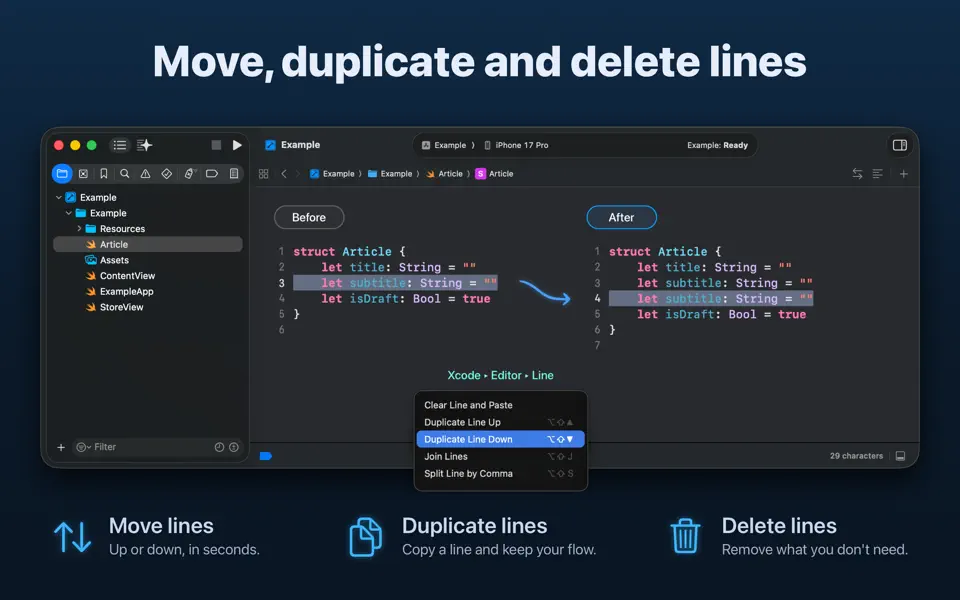
• Move Line Up / Move Line Down — swap the selection with the line above or below
• Duplicate Line Up / Duplicate Line Down — copy the selection and choose which copy keeps the caret
• Delete Line — delete whole lines wherever the caret sits
• Clear Line — empty the lines but keep their indentation and position
• Clear Line and Paste — replace the selected lines with the clipboard
• Copy Line / Cut Line — put whole lines on the clipboard, no selecting first
• Insert Line Above / Insert Line Below — open a blank line at the right indent
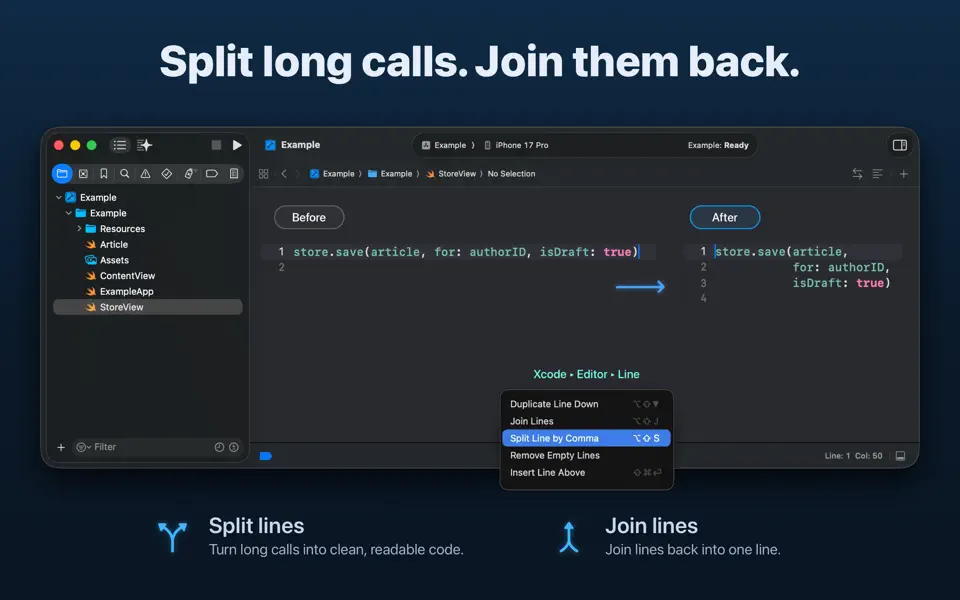
• Join Lines — collapse a selection onto one line, spacing it sensibly around brackets
• Split Line by Comma — break a comma-separated line apart, aligned under its bracket
• Remove Empty Lines — drop the blank lines inside a selection
• Next Blank Line / Previous Blank Line — move the caret between blocks
• Trim Trailing Whitespace — remove spaces and tabs from selected line endings
• Collapse Empty Lines — reduce each run of blank lines to one
• Remove Duplicate Lines — keep the first occurrence of each exact selected line
• Sort Lines Ascending / Sort Lines Descending — sort selected lines deterministically
• Reverse Lines — reverse the order of the selected lines
Editor > Editor+
• Remove Comment — strip // comments, leaving code and string or regex literals alone
• Add Type Extension — write an extension on the first type declared in the file
• Add Type Delegate — write a delegate protocol for it
• Insert MARK Section — insert a // MARK: section placeholder
• Wrap in #if DEBUG — wrap selected lines in a conditional compilation block
• Organize Imports — sort and de-duplicate safe, contiguous Swift import blocks
• Wrap in Task — wrap and indent selected lines in Task { }
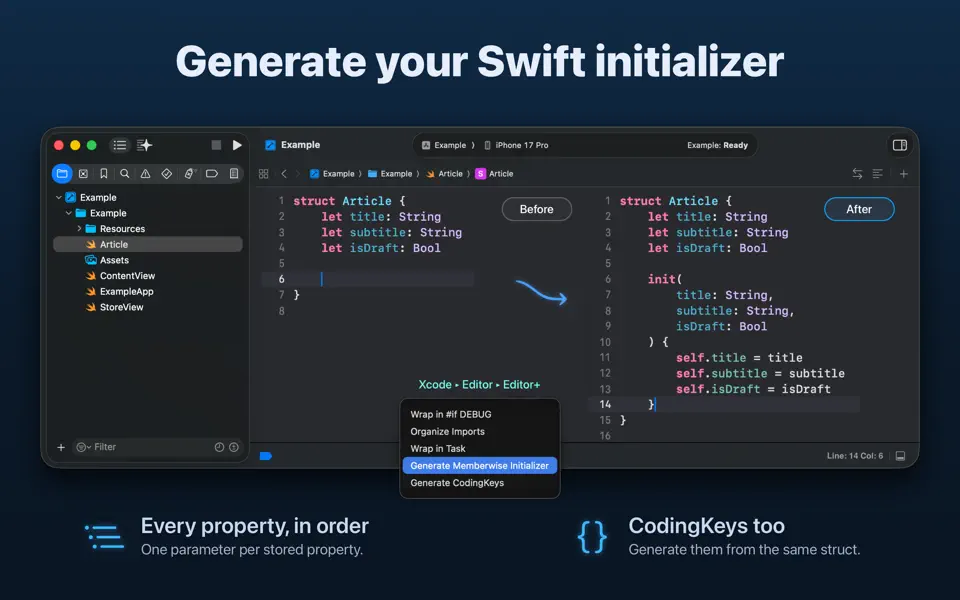
• Generate Memberwise Initializer — create an initializer from a struct's stored properties, and decline rather than guess on syntax it cannot handle
• Generate CodingKeys — create CodingKeys from direct stored properties
FREE, AND STAYING FREE
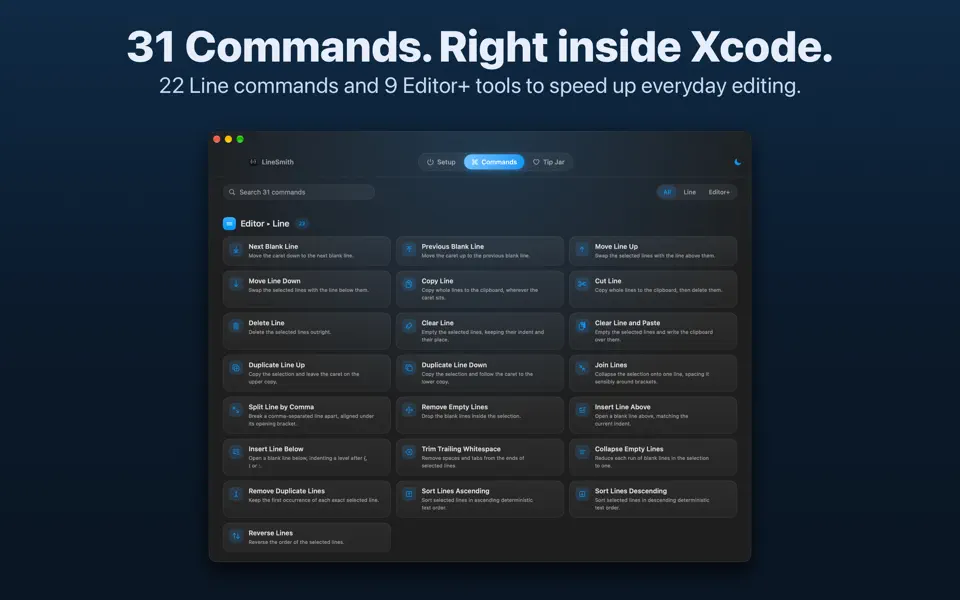
All 31 commands are free. There is no paid tier, no account, no ads and no tracking. LineSmith collects nothing about you or your code. If LineSmith saves you time, there is a tip jar in the app; a tip unlocks nothing, because there is nothing to unlock.
SETTING IT UP
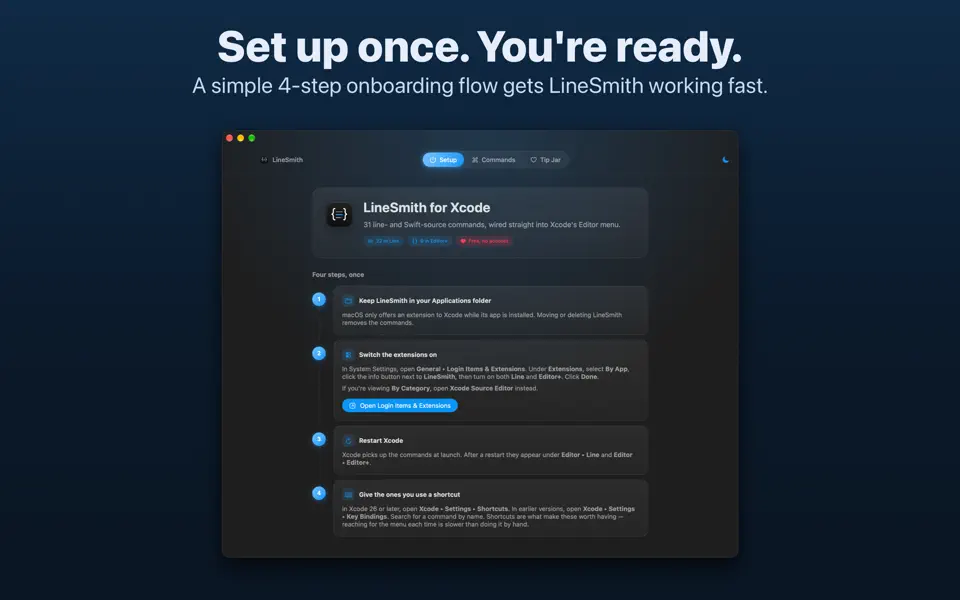
1. Keep LineSmith in your Applications folder.
2. In System Settings, find Xcode Source Editor and enable both Line and Editor+.
3. Restart Xcode.
4. Assign shortcuts in Xcode > Settings > Shortcuts (Key Bindings in earlier Xcode versions).
Requires macOS 14 or later and Xcode.
UPGRADING FROM TEXTPLUS
The 19 command identifiers inherited from TextPlus are unchanged, so existing keyboard shortcuts carry over. Version 2.0 also brings reliability fixes and 12 new commands, for 31 in total.
От разработчика
Списки 0
-
 LineSmith for Xcode
Очки 5
-

- +1 Очко
-
- 2 002 Dragon
- +1
-
- 17 Kai Lee
- +1
-
- 1 249 바람처어럼
- +1
-
- 18 989 Simon Chan
- +1
-
- 173 upto
- +1






Рейтинги 0
-
- Ваша оценка
Разработчик 4
- Tuan Truong
- Подписчики: 0
- Платформы: iOS Приложения (2) macOS Приложения (1) macOS Игры (1)
- Скидки: 1
- Списки: 0 1
- Очки: 7
- Рейтинги: 0
- Комментарии: 0
- Видео: 0
- RSS: Подписаться
Что нового
- Версия: 2.0.2
- Последнее обновление:
- LineSmith 2.0.2
• Undo after a command now restores only the lines that changed, without selecting the whole file or jumping to the top.
• Generate Memberwise Initializer and Generate CodingKeys handle trailing comments, property wrappers, property observers, and class methods correctly, and no longer guess wrong types.
• Join Lines keeps trailing comments intact and handles blank lines better.
• Split Line by Comma aligns under the innermost open bracket.
• Clear Line and Paste keeps indentation when the clipboard is empty.
• Files with mixed LF/CRLF line endings keep the endings of untouched lines.
• All 31 editing commands remain free.
Дополнительная информация
- Дата выпуска:
- Категория:
Приложения для macOS›Инструменты разработчика - Операционные системы:
macOSmacOS 14.0 и выше - Размер:
2 Mb - Поддерживаемые языки:
Английский - Возрастные ограничения:
4+ - Mac App Store Рейтинг: ¡
0
 https://leafworkstudio.com/linesmith
Оценка AppAgg
Примерная оценка AppAgg для
LineSmith for Xcode
Разработчик: Tuan Truong
Более высокая оценка обычно означает лучшие результаты по показателям AppAgg.
На основе: популярности · оценок пользователей · актуальности · скидок · данных магазинов · активности сообщества
Пересчитывается ежедневно на основе актуальных данных AppAgg.
Комментарии 0 ¡
Поделиться
LineSmith for Xcode Короткий URL: Скопировано!- Mac App Store

