
Gespeichert
Wähle den Namen, der im Menü Gespeichert angezeigt werden soll.
Fertig!
| Entwickler: | Damian Pieszczynski (2) | ||
| Preis: | $4.99 | ||
| AppAgg-Bewertung: | 3,180 | ||
| Klassifizierungen: | 0 | ||
| Kommentare: | 0 Kommentar posten | ||
| Listen: | 0 + 0 | ||
| Punkte: | 0 + 0 ¡ | ||
| +1 Punkte | |||
Beschreibung

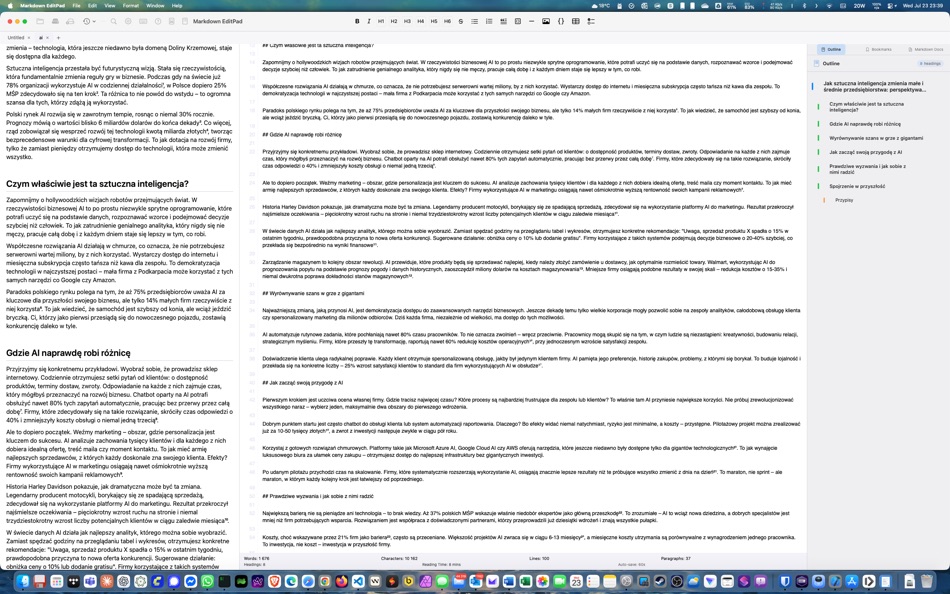
Features:
- live preview
- outline
- bookmarks
- markdown docs and interface to add markdown tags
- export to HTML and RTF
Screenshots


Ad
Preisentwicklung
- Aktueller Preis: $4.99
- Mindestens: $4.99
- Maximale: $4.99
Preise beobachten
AppAgg-Bewertung
Geschätzte AppAgg-Bewertung für Markdown EditPad
3,180
Höhere Bewertungen bedeuten meist stärkere Signale auf AppAgg.
Basierend auf: 🔥 Popularität · ⭐ Nutzerbewertungen · 🕒 Aktualität · 🏷️ Angeboten · 🏬 Shop-Daten · 👥 Community-Aktivität
Wird täglich anhand aktueller AppAgg-Daten neu berechnet.
Kurz-URL: Kopiert!
Neue Funktionen
- Version: 1.0
- Zuletzt aktualisiert:
Weitere informationen
- Veröffentlichungsdatum:
- Kategorie:
macOS Apps›Entwickler-Tools - Betriebssysteme:
macOS,macOS 14.6 oder höher - Größe:
2 Mb - Unterstützte Sprachen:
Spanish - Altersfreigabe:
4+ - Mac App Store Bewertung:
0
Entwickler
- Damian Pieszczynski
- Plattformen: Android Apps (1) macOS Apps (1)
- Listen: 0 + 0
- Punkte: 0 + 0 ¡
- Klassifizierungen: 0
- Kommentare: 0
- Rabatte: 0
- Videos: 0
- RSS: Abonnieren
Listen (0)
0 ☹️
- Markdown EditPad
Punkte (0)
0 ☹️
Klassifizierungen (0)
0 ☹️
Kommentare (0)
Seien Sie der Erste, der einen Kommentar abgibt 🌟
«Markdown EditPad». Plattform: macOS. Kategorie: Entwickler-Tools. Entwickler: «Damian Pieszczynski». Erste Veröffentlichung: . Letzte Aktualisierung: . Aktueller Preis: $4.99. Niedrigster aufgezeichneter Preis: $4.99. Höchster aufgezeichneter Preis: $4.99. Dieser Titel hat noch keine Bewertungen oder Rezensionen auf AppAgg erhalten. Verfügbare Sprachen: Spanish. AppAgg verfolgt den Preisverlauf, Bewertungen und Benutzerfeedback für «Markdown EditPad». Verfolgen Sie zukünftige Rabatte und Updates über RSS. AppAgg hostet keine Anwendungen und vertreibt keine Software. Alle Marken, Logos und Screenshots gehören ihren jeweiligen Eigentümern.
Markdown EditPad Kurz-URL: Kopiert!- 🌟 Teilen
- Mac App Store
Ähnliches
-
- Markdown Browser
- macOS Apps: Entwickler-Tools Von: Shaun Hirst
- $1.99
- Listen: 0 0 0
- Punkte: 0 + 0 4k Version: 1.0.0 Markdown Browser is a powerful yet elegant native Mac application designed for reading, browsing, and navigating Markdown documents with ease. Whether you're reviewing documentation, ... ⥯
-
- Markdown Workbench
- macOS Apps: Entwickler-Tools Von: David Page
- $2.99
- Listen: 0 + 1 0 0
- Punkte: 4 + 0 6k Version: 1.0.4 Markdown Workbench is a fast, focused document viewer and editor built for people who work with Markdown and code files every day. Open any Markdown file and see it beautifully ... ⥯
-
- Markdown Buddy
- macOS Apps: Entwickler-Tools Von: Jan Tumpach
- $0.99
- Listen: 0 0 0
- Punkte: 0 + 0 3k Version: 1.1 Markdown Buddy is a native macOS app that lets you preview Markdown files beautifully, right from your code editor or Finder. Source Editor Extension Integrates directly into your ... ⥯
-
- Markdown Export
- macOS Apps: Entwickler-Tools Von: Tanvir N Hasan
- * Kostenlos
- Listen: 0 0 0
- Punkte: 0 + 0 4k Version: 1.3 A Professional Markdown-to-Document Converter Transform your markdown into beautifully formatted PDFs, Word documents, and PNG images with just a click. Markdown Export combines a ... ⥯
-
- Markdown Quick Look
- macOS Apps: Entwickler-Tools Von: Bitfield AB
- $4.99
- Listen: 0 0 0
- Punkte: 0 + 0 3k Version: 1.0 Stop opening files just to peek. Markdown Quick Look adds instant, beautifully rendered Markdown previews to Finder. Press the spacebar on any .md, .markdown, or .mdown file and see ... ⥯
-
- Ohai Markdown Viewer
- macOS Apps: Entwickler-Tools Von: Verbari LLC
- $14.99
- Listen: 0 0 0
- Punkte: 0 + 0 5k Version: 1.0 Stop reading raw text in your terminal. Ohai is a native macOS markdown viewer built for the age of AI. It acts as a real-time canvas for tools like Claude Code, Cursor, and Copilot. ... ⥯
-
- Meva - Markdown Viewer
- macOS Apps: Entwickler-Tools Von: Shuchi Muley
- * Kostenlos
- Listen: 0 0 0
- Punkte: 0 + 0 4k Version: 1.3.0 Markdown files deserve a better reader. Meva is a fast, native markdown viewer built specifically for consuming documentation generated by tools like Claude, ChatGPT, Cursor, and ... ⥯
-
- Telescopo: Markdown Viewer
- macOS Apps: Entwickler-Tools Von: Bad Command AI
- * Kostenlos
- Listen: 0 + 1 0 0
- Punkte: 6 + 0 5k Version: 6.1.0 Telescopo: Markdown Viewer is a lightning-fast, native Markdown viewer for macOS featuring an integrated AI Assistant, builtin Mermaid diagrams, LaTeX math, and pro-grade PDF exports. ... ⥯
-
- Pixley Markdown
- macOS Apps: Entwickler-Tools Von: Jose Duarte
- Kostenlos
- Listen: 0 + 1 0 0
- Punkte: 1 + 0 1k Version: 3.1 AI tools generate markdown. Pixley makes it interactive. Open a file or browse a folder of markdown documents in a clean sidebar. Pixley converts plain text into interactive controls ... ⥯
-
- Easy Markdown
- macOS Apps: Entwickler-Tools Von: Roberto Panetta
- $7.99
- Listen: 0 + 1 0 0
- Punkte: 0 + 0 6k Version: 1.9.3 Easy Markdown lets you create Web pages just writing plain text with Markdown syntax. It's simply and powerful. We are sure you will love it. A text written in Markdown is a plain text ⥯
-
- BetterLocale MarkDown
- macOS Apps: Entwickler-Tools Von: Christian Drapatz
- $3.99
- Listen: 0 0 0
- Punkte: 1 + 0 6k Version: 1.0 BetterLocale MarkDown is a powerful Markdown editor for macOS. It combines a clear writing interface with a direct HTML live preview. As you write your Markdown text on the left, you ... ⥯
-
- Markdown2PDF: Convert Markdown
- macOS Apps: Entwickler-Tools Von: Haplo, LLC
- $1.99
- Listen: 0 0 0
- Punkte: 0 + 0 3k Version: 1.2 Easily Convert Markdown to PDF with Markdown2PDF Markdown2PDF is the fastest way to turn your Markdown files into high-quality PDFs. Whether you re writing notes, documentation, or ... ⥯
-
- Markdowny - Markdown Viewer
- macOS Apps: Entwickler-Tools Von: RanduSoft SRL
- $1.99
- Listen: 0 0 0
- Punkte: 0 + 0 4k Version: 2.0.1 The Perfect Companion for Your Writing Workflow Do you prefer writing in Vim, Emacs, Sublime Text, or a simple text editor? Do you need a crisp, rendered preview of your work without ... ⥯
-
- Doku: Markdown Viewer & Reader
- macOS Apps: Entwickler-Tools Von: Anh Phong
- Kostenlos
- Listen: 0 0 0
- Punkte: 1 + 0 1k Version: 1.1.0 WHAT YOU GET Open any Markdown file and see it rendered with full GitHub Flavored Markdown support. Headings, lists, tables, task lists, footnotes, and horizontal rules all display ... ⥯
Das könnte Ihnen auch gefallen
Zuletzt angesehen
Zuletzt aktualisiert:
Suchoperatoren in AppAgg