
Gespeichert
Wähle den Namen, der im Menü Gespeichert angezeigt werden soll.
Fertig!
| Entwickler: | David Page (3) | ||
| Preis: | $2.99 | ||
| Einschätzung: | 590 Bronze | ||
| Klassifizierungen: | 0 | ||
| Kommentare: | 0 Kommentar posten | ||
| Listen: | 0 + 1 | ||
| Punkte: | 4 + 0 ¡ | ||
| +1 Punkte | |||
Beschreibung
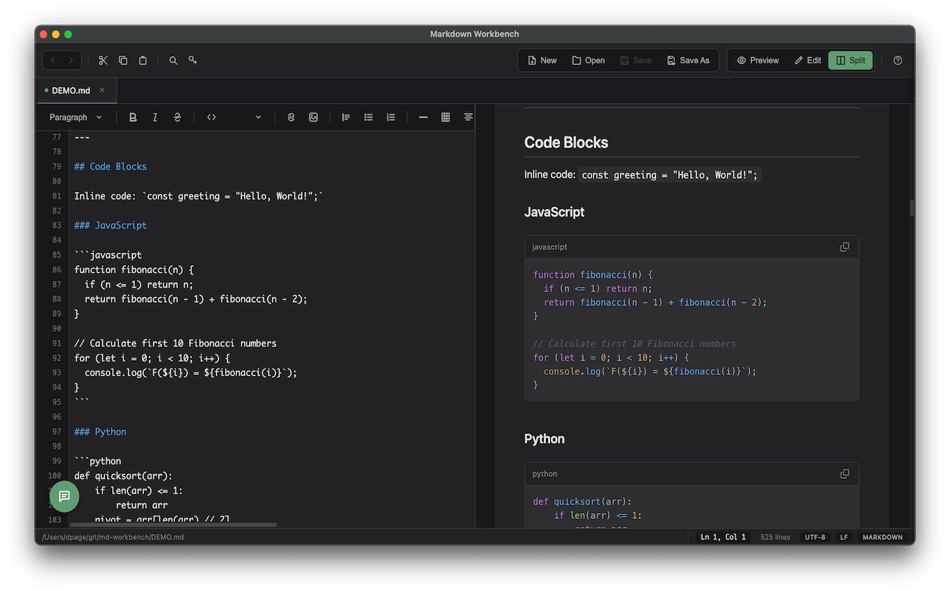
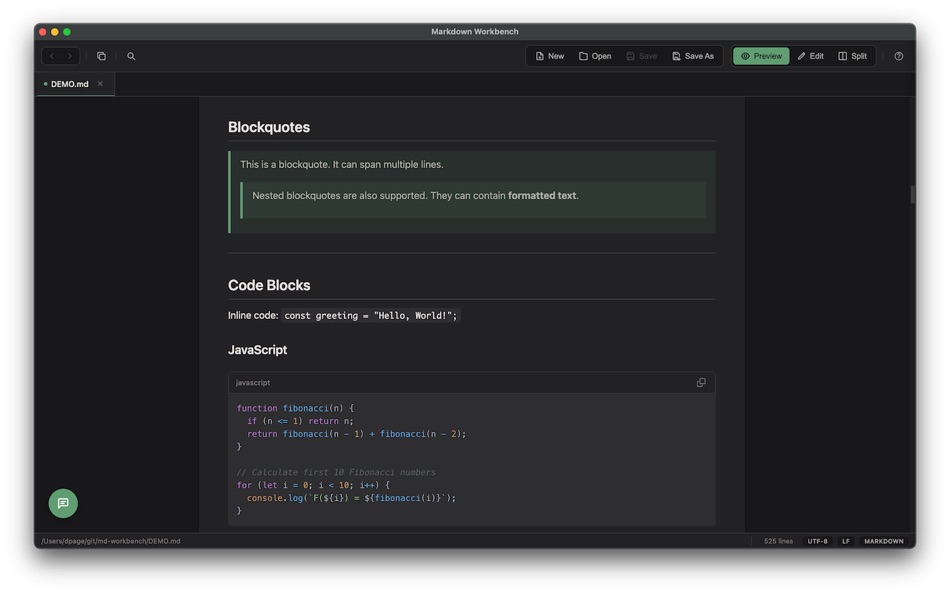
Open any Markdown file and see it beautifully rendered with full support for GitHub Flavored Markdown, including tables, task lists, footnotes, and syntax-highlighted code blocks. Switch to Edit mode for a side-by-side view with your source on the left and a live preview on the right, updating as you type.
AI Chat Assistant
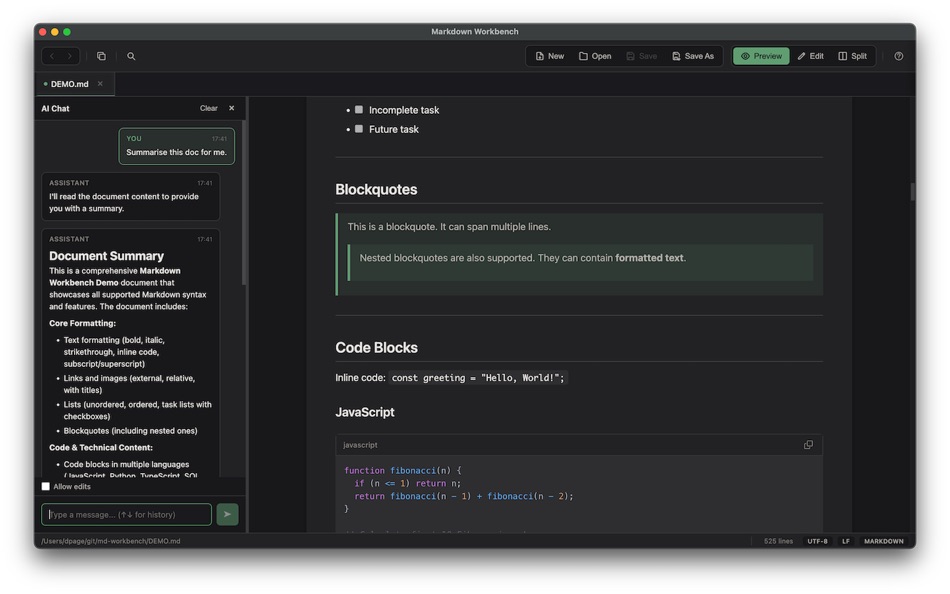
Ask questions about your documents, get summaries, request edits, or brainstorm ideas — all without leaving the app. Markdown Workbench connects to your choice of AI provider: use a local model via Ollama or LM Studio for complete privacy, or connect to Anthropic (Claude), Google (Gemini), or OpenAI (ChatGPT) with your own API key. Your conversations stay contextual to the document you're working on.
Rich Markdown Rendering
Go beyond basic Markdown with support for Mermaid diagrams, math and LaTeX equations rendered with KaTeX, admonition blocks (note, warning, tip, and more), emoji shortcodes, subscript and superscript, and an auto-generated Table of Contents. Your documents look polished and professional without any extra effort.
Work With More Than Just Markdown
Markdown Workbench handles a wide range of file types with full syntax highlighting: JSON, YAML, XML, CSV, TOML, HTML, CSS, JavaScript, TypeScript, Python, SQL, shell scripts, config files, and plain text. Every file type gets a clean, readable presentation.
Automatic Code Formatting
Format your documents with a single keystroke. Supported formats include JSON, YAML, SQL, JavaScript, TypeScript, CSS, HTML, XML, and Markdown. Configure your preferred indent size, choose tabs or spaces, set a maximum line length, and even enable format-on-save. SQL formatting supports PostgreSQL, SQLite, and Standard SQL dialects. JSON and YAML keys can be sorted alphabetically.
A Thoughtful Editor
The editor includes line numbers, current line highlighting, a configurable column ruler, and soft word wrap. A status bar shows your file path, cursor position, file type, encoding, and line endings at a glance. Auto-save keeps your work safe with a configurable debounce, and external file changes are detected and reloaded automatically.
Navigate Your Projects
Open a folder and browse its contents in the sidebar. Use tabs to keep multiple documents open at once. Navigate back and forward through your history. Click links within Markdown files to open other local files, and external links open in your default browser.
Find and Replace
Search across any viewing mode with support for case-sensitive and regular expression matching. In edit mode, use find and replace to make changes efficiently. Your search state is preserved when switching between modes.
Flexible Viewing Modes
Every file can be viewed in multiple ways. Preview mode shows rendered Markdown. Source mode displays syntax-highlighted code. Edit mode gives you a split editor with live preview for Markdown, or a full-width editor for other file types. Set your preferred default mode for each file type in Preferences.
Make It Yours
Choose from light, dark, or system-matched themes. Configure editor options like line numbers, column ruler position, and current line highlighting. Set default viewing modes per file type. Adjust formatting preferences including indent style, line length, and SQL dialect. Control auto-reload and auto-save behaviour, and choose whether links open in Preview or Source mode.
Keyboard-Driven Workflow
Every common action has a keyboard shortcut: open files, save, find and replace, format code, close tabs, navigate history, and open preferences. Markdown Workbench stays out of your way and lets you work at the speed of thought.
Screenshots

Ad
Preisentwicklung
- Aktueller Preis: $2.99
- Mindestens: Kostenlos
- Maximale: $2.99
Preise beobachten
AppAgg-Einschätzung
590
Geschätzte AppAgg-Einschätzung für
Markdown Workbench
590 Bronze
Höhere Einschätzungen bedeuten meist stärkere Signale auf AppAgg.
Basierend auf: Popularität · Nutzerbewertungen · Aktualität · Angeboten · Shop-Daten · Community-Aktivität
Wird täglich anhand aktueller AppAgg-Daten neu berechnet.
Kurz-URL: Kopiert!
Neue Funktionen
- Version: 1.0.4
- Zuletzt aktualisiert:
Weitere informationen
- Veröffentlichungsdatum:
- Kategorie:
macOS Apps›Entwickler-Tools - Betriebssysteme:
macOS,macOS 10.15 oder höher - Größe:
120 Mb - Unterstützte Sprachen:
Afrikaans,Amharic,Arabic,Bengali,Bulgarian,Catalan,Chinese,Croatian,Czech,Danish,Dutch,English,Estonian,Finnish,French,German,Greek,Gujarati,Hebrew,Hindi,Hungarian,Indonesian,Italian,Japanese,Kannada,Korean,Latvian,Lithuanian,Malay,Malayalam,Marathi,Norwegian,Persian,Polish,Portuguese,Romanian,Russian,Serbian,Slovak,Slovenian,Spanish,Swahili,Swedish,Tamil,Telugu,Thai,Turkish,Ukrainian,Urdu,Vietnamese - Altersfreigabe:
4+ - Mac App Store Bewertung:
0
Entwickler
- David Page
- Plattformen: iOS Apps (1) macOS Apps (2)
- Listen: 0 + 1
- Punkte: 10 + 0 ¡
- Klassifizierungen: 0
- Kommentare: 0
- Rabatte: 0
- Videos: 0
- RSS: Abonnieren
Listen (0)
0
- Markdown Workbench
Punkte (4)
-

- 3,766 Dragon
- +1
-
- 11,480 Simon Chan
- +1
-
- 2,241 Lu Chin
- +1
-
- 3,066 Alan
- +1


Klassifizierungen (0)
0
Kommentare (0)
Seien Sie der Erste, der einen Kommentar abgibt
Kurzinfo
Markdown Workbench Kurz-URL: Kopiert!- Teilen
- Mac App Store
«Markdown Workbench». Plattform: macOS. Kategorie: Entwickler-Tools. Entwickler: «David Page». Erste Veröffentlichung: . Letzte Aktualisierung: . Aktueller Preis: $2.99. Niedrigster aufgezeichneter Preis: $0.00 (). Höchster aufgezeichneter Preis: $2.99 (). Dieser Titel hat noch keine Bewertungen oder Rezensionen auf AppAgg erhalten. Verfolgte Punkte: bestätigte 4, indirekte 0. Verfügbare Sprachen: Afrikaans, Amharic, Arabic, Bengali, Bulgarian, Catalan, Chinese, Croatian, Czech, Danish, Dutch, English, Estonian, Finnish, French, German, Greek, Gujarati, Hebrew, Hindi, Hungarian, Indonesian, Italian, Japanese, Kannada, Korean, Latvian, Lithuanian, Malay, Malayalam, Marathi, Norwegian, Persian, Polish, Portuguese, Romanian, Russian, Serbian, Slovak, Slovenian, Spanish, Swahili, Swedish, Tamil, Telugu, Thai, Turkish, Ukrainian, Urdu, Vietnamese. AppAgg verfolgt den Preisverlauf, Bewertungen und Benutzerfeedback für «Markdown Workbench». AppAgg hostet keine Anwendungen und vertreibt keine Software. Alle Marken, Logos und Screenshots gehören ihren jeweiligen Eigentümern. Verfolgen Sie zukünftige Rabatte und Updates über RSS
Ähnliches
-
- Markdown Browser
- macOS Apps: Entwickler-Tools Von: Shaun Hirst
- $1.99
- Listen: 0 0 0
- Punkte: 0 + 0 500 Version: 1.0.0 Markdown Browser is a powerful yet elegant native Mac application designed for reading, browsing, and navigating Markdown documents with ease. Whether you're reviewing documentation, ... ⥯
-
- Markdown Buddy
- macOS Apps: Entwickler-Tools Von: Jan Tumpach
- $0.99
- Listen: 0 0 0
- Punkte: 0 + 0 500 Version: 1.1 Markdown Buddy is a native macOS app that lets you preview Markdown files beautifully, right from your code editor or Finder. Source Editor Extension Integrates directly into your ... ⥯
-
- Markdown EditPad
- macOS Apps: Entwickler-Tools Von: Damian Pieszczynski
- $4.99
- Listen: 0 0 0
- Punkte: 0 + 0 500 Version: 1.0 Markdown editor with support for GitHub flavor. Features: - live preview - outline - bookmarks - markdown docs and interface to add markdown tags - export to HTML and RTF ⥯
-
- Markdown Export
- macOS Apps: Entwickler-Tools Von: Tanvir N Hasan
- * Kostenlos
- Listen: 0 0 0
- Punkte: 0 + 0 500 Version: 1.3 A Professional Markdown-to-Document Converter Transform your markdown into beautifully formatted PDFs, Word documents, and PNG images with just a click. Markdown Export combines a ... ⥯
-
- Markdown Quick Look
- macOS Apps: Entwickler-Tools Von: Bitfield AB
- $4.99
- Listen: 0 0 0
- Punkte: 0 + 0 500 Version: 1.0 Stop opening files just to peek. Markdown Quick Look adds instant, beautifully rendered Markdown previews to Finder. Press the spacebar on any .md, .markdown, or .mdown file and see ... ⥯
-
- Dolt Workbench
- macOS Apps: Entwickler-Tools Von: DoltHub Inc
- Kostenlos
- Listen: 0 0 0
- Punkte: 1 + 0 520 Version: 0.3.71 A modern SQL workbench for your MySQL and PostgreSQL compatible databases, offering a modern UI for viewing and editing your data with powerful version control features when using ... ⥯
-
- Ohai Markdown Viewer
- macOS Apps: Entwickler-Tools Von: Verbari LLC
- $14.99
- Listen: 0 0 0
- Punkte: 0 + 0 500 Version: 1.0 Stop reading raw text in your terminal. Ohai is a native macOS markdown viewer built for the age of AI. It acts as a real-time canvas for tools like Claude Code, Cursor, and Copilot. ... ⥯
-
- Meva - Markdown Viewer
- macOS Apps: Entwickler-Tools Von: Shuchi Muley
- * Kostenlos
- Listen: 0 0 0
- Punkte: 0 + 0 500 Version: 1.3.0 Markdown files deserve a better reader. Meva is a fast, native markdown viewer built specifically for consuming documentation generated by tools like Claude, ChatGPT, Cursor, and ... ⥯
-
- Telescopo: Markdown Viewer
- macOS Apps: Entwickler-Tools Von: Bad Command AI
- * Kostenlos
- Listen: 0 + 1 0 0
- Punkte: 6 + 0 870 Version: 6.1.0 Telescopo: Markdown Viewer is a lightning-fast, native Markdown viewer for macOS featuring an integrated AI Assistant, builtin Mermaid diagrams, LaTeX math, and pro-grade PDF exports. ... ⥯
-
- Pixley Markdown
- macOS Apps: Entwickler-Tools Von: Jose Duarte
- Kostenlos
- Listen: 0 + 1 0 0
- Punkte: 1 + 0 550 Version: 3.1 AI tools generate markdown. Pixley makes it interactive. Open a file or browse a folder of markdown documents in a clean sidebar. Pixley converts plain text into interactive controls ... ⥯
-
- Easy Markdown
- macOS Apps: Entwickler-Tools Von: Roberto Panetta
- $7.99
- Listen: 0 + 1 0 0
- Punkte: 0 + 0 520 Version: 1.9.3 Easy Markdown lets you create Web pages just writing plain text with Markdown syntax. It's simply and powerful. We are sure you will love it. A text written in Markdown is a plain text ⥯
-
- BetterLocale MarkDown
- macOS Apps: Entwickler-Tools Von: Christian Drapatz
- $3.99
- Listen: 0 0 0
- Punkte: 1 + 0 520 Version: 1.0 BetterLocale MarkDown is a powerful Markdown editor for macOS. It combines a clear writing interface with a direct HTML live preview. As you write your Markdown text on the left, you ... ⥯
-
- Markdown2PDF: Convert Markdown
- macOS Apps: Entwickler-Tools Von: Haplo, LLC
- $1.99
- Listen: 0 0 0
- Punkte: 0 + 0 500 Version: 1.2 Easily Convert Markdown to PDF with Markdown2PDF Markdown2PDF is the fastest way to turn your Markdown files into high-quality PDFs. Whether you re writing notes, documentation, or ... ⥯
-
- Markdowny - Markdown Viewer
- macOS Apps: Entwickler-Tools Von: RanduSoft SRL
- $1.99
- Listen: 0 0 0
- Punkte: 0 + 0 500 Version: 2.0.1 The Perfect Companion for Your Writing Workflow Do you prefer writing in Vim, Emacs, Sublime Text, or a simple text editor? Do you need a crisp, rendered preview of your work without ... ⥯